
Emoji on the Web
Fonts aren’t always the answer
Emoji began their existence as fonts, and for the most part they continue to be fonts to this day. Apple, Google, Microsoft, they all have their own emoji fonts (of course, they’re all different formats). If you are making a native app, on iOS or Android for example, an emoji font in the proper format is the best way to get your custom emoji to your audience.
However, say you are running a web app alongside that native app, like Twitter or Facebook. A font might not be your best choice. Here’s why, and how to make this little guy work on your website, after the jump:
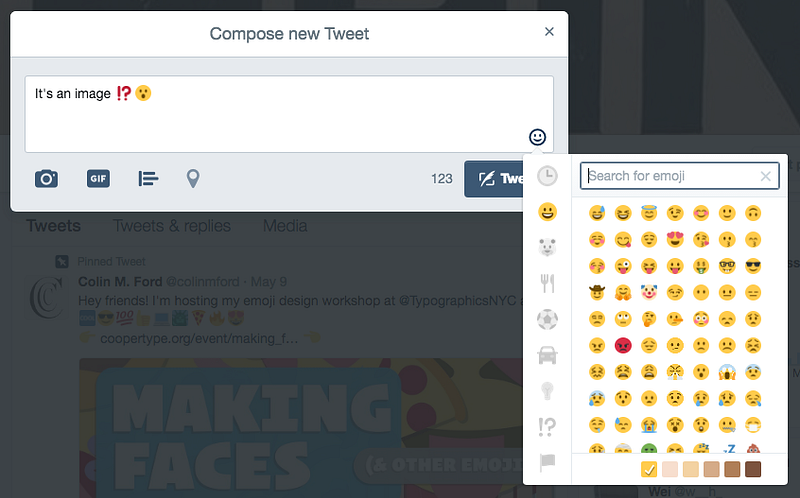
Hi! If you like these articles, click the “Follow” up there 👆 (next to my name) and/or the 💚 down there 👇 to recommend the article.
Thanks! And on with the article! 🙃
There’s a 💩 Ton of Emoji
As of this writing there are 2,666 emoji [1]. Before getting into how much data the different color tables add, that is a lot of glyphs. Just doing some back-of-the-napkin math with one of our most recent fonts, Ringside: there’s 96 fonts in the family, each of the fonts has 512 glyphs, and the average uncompressed .otf file size is 124.64kb. That’s about 243.456 bytes per glyph, if you divide the file size by the number of glyphs (roughly; there is some header data in there that would not scale with the size of the glyph set).
An average font with 2,666 glyphs in it alone would be 649kb. In a single file, that’s enough to slow a browser to a crawl in most cases. But emoji fonts, depending on the format, have a lot more in them. CBDT/CBLC and sbix fonts contain multiple images per “strike”. (For instance, Apple’s sbix-flavored emoji font is a whopping 69.1MB!) COLR/CPAL fonts contain one vector glyph per color layer, which can be reused in some cases (think the circle base of the smiley glyphs 😜 😂 😍 being used over and over), but still that would be enough to increase the file size. SVG-in-OT fonts would contain a full SVG per glyph, and thus would find itself between the other two (though closer to COLR/CPAL) [2].
You would never force a user to download a folder of 2,666 pngs, so the same follows for emoji fonts. The traditional way to slim down fonts is to subset the character set, or remove some of the glyphs you know you’ll never use. But if a user of your website can input text, you’ll never be sure he or she won’t reach for the obscure 💮 or 🔣 emoji, so subsetting is for the most part out of the question.
Different Platforms 🙅 Don’t Share
It shouldn’t surprise anyone used to the font world that different platforms support different parts of the OpenType spec. A font made with sbix will work in Safari on Mac OS, but not Chrome. The COLR/CPAL format will work in Firefox on every platform, including Mac OS, but that same font will not open in Safari. Microsoft Edge is the only browser that supports every format (kudos!). To check your browser use ChromaCheck.
What that would mean is that if you chose to serve emoji fonts to web users (ignoring the section above), you would have to support more than one format. Developer Roel Nieskens tried to make a font with multiple formats in one file, and the results were mixed [3].
It’s Time ⏰ for a Replacement ⚒
These things are probably true for most website designers: 1) you want your website to load quickly, 2) you want to use web standards, and 3) you want to use as many emoji as possible (ok, the last one is pretty specific).
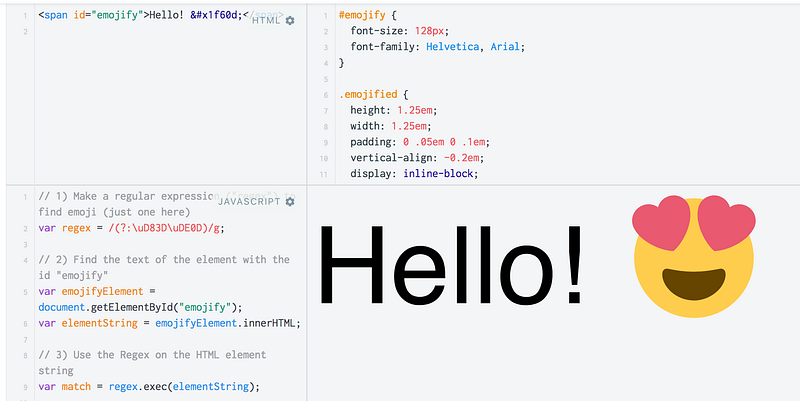
Enter image replacement. When Twitter or Facebook use emoji on their website, they want users to see their own emoji, not the system default. They also don’t want their users to download a large font file of all the emoji, when realistically only a small amount will be used on the page. So, they search their pages for any instance of emoji, and use a script to replace it with an image.
Below is a very simple sketch of what Facebook and Twitter do (make sure to click “Result” to see the… result):
A more robust version can be found in Twitter’s Twemoji Github Repository.
You could even do this with an SVG (normal, not SVG-in-OT), which can also be animated (again, click “Result”, you’ll wanna see this):
The animation is controlled by CSS Animations, so it might not work on every browser. The above could also be just as easily made using SIML Animation within the SVG.
But! ☝️
I am a type designer, so I tend to look at technical solutions involving fonts like a hammer in want of a nail. That said, even I can see the advantages in this approach. Save your visitors a lot of bandwidth and use image replacement.
But — emoji fonts are still the desired solution for pretty much everything off the web. I also think that despite the fact that they are “images” when on the web, they should still be thought of and designed like something closer to type. Emoji are an important part of modern textual communication, not an illustration or something “optional” (I feel like here I should bring up Typomoji again, but it’s silly, so I won’t).
Thanks for reading! 🙇 Please check out the Making Faces (and Other Emoji) page for more articles. If you liked this article, make sure to click 💚 below to recommend the article so others can find it.
Footnotes
[1] “Unicode Emoji.” UTS #51: Unicode Emoji. Accessed May 16, 2017. http://unicode.org/reports/tr51/proposed.html#Emoji_Counts.
[2] Exploding Emoji and Other Experiments in Web Typography. Roel Nieskens. Accessed May 16, 2017. https://youtu.be/V0Ph3ESgGKE?t=28m17s. Discussion of file sizes at 28 minutes, 17 seconds
[3] Exploding Emoji and Other Experiments in Web Typography. Roel Nieskens. Accessed May 16, 2017. https://youtu.be/V0Ph3ESgGKE?t=30m7s. Experiment with combining color font tables starts at 30 minutes, 7 seconds