
Xcode Build System: Linking
What Mach-O files are, and why do symbols, segments, and sections matter? What Pages, Page Faults, and Fat Binary are? Dead Stripping, Order File Optimizations, and more.
This article is a part of the Xcode Build System: Everything Everywhere All at Once main article.
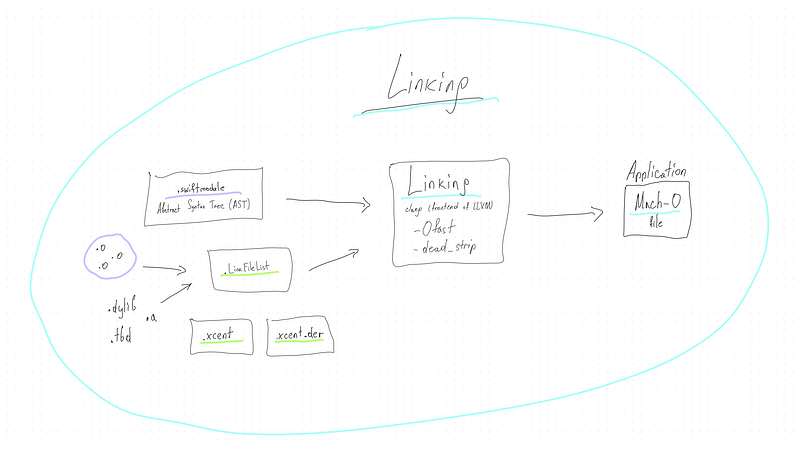
After individual source files (.swift, .m, .c, etc.) are compiled into object files (usually in the form of .o files), the linking process begins. Linking is about taking all these compiled object files and possibly external libraries or frameworks and combining them into a single executable file. The linker resolves references between symbols (functions, methods, variables) across all these object files and libraries, essentially “linking” them together. The result of this process in the context of macOS and iOS development is typically a Mach-O file.
Mach-O file
Mach-O stands for Mach Object file format. It’s the native binary format for macOS and iOS. A Mach-O file can be an executable, a dynamic library, or a bundle of code. It contains the machine code (binary instructions), data, information about external symbols, and more. It’s what gets run by the system when you execute an application.
Difference between Mach-O file and Application:
- Mach-O File: As mentioned, it’s the compiled binary file containing all the necessary code and information to execute a single program or library. It’s one piece of what might be needed to run an application but doesn’t include resources like images, sounds, or other assets. It also doesn’t include metadata like the app’s name, icon, or permissions.
- Application (macOS/iOS): An application is typically a package (with an .app extension in macOS) that contains the Mach-O executable along with all other necessary resources and metadata. This package is a directory that includes various files structured in a specific way. For instance, it contains folders like “Contents/MacOS” where the Mach-O executable resides, and “Contents/Resources” for assets. It also includes a property list file (Info.plist) containing metadata about the application, such as its version, display name, required permissions, and more.
During the “Linking” phase of the Xcode Build System, various object files and libraries are combined into a Mach-O file, which is the executable backbone of your application. This Mach-O file is then included in a larger, structured .application package, which constitutes the complete application with all necessary code, resources, and metadata.
Symbols
Symbols refer to named entities from your code that need to be resolved to specific locations in memory for your program to function correctly. These entities typically include variables, functions, methods, and class names.
After your code is compiled into object files (.o), these files contain a mix of executable code and symbolic references to other entities (like functions or variables) that need to be connected or “linked.” The linker’s job is to resolve these symbolic references, replacing them with actual memory addresses.
Types of Symbols:
- External Symbols: These are symbols defined in other object files or libraries. For example, if you call a function that’s defined in a different file or a standard library, that function’s name is an external symbol that the linker needs to resolve.
- Internal Symbols: These symbols are defined and used within the same object file. While they might not need cross-file resolution, they still need to be mapped to the final executable’s memory layout.
Each object file typically comes with a symbol table, which is essentially a list of symbols used or defined in that file. The symbol table includes names and additional data about each symbol, such as its size, type, and whether it’s defined in this object file or an external one.
- Undefined Symbols: When an object file uses a symbol defined in another file or library, it initially doesn’t know the location of that symbol. Such symbols are marked as undefined and must be resolved by the linker.
- Defined Symbols: These are symbols whose location and other attributes are known within an object file. The linker uses this information to resolve undefined symbols in other files.
During linking, the linker looks at all object files and libraries in your project. It uses symbol tables to match undefined symbols with their definitions. Once all symbols are resolved, the linker can create a final executable or library, with all references correctly pointing to the appropriate memory addresses.
- In static linking, the linker resolves symbols and copies all the necessary code into the final executable at compile time.
- In dynamic linking, some symbols are resolved at runtime, and the final executable contains references to external libraries or shared objects.
Sure, in the context of macOS and iOS development, linking involves creating a Mach-O (Mach Object) file from one or more object files. Here’s how the linking process works with Mach-O files, symbols, segments, and sections:
Mach-O File Structure:
At the beginning of every Mach-O file is a header that describes the structure and content of the file. It includes crucial information like the architecture (e.g., x86_64, arm64), the type of file (e.g., object file, executable, dynamic library), and the number and location of the load commands.
Load Commands are part of the Mach-O header and dictate how the kernel should load and handle the file. They include information about the location and size of the segments, entry point of the executable, dynamic libraries needed, and more. Each load command serves a specific purpose, instructing the system on different aspects of loading and running the Mach-O file.
Data Segments are large-scale divisions in a Mach-O file, and they contain sections. A segment typically represents a region of memory used for a particular purpose when the program runs. Each segment corresponds to a portion of memory used for a particular purpose.
- The
__TEXTsegment contains code (executable instructions) - The
__DATAsegment contains data (like global variables). - There might also be other segments like
__LINKEDITcontaining metadata and symbol tables.
Each segment is divided into smaller parts called sections. Sections hold actual content like executable instructions, constant data, and more. For example, the __text section (inside the __TEXT segment) contains the executable instructions of the program.
How does the Linker work under the hood?
The linker first identifies all symbols in the object files, resolving references between them. Undefined symbols are matched with their definitions in other object files or libraries. The linker ensures each symbol points to the right location in the final executable.
Each segment and section is assigned a specific address. The linker calculates the size of each segment and section and lays them out in memory. It then updates all symbolic references to actual memory addresses.
If the code or data is moved from its original address (like when combining multiple object files), the linker adjusts the code so that all references point to the new addresses. This process is called relocation.
The linker combines segments and sections from different object files into a single Mach-O file. For example, all __text sections from all object files might be combined into one __text section in the final Mach-O file.
If the program uses external libraries, the linker handles the linking of these libraries, whether statically (including the library’s code in the final executable) or dynamically (referencing the library to be used at runtime).
cd /LongNights
    ~/Xcode.app/Contents/Developer/Toolchains/XcodeDefault.xctoolchain/usr/bin/clang
    -Xlinker -reproducible
    -target arm64
    -apple-ios17.0-simulator
    -isysroot
        ~/Xcode.app/Contents/Developer/Platforms/iPhoneSimulator.platform/Developer/SDKs/iPhoneSimulator17.0.sdk
    -Ofast
    -L
        ~/Xcode/DerivedData/.../Build/Intermediates.noindex/EagerLinkingTBDs/Debug-iphonesimulator
    -L
        ~/Xcode/DerivedData/.../Build/Products/Debug-iphonesimulator
    -F
        ~/Xcode/DerivedData/.../Build/Intermediates.noindex/EagerLinkingTBDs/Debug-iphonesimulator
    -F
        ~/Xcode/DerivedData/.../Build/Products/Debug-iphonesimulator
    -filelist
        ~/Xcode/DerivedData/.../Build/Intermediates.noindex/LongNights.build/Debug-iphonesimulator/LongNights.build/Objects-normal/arm64/LongNights.LinkFileList
    -Xlinker -rpath
    -Xlinker @executable_path/Frameworks
    -dead_strip
    -Xlinker -object_path_lto
    -Xlinker
        ~/Xcode/DerivedData/.../Build/Intermediates.noindex/LongNights.build/Debug-iphonesimulator/LongNights.build/Objects-normal/arm64/LongNights_lto.o
    -Xlinker -export_dynamic
    -Xlinker -objc_abi_version
    -Xlinker 2
    -Xlinker -debug_variant
    -fobjc-link-runtime
    -fprofile-instr-generate
    -L
        ~/Xcode.app/Contents/Developer/Toolchains/XcodeDefault.xctoolchain/usr/lib/swift/iphonesimulator
    -L
        /usr/lib/swift
    -Xlinker -add_ast_path
    -Xlinker
        ~/Xcode/DerivedData/.../Build/Intermediates.noindex/LongNights.build/Debug-iphonesimulator/LongNights.build/Objects-normal/arm64/LongNights.swiftmodule
    -Xlinker -sectcreate
    -Xlinker __TEXT
    -Xlinker __entitlements
    -Xlinker
        ~/Xcode/DerivedData/.../Build/Intermediates.noindex/LongNights.build/Debug-iphonesimulator/LongNights.build/LongNights.app-Simulated.xcent
    -Xlinker -sectcreate
    -Xlinker __TEXT
    -Xlinker __ents_der
    -Xlinker
        ~/Xcode/DerivedData/.../Build/Intermediates.noindex/LongNights.build/Debug-iphonesimulator/LongNights.build/LongNights.app-Simulated.xcent.der
    -Xlinker -no_adhoc_codesign
    -Xlinker -dependency_info
    -Xlinker
        ~/Xcode/DerivedData/.../Build/Intermediates.noindex/LongNights.build/Debug-iphonesimulator/LongNights.build/Objects-normal/arm64/LongNights_dependency_info.dat
    -o
        ~/Xcode/DerivedData/.../Build/Products/Debug-iphonesimulator/LongNights.app/LongNights
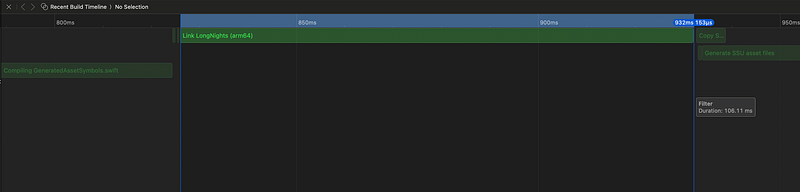
The linker, ld, is being invoked through clang, a frontend for the LLVM project, which includes the linker. The task of the linker is to take compiled object files and libraries, combine them, and produce the final executable file — in this case, the LongNights app for the iOS Simulator.
Let’s break down the key parts of the command:
-Xlinker: This option passes the subsequent argument directly to the linker. You see it before many of the following options, ensuring they're interpreted by the linker and not byclangitself.-reproducible: Ensures that the build is reproducible, meaning that subsequent builds of the same source will produce the same binary output.-target arm64-apple-ios17.0-simulator: Specifies the target architecture and platform, which is the iOS 17.0 simulator on an arm64 architecture.-isysroot: Points to the root directory of the SDK (Software Development Kit) that the linker should use.-Ofast: Specifies the optimization level for the linker.-Ofastenables aggressive optimizations.-L: Specifies a directory to search for libraries during linking.-F: Specifies a directory to search for frameworks during linking.-filelist: Points to a file containing a list of object files to link together.-dead_strip: Instructs the linker to remove dead code (code that is never called or used).-fobjc-link-runtime: Includes the Objective-C runtime library.-fprofile-instr-generate: Indicates that the binary should be instrumented for profiling with tools like Xcode's Instruments.-Xlinker -add_ast_path: This option tells the linker to add the path to the Abstract Syntax Tree (AST) file. AST files (.swiftmodulefiles for Swift) contain a serialized form of the source code's structure, which can include definitions for types, functions, and other declarations. This can be important for Swift's reflection capabilities or for debugging purposes.-Xlinker -sectcreate: This is a command to create a new section in the output file. In Mach-O executables, files are divided into sections and segments. The-sectcreateoption is generally followed by three additional arguments: the segment name, the section name, and the file path. This leads to options like__TEXTand__entitlements. They're used to specify where in the executable certain data should go.-Xlinker __TEXT: The__TEXTsegment is one of the standard segments in a Mach-O file, typically containing the executable code. Specifying__TEXTwith-sectcreatemeans "create a section in the__TEXTsegment." It's commonly used to embed additional data directly into the text segment of the binary.-Xlinker __entitlements: This option specifies that the linker should create a section for the app’s entitlements within the__TEXTsegment. Entitlements are key-value pairs defining capabilities and permissions for your app, like whether it's allowed to access the camera, network, or other system resources.-Xlinker __ents_der: Similar to__entitlements, this option is creating a section in the binary for entitlements data, but it might be used for a different format or additional entitlements information. The "_der" part typically refers to a binary representation of data (Distinguished Encoding Rules), suggesting this data is in a compiled or binary form as opposed to a raw or textual representation.-Xlinker -no_adhoc_codesign: This option tells the linker not to perform ad-hoc code signing. Ad-hoc signing is a minimal form of code signing applied to executables when no other signature is provided. By passing-no_adhoc_codesign, the build process is indicating that the binary shouldn't be signed in this manner, perhaps because it will be signed in a different way or at a different stage in the build process.-Xlinker -dependency_info: This option specifies the path to a file that the linker should use to record dependency information. Dependency info might include details about what source files and libraries went into the binary, which can be used for incremental builds or for debugging the build process itself.-o /Debug-iphonesimulator/LongNights.app/LongNights: Specifies the output file of the linking process, which is the executable for the LongNights app within the appropriate Debug-iphonesimulator directory.- Pages: In memory management, both the physical memory (RAM) and virtual memory are divided into pages. These are fixed-size blocks, and memory is addressed in terms of pages. This concept is important for understanding how programs are loaded into memory, as segments and sections are often aligned to page boundaries for efficient access and protection.
- Fat Binary: A fat binary (or universal binary) contains machine code for multiple architectures in a single file. This way, the same executable can run on different hardware (e.g., Intel and Apple Silicon). The Mach-O format supports this by including multiple Mach-O files, one for each architecture, packed together with a special header that describes each one.
- Dead Stripping: This is an optimization process during linking that removes code and data that are never used (dead code). Dead stripping reduces the size of the final executable by eliminating unnecessary parts, making the application load faster and use less memory.
- Order File: An order file is used during the linking process to specify the order of functions or symbols in the resulting binary. Arranging the symbols in a particular order can improve performance by optimizing cache usage or minimizing page faults. You can create an order file manually or generate one based on profiling data to optimize the layout of your executable.
- Page Faults: Page faults are events that occur when a program tries to access a portion of memory that is not currently in the computer’s main memory (RAM). They are part of the virtual memory management system in most operating systems, which uses disk space to extend available memory.
- Minor Page Fault: This happens when the data is not in the RAM but still within the relatively faster accessible space, like a memory-mapped file or another form of lazy allocation. The system can resolve these quickly without accessing the disk.
- Major Page Fault: This occurs when the system needs to retrieve the data from the disk, a much slower process. Major page faults can significantly affect performance because accessing the disk is slower than accessing RAM.
The operating system uses a page replacement algorithm to decide which pages to remove from RAM to make space for the new ones. It might choose least recently used pages or employ more sophisticated strategies to predict which pages will not be needed soon.
Efficient handling of page faults is crucial for system performance. Too many page faults, especially major ones, can lead to thrashing, a state where the system spends more time loading pages from disk than executing tasks.

Buy a Coffee for salgara: https://ko-fi.com/salgara


