avatarChristopher Reno Budiman

Free AI web copilot to create summaries, insights and extended knowledge, download it at here

4910

Abstract

<figcaption></figcaption></figure><figure id="0e15"><img src="https://cdn-images-1.readmedium.com/v2/resize:fit:800/1*ytJLK1BB55JneU1cH3CXMA.jpeg"><figcaption>Photo by <a href="https://www.apple.com/au/newsroom/2020/06/ipados-14-introduces-new-features-designed-specifically-for-ipad/">Apple</a> on <a href="https://www.apple.com/au/newsroom/2020/06/ipados-14-introduces-new-features-designed-specifically-for-ipad/">Newsroom</a></figcaption></figure><p id="d61a">Even more, it can recognise shapes as well. Your iPad can <b>automatically detect shapes and convert them into a subtle look. </b>Sometimes drawing shape can be tricky and messy, but that’s not the case any more in iPadOS 14.</p><figure id="0001"><img src="https://cdn-images-1.readmedium.com/v2/resize:fit:800/1*gD6huqJ_Nu5hJi1pvqblLg.gif"><figcaption>Photo by <a href="https://www.apple.com/au/newsroom/2020/06/ipados-14-introduces-new-features-designed-specifically-for-ipad/">Apple</a> on <a href="https://www.apple.com/au/newsroom/2020/06/ipados-14-introduces-new-features-designed-specifically-for-ipad/">Newsroom</a></figcaption></figure><h2 id="4fed">3. watchOS 7: Handwashing</h2><p id="a386">watchOS 7 introduced some major features like <b>sharing watch faces</b>, the highly requested <b>sleep tracking</b> and added <b>fitness activity.</b> Somehow, my favourite feature is the new <b><i>Handwashing app.</i></b> This is a game-changing app, which guides Apple Watch users to wash their hand as per recommended time by the World Health Organisation. As people now frequently wash their hands, I think this is a really great addition to motivate people living in healthier habits.</p><figure id="c9e9"><img src="https://cdn-images-1.readmedium.com/v2/resize:fit:800/1*CfEO_aJmnLTYi9ffBsVtkg.gif"><figcaption>Photo by <a href="https://www.apple.com/au/newsroom/2020/06/watchos-7-adds-significant-personalization-health-and-fitness-features-to-apple-watch/">Apple </a>on <a href="https://www.apple.com/au/newsroom/2020/06/watchos-7-adds-significant-personalization-health-and-fitness-features-to-apple-watch/">Newsroom</a></figcaption></figure><p id="481c">The technology behind this feature is pretty fascinating. The Apple Watch detects <a href="https://www.apple.com/watchos/watchos-preview/"><i>hands movement of scrubbing and rubbing,</i> while s<i>enses the sound of flowing water through its microphone.</i></a> Then, the Watch started a 20-second countdown. If a stop movement is detected, it will pause automatically and remind you to continue until you finish washing your hand. Pretty amazing, right?</p><h2 id="878a">4. macOS Big Sur: A Major UI Redesign</h2><figure id="7dce"><img src="https://cdn-images-1.readmedium.com/v2/resize:fit:800/1*fhJhg9llyoxe538or4Gdbg.jpeg"><figcaption>Photo by <a href="https://www.apple.com/au/newsroom/2020/06/apple-introduces-macos-big-sur-with-a-beautiful-new-design/">Apple</a> on <a href="https://www.apple.com/au/newsroom/2020/06/apple-introduces-macos-big-sur-with-a-beautiful-new-design/">Newsroom</a></figcaption></figure><p id="76e0">My favourite announcement of the keynote. The new macOS is finally transitioning from OS X to 11.0. It received a <b>major redesign of its UI</b>, with the new icons, redesign app docks, adding depth and layers to the UI and a control centre. It results in a better and cleaner look, compared to the previous macOS.</p><figure id="5b56"><img src="https://cdn-images-1.readmedium.com/v2/resize:fit:800/1*KypgIx7LqS7L7kpWL4pP-Q.jpeg"><figcaption></figcaption></figure><figure id="b423"><img src="https://cdn-images-1.readmedium.com/v2/resize:fit:800/1*w0fIrJVXG66GZQZ-LdrnZA.jpeg"><figcaption>Photo by <a href="https://www.apple.com/au/newsroom/2020/06/apple-introduces-macos-big-sur-with-a-beautiful-new-design/">Apple</a> on <a href="https://www.apple.com/au/newsroom/2020/06/apple-introduces-macos-big-sur-with-a-beautiful-new-design/">Newsroom</a></figcaption></figure><p id="60ba">Apart from the UI redesign, Apple also introduces <b>a new Safari experience that claims to be faster and reliable than Chrome</b>, with translation feature, customisable extensions and adding a new wallpaper to the Safari home screen. The Safari also added an extra security element that allows you to understand how the websites treat your privacy.</p><p id="6f22">I know some people still prefer the previous design, but this new design symbolises the new character of the mac, which brings us to the last announcement of the keynote.</p><h2 id="09ae">5. Apple Silicon for Mac</h2><p id="bd1f">Yes, this is what most people been waiting for. Throughout years and months, we heard this rumours flying around about Apple transitioning to its own silicon for their Macs. It is finally here,<b> Apple will start using its own processors into the Mac. </b>So, no more <i>Intel Inside?</i></p><figure id="d478"><img src="https://cdn-images-1.readmedium.com/v2/resize # Options :fit:800/1*Et4X-aKa5oc7176VTeok6A.png"><figcaption>Source: <a href="https://www.youtube.com/watch?v=GEZhD3J89ZE">WWDC 2020 Special Event Keynote — Apple</a> on <a href="https://www.youtube.com/watch?v=GEZhD3J89ZE">YouTube</a></figcaption></figure><p id="adb0">The Apple-based System on Chip (or SoC) creates multiple advantages, such as <b>delivering high-performance capabilities</b>, yet <b>maintaining power efficiency of the device.</b> We had seen Apple implemented this fundamental throughout its iOS and watchOS devices. Its reputation is unquestionable. However, would it sustain the same expectation with a more powerful device like the Mac?</p><figure id="dc10"><img src="https://cdn-images-1.readmedium.com/v2/resize:fit:800/1*GfY7SX4OiATpn4waj3c8Cg.png"><figcaption>Source: <a href="https://www.youtube.com/watch?v=GEZhD3J89ZE">WWDC 2020 Special Event Keynote — Apple</a> on <a href="https://www.youtube.com/watch?v=GEZhD3J89ZE">YouTube</a></figcaption></figure><p id="7e67">As what Apple tested in their keynote, <b>it can run high-demanding programs</b>, like Final Cut Pro and Logic Pro X without any issues. Even some Microsoft and Adobe apps like Photoshop and Lightroom that they demonstrated, it runs smoothly without any issue. What makes it even better is, for developers they can convert their iPhone and iPad apps easily to the Mac since they shared the same silicon. Apple also allows cross-platform usage through Virtualisation, which they show how Linux can be operated through macOS Big Sur.</p><figure id="7cdc"><img src="https://cdn-images-1.readmedium.com/v2/resize:fit:800/1*DdJWuEN6yWBtQphD6FKflw.jpeg"><figcaption></figcaption></figure><figure id="68e0"><img src="https://cdn-images-1.readmedium.com/v2/resize:fit:800/1*kSd2PAXIgnk040wG_dAI8Q.jpeg"><figcaption>Photo by <a href="https://www.apple.com/newsroom/2020/06/apple-announces-mac-transition-to-apple-silicon/">Apple</a> on <a href="https://www.apple.com/newsroom/2020/06/apple-announces-mac-transition-to-apple-silicon/">Newsroom</a></figcaption></figure><p id="ce91">Tim Cook mentioned that the <a href="https://www.youtube.com/watch?v=GEZhD3J89ZE"><b>first ARM-based Mac will be introduced before the end of this year</b>,</a> but the question is, which one? Maybe the Mac Mini, MacBook Air or even the MacBook Pro? We’ll have to wait until the official announcement. As today, Apple will ship a test unit to developers in a Mac Mini’s enclosure, running Apple’s A12Z Bionic chip, the same chip used in the latest iPad Pro, so they can convert easily their iOS apps to the Mac.</p><p id="0c20">What an exciting day of Apple’s announcement! All of this feature will be available later this fall for the public release. Or if you are a developer, you can download the developer beta today. What are your favourite announcements so far?</p><h1 id="5eab">More from the author</h1><div id="5707" class="link-block"> <a href="https://readmedium.com/earpods-will-not-be-included-with-iphone-12-is-it-true-2e88b1fb5f9d"> <div> <div> <h2>EarPods WILL NOT Be Included With iPhone 12: Is It True?</h2> <div><h3>An in-depth look at Apple’s strategy in 2020.</h3></div> <div><p>medium.com</p></div> </div> <div> <div style="background-image: url(https://miro.readmedium.com/v2/resize:fit:320/0*mO7OR8LQTEPavWc6)"></div> </div> </div> </a> </div><div id="a0ad" class="link-block"> <a href="https://readmedium.com/do-really-need-a-flagship-phone-1e917fb7d0db"> <div> <div> <h2>Do You Really Need a Flagship Phone?</h2> <div><h3>Need to change your phone? Do you really want to spend a hefty amount for the next upgrade? Think about it twice.</h3></div> <div><p>medium.com</p></div> </div> <div> <div style="background-image: url(https://miro.readmedium.com/v2/resize:fit:320/1*[email protected])"></div> </div> </div> </a> </div><p id="0801"><b>Christopher Reno Budiman</b> is a writer, explorer and entrepreneur-minded person. He received Bachelor of Business (Hospitality Management) and Bachelor of International Hospitality Management with Swiss Hotel Association accreditation. He’s on <a href="https://www.facebook.com/chris.budiman97">Facebook</a>, <a href="https://www.instagram.com/christopherreno/?hl=en">Instagram</a> and <a href="https://www.google.com.au/url?sa=t&amp;rct=j&amp;q=&amp;esrc=s&amp;source=web&amp;cd=1&amp;ved=2ahUKEwjGxazLvLjpAhXK7HMBHVooDK4QFjAAegQIARAB&amp;url=https%3A%2F%2Fau.linkedin.com%2Fin%2Fchristopher-reno-budiman-239b05120&amp;usg=AOvVaw3wypG6ZPqqxqcC6lQ9mqnI">LinkedIn</a> if you would like to know more about him</p></article></body>

WWDC 2020: My Top 5 Features and Announcement!

Game-changing features that will set benchmarks in the tech world.

Click here to listen in a narrative version!

Apple just held its annual WWDC keynote. This year’s keynote is different, with the current restrictions in place, the presentation was held at The Apple Park by a pre-recorded video. Although it was not live, the production of the presentation is exquisite. In the keynote, Apple surprises everyone with new features coming on their lineup. Here are my top 5 features and announcements from Apple:

1. iOS 14: Compact UI
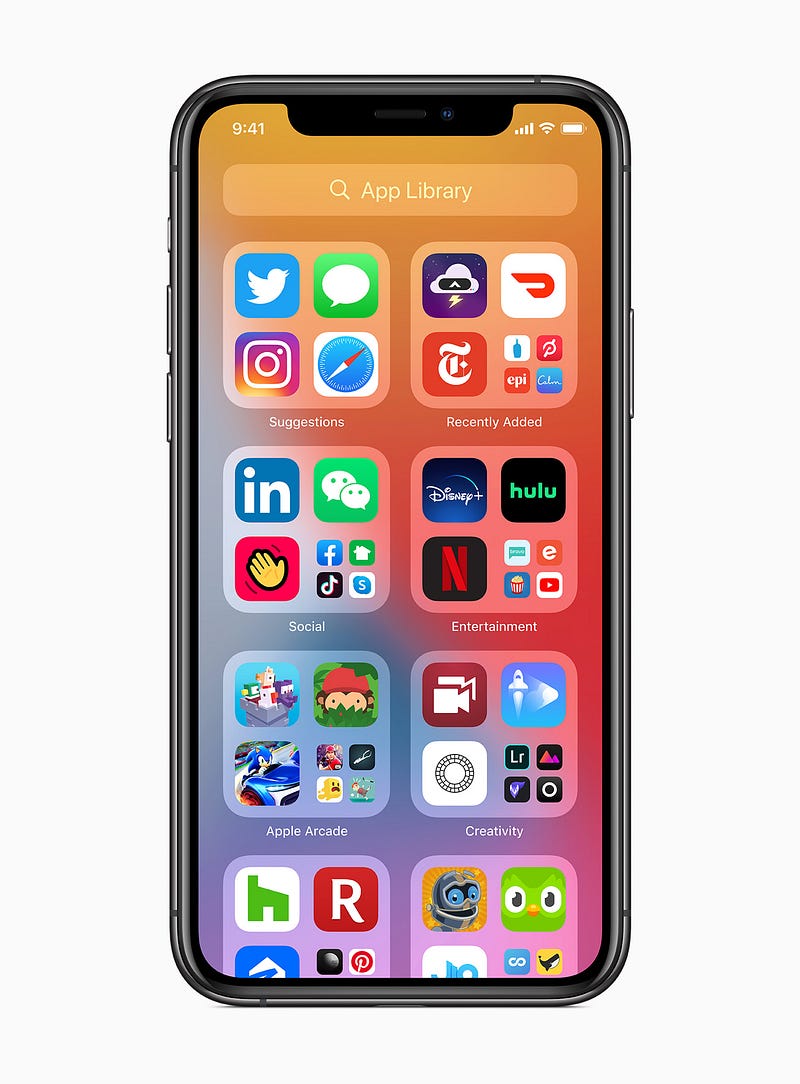
Photo by Apple on Newsroom

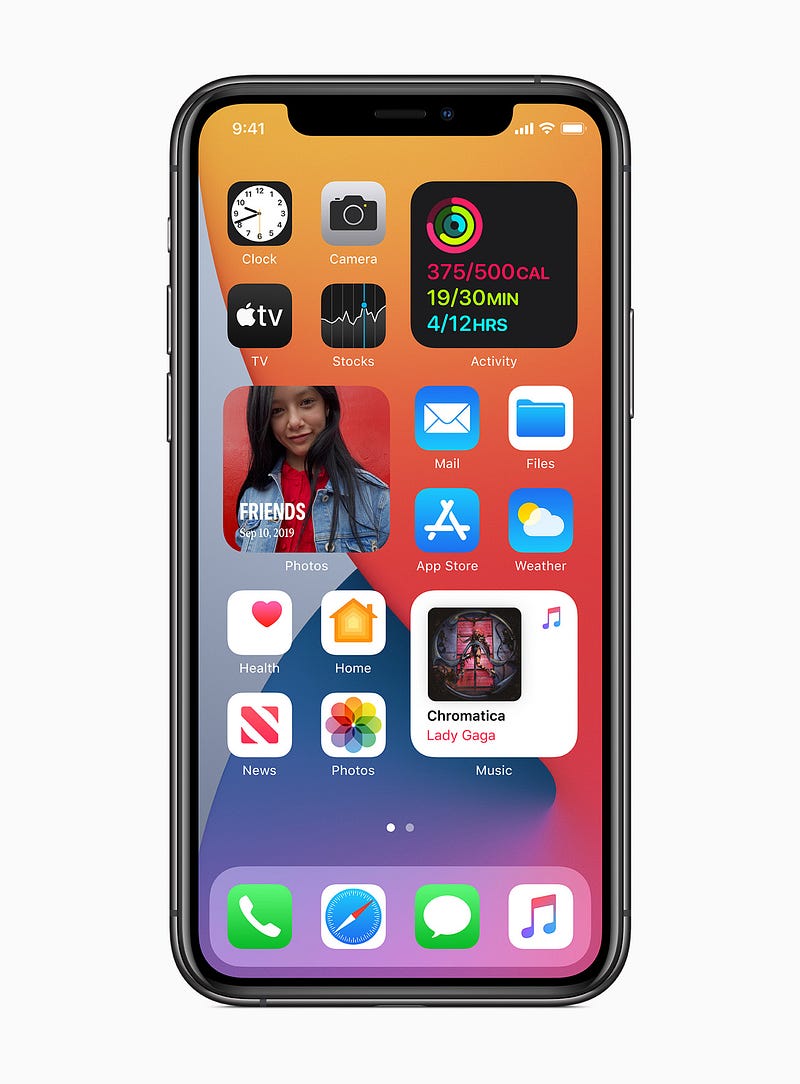
iOS 14 is a statement of how Apple listens to its customer feedback. The changes are very significant.

Apple finally allows users to customise and re-design the home screen. In the past release of iOS, the home screen seems a bit boring, with the uniform app icons floating around the screen. Now, you can customise your home screen by pinning a widget to the home screen, such as weather, world clock, activity ring, news and more. At last, iOS users can enjoy this customisation, similar to what Android users had for years.

Not only that, but some of us have multiple apps that overwhelm our phone. Now in iOS 14, you can hide some apps in the App Library, so your home screen is friendlier to see. It uses an automatic app organisation based on each category.
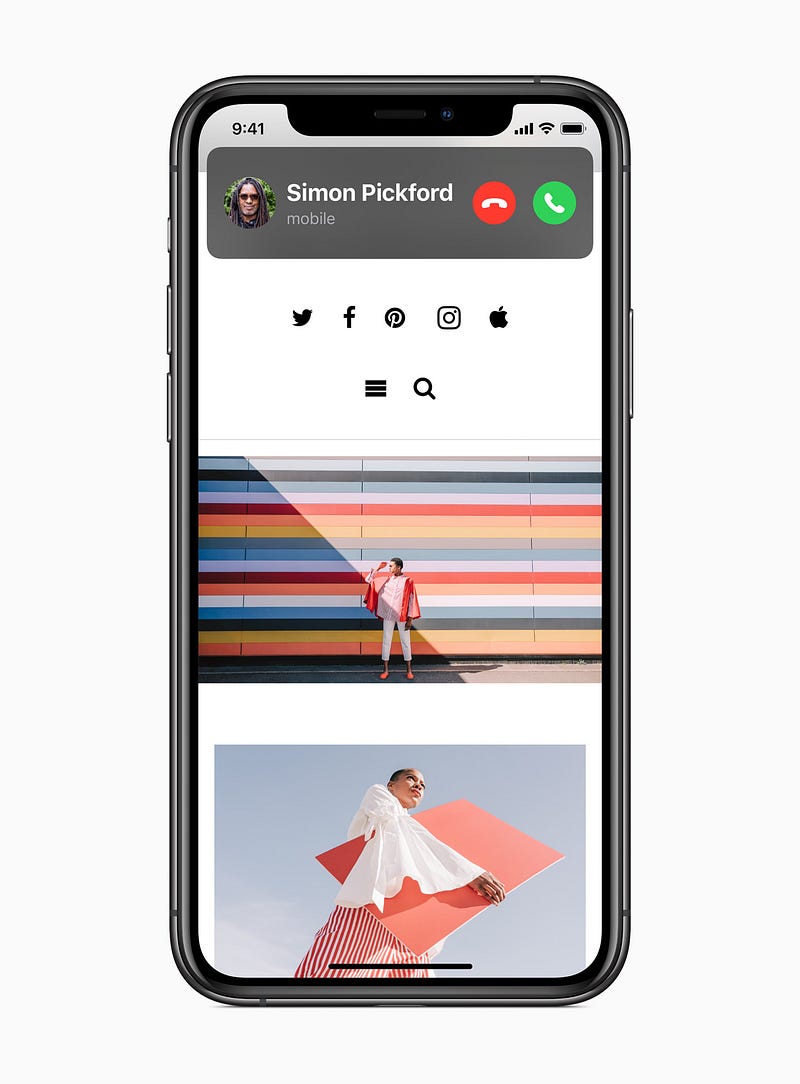
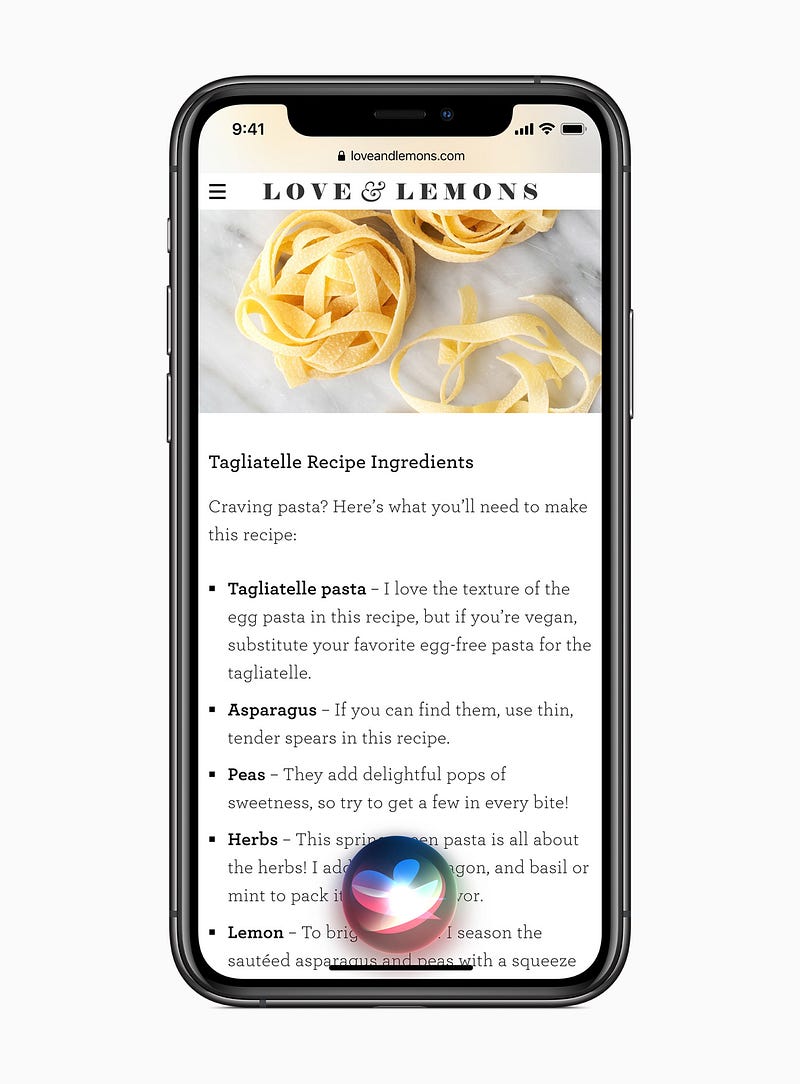
Photo by Apple on Newsroom

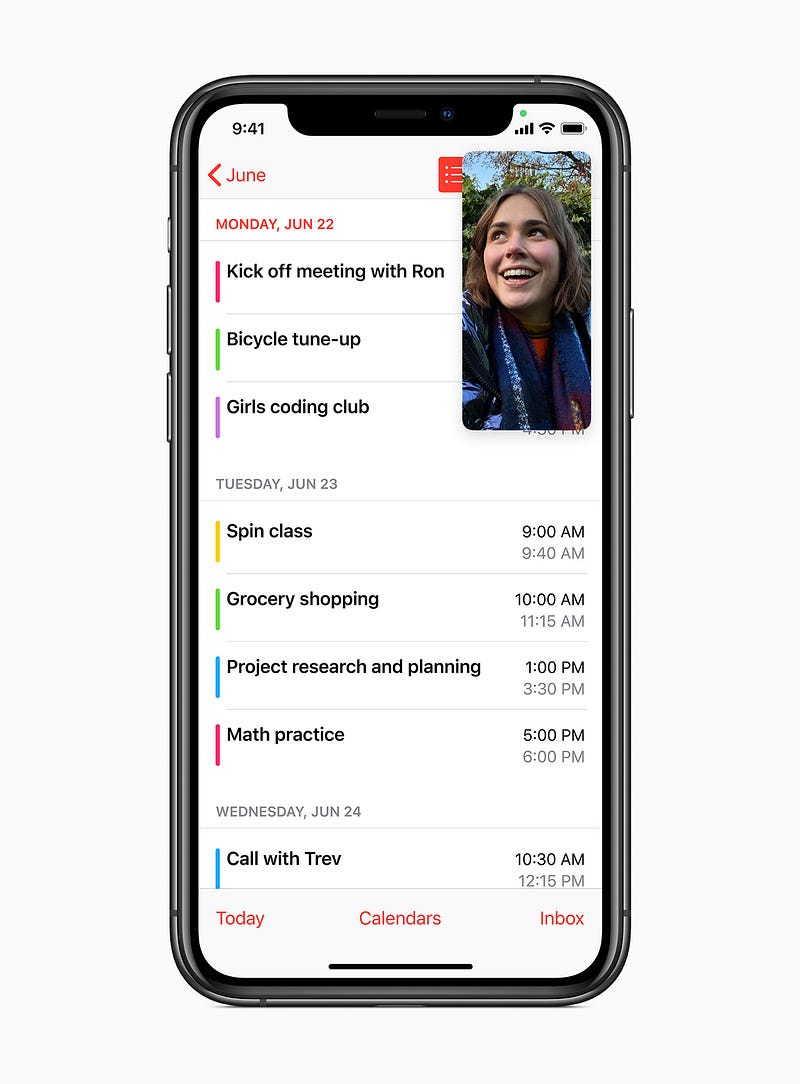
They also redesign a non-intrusive look of the phone calls and Siri UI. In past, when you received a phone call or activate Siri, it took up the whole screen, which is quite disturbing. Now, with a cleaner look, incoming calls appear on the top of the phone and Siri takes up less space, which now shows more contextual information. The new UI style also allows picture in picture mode for videos and FaceTime calls on the iPhone. It means that you can still multitask while watching videos or calling with someone.

There are more enhancements and features in iOS 14, such as improved maps, redesign CarPlay, the introduction of CarKeys, App Clips and AirPods Pro spatial audio.

2. iPadOS 14: Scribble

While all of these features announced for iOS 14 are also coming to iPadOS 14, Apple introduces some distinctive features for the iPad. For instance, the new scribble mode allows you to write with the Apple Pencil on the search bar in Safari, or even converting handwriting to text. So, you don’t have to worry about putting your pencil down while you are searching on the web.
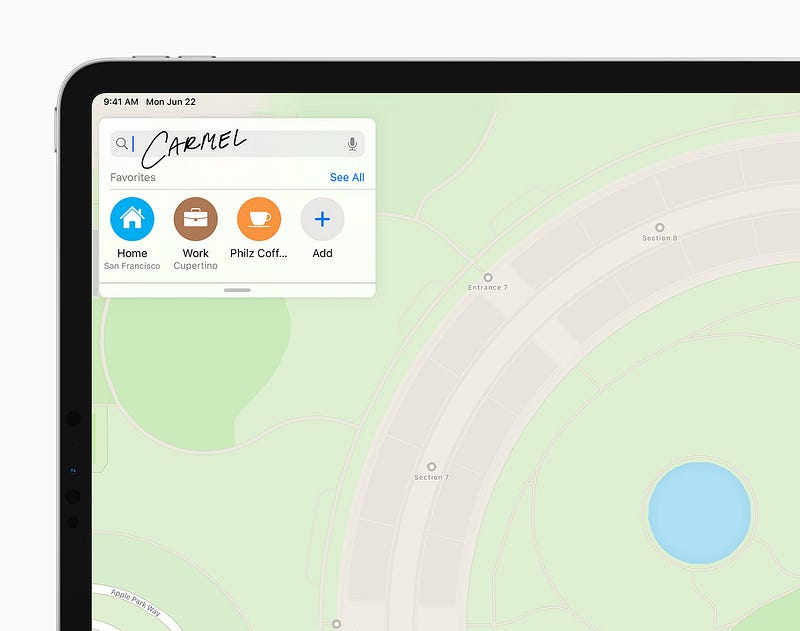
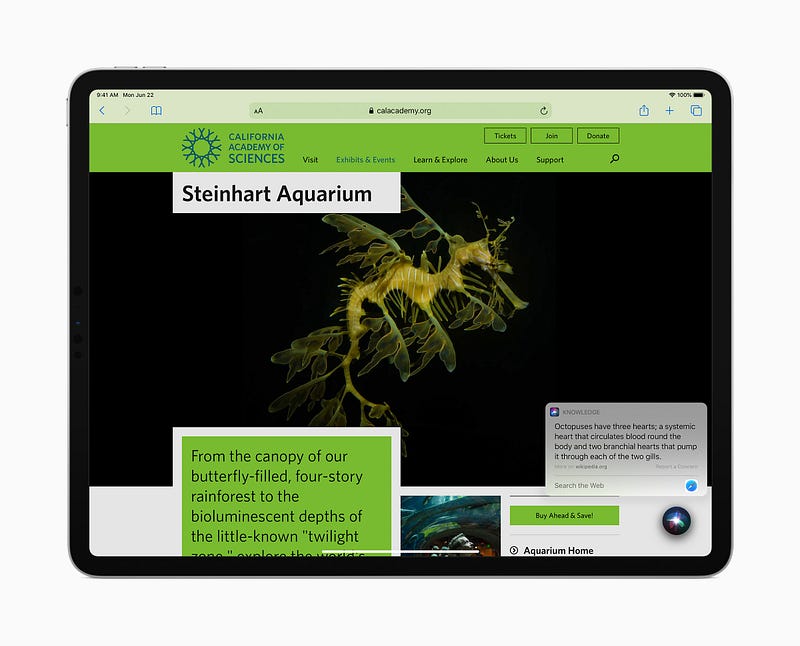
Photo by Apple on Newsroom

Even more, it can recognise shapes as well. Your iPad can automatically detect shapes and convert them into a subtle look. Sometimes drawing shape can be tricky and messy, but that’s not the case any more in iPadOS 14.
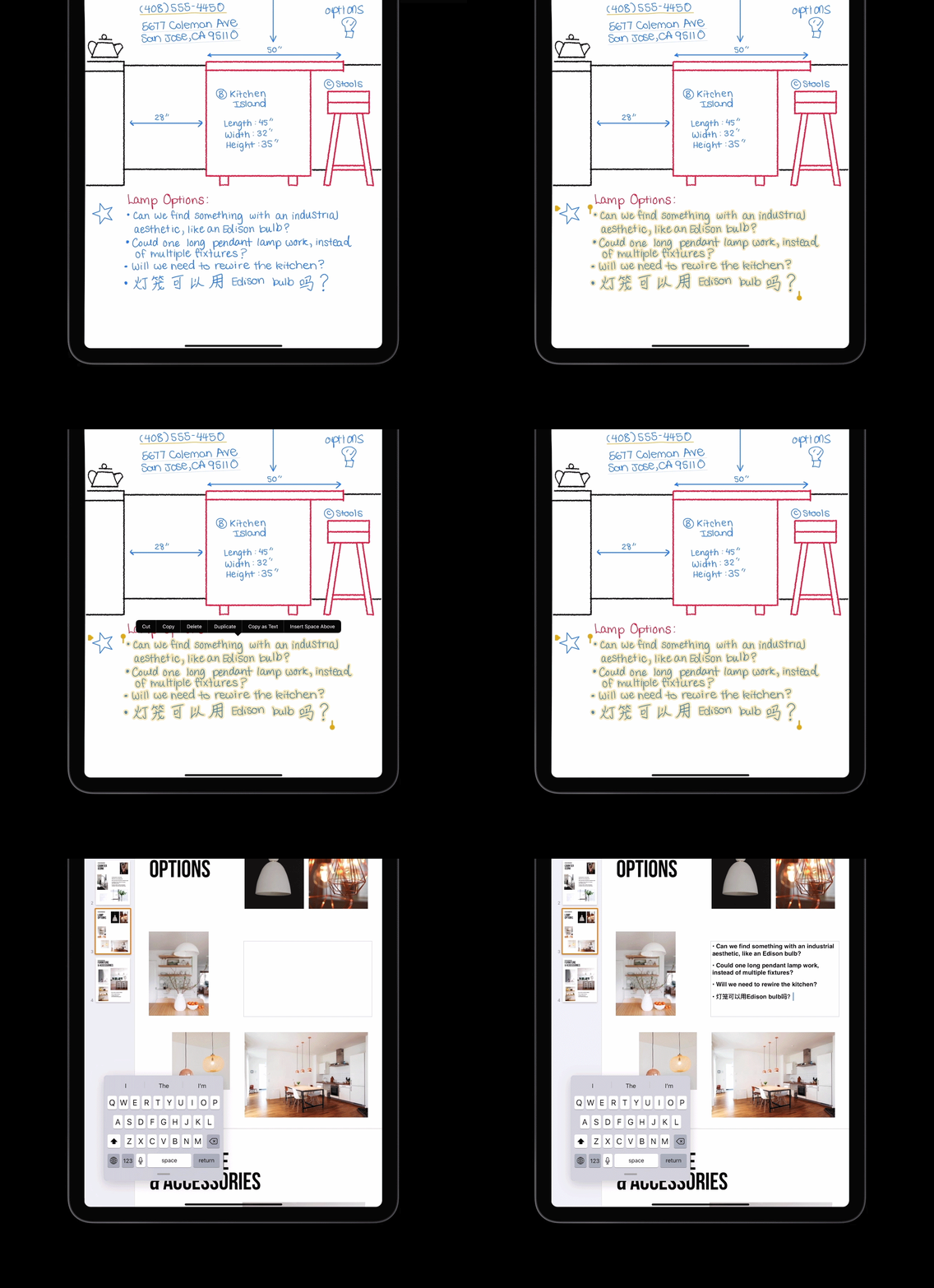
Photo by Apple on Newsroom

3. watchOS 7: Handwashing

watchOS 7 introduced some major features like sharing watch faces, the highly requested sleep tracking and added fitness activity. Somehow, my favourite feature is the new Handwashing app. This is a game-changing app, which guides Apple Watch users to wash their hand as per recommended time by the World Health Organisation. As people now frequently wash their hands, I think this is a really great addition to motivate people living in healthier habits.
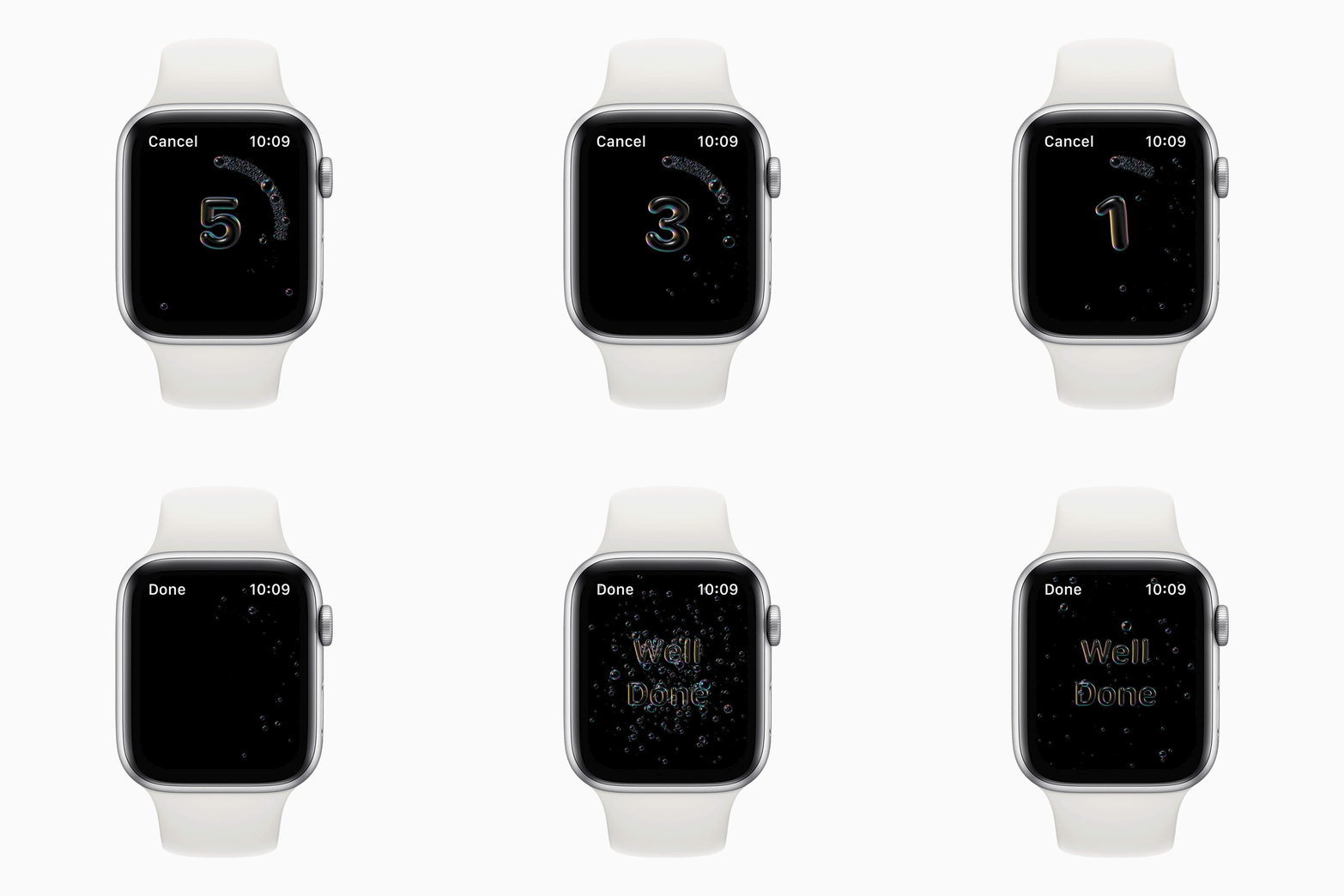
Photo by Apple on Newsroom

The technology behind this feature is pretty fascinating. The Apple Watch detects hands movement of scrubbing and rubbing, while senses the sound of flowing water through its microphone. Then, the Watch started a 20-second countdown. If a stop movement is detected, it will pause automatically and remind you to continue until you finish washing your hand. Pretty amazing, right?

4. macOS Big Sur: A Major UI Redesign
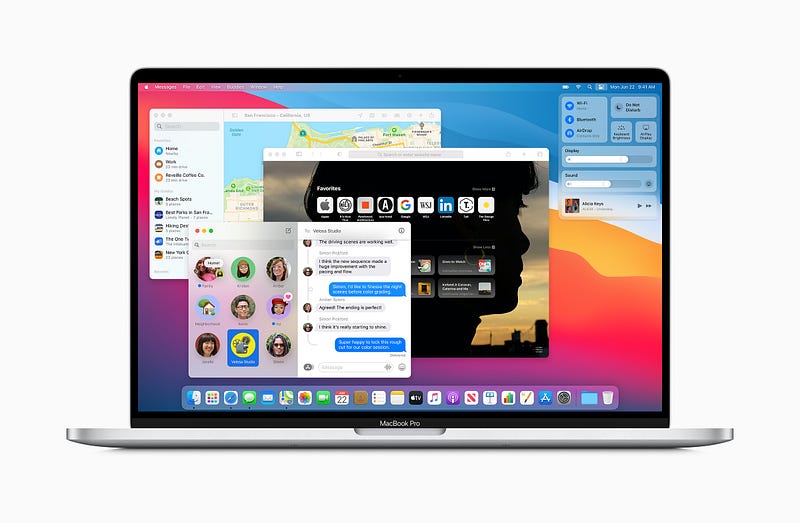
Photo by Apple on Newsroom

My favourite announcement of the keynote. The new macOS is finally transitioning from OS X to 11.0. It received a major redesign of its UI, with the new icons, redesign app docks, adding depth and layers to the UI and a control centre. It results in a better and cleaner look, compared to the previous macOS.
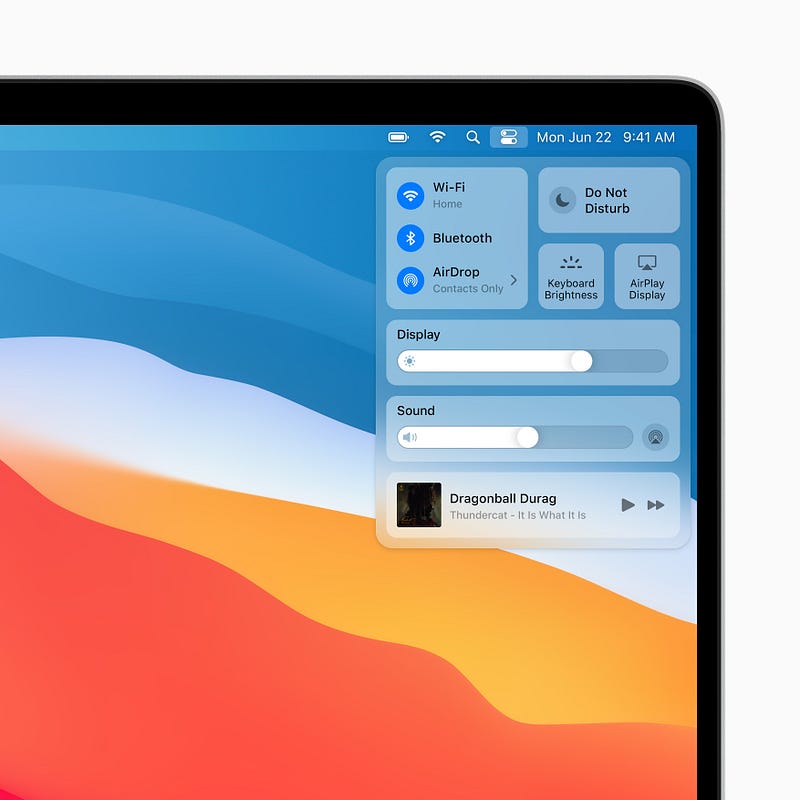
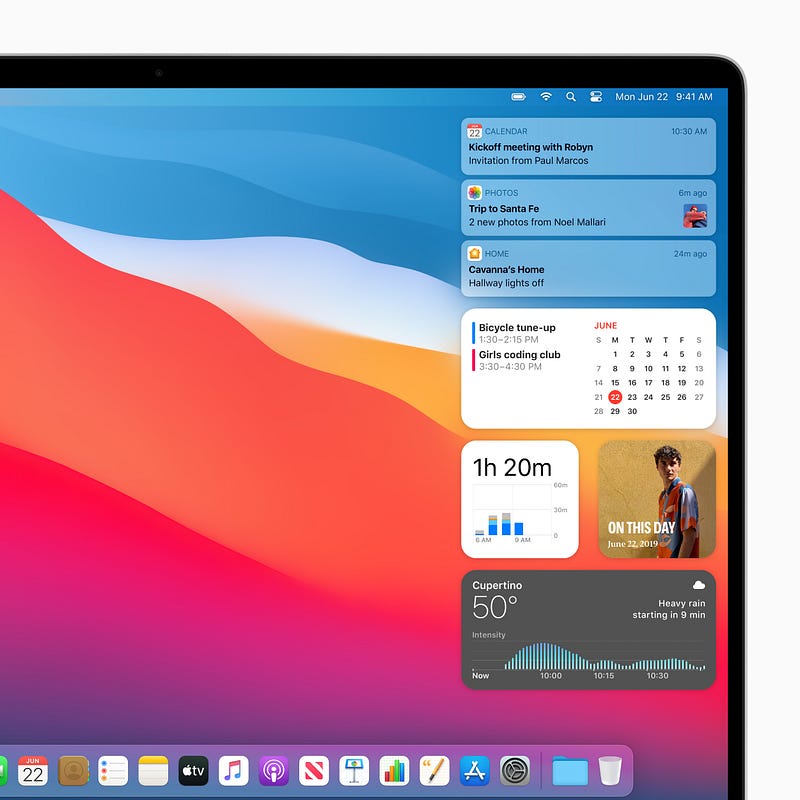
Photo by Apple on Newsroom

Apart from the UI redesign, Apple also introduces a new Safari experience that claims to be faster and reliable than Chrome, with translation feature, customisable extensions and adding a new wallpaper to the Safari home screen. The Safari also added an extra security element that allows you to understand how the websites treat your privacy.

I know some people still prefer the previous design, but this new design symbolises the new character of the mac, which brings us to the last announcement of the keynote.

5. Apple Silicon for Mac

Yes, this is what most people been waiting for. Throughout years and months, we heard this rumours flying around about Apple transitioning to its own silicon for their Macs. It is finally here, Apple will start using its own processors into the Mac. So, no more Intel Inside?
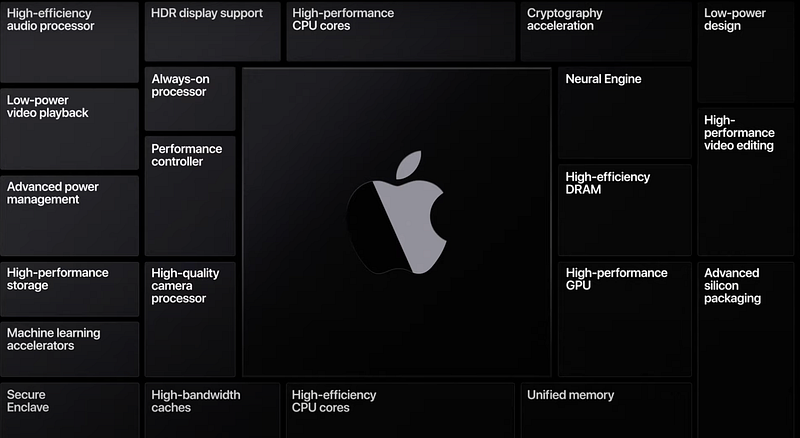
Source: WWDC 2020 Special Event Keynote — Apple on YouTube

The Apple-based System on Chip (or SoC) creates multiple advantages, such as delivering high-performance capabilities, yet maintaining power efficiency of the device. We had seen Apple implemented this fundamental throughout its iOS and watchOS devices. Its reputation is unquestionable. However, would it sustain the same expectation with a more powerful device like the Mac?
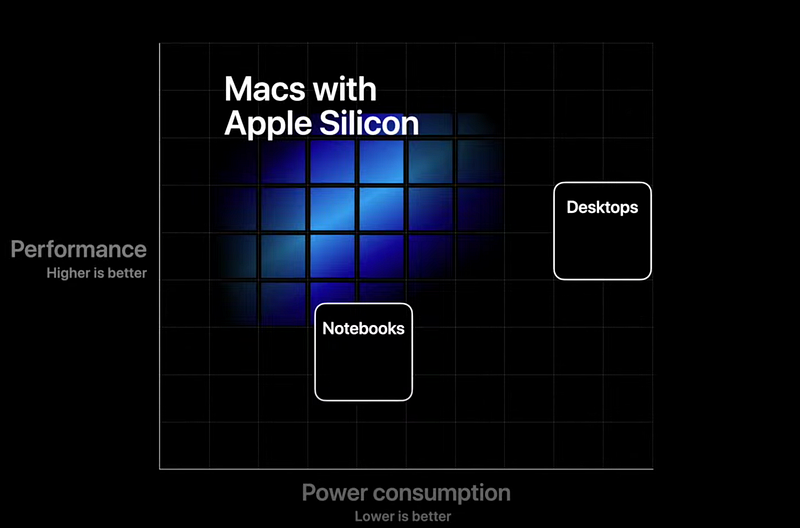
Source: WWDC 2020 Special Event Keynote — Apple on YouTube

As what Apple tested in their keynote, it can run high-demanding programs, like Final Cut Pro and Logic Pro X without any issues. Even some Microsoft and Adobe apps like Photoshop and Lightroom that they demonstrated, it runs smoothly without any issue. What makes it even better is, for developers they can convert their iPhone and iPad apps easily to the Mac since they shared the same silicon. Apple also allows cross-platform usage through Virtualisation, which they show how Linux can be operated through macOS Big Sur.
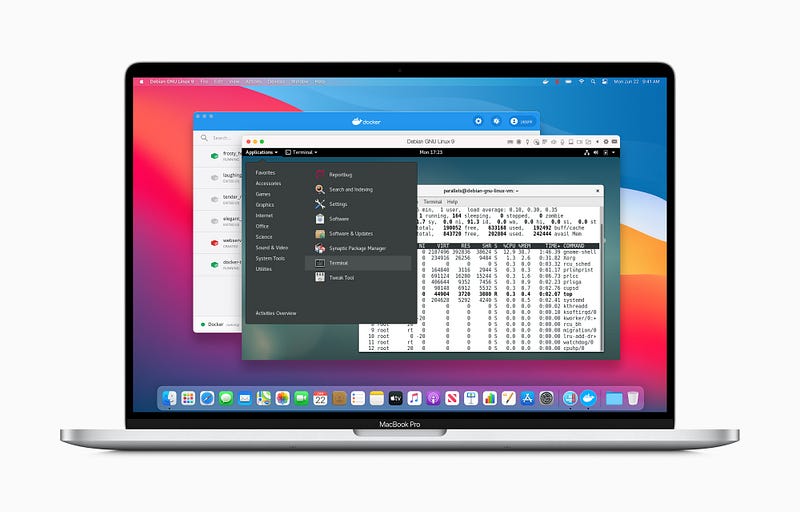
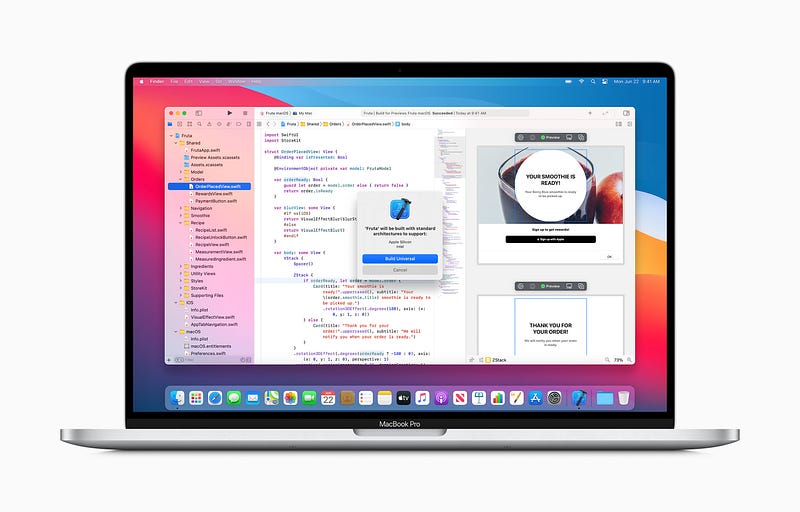
Photo by Apple on Newsroom

Tim Cook mentioned that the first ARM-based Mac will be introduced before the end of this year, but the question is, which one? Maybe the Mac Mini, MacBook Air or even the MacBook Pro? We’ll have to wait until the official announcement. As today, Apple will ship a test unit to developers in a Mac Mini’s enclosure, running Apple’s A12Z Bionic chip, the same chip used in the latest iPad Pro, so they can convert easily their iOS apps to the Mac.

What an exciting day of Apple’s announcement! All of this feature will be available later this fall for the public release. Or if you are a developer, you can download the developer beta today. What are your favourite announcements so far?

More from the author

Christopher Reno Budiman is a writer, explorer and entrepreneur-minded person. He received Bachelor of Business (Hospitality Management) and Bachelor of International Hospitality Management with Swiss Hotel Association accreditation. He’s on Facebook, Instagram and LinkedIn if you would like to know more about him

Apple
WWDC
Technology
iOS
Mac
Recommended from ReadMedium