
Writers!!! You’re gonna love this…
Ever since I’ve been on Medium, I’ve loved the content I’ve been served by this platform. Be it the curation, the diversity of the content, aspiring writers, and newbies trying to state their views. It also serves great for the support of your own personal blog.

But as much as I like Medium, I’d be lying if I say I prefer it more than podcasts, I usually listen to podcasts while cycling, and I’m sure many commuters too. A few days back, I was going cycling when I got notified by Medium that Tim Denning (who I’ve been following and enjoying their content) had published a new story and quite an anticipating one for what it matters.
And, that was the moment I wished Medium Stories could be read out loud like podcasts, and that started my hunt for text-to-speech voice tech, I came across some extensions but they wouldn’t work on Android, also they felt very counter-engaging like I just wanted to shut them off. After few moments of research, I ended up on Play.ht, and boy they aren’t kidding, they’ve got over 600+ voices paired up with accents so you can forget that robotic voice without accent, god I hate that.
Voice Generation using AI
- Generate realistic voiceovers for videos, podcasts, e-learning, etc. using our powerful online AI voice generator.
Audio Articles
- Convert your blog posts to audio using synthetic voices to increase content accessibility, user engagement and time on page metrics.
570+ AI Voices
- Choose from a growing library of 570+ natural-sounding Text to Speech voices across 60+ languages and accents.
Speech Styles
- Use expressive emotional speaking styles to make the voices sound more natural and engaging.
Multi-Voice Feature
- Create conversation-like voiceovers by using different voices for sentences in the same audio file.
Voice Inflections
- Fine-tune Rate, Pitch, Emphasis, and Pauses to create a more suitable voice tone.
Custom Pronunciations
- Define how specific words are pronounced. Save and re-use those pronunciations when synthesizing speech.
Preview Mode
- Listen and preview a single paragraph or full text before converting it to speech.
Although I found Play in quite a short time, I wondered why did it even take that much time, and that was because I haven’t seen any writer implementing it in its story. I was like “Why??”.
- Listening is more convenient.
- By adding a voice-over, the publisher is literary making its content accessible to a wide audience.
- But foremost, you’re giving your audience a CHOICE on how they would like to consume that content, and people love choice, that’s what kept Android alive to this date.
- Now that podcasts are growing more and being more engaging, the sooner you adopt this, the bigger audience you get.
All you gotta do is follow these few simple steps and boom! You’re good to go, be it new stories, or published ones.
- Sign Up and then Download and Install the Chrome Extension!
- Open the draft that you want to publish and hit ‘Publish now with Audio’
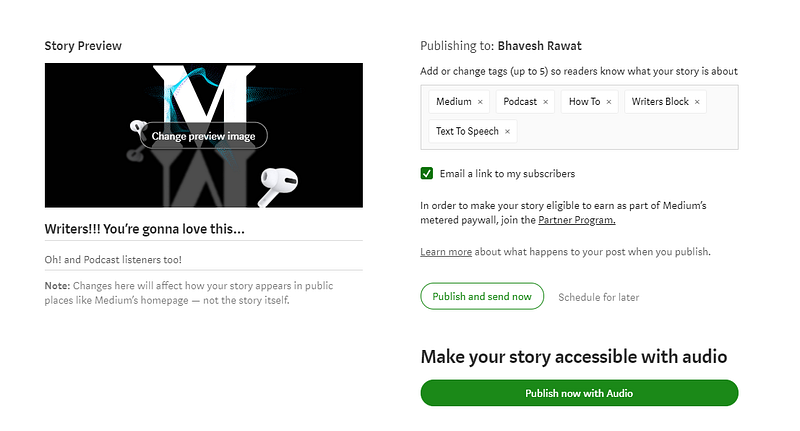
Make sure to customize the voice and accent as you like.
Well, that was it for this one, hope you enjoyed the story! If you did, consider following me. Thank you, guys, for reading. ☮
Here are some other stories:
— — — — — — This story contains some affiliate links — — — — — —
If you like my work, you can buy me a 🍩 here.