avatarCharly Poly

Free AI web copilot to create summaries, insights and extended knowledge, download it at here

4310

Abstract

I don’t need to understand JavaScript</h2><p id="e964">As a JavaScript lover for a long time, I always privilege a functional approach compared to Object-Oriented one.</p><p id="6fc5">I consider that TypeScript should be here to facilitate teamwork, increase velocity, and improve project maintainability.</p><p id="594f">TypeScript shouldn't be used (in my opinion) to put some non-JavaScript developers on the front-end as fast as possible.</p><p id="bf9f">TypeScript is still JavaScript, so <a href="https://readmedium.com/the-two-pillars-of-javascript-ee6f3281e7f3">understanding JavaScript is important</a>.</p><h1 id="a249">The good reasons</h1><h2 id="9d71">TypeScript will help your developers work together on a growing codebase</h2><p id="38a4" type="7">TypeScript allows developers to focus on exposed API rather than having to know all the code by heart.</p><p id="41f6">I believe that the best point of TypeScript is to encourage developers to develop exposing interfaces (like <i>contracts</i>).</p><p id="31eb">If you’re evolving in architecture with isolated components/service following <a href="https://en.wikipedia.org/wiki/Single_responsibility_principle">SRP</a>, then TypeScript allows you to expose your APIs with typed interfaces, keep others developers “in the loop”.</p><figure id="7961"><img src="https://cdn-images-1.readmedium.com/v2/resize:fit:800/1*bppnodIBQfgPLhcHg_Ybkg.png"><figcaption>This exported function exposes a clear signature, if I change it I will be immediately notified if any code using it is broken</figcaption></figure><p id="52c5">I will add that this “interface oriented development” make easier to work with big teams, especially if those teams are composed of developers of different levels (junior, senior). <b>I insist that a good understanding of JavaScript is crucial</b>, but TypeScript enables a <b>softer on-boarding</b> in big projects and allows developers to focus on exposed API rather than having to know all the code by heart.</p><p id="9f16">And more, TypeScript will avoid inattention errors, like “typos”.</p><h2 id="784f">TypeScript tools will save your developers time</h2><blockquote id="f822"><p>Honestly, I always dodged every tooling and IDE, believing it will make me dumb and lazy.</p></blockquote><p id="3c85">But for TypeScript (and other languages too), the core team made an awesome architectural work for tools.</p><p id="c048">These are divided into many parts:</p><ul><li><a href="https://github.com/Microsoft/TypeScript/wiki/Standalone-Server-%28tsserver%29"><co<b>de>tsserver</co<b></a> The TypeScript core teams care a lot about Developer experience, that’s why they developed a tool available (as a process service) This tool is then used by all IDE to bring the same UX to all developers across all IDEs.</li><li><a href="https://microsoft.github.io/language-server-protocol/"><b>Language Servers Protocol Project</b></a><b> </b>Microsoft did not stop this initiative at TypeScript level. The Language Server is a Protocol to develop “tsserver” like services (aka Language Server) for all languages.</li></ul><blockquote id="298e"><p>The idea behind the <i>Language Server Protocol (LSP)</i> is to standardize the protocol for how tools and servers communicate, so a single <i>Language Server</i> can be re-used in multiple development tools, and tools can support languages with minimal effort.</p></blockquote><ul><li><b>Others tools and initiatives </b>By looking at <a href="https://github.com/Microsoft/TypeScript/wiki/Architectural-Overview">TypeScript architecture</a>, you’ll see that the compiler and utils are “open”. This allows the community to develop a lot of awesome tools like <a href="https://github.com/palantir/tslint">TSLint</a>.</li></ul><p id="afd1">For example, VSCode uses all available features of TypeScript languages and tools to help developers to refactor and write code with ease. This allows me to focus on real problems and let TypeScript cover my back on the things I already know but that I forget sometimes (typos, standard APIs, etc …) This includes all the refactoring precautions, that I’m totally capable of taking but often too lazy to take! ⤵️</p> <figure id="cc7c"> <div> <div> <img class="ratio" src="http://placehold.it/16

Options

x9"> <iframe class="" src="https://cdn.embedly.com/widgets/media.html?type=text%2Fhtml&amp;key=a19fcc184b9711e1b4764040d3dc5c07&amp;schema=twitter&amp;url=https%3A//twitter.com/typescriptlang/status/903300458508255232&amp;image=https%3A//i.embed.ly/1/image%3Furl%3Dhttps%253A%252F%252Fpbs.twimg.com%252Fext_tw_video_thumb%252F903296945539604482%252Fpu%252Fimg%252FZXCfY44BzeMgetHf.jpg%26key%3Da19fcc184b9711e1b4764040d3dc5c07" allowfullscreen="" frameborder="0" height="185" width="500"> </div> </div> </figure></iframe></div></div></figure><p id="a33f">I’ll cover some features of VSCode in detail in Chapter 2.</p><h2 id="1b25">The Microsoft community-effort success story</h2><p id="5cc0">Historically, like a lot of Front-end developers, I wasn’t a big fan of Microsoft. But, let’s just be honest, Microsoft made an awesome work for the web in recent years.</p><p id="70f6">In my experience, the first “community” to introduce typing to JavaScript was Google with Dart and AngularDart. Later, the Angular teams started a framework called AtScript (JavaScript superset with types and runtime type checking). Finally, the Angular team at Google choose to use TypeScript, and new JavaScript superset language publicly released by Microsoft. At the same time, Facebook released Flow (mainly for React).</p><p id="5bb0">3 years later after Angular 2 integration, with the VSCode development and full React integration, TypeScript has a huge active community with <a href="https://www.typescriptlang.org/community/friends.html">many companies using it in production</a>.</p><p id="6cd8">Here is a (very) shortlist of the greatest community accomplishments:</p><ul><li><b>React “integrated” propsTypes</b> “Native” mapping between TypeScript types and React PropTypes.</li></ul> <figure id="f3b3"> <div> <div>

            <iframe class="gist-iframe" src="/gist/wittydeveloper/5ffb5f7d5d0c744612404ffdc802cd0a.js" allowfullscreen="" frameborder="0" height="undefined" width="undefined">
          </div>
        </div>
    </figure></iframe></div></div></figure><ul><li><b>DefinitelyTyped <i>@types 

</i></b><i>Almost all popular packages have their TypeScript typings<b> </b>More than <a href="https://www.npmjs.com/~types">4200+ npm packages</a> “typed” by the community!</i></li><li><b>ApolloData GraphQL types generation </b>If you are using a GraphQL API, this is truly a <i>killer-feature! A set of tools developed by Apollo team will generate all TS types for your front application, this makes “types real”. For more details: <a href="https://github.com/apollographql/apollo-codegen"></a></i><a href="https://github.com/apollographql/apollo-codegen">apollo-codegen</a></li></ul><h2 id="af32">TypeScript gives you a taste of future JavaScript, with typings.</h2><p id="fb01">Even if “TypeScript” contains “type”, the language does not force users to use types. Even if I will encourage you to use all the power of types (in chapter 2), TypeScript does a fairly good work on ES-next feature set transpiling. However, <b>it’s not an equivalent of Babel</b> which allows using features from really early <a href="https://tc39.github.io/process-document/">TC39 stages</a>.</p><h1 id="40e3">Summary</h1><p id="ede9"><b>Bad</b></p><ul><li>Test replacement, <b>TypeScript ain’t a test framework</b></li><li>Runtime safety, <b>TypeScript ain’t a runtime type checker</b></li><li>I can write object-oriented C# a-like code, <b>TypeScript is typed JavaScript</b></li></ul><p id="08fd"><b>Good</b></p><ul><li>Team and code scalability with “Interface oriented development” <b>TypeScript will help you deal with growing teams and large codebase</b></li><li>Tooling and Community <b>Microsoft made an awesome community effort work.</b></li><li>ES-next compliance <b>TypeScript give you a taste of future JavaScript, with typing.</b></li></ul><p id="2eda">I hope this chapter helped you have a good grasp of what TypeScript is and determine if it’s a technology you may benefit from. 👌</p><h2 id="6f33">Feel free to follow me for Chapter two:</h2><p id="f5a6"><a href="https://readmedium.com/typescript-the-honest-trailer-ae19e7bc0f7e"><b>The honest trailer: pros and cons”</b></a></p></article></body>

Why use TypeScript, good and bad reasons

The choice.

This article is part of the collection “TypeScript Essentials”, this is Chapter One.

If you are asking yourself:

Should I use TypeScript? Do I need it?

Then, this article is for you.

⚠️ This article only reflects my opinion, lessons I learned and quoted the opinions of other developers.

The bad reasons

With TypeScript, no need for writing tests

As explained by Eric Elliot in the following great article, “static types do not reduce overall bug density”. Types are written by the developers and not checked at runtime, so the “strength” of your program depends on your usage of TypeScript. If you looking at TypeScript to reduce your bugs, please look at TDD instead.

However, a recent study shows that the use of type results in a 15% decrease of bugs. Quoting Adrian Colyer:

Is a 15% reduction in bugs making it all the way through your development pipeline worth it to you?

If you like data and are willing for more details about this “15%”, I highly encourage you to read the full article:

Develop with JavaScript using types won’t make programs less error-prone. Still wondering “why?”, this brings us to the next section 👇.

With TypeScript, I can trust my code at runtime

TypeScript is a static type-checking tool, it does not guarantee that your code will run as expected at runtime. Example with the following snippet:

Although your function is “typed”, TypeScript ignores the type validation if a developer chooses to type-cast the argument to any . For more information about type-casting, please follow me for Chapter 2.

Remember that TypeScript will not make type assertions at runtime

TypeScript looks more like C#, I don’t need to understand JavaScript

As a JavaScript lover for a long time, I always privilege a functional approach compared to Object-Oriented one.

I consider that TypeScript should be here to facilitate teamwork, increase velocity, and improve project maintainability.

TypeScript shouldn't be used (in my opinion) to put some non-JavaScript developers on the front-end as fast as possible.

TypeScript is still JavaScript, so understanding JavaScript is important.

The good reasons

TypeScript will help your developers work together on a growing codebase

TypeScript allows developers to focus on exposed API rather than having to know all the code by heart.

I believe that the best point of TypeScript is to encourage developers to develop exposing interfaces (like contracts).

If you’re evolving in architecture with isolated components/service following SRP, then TypeScript allows you to expose your APIs with typed interfaces, keep others developers “in the loop”.
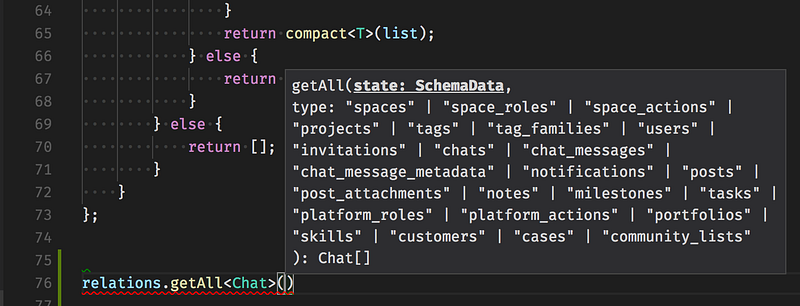
This exported function exposes a clear signature, if I change it I will be immediately notified if any code using it is broken

I will add that this “interface oriented development” make easier to work with big teams, especially if those teams are composed of developers of different levels (junior, senior). I insist that a good understanding of JavaScript is crucial, but TypeScript enables a softer on-boarding in big projects and allows developers to focus on exposed API rather than having to know all the code by heart.

And more, TypeScript will avoid inattention errors, like “typos”.

TypeScript tools will save your developers time

Honestly, I always dodged every tooling and IDE, believing it will make me dumb and lazy.

But for TypeScript (and other languages too), the core team made an awesome architectural work for tools.

These are divided into many parts:

  • de>tsserver The TypeScript core teams care a lot about Developer experience, that’s why they developed a tool available (as a process service) This tool is then used by all IDE to bring the same UX to all developers across all IDEs.
  • Language Servers Protocol Project Microsoft did not stop this initiative at TypeScript level. The Language Server is a Protocol to develop “tsserver” like services (aka Language Server) for all languages.

The idea behind the Language Server Protocol (LSP) is to standardize the protocol for how tools and servers communicate, so a single Language Server can be re-used in multiple development tools, and tools can support languages with minimal effort.

  • Others tools and initiatives By looking at TypeScript architecture, you’ll see that the compiler and utils are “open”. This allows the community to develop a lot of awesome tools like TSLint.

For example, VSCode uses all available features of TypeScript languages and tools to help developers to refactor and write code with ease. This allows me to focus on real problems and let TypeScript cover my back on the things I already know but that I forget sometimes (typos, standard APIs, etc …) This includes all the refactoring precautions, that I’m totally capable of taking but often too lazy to take! ⤵️

I’ll cover some features of VSCode in detail in Chapter 2.

The Microsoft community-effort success story

Historically, like a lot of Front-end developers, I wasn’t a big fan of Microsoft. But, let’s just be honest, Microsoft made an awesome work for the web in recent years.

In my experience, the first “community” to introduce typing to JavaScript was Google with Dart and AngularDart. Later, the Angular teams started a framework called AtScript (JavaScript superset with types and runtime type checking). Finally, the Angular team at Google choose to use TypeScript, and new JavaScript superset language publicly released by Microsoft. At the same time, Facebook released Flow (mainly for React).

3 years later after Angular 2 integration, with the VSCode development and full React integration, TypeScript has a huge active community with many companies using it in production.

Here is a (very) shortlist of the greatest community accomplishments:

  • React “integrated” propsTypes “Native” mapping between TypeScript types and React PropTypes.
  • DefinitelyTyped @types Almost all popular packages have their TypeScript typings More than 4200+ npm packages “typed” by the community!
  • ApolloData GraphQL types generation If you are using a GraphQL API, this is truly a killer-feature! A set of tools developed by Apollo team will generate all TS types for your front application, this makes “types real”. For more details: apollo-codegen

TypeScript gives you a taste of future JavaScript, with typings.

Even if “TypeScript” contains “type”, the language does not force users to use types. Even if I will encourage you to use all the power of types (in chapter 2), TypeScript does a fairly good work on ES-next feature set transpiling. However, it’s not an equivalent of Babel which allows using features from really early TC39 stages.

Summary

Bad

  • Test replacement, TypeScript ain’t a test framework
  • Runtime safety, TypeScript ain’t a runtime type checker
  • I can write object-oriented C# a-like code, TypeScript is typed JavaScript

Good

  • Team and code scalability with “Interface oriented development” TypeScript will help you deal with growing teams and large codebase
  • Tooling and Community Microsoft made an awesome community effort work.
  • ES-next compliance TypeScript give you a taste of future JavaScript, with typing.

I hope this chapter helped you have a good grasp of what TypeScript is and determine if it’s a technology you may benefit from. 👌

Feel free to follow me for Chapter two:

The honest trailer: pros and cons”

JavaScript
Typescript
Functional Programming
Front End Development
GraphQL
Recommended from ReadMedium