
TypeScript — The honest trailer 📺
Pros and Cons

This article is part of the collection “TypeScript Essentials”, this is the Chapter two.
Before showing you all the things that IMHO are cool in TypeScript, I wanted to share with you an honest list of pros and cons.
And since it’s an honest trailer, let’s start with cons.
Cons #1: Don’t use TypeScript “as” or “any”
The handy evil “any” type.
This is one of the “Pros” and “Cons” feature of TypeScript. TypeScript allows to “break the typing” by forcing a type or ignoring it. This is, at first sight, very handy, but it can result in really hard to find errors.
(myObjectIwillTypeLaterButNotToday as any).undefinedProperty.child
// will throw an error at runtime, but will pass typechecking ...
I can’t count how many times I found this kind of error in production. If I had one recommandation, it would be (if you can):
If you use TypeScript, type everything!
Pros #1: VSCode / Editors integration
what would VSCode be without TypeScript?
As seen in chapter one, the TypeScript project introduced
- Auto-import
- Code extraction
- Renaming Basically rename a React Component and all itsoccurrences in 2 key strokes.
- Live background type checking
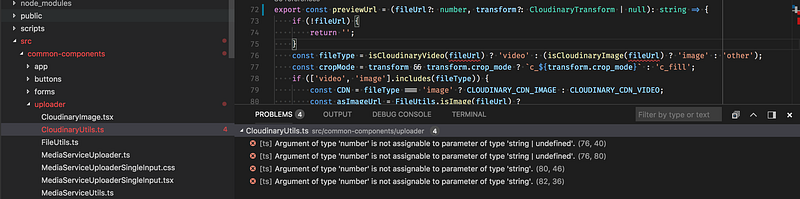
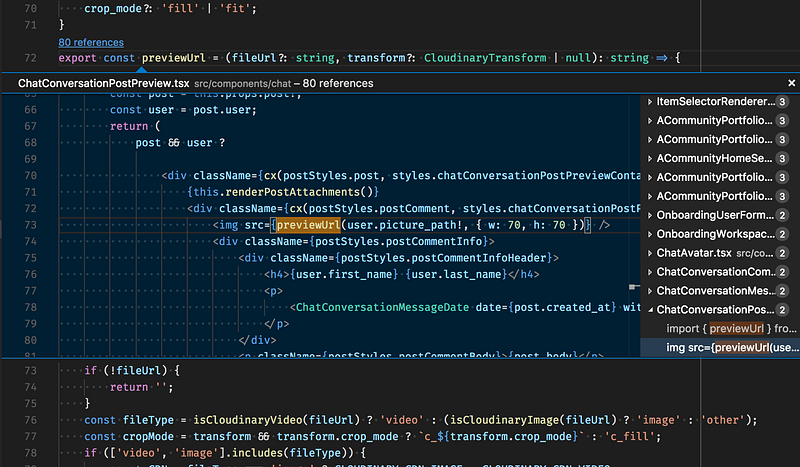
Trust me, those features (packaged with VScode) are killer features! 🚀
Cons #2 : The “magic security belt”
TypeScript is not magic.
In bodybuilding, the proteins are to be used in addition to a good training and a proper diet. It’s the same for TypeScript with tests.
Even if you know that TypeScript does not replace tests, the “TypeScript magic security belt” will make you feel stronger than them.
This belt misleads some people into seeing TypeScript as a QA tool, instead of a language/developer tool.
Beware, as Eric Elliot said, that “you might not need TypeScript” ⤵️
Pros #2: Types generation tools
Although I already mentioned this in chapter one, it’s definitely a game changer.
The example I’m about to share with you is the Apollo GraphQL initiative with the apollo-codegen tools.
Apollo GraphQL is a set of libraries for developing with GraphQL.
o help you add GraphQL to your application (React, Angular or mobile), the apollo-codegen tool will generate all type annotations, given a GraphQL server or schema.
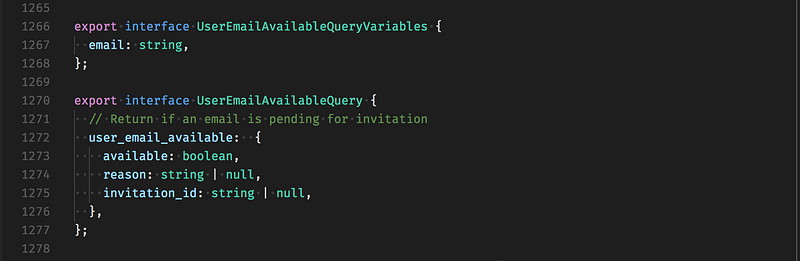
This is truly awesome, because your front — or mobile — application types are in sync with the APIs.
I really hope that more libraries will bring some “code generation” for TypeScript in the near future. 👀
Cons #3 : Compilation speed over time
Types comes with a cost.
To be honest, maintaining a “low transpiling time” needs continuous effort. You’ll need to carefully track all your types dependencies and hack your webpack config.
Why?
Libraries like lodash expose complex functions that increase the transpile time.
Or, generally speaking, having a big mono-repo without a custom config that split your types/code into many parts can be an issue.
Not for development mode — thanks to the incremental compilation, but for production package generation.
The more types you have, or the more complex they are, the more time will be taken by tsc .
Check the “Tooling: webpack, TSlint ⚙️” chapter for an in-depth analysis of effective solutions to this problem.
Pros #3 : Refactoring made easy
All the code is linked by a “types-chain”. 🔗
As we’ve already seen in Why use TypeScript, good and bad reasons:
TypeScript allows developers to focus on exposed API rather than having to know all the code by heart.
This is bigger than that, it’s not just a “way of thinking” for developers.
Types make all your components and modules adapt to changes from others, like magic.
No more code broken by a change made by another distant part of the code.
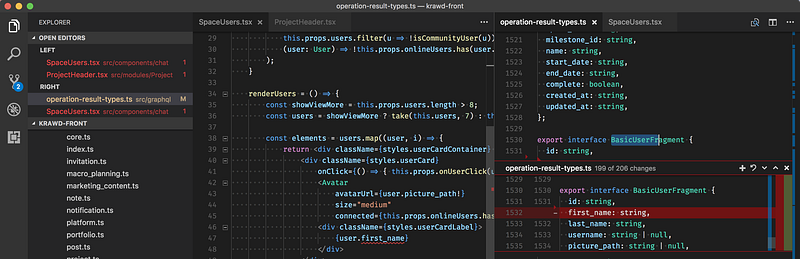
TypeScript informs me that removing first_name on User breaks code all over the application (in 10 files precisely).
No more silent errors possible. 💥
Cons #4 : Development overhead and syntax complexity
Scaling and building complex types needs work.
Is it useful for small projects ?
I mean, it depends, if you’re not “fluent” with TypeScript tooling and setup, using it for a really small project will may not be worth it.
But, in the era of Webpack and “zero-config” building tools — think about Parcel and Create React App — setting up TypeScript is not that big a deal, and even small projects could benefit from it. Let’s admit though that overhead exists on big ones. ⤵️
Scaling types need practice
By scaling types, I mean being able to reuse types. We might easily think that it comes naturally with code factoring, but it doesn’t : types are about data, not function signatures.
That’s why factorising types is hard : types are tied to your data.
One good inspiration is GraphQL Fragment that represents “sub-GraphQL Type” or common fields on a GraphQL Type.
For example, one can break down a User type into several smaller types:
User = BasicUserFragment | PlatformUserFragment | SpaceUserFragment
This avoids having many User types around the application describing the same data in different ways.
Complex types are still difficult to define

Even if TypeScript types system evolves fast, some complex types are still hard to express.
This is not an issue most of the time, but some simple cases result in a complex type declaration.
Example with the Diff<T> template type, used to declare Omit<T> .
Omit<T> allows you to create a type has a subset of an other one:
Omit<{a: string, b: string}, 'b'> => {a: string}
For more technical explanations about advanced types, please read this Github issue.
Pros #4 : Smart and gentle compiler
TypeScript is particularly easy to setup on an existing project.
Since 2.3 release, the checkJs option tells TypeScript to also try to infer types from plain JS files.
You don’t need to migrate all your code to TypeScript in order to use it.
Also, TypeScript can be really gentle with your code. As said in Cons #1, you can “break the typing” by forcing a type or ignoring it. You can also say to the compiler to ignore non-resolvable typing or non-typed variables.
All theses things can be configured with the strict family options.
Family options means that strict is divided in:
noImplicitAnyevery variables must have a explicit type (evenany)noImplicitThisevery this must have a explicit type (evenany)alwaysStrictDo not be confused, this option will add"use strict"to all files.strictNullChecksnullandundefinedare two distinct valuesstrictFunctionTypesevery functions must have a explicit type (evenany)strictPropertyInitializationevery property of a class must be initialized
With theses two options, you have everything to migrate, step by step a project to TypeScript, without breaking everything.
This is pretty awesome, isn’t it? ✨
Conclusion
As a conclusion, I will say that TypeScript is not magic and can be “overkill” for small projects.
Keep in mind getting the most of TypeScript will need you to learn how TypeScript works: the compiler configuration, types rules, etc …
The good news is that TypeScript will do anything to help you with your Developer eXperience, from the compiler to the editor.
If you’re convinced, see you at the third chapter for more practical articles! 🚀
Thanks to Sylvain PONTOREAU for the review and inspiration for the “Pros #4”


