
Why Time Blocking Is Better Than Using Task Lists
It’s the only thing that works for me
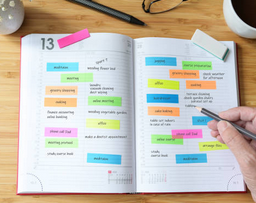
One powerful tool for maximizing time management is time blocking. I acknowledge that there are a plethora of articles/videos on this topic.
I want to give you my story and let me know if it resonates with you…
I teach for a living and religiously use time blocking in concert with keeping track of my tasks with a task manager. If I don’t SCHEDULE my tasks, I tend to waste time.
I first used this technique when building my first online class and it allowed me to be extremely productive. Importantly, I was able to add so many creative features to the course since I planned ahead for them rather than rushing everything.
Basics of Time Blocking:
Time blocking is the practice of dividing one’s day into specific, pre-scheduled blocks of time for various tasks.
You literally block off times on your calendar as if they were appointments.
So, why is time blocking better than simple task management?
With time blocking, you can guarantee that you are allocating a specific amount of time for each task, leading to more efficient use of time. Additionally, time blocking allows for more focused and uninterrupted work.
The key is that you are NOT ALLOWING OTHER THINGS TO GET IN YOUR WAY. Once you schedule your tasks, you give them priority over other items that can be done later in your day (since you’ve allowed time for these items as well).
By scheduling items, you can TRUST that you will be able to get to other things during the day — and this helps you focus during the time period that you allocated for that particular item since you aren’t worrying about what else you should be doing…
Doing this is very powerful and is the primary reason why time blocking is much more effective than JUST listing out tasks for the day.
When you list out your tasks for the day (or even the week), it is useful as a reminder of what needs to get done.
HOWEVER, this doesn’t really help you plan your day.
If you only have a list, even a prioritized list, you still need to understand the demands on your time in order to get these things done.
It’s extremely important to understand WHEN to do your tasks in addition to WHAT tasks need to be done.
They only way to do this is to place tasks on your calendar…
How should you do this?
It sounds easy (and it’s really not that difficult), but there is some nuance to it.
FIRST, estimate how much time you want to allocate to each task. Make sure this is REASONABLE. For example, let’s say you want to work on a research project. Let’s also assume to finish the project you will need about 10 hours.
So, should you schedule 10 hours in one day?
Probably not. This isn’t reasonable and it doesn’t allow for other things that you need to do such as, follow up on other items from work (or school), eat, exercise, take breaks, etc…
Plus, it also doesn’t allow for any unanticipated situations to arise each day.
SO, don’t put that much pressure on yourself. Try to schedule two 2-hour blocks to work on your research project. Then plan your lunch time, mental break time, dinner time and exercise/personal time. You can allow more days to get the project done.
Planning out your day can seem too “rigid” at times, but if you don’t do it, it becomes very difficult to gain real momentum during your day.
If you work in an office setting, you may use the same technique, but I suggest you use your work calendar for time blocking and utilize the “private” setting when scheduling you task-meetings. I’ll admit it’s harder in an office setting to deflect external interruptions, but try your best to minimize these (i.e. shut email down, go into a conference room, etc…). Read my article on how to improve focus.
If you are on the fence about signing up for a membership, please realize that you may cancel anytime so it is a very low risk proposition at about $5 per month.
If interested, you may signup using my link for no additional cost to you.
Now, let’s take a look at a step-by-step guide to time blocking in your work calendar:
- Identify your most important tasks for the day. Before you begin time blocking, it’s essential to determine which tasks are most important and require the most time. This will allow you to allocate sufficient time for these tasks and ensure that they are completed efficiently. Usually, keeping a prioritized list on a standard task manager will do the trick. (ex: Microsoft ToDo, TickTick, Asana, etc…) I recommend Microsoft ToDo as it links directly with Outlook if you use Microsoft products. But any task manager will do. The main purpose is to collect all your tasks and prioritize them.
- Assign a block of time for each task. Once you have identified your most important tasks, it’s time to schedule each task. Ensure that you allocate enough time for each to complete it efficiently, but also be mindful of not over-allocating time, as this can lead to feeling overwhelmed and unproductive.
- You may use different colors for each type of task. To help differentiate between tasks, make use of different colors for each type of task. For example, you may choose to use red for deadlines, blue for meetings, and green for personal time.
- Make use of the “private” function. This is key if you are using your work calendar ( I use my work email/calendar so all my personal tasks are “private”) To allow for more focused and uninterrupted work, make use of the “private” function in your work calendar. This will block off time for focused work and ensure that you are not interrupted by unnecessary distractions.
- Reserve blocks of time for breaks, meetings, and other unavoidable interruptions. It’s essential to reserve blocks of time for breaks — it sounds silly and/or unproductive, but we are not built to work 24/7 — we need to RECHARGE OUR BATTERIES each day… This will allow you to manage your time more effectively and avoid feeling overwhelmed.
- Review your schedule at the end of each day (or very early next morning) and make any necessary adjustments. Finally, it’s crucial to review your schedule at the end of each day as this will ensure that your time blocking remains effective and efficient.
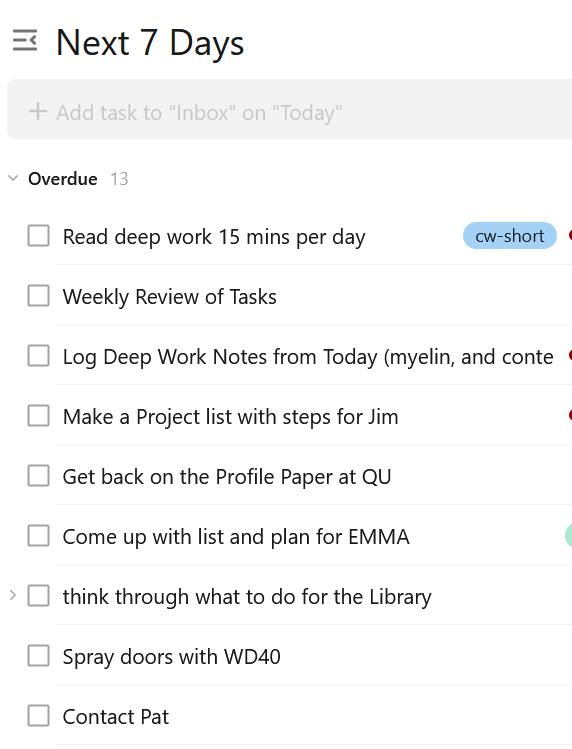
HERE IS A TASK LIST (with no order or time element)
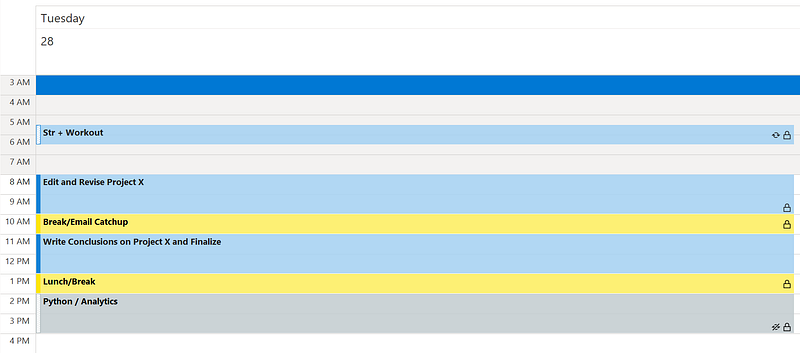
HERE’S AN EXAMPLE OF A SCHEDULED LIST OF TASKS
Key Takeaways:
Time blocking is a powerful tool for managing your time and increasing productivity. By dividing your day into specific, pre-scheduled blocks of time, you can ensure that sufficient time is allocated for each task and that time-wasting activities are avoided. Start incorporating time blocking into your work calendar today and see the results for yourself.
Scheduling my days has absolutely improved my focus, ability to get things done and has reduced the feeling of overwhelm.
I have increased my feeling of control over my days
If this story resonates with you, please take a look at other, related, stories: - Becoming more productive - Staying Focused - How To Stay Alert And Focused While Working, Writing, Studying - Plan your day in advance
If you enjoy my stories please consider following me and/or subscribing.