
Become More Productive With This Strategy
A few steps to getting back on track.
You’d be in the minority these days if you said that you’ve never felt overwhelmed… Like the walls are pushing in on you. With so many things to do, most of us need help to stay on track.
My schedule over the years has been hectic. I earned a Doctorate while working full-time, then changed jobs. All this while being a very engaged and present father, husband, and family man. Needless to say, I am like many of you and have to juggle many tasks and priorities.
This can lead to feeling overwhelmed…
Fortunately, tackling all of your tasks and projects can be very manageable.
To be fair, getting organized will take some focused time initially, but you will be able to create a straightforward process to deal with the “things” in your life.
Below I outline a simple process that will help you get started, and then it is up to you to maintain… In terms of a “planner,” you can use whatever you are comfortable with (apps for your phone, laptop, a basic notebook, calendar, etc.). I will provide options at the end of the article. You will need a blank sheet of paper or a basic notebook to get started.
Before you start, find a day where you can commit to 1–2 hours to isolate yourself with no distractions.
What you will need:
- Pen/Pencil and several sheets of paper
- A basic notebook to write out this week’s tasks
- A desk or table to spread out on
- A laptop or computer
- Your cell phone
- Time and Patience
Note: If you don’t already have a planner or App, don’t worry, use a piece of paper for this week. Getting a planner can be one of your first tasks of the week ✔
1. Brainstorm
Go old-school and take a few sheets of paper and a pen and get ready to brainstorm.
Before you start: Brainstorming means you write everything you can think of onto the pieces of paper… Write everything down in your brain regarding what you need to do.
No judgment, no organizing, only writing things down. You can organize and think about these items later. The power of brainstorming is to dump everything out onto a page or two.
Start your brainstorming: set a 5-minute timer and start writing everything down that you have to get done, who you need to call, what bills you need to pay, etc. Everything you can think of. Don’t try to organize anything; just write everything down.
Once the timer goes off, you’re done and can add additional items later.
2. Categorize
Start to think of your items in broad categories. One example is to separate them into “home, ” “school,” and/or “work” items. As best you can, try to keep these categories broad. The more categories, the more confusion.
For example: Home Category: pack lunch, buy groceries, clean bathroom, call mom. Work Category: email Melissa, finish the PowerPoint presentation School Category: set a meeting with my teacher, and review 10 math problems for the exam.
Next, think of any sub-categories you may have. Sub-categories can be thought of as specific projects or things you are involved with that have a life of their own.
For example: In the “Home” category, if you are remodeling your basement, create a sub-category called ‘Basement’ since it will have many related tasks.
3. Re-Write Your List
Now, take a fresh sheet of paper (or use a spreadsheet or word document) to list all the to-do items below each category. If there are items that don’t fit neatly in a category, just put them in “other,” “ideas,” or “for later.” The wording is up to you but put them separately.
Before you plan for the upcoming week, it’s important that you have two items nearby at all times. (1) The full list of categorized items (this can be on paper or in an app/laptop). Keeping your running list is very important. This will be separate from your working planner. The list is meant to CAPTURE everything. The Planner is what you will use to direct you daily.
(2) Working planner. This is the place where you list everything and will be your guide for the week.
4. Start Planning
From your categorized list, identify items that need to be done (1) Today or Tomorrow and then items that need to be done (2) During the upcoming week (including weekends). (note: today/tomorrow depends on the time of day you perform this process. Most people will do this at night or mid-day, which is why I say “things for tomorrow.” If you complete this process early AM, then obviously, you can get started right away).
Next, you will start assigning tasks to yourself for a given day and/or time. This task list is placed in your planner. If you don’t already have a dedicated organizer/planner, you can start with a notebook or blank sheet of paper, as I mentioned before.
Tomorrow: write down a few tasks that you need to complete. You can alter this anytime, but be sure to plan out your day. Try to keep the list relatively short and be reasonable about the time it will take to get these things done. I suggest choosing two items for tomorrow.
Upcoming Week: Identify the priorities for the upcoming week (and weekend) and put these items in a calendar of whatever form you prefer (paper or online). If you can, schedule an estimated time to attack these items.
Each Day: Revise and adjust your “tomorrow list” and weekly list as needed.
Find the right time of the day to do this. It may be before bed, just after dinner, or early AM. But you must do this daily. It will be hard at first, but it will gradually become effortless.
5. DO
This is when you need to Trust your System and follow the plans you laid out for yourself. This will be easy on day 1, when you are all excited about your new process, but you will need to push yourself to stay on top of your process each day. The key is to trust the planning you have already done.
I hope this helps you start your journey to reducing stress and accomplishing more of your priorities. Treat this as a step-by-step guide. Please use this and get started.
This is only one way to organize your tasks/priorities. There are other ways to approach this, but I think you will find this a good way to get started.
Please comment with any other suggestions or general feedback.
EXTRA: Apps and Planners
APPS: phone apps are extremely convenient and usually pair with your laptop. Some are strict “Task managers” with limited or weak category implementation. Some are more robust.
Asana: I use the free version of Asana. It works well with basic task capture linked to categories (they call them “projects”). It also has a nice calendar view. It’s built for large companies but nimble enough for a single person. It may have more of a learning curve than Microsoft ToDo, but I think it is a very good option.
Asana link (no affiliation): https://app.asana.com
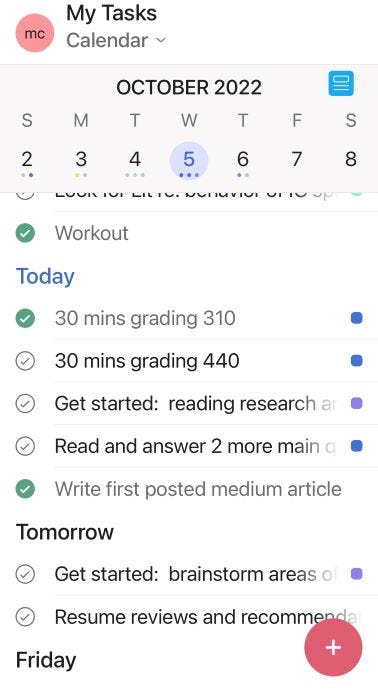
Microsoft ToDo: Very simple app to use for quick capture. You may build categories here also (called “lists”). It's easy to use and can pair well with other Microsoft Office products. Microsoft ToDo link (no affiliation): https://todo.microsoft.com/tasks/
PAPER PLANNERS: There are hundreds of varieties of planners out there for this type of task management. You may like a structured daily calendar or weekly calendar with or without times of the day. The weekly always worked best for me, but ultimately up to you. I linked a few below that I have used, but choose whatever works best (I have no affiliation to these links).
Amazon Basics Notebook: https://a.co/d/9GTFSJK Moleskin Weekly Calendar: https://a.co/d/3TfkZ68 Moleskin Daily Calendar: https://a.co/d/b8G7vD4