
Why Raw Selenium Syntax is better than Cypress and Playwright? Part 2: The Audience Matters
Whether test script syntax is better or not depends on the audience, which many fake automated testers are not clear about.
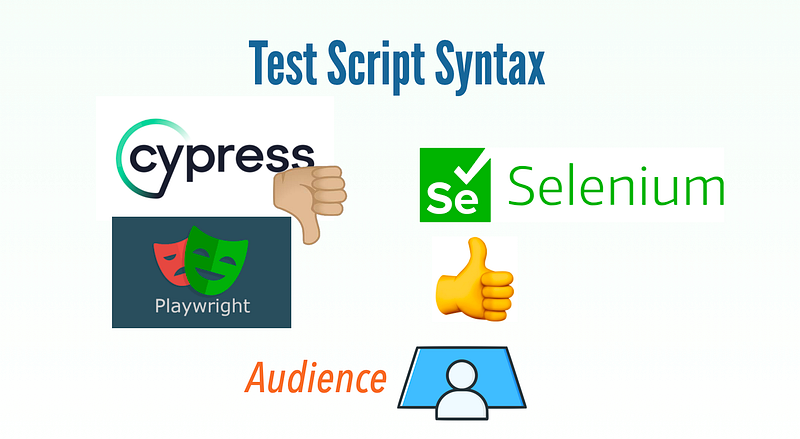
To real test automation engineers, raw Selenium WebDriver syntax is clearly much better than Cypress, Playwright, and all others (including claimed ‘a better Selenium’ Protractor.js, which had been dead for a few years). However, there are so many misconceptions and lies about Selenium and marketing for so-called new frameworks, I have to write a series of articles to clear this up.
Update 2023–07–05: Part 3: Selenium is Accurate, Intuitive, Consistent, and Geniously Designed
Recap from Part 1:
- Selenium WebDriver is based on W3C WebDriver standard Many junior testers (not by age) underestimate this importance. Just think of anything in your life, train track, door size, tyres …, etc. W3C defined all the technologies used in websites: our testing target.
- The appalling record of using JavaScript in the history of test automation Developers, don’t get offended. I am talking about test automation here, not coding. Testers, it is in your code of conduct to accept the facts, no matter how uncomfortable.
- The successful examples of using Selenium WebDriver Selenium WebDriver really works well, very well. In fact, besides Watir (now just a syntax tier on top of Selenium), I only witnessed successful test automation in raw Selenium WebDriver since 2005. All others, including hyped Phantom.js, Protractor.js, TestCafe, and Cypress were all complete failures. The new favourite JS automation framework Playwright is indeed better than Cypress. Anyway, based on my observations, none of the attempts using Playwright were successful either. One reason: Playwright syntax is still not good, compared to raw Selenium WebDriver.
In this Part 2, I will get to the test script syntax. Let me start with a basic question.
“Who is the audience (i.e. users) of End-to-End Test Scripts?”
Once understand the users (for test scripts), we can start talking about which are good or bad for them, right?
Table of Contents: · The audience of End-to-End Test Scripts is the whole team · Test Script Tiers ∘ Both Tiers (DSL And Statements) Shall be in the same scripting language ∘ Using Cucumber, SpecFlow and other Gherkin syntax in DSL tier is wrong. · The so-called ‘syntax enhancement’ of test statements for the top tier is very wrong ∘ 1. Ugliness of using JavaScript in the top tier. ∘ 2. Clearly, JavaScript is a bad language for end-to-end test automation. But why it is chosen? · FAQ
The audience of End-to-End Test Scripts is the whole team
One major reason that people commonly make a bad choice of test automation framework or language: they take it from a developer’s perspective. This is clearly wrong, once pointed out, we testers are to verify their work.
“Our app is coded in JavaScript, so we choose JavaScript for end-to-end test scripts”, this is a common comment I heard when on a rescue mission. My next question is: “Does it have to be JavaScript though?”
No, of course, it is not. Putting “our code is JavaScript” argument aside, end-to-end test scripts (manual or automated), in one way, are the instructions to use (then verify) the app, having nothing to do with the coding language behind it.
These end-to-end test scripts speak in an active tone as an end-user. For example,
- Open the ‘https://whenwise.com’ in a Chrome browser
- Click the ‘SIGN IN’ button (technically it is a link, but looks like a button)
- Enter email
[email protected] - Enter password
test01 - Click the “SIGN IN” button
- Verify the text “You have signed in successfully” present.
Let me show how I typically write this test script.
it "user login" do
  visit("https://whenwise.com")
  home_page = HomePage.new(driver)
  home_page.click_sign_in
  sign_in_page = SignInPage.new(driver)
  sign_in_page.enter_email("[email protected]")
  sign_in_page.enter_password("test01")
  sign_in_page.click_sign_in_button
  expect(driver.page_source).to include("You have signed in successfully")
end
When I explain the above to a business analyst, a manual tester or even a customer, I first said “Ignore HomePage.new(driver) part, do you understand this test script?”. A typical answer is “Yes, I understand, it is like the manual test script or even the user guide”. Please note, this is an executable script in a proper scripting language, Ruby.
For BA, manual testers or customers who showed interest in running this test script, I offered “I can help you run them on your machines”. At first, they thought it was going to be a huge effort. Then I told them, it would be just a couple of minutes. Then, I helped them
- Get and install TestWise
- Get our test scripts (using Git)
- Launch TestWise, find the test case and run it
All done, just a few minutes. Because the test script (the top tier as I just showed) is so easy, most BAs are comfortable making some changes and running automated tests for their own needs.
I know some readers will have questions, such as “Where are actual test scripts, i.e. clicking a specific element?”, “Are you suggesting BAs, manual testers, customers run or even run automated end-to-end test scripts?”, …, etc. I will answer these shortly. But here is a fact that we all test automation engineers should accept first:
Rule 1: The audience of Automated End-to-End Test Scripts (top tier) is the whole team, including business analysts, manual testers and even customers. They should be able to understand them confortably, and run them easily.
Once you accept this, the ‘fixation on a particular language such as JavaScript or Java is ridiculous, obviously”. I have written thousands of end-to-end test scripts against all kinds of apps (written in Java, PHP, C#, Python, Ruby, and JavaScript) using the same raw Selenium WebDriver + RSpec (ruby).
Test Script Tiers
The test script I showed earlier is the top tier, which I call it “Domain Specific Language (DSL) tier”. A well-written test script, for this tier, the non-technical team members should be able to understand them comfortably.
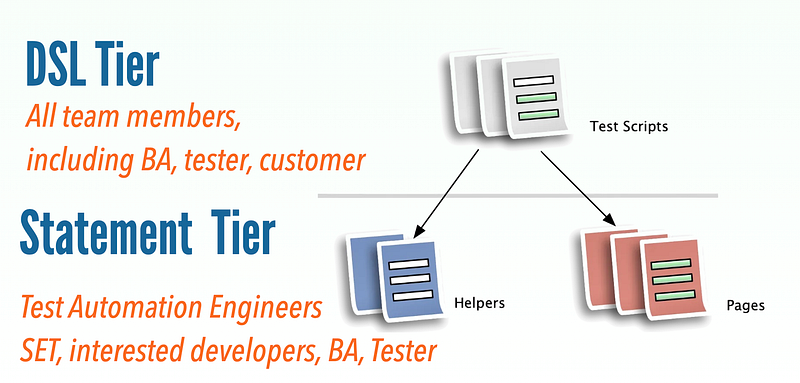
Your next question will be, “What is the statement tier look like?”. Below are the ones for the above DSL tier.
class HomePage < AbstractPage
  def initialize(driver)
    super(driver, "")
  end

  def click_sign_in
    driver.find_element(:link, "SIGN IN").click
  end
end

class SignInPage < AbstractPage
  def initialize(driver)
    super(driver, "")
  end

  def enter_email(email)
    driver.find_element(:id, "email").send_keys(email)
  end

  def enter_password(pass)
    driver.find_element(:id, "password").send_keys(pass)
  end

  def click_sign_in_button
    driver.find_element(:id, "login-btn").click
  end
end
You can find raw Selenium statements here.
I know some don’t like the repetitive style of selenium driver.find_elementstatements, such as:
driver.find_element(:link, "SIGN IN").click
driver.find_element(:id, "email").send_keys("[email protected]")
driver.find_element(:id, "password").send_keys("useSelenium")
driver.find_element(:id, "login-btn").click
They try to “improve” it with something like enter_text("email", "xxx") or type('email’, ‘xxx’). By the way, I made this mistake myself 13 years ago, creating a syntax ‘framework’: rwebspec. It got a total of 6-digits downloads as well. That was before Selenium WebDriver. Soon, I deprecated it (acknowledging that was a bad or at least unnecessary approach, due to the tiered design) and have been using raw Selenium WebDriver directly, ever since.
Both Tiers (DSL And Statements) Shall be in the same scripting language
The main benefit of this tiered design is Maintainability, readability is a bonus.
“Non-Maintainble Test Automation Solution is useless, period.” — Zhimin Zhan
As we all know, end-to-end (via UI) tests are prone to app changes, which are frequent and constant. In well-designed test scripts, if a button ID is changed on Page X, then we just need to find the PageX class and make one update there. That’s all, no touching DSL tiers 👍.
Astute readers might already figure out, in this maintainable test design (page object is a well-known pattern in test automation, check out my article, Page Object Model is universally applicable in web test automation), we can write statement tiers using different frameworks and languages to achieve the same DSL tier.
Rule 2: Only the bottom tier of Automated End-to-End Test Scripts are the concerns of test automation engineers
Protractor.js developers (I assume most worked at Google) did not understand this simple rule, trying to shorten and “simplify selenium tests” (and appearing so). Despite the tremendous hype surrounding Protractor then, I accurately predicted its failure. TestCafe, Puppeteer, and Cypress made the same mistake, and now they either have failed or are failing. The new hype that is replacing Cypress is Playwright, which is moving a correct step backward to be more like WebDriver, but syntax-wise, still, no good compared to raw WebDriver.
Using Cucumber, SpecFlow and other Gherkin syntax in the DSL tier is wrong.
When seeing DSL tier (that BA can read), many readers might think of Cucumber or “Given-When-Then” syntax in test scripts. It also comes with a fancy name: BDD framework.
I also correctly predicted its failure several years ago, in my book or the articles:
- Why Gherkin (Cucumber, SpecFlow,…) Always Failed with UI Test Automation?
- A Practical Advice on Rejecting Gherkin for Test Automation
Now, Cucumber is dying.
The reason for my prediction: Test Creation Only Accounts for ~10% of Web Test Automation Efforts, and Maintenance is the key and where the most efforts are. Introducing another “Given-When-Then” tier, not in the same scripting language, means a lot more maintenance work.
The so-called ‘syntax enhancement’ of test statements for the top tier is very wrong
Once we understand the audience differences between the two tiers in automated test scripts, we can explain many obvious wrongdoings.
1. Ugliness of using JavaScript in the top tier.
In some JS developers’ eyes, the below Playwright version (from the official Playwright doc) might seem human-friendly, but it is not (remember its audience?).
test('user login', async ({ page }) => {
  await page.goto('https://playwright.dev/');

  // Click the get started link.
  await page.getByRole('link', { name: 'SIGN IN' }).click();

  // the following statements is not for this test case context,
  // just for comparision purpose
  await page.fill("#username", "agileway")
  await page.fill("#password", "testwise")
  await page.click("input:has-text('Sign in')")

  await page.textContent("body").then(function(body_text) {
   assert(body_text.contains("Signed in"))
  })
});
Poor no-JS-background tester’s brain (remember rule #1) might need to process the following:
- What the hell does
asyncmean here? andawaittoo? - If
awaitis required for each line, why not on the second last one? thenis to resolve the promise (?).- two many braces,
({ page }) => {,});
Man! Why make life hard?
Some JS Testers might still think, “Every JS tester shall be very comfortable with the above”. Yes, but we are talking about the DSL tier, the end-to-end test scripts (emulate end-user operations).
Can you see the problems with those JS testers? they lack a testing mindset.
“In my experience, great developers do not always make great testers, but great testers (who also have strong design skills) can make great developers. It’s a mindset and a passion. … They are gold”. - Google VP Patrick Copeland, in an interview (2010)
I agree with Patrick Copeland, these people won’t be good developers either.
2. Clearly, JavaScript is a bad language for end-to-end test automation. But why it is chosen?
The answer is simple, it was pushed by developers as JavaScript has become the mainstream coding language.
Astute readers immediately understand this is wrong for many reasons:
- We testers are supposed to independently verify developers' work, how could they dominate what testers use?
- Developers, most of them, do not understand test automation at all. according to Gerald Weinberg, a software legend, most developers simply are at that level yet.
“Testing is harder than developing. If you want to have good testing you need to put your best people in testing.” - Gerald Weinberg, in a podcast (2018)
Some JS testers would argue, “I know JS well, I am comfortable with the above”. I also knew JavaScript quite well and published a book and online course on Educative. An automated tester should be judged by testing results, the daily testing results of running the whole automated suite.
You might be able to manage the complexity with 20 or 30 tests but will start to struggle with 50 tests. Here I mean continuous testing, running them daily and maintaining them valid. I have never met a single JS tester who could reach Level 2 of AgileWay Continuous Testing Grading (50 tests).
To sum it up, don’t say Cypress or Playwright syntax is more end-user friendly, as the fact is that the end-users prefer not seeing framework statements directly.
Some JS testers might defend, “OK, I agree, but as your article pointed out, we can test scripts supporting top tier (using page object) in any automation framework, Selenium or Playwright”. Yes. we can. But any appearance of async and await still sucks for non-tech team members. Overall, staying away from JavaScript in end-to-end test automation is always good.
In the next article, I will prove that, for the statement tier, WebDriver syntax is a lot better than Cypress and Playwright, for test automation engineers.
FAQ
1. But I (a JS Developer) still think Cypress or Playwright is better, even in the top tier.
Maybe you have always been working in fake Agile projects, but at least, you should have heard of “DevOps”, “Test Early; Test Often”, and “Test Automation is the foundation of Agile”, right?
Now think of the “Cannikin Law (Wooden Bucket Theory)”.
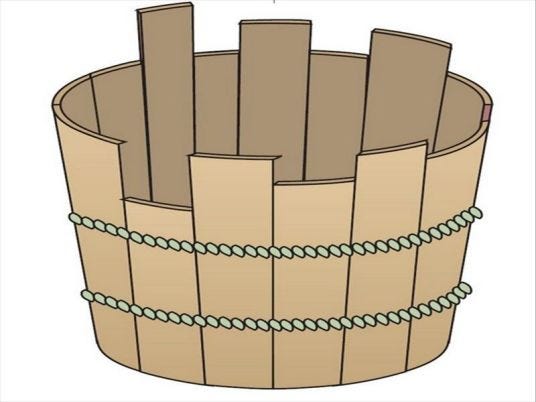
Stop being self-centred.
2. How do I script the DSL tier? It seems quite a bit of effort, therefore, using syntax-enhanced-for-end-user script syntax might be still of value.
Use Test Refactoring, it is quite easy to do (in seconds) as programmers use refactoring support in their coding IDE. Seeing is believing, check out the video below, and the article for more.
Related reading:


