
avatarIgor Jovanovic M.Sc.

Free AI web copilot to create summaries, insights and extended knowledge, download it at here

2525

Abstract

So, all the queries to resolve a domain name into an IP address start by knocking on the door of the DNS server that your internet connection is configured to. This is most often the DNS server of your ISP.</b></p><p id="a60e">ISP also maintains a list of web domains and IP addresses many people visit. If you want to visit one of those domains, ISP might answer right away and send you the IP address. We say that ISP holds this copy of data in their cache.</p><p id="5322">When the ISP does not have the information, it simply forwards the request to the root servers.</p><div id="867d" class="link-block"> <a href="https://igordr3.gumroad.com/l/tech-career"> <div> <div> <h2>Learn From a 140k/y Engineer: Full Path To A Well-Paid Tech Career For Beginners</h2> <div><h3>Black Week Pop-Up Discount: This material usually sells at 49 but today it is only $19. (That's a 60% discount.) Lock…</h3></div> <div><p>igordr3.gumroad.com</p></div> </div> <div> <div style="background-image: url(https://miro.readmedium.com/v2/resize:fit:320/0*qwVOhxMHMVuCw0vV)"></div> </div> </div> </a> </div><h1 id="b276">Root Servers DNS</h1><p id="08ee">If the internet service provider (ISP) does not have the IP of a given domain in their cache, the ISP forwards the request to the root servers.</p><p id="7a3c">💡You can see here the decentralized and distributed nature of DNS. All the players that take part work on a best-effort basis. Each says, “let me see if I have the IP of this domain; if I do not have it, I can give you the address of someone who might know more.”</p><p id="d23b">Internet Assigned Numbers Authority (IANA) is the agency that maintains the root server database. This database comes in the form of the rote zone file that contains all the TLD servers that resolve the queries further. IANA distributes the zone file to 12 operators that make the content of the file available on the Internet. <b>The twelve operators run the root name servers of the world</b>.</p><p id="cc1b">💡The root zone file is a list of all the top-level domain names across the globe, together with the responsive authority of a given domain (their IP address). The list includes both country-based (e.g. .NL or .CO.UK) and generic domains (such as .COM or .INFO). There are around 1,500 TLDs in the root zone. <a href="https://www.iana.org/domains/root/db">Here</

Options

a> is the database of all the TLD servers that IANA maintains within the root zone.</p><p id="1866">Currently, <b>13 root name servers handle the requests for the entire planet</b>. These are necessary for the Internet to work. (There are many more physical servers behind each root name server to avoid service failure).</p><p id="6e62">Here are the 13 root name servers, the IP address where to access them, and the operator name responsible for keeping the name server up and running.</p><figure id="9bdb"><img src="https://cdn-images-1.readmedium.com/v2/resize:fit:800/1*zRRgNtu0IDFdlrTq4LxuNw.png"><figcaption>Source: <a href="https://igorjovanovic.com/dns-in-computer-networks/#root-servers-dns">https://igorjovanovic.com/dns-in-computer-networks/#root-servers-dns</a></figcaption></figure><p id="eae6">NOTE: VeriSign hosts 2 root servers and that is why there are 12 operators and 13 root name servers.</p><p id="d3de">The organizations/operators make sure that servers get evenly distributed geographically. Here is a picture that shows the physical locations where the root servers reside.</p><figure id="4c3d"><img src="https://cdn-images-1.readmedium.com/v2/resize:fit:800/0*Nyp1dXv_ZUQUvnTL.png"><figcaption></figcaption></figure><p id="4b79">The requests for domain name resolution always go against one of the 13 root name servers. To avoid lengthy waiting times, the underlying physical servers are pretty much evenly distributed across the globe (as in the picture).</p><p id="a860">The final task of the root name server is to respond to the domain resolution query.</p><p id="69c5">💡The root name servers simply respond back with the responsible TLD server (e.g. .COM servers or .CO.UK) that is in line for asking further.</p><p id="fcfb">In the next post, I’ll tell you all about TLDs (stay tuned).</p><div id="e632" class="link-block"> <a href="https://igordr3.gumroad.com/l/tech-career"> <div> <div> <h2>Learn From a 140k/y Engineer: Full Path To A Well-Paid Tech Career For Beginners</h2> <div><h3>Black Week Pop-Up Discount: This material usually sells at 49 but today it is only $19. (That's a 60% discount.) Lock…</h3></div> <div><p>igordr3.gumroad.com</p></div> </div> <div> <div style="background-image: url(https://miro.readmedium.com/v2/resize:fit:320/0*qwVOhxMHMVuCw0vV)"></div> </div> </div> </a> </div></article></body>

Who Is To Blame When Your Internet Is Down?

And it’s not your partner, housemate, or your cat…

Photo by Shane on Unsplash

In the previous post, I explained why you should care about DNS Resolution, to begin with… Let’s continue further with ISPs… Wait, ISP?

What?

An Internet Service Provider or ISP is a company that you are paying for your internet connectivity. In exchange, the provider lets you use their network to connect to the Internet.

💡 See here the list of the top ISPs in 2022 in the world. Some of that you may recognize are T-Mobile, AT&T Internet, and WOW.

Every request you make from your computer to the outside network (the Internet) travels through your modem to the ISP’s servers. These servers direct the request further and return the results.

ISP also helps translate the domain name into an IP address. It is the first step of the DNS lookup (domain name resolution).

When you connect to any Wi-Fi network, before you see the “Connected” notification, your device will get configured to use the ISP’s DNS (this happens in a fraction of a second).
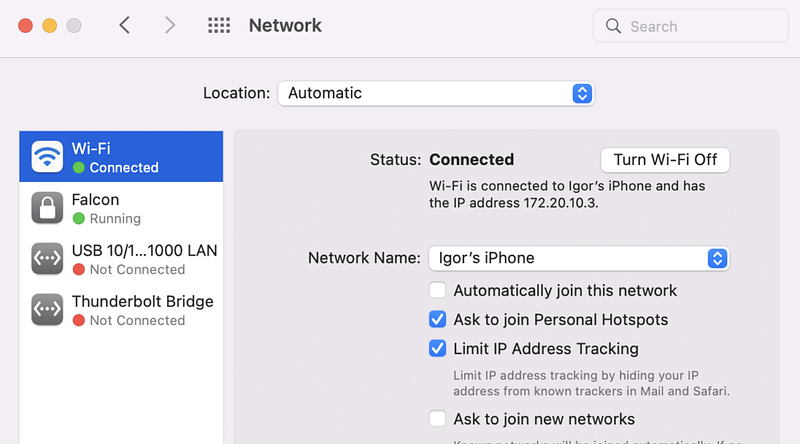
💡 Read here how to find your ISP’s DNS server directly from your Wi-Fi settings (for Windows). This article will show you the same on macOS.

For completeness, here are the DNS settings of my internet connection.
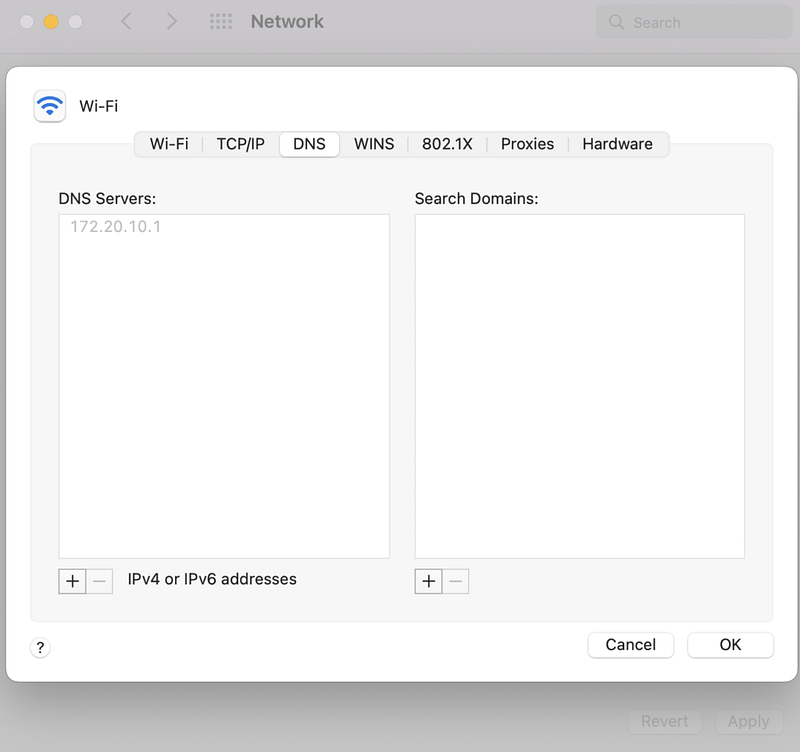
So, all the queries to resolve a domain name into an IP address start by knocking on the door of the DNS server that your internet connection is configured to. This is most often the DNS server of your ISP.

ISP also maintains a list of web domains and IP addresses many people visit. If you want to visit one of those domains, ISP might answer right away and send you the IP address. We say that ISP holds this copy of data in their cache.

When the ISP does not have the information, it simply forwards the request to the root servers.

Root Servers DNS

If the internet service provider (ISP) does not have the IP of a given domain in their cache, the ISP forwards the request to the root servers.

💡You can see here the decentralized and distributed nature of DNS. All the players that take part work on a best-effort basis. Each says, “let me see if I have the IP of this domain; if I do not have it, I can give you the address of someone who might know more.”

Internet Assigned Numbers Authority (IANA) is the agency that maintains the root server database. This database comes in the form of the rote zone file that contains all the TLD servers that resolve the queries further. IANA distributes the zone file to 12 operators that make the content of the file available on the Internet. The twelve operators run the root name servers of the world.

💡The root zone file is a list of all the top-level domain names across the globe, together with the responsive authority of a given domain (their IP address). The list includes both country-based (e.g. .NL or .CO.UK) and generic domains (such as .COM or .INFO). There are around 1,500 TLDs in the root zone. Here is the database of all the TLD servers that IANA maintains within the root zone.

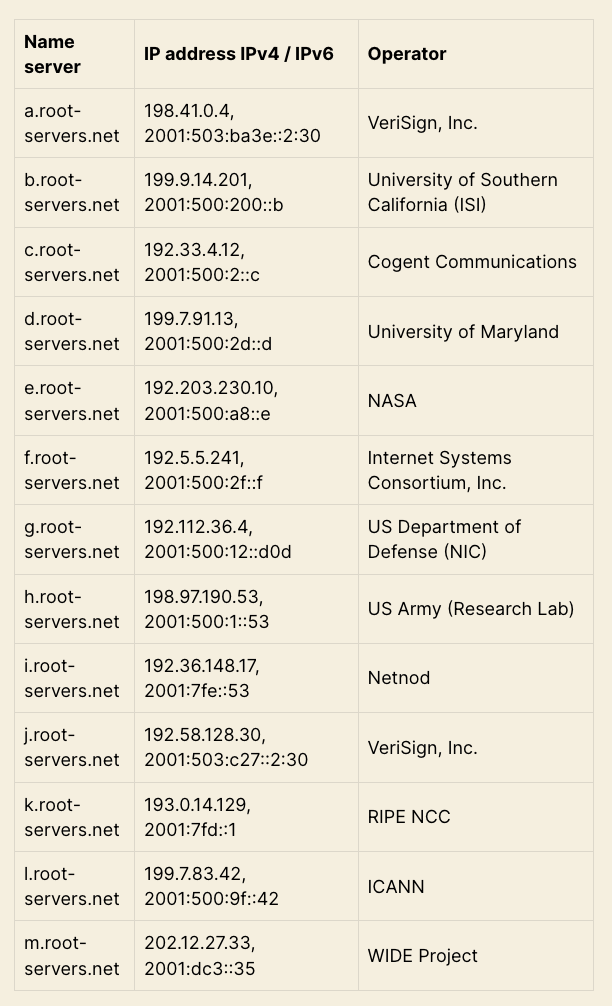
Currently, 13 root name servers handle the requests for the entire planet. These are necessary for the Internet to work. (There are many more physical servers behind each root name server to avoid service failure).

Here are the 13 root name servers, the IP address where to access them, and the operator name responsible for keeping the name server up and running.
Source: https://igorjovanovic.com/dns-in-computer-networks/#root-servers-dns

NOTE: VeriSign hosts 2 root servers and that is why there are 12 operators and 13 root name servers.

The organizations/operators make sure that servers get evenly distributed geographically. Here is a picture that shows the physical locations where the root servers reside.
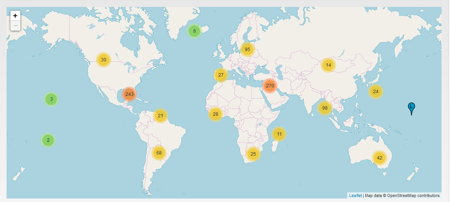
The requests for domain name resolution always go against one of the 13 root name servers. To avoid lengthy waiting times, the underlying physical servers are pretty much evenly distributed across the globe (as in the picture).

The final task of the root name server is to respond to the domain resolution query.

💡The root name servers simply respond back with the responsible TLD server (e.g. .COM servers or .CO.UK) that is in line for asking further.

In the next post, I’ll tell you all about TLDs (stay tuned).

Dns Resolution
Domain Name Server
Domain Name System
Dns Root Server
Dns Basics
Recommended from ReadMedium