
Why Is Your Computer Useless Without DNS Resolution?
Without this little-known but crucial process, every device you own would be completely useless, collecting dust…

It is no secret that DNS is one of the most complex topics in engineering. Let’s understand the purpose behind DNS in computer networks.
DNS stands for Domain Name System. In everyday language, you will hear people referring to domain names. DNS is a system that translates (resolves) domain names into IP addresses.
💡Domain name and hostname are synonyms — what to use depends on your preferences.
Engineers created domain names (e.g., wikipedia.org) because domain names are much easier to remember than IP addresses. (Since computers talk by using IP addresses, knowing the correct IP is a must).
Also, domain names do not frequently change, while the underlying IPs can change for multiple reasons (for instance, when the server’s lifetime comes to an end).
💡You can read here in detail about IP addresses. To recap, an IP address (IPv4) is a point-separated number that uniquely identifies a computer connected to the Internet (or a private network).
To remember this better, you can use the analogy of a phonebook. In the phonebook, you can easily find your friend’s phone number if you browse the pages by name.
By doing this, you are translating the friend’s name into a sequence of numbers. (Numbers are hard to memorize, so you are using this mental shortcut). The same reasoning applies to DNS — it makes life easier.
💡If you need a refresher, read here about the computer network and the computer network components. It will make this section much easier if you read the prerequisite.
Domain name (hostname) resolution
DNS lookup is a process that starts after you type a web address in your browser and press enter.
This process has one goal: to find the computer that hides behind the domain name, the computer that serves the request. The IP address number identifies this computer (server).
Here are the steps that happen during the domain name resolution.
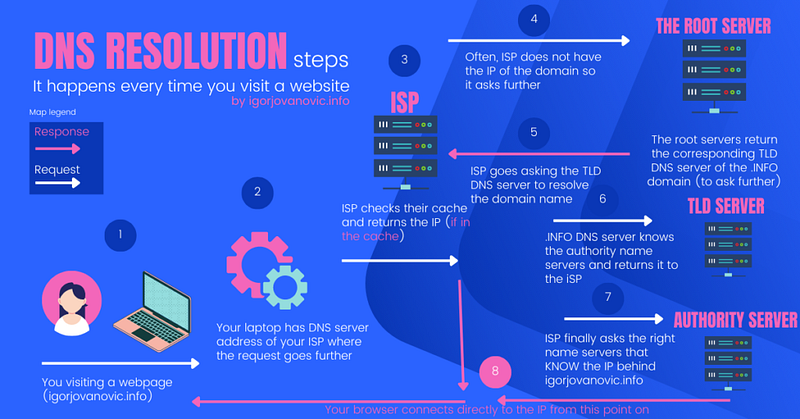
- You type a web address in a browser and hit enter. For example, if you want to visit https://igorjovanovic.com
- Your internet router is forwarding this request to the DNS server of your internet service provider (ISP), e.g., T-Mobile
- The ISP’s servers might already have a copy of the IP address for the https://igorjovanovic.com domain name. This happens if someone in their network visited this domain recently and if the ISP stores that in their cache (temporary copy of data).
- If the ISP does not have the IP address of the domain name, ISP forwards the request to the top-level DNS servers, which are called the Root Servers.
- The Root Servers respond with the corresponding TLD (Top Level Domain) DNS servers, which are the following location to ask.
- Since the domain name you are reaching out to is the .INFO domain, the root DNS server is going to return the responsible DNS server for the .INFO top-level domain (TLD)
- At this point, TLD’s name servers are in charge of further resolving the question of what is the IP address behind https://igorjovanovic.com
- Further, the TLD DNS server returns something called the authoritative name server. The authoritative means that the name server hosts the zone of the requested domain name. Another name for the authoritative name server is also the Second Level Domain (SLD) name server. This can be the name server of the hosting company where I registered my domain (e.g., Godaddy or AWS).
- The authoritative server hosts the actual domain and knows the IP address of the server that hosts this web blog. The authoritative server passes this piece of info to the server that asked for it (to your internet service provider).
- The information travels back through your ISP’s network and gets stored a few times along the way for future requests.
- At this point, the IP address of the domain name https://igorjovanovic.com is known, and your browser establishes a direct connection with the server that hosts the website.
In the next post, I will tell you more about ISPs to get an even more detailed understanding of the process.
Stay tuned.
Follow me on the social networks to always get the latest: LinkedIn | Medium | Facebook | Instagram | Twitter | Pinterest 🤝🤝🤝
Subscribe to DDIntel here.
Submit your work to DDIntel here.
Join our creator ecosystem here.
DDIntel captures the more notable pieces from our main site and our popular DDI Medium publication. Check us out for more insightful work from our community.
DDI Official Telegram Channel: https://t.me/+tafUp6ecEys4YjQ1


