
Choose the Right Python Data Structure for Your Need
All you need to know about Python data structures and when to use them.
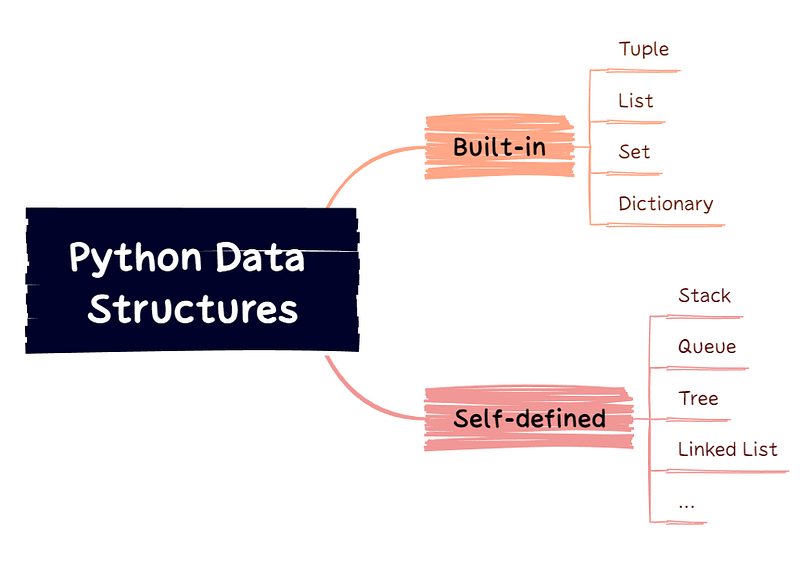
Python has 4 built-in data structures: tuple, list, set, and dictionary. This article introduces unique features of the common structures, the time complexity of each operation, and how to choose the one that best suits your need.
Tuple
- Tuples are represented by a sequence of elements in brackets
t1 = () # empty tupleprint(f"Tuple 1: {t1}; type: {type(t1)}")
>>> Tuple 1: (); type: <class 'tuple'>t2 = (1, 2, 3)print(f"Tuple 2: {t2}; type: {type(t2)}")
>>> Tuple 2: (1, 2, 3); type: <class 'tuple'>Note that creation of a tuple of only one element, remember the , after the element otherwise it would not be recognized as a tuple, but the primitive type of element instead.
Without comma:
test1 = (1)print(f"{test1}; type: {type(test1)}")
>>> 1; type: <class 'int'>test2 = ("medium")print(f"{test2}; type: {type(test2)}")
>>> medium; type: <class 'str'>With comma:
test3 = (1.0,)print(f"{test3}; type: {type(test3)}")
>>> (1.0,); type: <class 'tuple'>test4 = (True,)print(f"{test4}; type: {type(test4)}")
>>> (True,); type: <class 'tuple'>- Tuples allow items of different types
t3 = ("a", 2, 3, True)- Tuples are ordered and items are accessible by index
t3[0]
>>> 'a'
t3[-1]
>>> True- Tuples are immutable: elements cannot be changed, added or removed after the tuple has been created
# assignment is not allowed
t3[0] = "b"
>>> TypeError: 'tuple' object does not support item assignment- Tuples allow for duplicates
t4 = (1, 2, 3, 2, 3)print(f"Tuple 4: {t4}; type: {type(t4)}")
>>> Tuple 4: (1, 2, 3, 2, 3); type: <class 'tuple'>List
- Lists are represented by a sequence of items in square brackets
# creation
lst1 = []
lst2 = [1, 2, 3]
lst3 = ["a", 2, 3, True]- Lists are similar with tuples in many ways: they are ordered and accessible by index, allow different data types and duplicates.
- Lists are mutable
# item assignment
lst3[0] = "b"
lst3
>>> ['b', 2, 3, True]
# addition
lst3 += [0.5]
lst3
>>> ['b', 2, 3, True, 0.5]lst3.append("m")
lst3
>>> ['b', 2, 3, True, 0.5, 'm']# deletion
lst3.pop()
lst3
>>> ['a', 2, 3, True, 0.5]lst3.remove(2)
lst3
>>> ['a', 3, True, 0.5]Set
- Sets are represented by a sequence of items in curly brackets
# empty set
set1 = {}
set2 = set()
set3 = {1, 2, 3}
set4 = {"a", 2, 3, True}- Sets are unordered, the items do not have a defined order
set4 = {"a", 2, 3, True}
set4
>>> {2, 3, True, 'a'}
The items are printed in a different order as the creation, and might change each time you use the set, hence cannot be accessed by index. As a result, the items in sets cannot be altered, but addition and deletion of items are possible
- Sets do not allow duplicate values
set5 = {1, 2, 3, 2, 3}
set5
>>> {1, 2, 3}
Refer to the comprehensive guide on set operations if you are interested.
- Sets allow addition and deletion of items, but the items are unchangeable
Dictionary
- Dictionaries store data in
{key1: value1, key2: value2, ...}format
dict1 = {}
dict2 = {1: "a", 2: "b", 3: False}- Dictionaries are not ordered by index, but by keys
dict2[1]
>>> 'a'
dict2[0]
>>> KeyError: 0- Dictionaries are changeable, and do not allow duplicate keys
dict2[2] = "xyz"
dict2
>>> {1: 'a', 2: 'xyz', 3: False}
The original value “b” paired with key 2 is now updated to “xyz”, the pair of 2: "b" no longer exists in pair, only one pair with key 2.
Below is a summary of features comparisons:
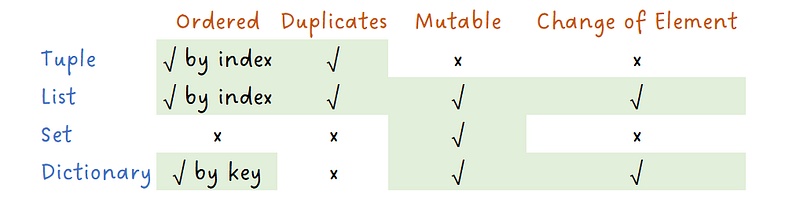
The different features determines that they are each suited to different use cases. For example, tuples can be used as keys in dictionary due to the immutable nature while lists cannot:
l = [1, 2]
dict1 = {l: "lists cannot be dictionary keys"}
>>> TypeError: unhashable type: 'list'
Time Complexities
Time complexity is another factor you may want to consider when choosing the data structure to use, especially if you are deal with a large amount of data and your program has certain speed requirements.
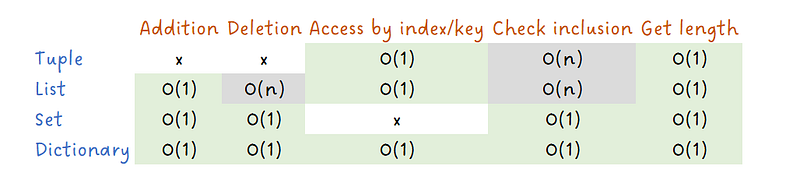
Let’s say you want to avoid duplicates in your data structure, the nature options would be sets or dictionaries. Although lists can also be used to achieve that goal by checking for inclusion of elements before addition, the time complexity would be O(n) for lists, while it’s only O(1) for sets and dictionaries. There also are scenarios when lists are the most ideal, like when orderings of elements is needed for updates of elements in list.
Final Note
Besides the four built-in data structures, Python also allows self-defined data structures such as stacks, queues, trees, and linked lists. For the detailed implementation guide:
Thanks for reading! For more of my articles on Python & Cryptos, please refer to:
More content at PlainEnglish.io. Sign up for our free weekly newsletter. Follow us on Twitter and LinkedIn. Check out our Community Discord and join our Talent Collective.


