
Implement Stacks, Queues, Binary Trees and Linked List in Python
Python allows users to define structures which may be readily available in other programming languages like Java.

In my previous article, I introduced the difference in features and operations time complexity of Python’s own data structures: list, tuple, set and dictionary:
And now let’s take a look at the implementations of Stack, Queue, Binary Tree and Linked List, using built-in structures, class representations or other Python library.
Stack
Stacks by List
Stack is a last-in first-out (LIFO) data structures. It works like stacking dirty plates for wash, every received dirty plate is always placed on top of the others, and for washing, the plate on top (last in) is taken out the first (first out).
Functions associated with stacks are:
empty(): to check whether the stack is emptysize(): returns number of elements in stackpush(): add new element to the top of stackpeek(): returns the element on top of the stackpop(): removes and returns the element on top of the stack
Basic features for stacks: orders matter, duplicates are allowed, and the structure needs to be mutable (for addition and deletion of elements). Hence list is perfect for the implementation:
The implementation by list, although convenient, has its shortcomings. The most significant issue is that the time complexity of list appending has a time complexity of O(n) while for stack it should be O(1). Hence the implementation above could have performance issue as the size increases.
Stacks by Deque
The deque class from Python’s collections module is preferred as it allows an O(1) time complexity for appending:
The program returns the same result when applied to the same block of test codes as illustrated in the previous section.
Stacks by LifoQueue
Python’s queue module provides a LifoQueue that works as a stack.
Queues
Like the third implementation of Stack, the queue module has a Queue class for the first-in first-out (FIFO) structure like real queues in life:
As can seen from the test program, “first” is the first to be pushed to queue, and hence the first one returned when pop() is called.
Binary Trees
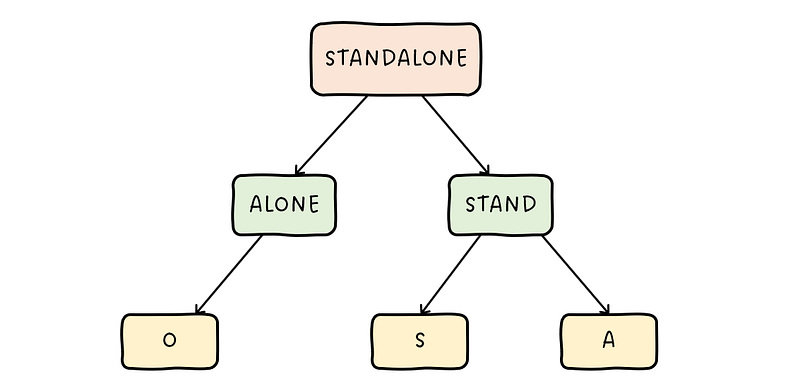
Trees are made of nodes: root, leaf and internal nodes. A binary tree is a data structure in which every node has at most two child nodes.
- Root: root the the topmost node of a tree. It can be used to access the whole tree by traversing through its child nodes and child nodes of those nodes, etc.
For example in the tree illustrated below, “STANDALONE” is the root node, “STAND” and “ALONE” being its left and right child, which also has their own child nodes. For “ALONE”, the only child node is the left node “O”, and “STAND” has “S” for its left and “A” for its right node. “O”, “S” and “A” nodes do not have any child node, and hence are known as leaf nodes.
A binary tree can be represented in different ways including raw data structures like dictionary and list, or class representations for each tree and node. There is also the binarytree module that can be employed straightaway.
The tree in the above image can be simply represented as a dictionary:
tree = {
    "STANDALONE": {
        "ALONE": {"O", None},
        "STAND": {"S", "A"}
    }
}
Or by a list (and similarly by tuple, but the tree would become immutable):
tree = [
    "STANDALONE",
    ["ALONE", ["O", None]],
    ["STAND", ["S", "A"]]
]
Each binary tree is represented by a list of length 3, first being the node, second being the left node, and third being the right node. Both implementations could be generalized for all trees.
While class representations are possible for trees, the most straightforward and simple way is to adopt the binarytree module.
Trees by binarytree Module
Python’s binarytree library allows generation and visualizing of binary trees. Different types of binary trees available are:
- Ordinary binary trees
- Binary search trees (BST): left always smaller than root, and right always greater than root for all subtrees
- Heap trees: max heap where root is always greater than its children, and min heap where root is always smaller than its children.
For example, generate trees of the above mentioned types of depth 3:
Linked List
Linked lists are made of nodes, and every node has two attributes:
data: the value stored in the nodenext: reference to the next node in the list

A simplified class implementation of the Linked List:
Now new linked lists can be constructed as follows:
# first node: head in list
node1 = Node(1)
linked_list = LinkedList(head=node1)
# next 2 nodes
node2 = Node(2)
node1.set_next(node2)
node3 = Node(3)
node2.set_next(node3)Additional methods could be added for the LinkedList class, such as its string representation and iterator so that it is easier to traverse through the list:
Thanks for reading! For more of my articles on Python & Cryptos, please refer to:
More content at PlainEnglish.io. Sign up for our free weekly newsletter. Follow us on Twitter and LinkedIn. Check out our Community Discord and join our Talent Collective.


