
Where Are Your Yum Packages Coming From?
ACM.321 This issue could be applicable to any cloud provider — check where your packages originate on the network
~~~~~~~~~~~~~~~~~~~~~~~~~~~~~~~~~~~~~~~~~~~~~~~~~~~~~
⚙️ Check out my series on Automating Cybersecurity Metrics | Code.
🔒 Related Stories: Network Security | AWS Security | Application Security
💻 Free Content on Jobs in Cybersecurity | ✉️ Sign up for the Email List
~~~~~~~~~~~~~~~~~~~~~~~~~~~~~~~~~~~~~~~~~~~~~~~~~~~~~
In the last post I wrote about a generic credential handler for a Custom Lambda Runtime and the associated risk.
What I wanted to do next was show you how we’re going to use the values stored in Secrets manager and to mirror a GitHub repository to AWS CodeCommit. But of course, I hit a snag. There’s always a snag.
First, I had to open up my network to get to GitHub from my now locked down EC2 environment. That led me down a Transit Gateway and GitHub prefix list rabbit hole I’ll write about later.
Next, I wanted to install a package to more easily parse JSON. I considered using the method that is used in the AWS Bash example code of writing a temp file and parsing out the values. However, then you have temp files hanging around with credentials in them. And no one wants that. Perhaps you delete the temp files after you’re done — but what if an error occurs before the delete command? If the temp file is in the /tmp directory it may be hanging around between invocations.
I decided to install jq. That particular package allows us to parse JSON hopefully more easily (though I still find it complicated and wrote my own python parser…but I’m not using Python here.) This particular package is risky if compromised because it potentially can access any value you’re pulling out of JSON strings. So we want to make sure we get the legitimate package from a legitimate source, correct?
We’re getting it from AWS via a Yum command so we should be ok right?
Well, I’m running a yum install of a package called jq in a container in an AWS network that has an S3 endpoint for private access to S3 for yum updates. I only want those updates to come from the region in which I am currently located.
In the past, I noticed that when I ran yum updates on an EC2 instance — those updates were coming from China. AWS now has a China region, so in theory you could stay on the AWS network and get updates from China, but my understanding is that region is completely segregated. But in that particular case many years back now it wasn’t. I thought AWS responded to me that they were going to fix the default configuration at some point but I’m not sure where that stands — and things are always changing like new AMIs that get developed and people forget things.
In any case, to ensure there are not misconfiguration mishaps I only want to provide access to S3 in my local region, so I created an AWS S3 endpoint. Since AWS packages come from S3 I was hoping that would then pull my packages from a private IP address for AWS S3.
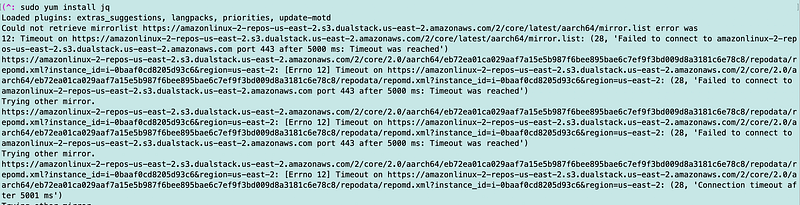
So just now I ran a yum install of jq and I’m getting these errors where it says “region unknown.” I don’t know why it says region unknown and I don’t really want to spend time digging into this right now, just making a note of it.
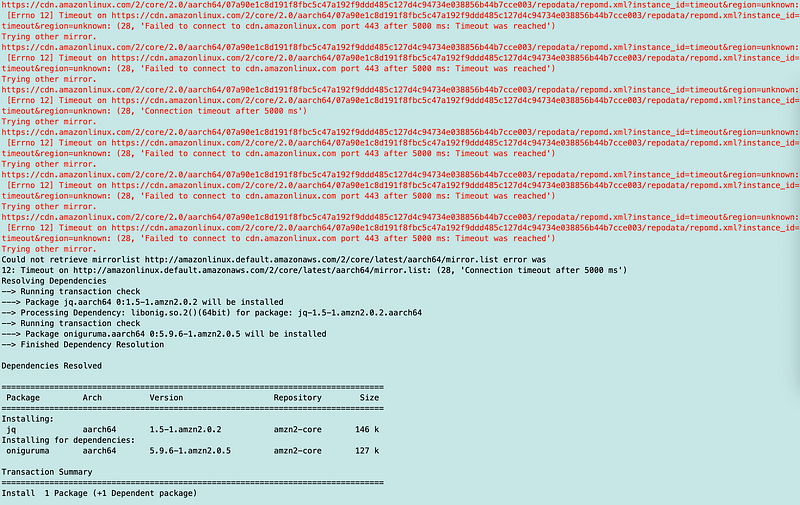
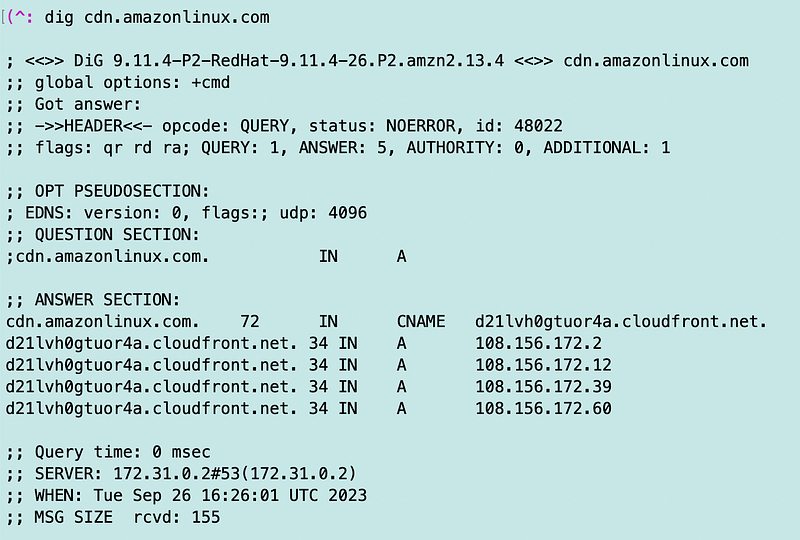
What I notice when I use dig on the AWS CDN is that it’s returning public, not private IP addresses.
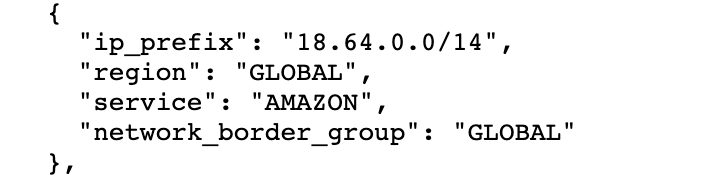
The first time I got a list of IP addresses in the 18.64.0.0/14 range.
Now I’m getting IP addresses in this range: 108.156.0.0/14 range.
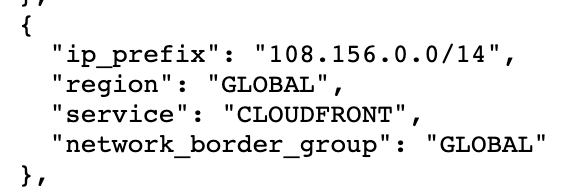
AWS IP ranges: https://ip-ranges.amazonaws.com/ip-ranges.json
Now I’m getting no answer.
Hmm.
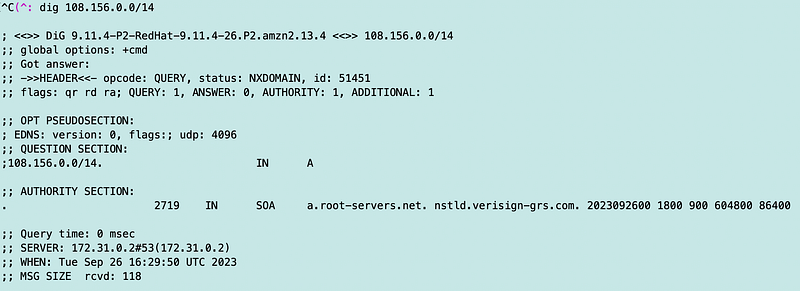
Not sure what’s going on here.
Notice that the initial responses were from CloudFront. The subsequent DNS response is from Versign.
When I try to install jq outside my container I get different results:
If I dig this domain: s3-r-w.dualstack.us-east-2.amazonaws.com
I get different IP addresses:
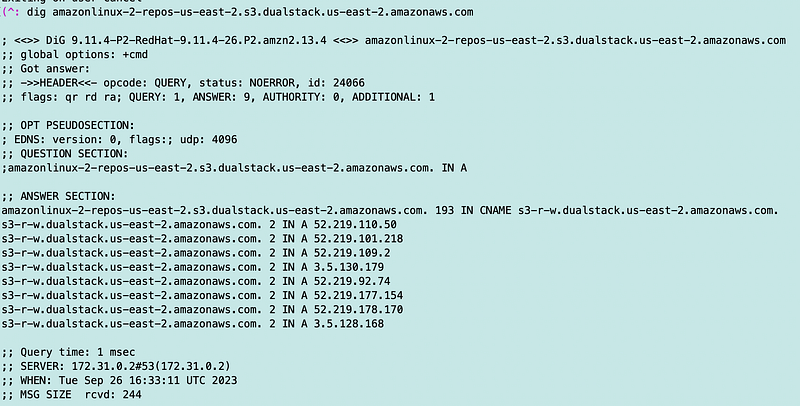
I think that is because my EC2 instance is based off a different AWS AMI.
Well, I added that 108 range returned currently to my network rules, though I would prefer that I could get updates from a private IP range. Not sure how to fix that …yet.
At least got my docker container to build correctly.
Do you check where. your packages are coming from when you deploy them via a CloudProvider package manager? Something to keep in mind as you pull packages off “the cloud.”
Perhaps I need to add a VPC Endpoint for CloudFront. Is there such a thing? I don’t see that option here.
I’m sure anyone working on this is aware of and preventing cache attacks on these packages.
Sometimes traffic to AWS public IP addresses remains on the AWS backbone, but I don’t see a way to verify that here as a customer. I would prefer to see private IPs given breaches such as SolarWinds where rogue packages were somehow deployed to customer systems.
Not what I planned to write about today but took up some time so there you go. Good reminder and maybe someone at AWS will tell me how to get private IPs for this process or I’ll find it in some documentation later. Maybe a VPC Endpoint for Yum and other package managers? Ubuntu updates are coming from Europe and in at least one case was requiring IPv6. Not cool.
I’ll write about how to keep package updates private if I figure that out. I also have plans to write more about package integrity. For now, be aware where your packages originate.
Follow for updates.
Teri Radichel | © 2nd Sight Lab 2023
About Teri Radichel:
~~~~~~~~~~~~~~~~~~~~
⭐️ Author: Cybersecurity Books
⭐️ Presentations: Presentations by Teri Radichel
⭐️ Recognition: SANS Award, AWS Security Hero, IANS Faculty
⭐️ Certifications: SANS ~ GSE 240
⭐️ Education: BA Business, Master of Software Engineering, Master of Infosec
⭐️ Company: Penetration Tests, Assessments, Phone Consulting ~ 2nd Sight Lab
Need Help With Cybersecurity, Cloud, or Application Security?
~~~~~~~~~~~~~~~~~~~~~~~~~~~~~~~~~~~~~~~~~~~~~~~~~~~~~~~~~~~~~
🔒 Request a penetration test or security assessment
🔒 Schedule a consulting call
🔒 Cybersecurity Speaker for PresentationFollow for more stories like this:
~~~~~~~~~~~~~~~~~~~~~~~~~~~~~~~~~~~~~~~~~~~~~~~~~~~~~~~~~~~~~
❤️ Sign Up my Medium Email List
❤️ Twitter: @teriradichel
❤️ LinkedIn: https://www.linkedin.com/in/teriradichel
❤️ Mastodon: @teriradichel@infosec.exchange
❤️ Facebook: 2nd Sight Lab
❤️ YouTube: @2ndsightlab


