
MEDIUM
What to do Before You Hit Submit on Your Medium Story
Tips and advice from a Medium editor
If you are having trouble viewing this content here’s how to fix that.
As the owner of three Medium publications (and editor of 6 others), I see a lot of submitted drafts. There are several very common mistakes that I see in them that, if corrected, would greatly improve the appearance of your stories and poems, the success of your work, and increase your chances of curation.
Easy Navigation Guide∘ MEDIUM
∘ This is about what to do BEFORE you hit SUBMIT on your article.
· Edit
· Here Is Your Title
· Add a Picture
∘ Acceptable pictures/graphics
· Check SEO Description
· Choose Publication and check submission guidelines
· Adding tags
∘ Before you publish, add your 5 tags.
∘ PublishFor the exact rules on curation — by the Medium staff themselves —read them here.
What I intended to send as a letter to my writers for The POM, I thought I’d write up in a quick-read article, in case the information is helpful for others as well.
This is about what to do BEFORE you hit SUBMIT on your article.
A quick rundown:
- edit — This is the most extensive and the primary focus of this article
- check your SEO description
- choose the publication
- Read or reread that publication’s guidelines for submission and follow them every single time.
- Submit and Add your tags.
- Publish
Edit
Most of the issues with submitted drafts are editing issues. I’d say the vast majority of entries are either not ready for publishing or there are errors to correct. Here are the most important editing issues I run into.
- Proofread — Most entries have misspellings and typos. Proofread, re-read, let it marinate overnight, and then read again. It is so easy to hurry this step — just, don’t.
Inside the Medium editor, you will see a red squiggly line under a word which indicates there is likely a spelling error. Check ALL red squiggly lines before you submit.
Also, look for places where you forgot to hit the space bar between things like this: Here is a sentence. And a second sentence…. The error is in bold. You see there’s an awkward missing space. Also, check to make sure there are no accidental spaces at the beginning of paragraphs or poetry lines.
- Over half the entries I receive have the wrong title and subtitle format. Here’s how to do it correctly — and if you want to be curated this is NON-negotiable.
If you want curation and for any of the larger pubs to take your work seriously you MUST follow the correct title and subtitle formatting.
Type Your Title With the Appropriate Capital Letters (do not put a period at the end)
Then right-click the title and choose the LARGE T option:
Here Is Your Title
Your subtitle will go here (directly below title) (no need to capitalize all words)
DO NOT put the subtitle in italics. — I see this DAILY.
Highlight the subtitle, right-click the subtitle and use the SMALL T selection so your title and subtitle will look like this:
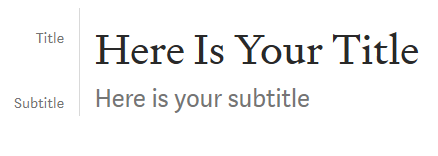
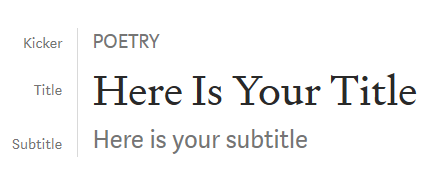
If you want to add a kicker, go into the Title line and place your cursor right before the first letter. Hit ENTER. Hit the up arrow to make your cursor go into the top-most space. Now type POETRY (usually all caps) or whatever kicker you want, highlight it, right-click, and choose the SMALL T as you did for the subtitle. It will populate as a Kicker like this:
Now, for poetry some editing is done a little different as your work will naturally have that double-spaced look that doesn’t flatter poetry. To make handy dandy stanzas and get rid of that annoying paragraph formatting— this is the must-read poetry editing article for that.
For titles, using title casing is best. For subtitles, it is best to capitalize the first letter and leave off the trailing punctuation unless it is an actual sentence or question. (Like this: “A poem” or “A free verse poem about butterflies” or “This is a poem about my father.”)
Add a Picture
Acceptable pictures/graphics
- A public domain photo (Websites that offer these include Unsplash, Pexels, and Pixabay)
- A photo that you have obtained permission to use from the photographer (if it is not public domain or exists elsewhere on the web)
- A photo you took yourself
- A screenshot of something on your computer (not a screenshot of someone else’s photo — you still need permission)
Add proper credit for the photo in the caption space below the photo. The photo goes in the space directly beneath your subtitle. To get the caption space to open, click on your photo — choose the sizing you want and add a caption.
Photo sizing — the editor opens 4 options, choose the 3rd one from the left for MOST publication requirements.
Check SEO Description
This is optional. It is to give your article more leverage in search engine optimization. I explained, in detail, how to do this in How To Optimize Your Medium Articles for Google. I do not check this in submitted drafts as an editor but I wanted to mention it here to encourage the habit.
Choose Publication and check submission guidelines
THIS is when you select Add to Publication. If you add to publication or if you are in the publication when you begin your draft — then every single editor in that publication can see your draft in the slush pile of submissions and they will not know when your draft is finalized. I cannot stress this enough. Add to publication only when you are ready to submit your draft. Don’t forget to click “select and continue.
Note: Read the submission guidelines — again. Some pubs require you to email a draft link rather than to add to publication and hit submit.
Make sure you have followed all the submission guidelines and once you’ve added the submission to the correct publication you can hit submit.
Adding tags
You are allowed up to 5 tags per article. Some pubs tell you what tags to use or at least one of them. The vast majority of entries I receive are either missing tags, are not tagged according to publication directions, or have tags that aren’t necessarily helpful.
Before you publish, add your 5 tags.
WHY:
- Some pubs are organized by tag — meaning, the tabs on the homepage are set up by tag. If you tag your work appropriately, it will spend time on the front page as usual, then as it gets pushed off the front page with other people’s posts as they come along — your work will still be easily found in the correct tab. Otherwise — way fewer eyes on your work.
- Medium users can follow or read articles by tag — if you want them to find your work, use well-thought-out tags.
HOW:
If you type ANY word (or group of words) in the tag editor box and hit enter it will add a tag so don’t worry if you start typing out “Hurricane” and nothing populates. Just type the word Hurricane and hit enter and it will put in the tag. (I see this a lot for POMprompt tag. Just type it and hit enter. Done.)
These tags tell your work where to be classified inside pubs and on Medium so they are very important. Try to use tags that have a Top Writer status. (Obtaining Top Writer Status) (Tags with a Top Writer Status)
Publish
If you’ve clicked add to publication, select and continue, added your tags, you can then publish. It will not go live unless you are an editor in that pub. If you are a writer for the pub, then the draft will be approved and published live when the editor for that pub reads and approves your work.
I hope these guidelines are clear and help you to present well-polished drafts of work. Following these guidelines should help you get into more publications and up your chances for curation. Thanks for reading.
Christina M. Ward is the owner of Politically Speaking, The POM, and Fiddleheads & Floss publications. She’s a poet and fiction writer, a well-living blogger and covers topics such as marketing, politics, advice, parenting, mental health, advice, chronic pain, and other personal essays. She also operates a Facebook group for Medium poets called Poets on Medium. 💗POM!💗


