
What Is RPA? Robotic Process Automation
Use Python to automate business processes, process transactions, and communicate with other digital systems.
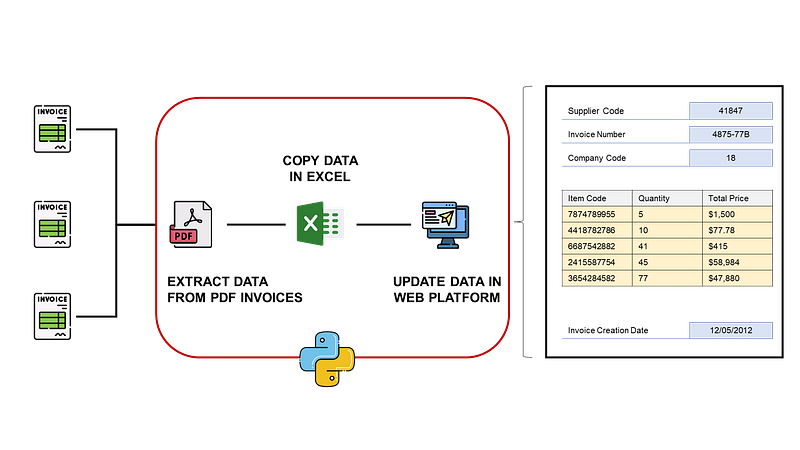
RPA stands for “Robotic Process Automation.”
It refers to the use of software to automate business processes, such as interacting with a computer application, processing transactions, and communicating with other digital systems.
The goal of RPA is to help organizations improve efficiency and reduce the need for human intervention in repetitive, rules-based tasks.
RPA solutions can be programmed to handle tasks such as data entry, processing transactions, and responding to customer inquiries, freeing up employees to focus on more value-added tasks.
As a data scientist, how can you boost the productivity of your company by automating boring manual tasks?
In this article, we will explore several libraries to develop RPA tools using Python with actual operational case studies related to Supply Chain Management.
💌 New articles straight in your inbox for free: Newsletter 📘 Boost your Productivity with Data Analytics: Productivity Cheat Sheet
Automate Manual Processes
Scenario: Invoice Management
You are the finance manager in an international fashion retail company that receives thousands of invoices in PDF format each month.
These invoices need to be entered into the accounting system manually, which is time-consuming and error-prone.
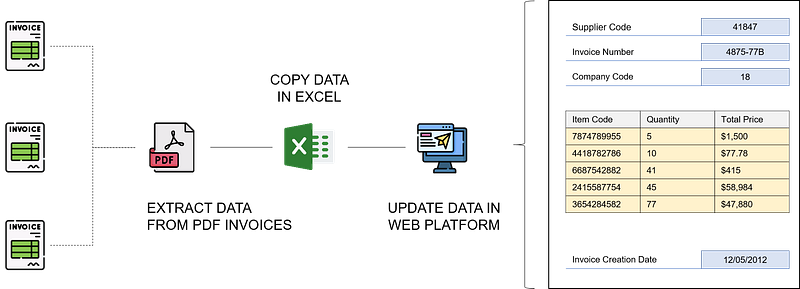
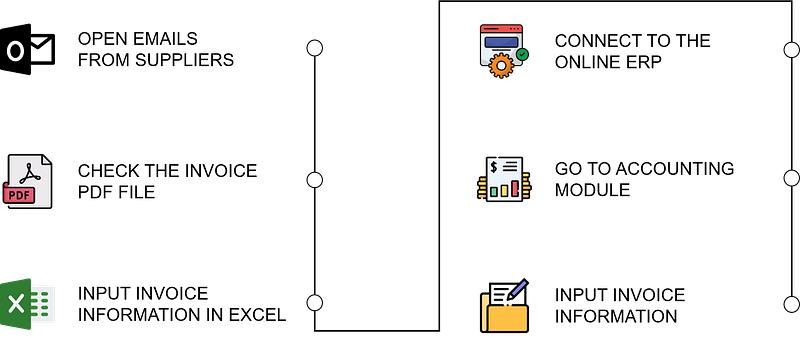
- Admins receive invoices by email in pdf format
- They extract information from the invoice (supplier code, invoice number, company code, …)
- They copy the data into an Excel file used for accounting
- They input the same data into the web-based accounting system
And your team is complaining about this process
- It is time-consuming as they receive dozens of invoices per day therefore they cannot take time for more added-value activities.
- They tend to make input errors as the process repetition affects their focus
- When the volume of invoices is getting high, during busy periods, the team is accumulating a large backlog.
If you automate this process, you will release time for your team, reduce errors and avoid late payments due to backlog.
💡 Assess productivity potential savings Before investing time and resources in designing a solution you need to assess the potential of productivity gains with RPA
- What is the current process productivity?
- Can we improve this productivity without RPA?
- What would be the number of man-hours saved if you deploy this solution? How much it is in euros?
- What would be the total cost of design, usage and maintenance?
- What is the return on investment?
Solution using Python
If you type RPA on Google you will find many ads from software companies that will propose their solutions.
The idea of this article is to show you that everything can be done with a piece of coding using Python, VBA or any other programming language.
For the specific example of invoice management, let us go step by step to build a solution to automate the task.
Step 1: Read PDF Invoice to extract data
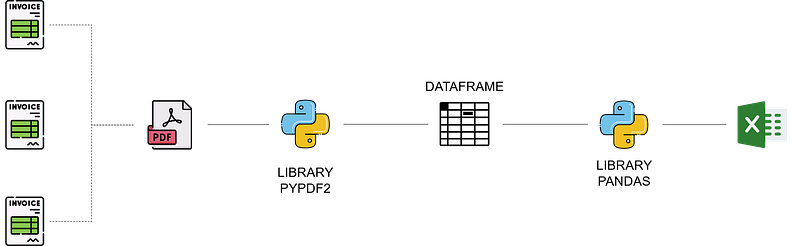
- Use the pyPDF2 library to extract data from any pdf report
- Store the data in pandas dataframe(s)
- Use pandas to export this data frame in an Excel or CSV file
Steps (1, 2 and 3) are now fully automated, however
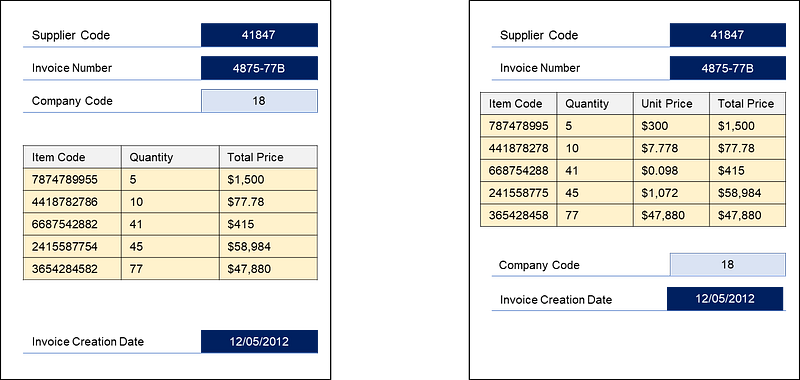
- pyPDF2 does not always extract data in a readable format: you’ll need extra efforts to clean the data output
- If the format of invoices is changing your tool needs to be updated
Step 2: Update data in the accounting system
In this particular example, the accounting system is web-based. So you have two potential solution
- If the software has an API, you can update information by sending HTTP requests to this API using the library
requests - If not, you can use browser automation tools like Selenium
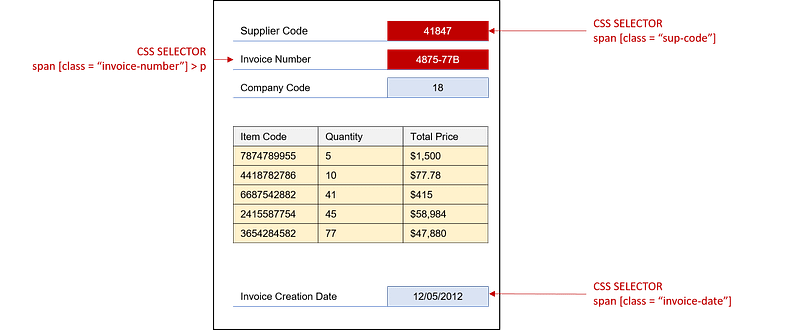
With Selenium, you can automatically interact with your browser and automate practically any task
- Start by selecting the elements of the page you want to interact with using CSS selectors (to locate this element in the HTML code of the page)
- You can then decide to write data in this element, click a button or just copy it into the clipboard
You can then build a bot that will connect to the page to create an invoice and paste data in the fields (Supplier Code, Invoice Number …).
However,
- This kind of solution can be impacted by page loading issues or unexpected popups
- If there is an update to the website, you need to rewrite your code
Step 2': Alternative Solutions
If your ERP, accounting system or any administrative software is not web-based you still have a solution
Some software has automation modules that use scripting languages to interact with their UI.
In my blog, you can find an example with SAP GUI: Automate PO Creation with SAP GUI.
If not, then you can use pyautogui library of Python to interact with elements on your screen.
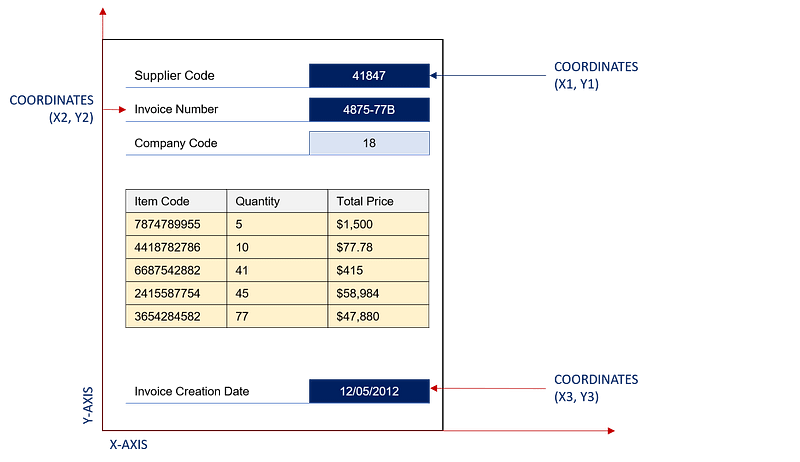
- Locate the element using pixels coordinates and move the mouse
- You can then click the element, write something and valid with enter or any key
Full End-to-End Automation
You can now link the two blocks to fully automate the process and package your script in an executable file (.exe) so your colleagues can use it.
For more information, have a look at this article:
💡 Follow me on Medium for more articles related to 🏭 Supply Chain Analytics, 🌳 Sustainability and 🕜 Productivity.
What are the challenges?
Initial setup
It requires a significant upfront investment in terms of time and resources to set up the automation infrastructure and processes.
You need to make sure that you have a correct process mapping
- Conduct interviews with admin teams to map processes and build workflows
- Make sure that it’s compliant with the current process and safety controls (data input, ISO audits)
Integration with existing systems
It requires integrations with other systems and data sources, which can be complex and time-consuming.
In previous articles, I have shared solutions to automate PowerPoint slides creations and email reports distributions
- They rely on libraries and APIs to connect with Microsoft Office Suite software.
- Therefore, the code is extremely simple and very robust: you’ll need limited maintenance
If you cannot find a library like this one for your project, you can use Pyautogui if we cannot connect via an API or Selenium.
However, it is the least stable and easy solution to implement as it may require complex codes to have a robust solution.
Change management
It can lead to changes in the roles and responsibilities of employees, and it is important to manage these changes effectively to ensure the smooth adoption of the technology.
It needs to be seen as a support to bring quality and added value and not a tool to reduce the workforce.
Maintenance and updates
Because these tools require regular maintenance and updates to ensure they continue to function properly, it is an added cost to be considered.
If you decide, as an individual contributor, to design RPA tools to support your colleagues make sure that you’ll have time to do maintenance, updates and technical support.
💡 Follow me on Medium for more articles related to 🏭 Supply Chain Analytics, 🌳 Sustainability and 🕜 Productivity.
About Me
Let’s connect on Linkedin, I am a Supply Chain Engineer that is using data analytics to improve logistics operations and reduce costs.
If you are interested in Data Analytics and Supply Chain, have a look at my website