avatarSamir Saci

Free AI web copilot to create summaries, insights and extended knowledge, download it at here

12439

Abstract

</span> <span class="hljs-variable">null</span> <span class="hljs-variable">and</span> <span class="hljs-variable">the</span> <span class="hljs-variable">system</span> <span class="hljs-variable">is</span> <span class="hljs-variable">matching</span> <span class="hljs-variable">with</span> <span class="hljs-variable">the</span> <span class="hljs-variable">one</span> <span class="hljs-variable">we</span> <span class="hljs-variable">target</span><span class="hljs-operator">:</span> <span class="hljs-variable">we</span> <span class="hljs-variable">use</span> <span class="hljs-variable">this</span> <span class="hljs-variable">object</span> <span class="hljs-built_in">If</span> <span class="hljs-built_in">Not</span> <span class="hljs-variable">session</span> <span class="hljs-variable">Is</span> <span class="hljs-built_in">Nothing</span> <span class="hljs-variable">Then</span> <span class="hljs-built_in">If</span> <span class="hljs-variable">session</span><span class="hljs-operator">.</span><span class="hljs-variable">Info</span><span class="hljs-operator">.</span><span class="hljs-variable">SystemName</span> <span class="hljs-operator">&</span> <span class="hljs-variable">session</span><span class="hljs-operator">.</span><span class="hljs-variable">Info</span><span class="hljs-operator">.</span><span class="hljs-variable">Client</span> <span class="hljs-operator">=</span> <span class="hljs-type">W_System</span> <span class="hljs-variable">Then</span> <span class="hljs-type">Create_SAP</span><span class="hljs-type">_Session</span> <span class="hljs-operator">=</span> <span class="hljs-built_in">True</span> <span class="hljs-built_in">Exit</span> <span class="hljs-built_in">Function</span> <span class="hljs-built_in">End</span> <span class="hljs-built_in">If</span> <span class="hljs-built_in">End</span> <span class="hljs-built_in">If</span></pre></div><div id="d785"><pre><span class="hljs-operator">'</span><span class="hljs-punctuation">(</span><span class="hljs-number">5</span><span class="hljs-punctuation">)</span> <span class="hljs-built_in">If</span> <span class="hljs-variable">we</span> <span class="hljs-variable">are</span> <span class="hljs-variable">not</span> <span class="hljs-variable">connected</span> <span class="hljs-variable">to</span> <span class="hljs-variable">anything</span> <span class="hljs-variable">and</span> <span class="hljs-variable">GUI</span> <span class="hljs-variable">Object</span> <span class="hljs-variable">is</span> <span class="hljs-built_in">Nothing</span> <span class="hljs-variable">we</span> <span class="hljs-variable">create</span> <span class="hljs-variable">one</span> <span class="hljs-built_in">If</span> <span class="hljs-variable">objGui</span> <span class="hljs-variable">Is</span> <span class="hljs-built_in">Nothing</span> <span class="hljs-variable">Then</span> <span class="hljs-built_in">Set</span> <span class="hljs-variable">SapGuiAuto</span> <span class="hljs-operator">=</span> <span class="hljs-variable">GetObject</span><span class="hljs-punctuation">(</span><span class="hljs-string">"SAPGUI"</span><span class="hljs-punctuation">)</span> <span class="hljs-built_in">Set</span> <span class="hljs-variable">objGui</span> <span class="hljs-operator">=</span> <span class="hljs-variable">SapGuiAuto</span><span class="hljs-operator">.</span><span class="hljs-variable">GetScriptingEngine</span> <span class="hljs-built_in">End</span> <span class="hljs-built_in">If</span></pre></div><div id="50a2"><pre><span class="hljs-comment">'(6) Loop through all SAP GUI Sessions to find the one with the right transaction</span> <span class="hljs-keyword">For</span> il = <span class="hljs-number">0</span> <span class="hljs-keyword">To</span> objGui.Children.Count - <span class="hljs-number">1</span> <span class="hljs-keyword">Set</span> W_conn = objGui.Children(il + <span class="hljs-number">0</span>)

<span class="hljs-keyword">For</span> it = <span class="hljs-number">0</span> <span class="hljs-keyword">To</span> W_conn.Children.Count - <span class="hljs-number">1</span>
    <span class="hljs-keyword">Set</span> W_Sess = W_conn.Children(it + <span class="hljs-number">0</span>)
    Transac = W_Sess.Info.Transaction
    Info_System = W_Sess.Info.SystemName &amp; W_Sess.Info.Client
    
    <span class="hljs-comment">'Check if Session Name and Transaction Code are matching then connect to it</span>
    <span class="hljs-keyword">If</span> W_Sess.Info.SystemName &amp; W_Sess.Info.Client = W_System <span class="hljs-keyword">Then</span>
    <span class="hljs-comment">'If W_Sess.Info.SystemName &amp; W_Sess.Info.Client = W_System And W_Sess.Info.Transaction = tcode Then</span>
        <span class="hljs-keyword">Set</span> objConn = objGui.Children(il + <span class="hljs-number">0</span>)
        <span class="hljs-keyword">Set</span> session = objConn.Children(it + <span class="hljs-number">0</span>)
        <span class="hljs-keyword">Exit</span> <span class="hljs-keyword">For</span>
    <span class="hljs-keyword">End</span> <span class="hljs-keyword">If</span>
    
<span class="hljs-keyword">Next</span>

<span class="hljs-keyword">Next</span></pre></div><div id="8712"><pre><span class="hljs-string">'(7) If we can'</span>t find <span class="hljs-keyword">Session</span> <span class="hljs-keyword">with</span> the right <span class="hljs-keyword">System</span> <span class="hljs-type">Name</span> <span class="hljs-keyword">and</span> <span class="hljs-keyword">Transaction</span> Code: display error message <span class="hljs-keyword">If</span> <span class="hljs-keyword">session</span> <span class="hljs-keyword">Is</span> <span class="hljs-keyword">Nothing</span> <span class="hljs-keyword">Then</span> MsgBox "There is no active session found for " + W_System + " with transaction " + tcode + ".", vbCritical + vbOKOnly Create_SAP_Session = <span class="hljs-keyword">False</span> <span class="hljs-keyword">Exit</span> <span class="hljs-keyword">Function</span> <span class="hljs-keyword">End</span> <span class="hljs-keyword">If</span></pre></div><div id="b5e5"><pre><span class="hljs-operator">'</span><span class="hljs-punctuation">(</span><span class="hljs-number">8</span><span class="hljs-punctuation">)</span> <span class="hljs-variable">Turn</span> <span class="hljs-variable">on</span> <span class="hljs-variable">scripting</span> <span class="hljs-variable">mode</span> <span class="hljs-built_in">If</span> <span class="hljs-variable">IsObject</span><span class="hljs-punctuation">(</span><span class="hljs-variable">WScript</span><span class="hljs-punctuation">)</span> <span class="hljs-variable">Then</span> <span class="hljs-variable">WScript</span><span class="hljs-operator">.</span><span class="hljs-variable">ConnectObject</span> <span class="hljs-variable">session</span><span class="hljs-operator">,</span> <span class="hljs-string">"on"</span> <span class="hljs-variable">WScript</span><span class="hljs-operator">.</span><span class="hljs-variable">ConnectObject</span> <span class="hljs-variable">objGui</span><span class="hljs-operator">,</span> <span class="hljs-string">"on"</span> <span class="hljs-built_in">End</span> <span class="hljs-built_in">If</span></pre></div><div id="78c3"><pre><span class="hljs-comment">'(9) Confirm connection to a session</span> Create_SAP_Session = <span class="hljs-literal">True</span></pre></div><div id="a50d"><pre><span class="hljs-keyword">End</span> <span class="hljs-keyword">Function</span></pre></div><figure id="9d8b"><img src="https://cdn-images-1.readmedium.com/v2/resize:fit:800/1*7tlBiCDs8idqiUImR6v1Mw.png"><figcaption>System Code: T01220 — (Image by Author)</figcaption></figure><p id="2afa">Create SAP GUI Object linked to a system and transaction code</p><ul><li><b>Step 1 to 4: </b>Connect to SAP following System Name that can be found in GUI Window (picture above)</li><li><b>Step 5:</b> Create the SAP GUI Object</li><li><b>Step 6:</b> Loop through all SAP Windows and link GUI Object to the one connected to transaction tcode</li><li><b>Step 7:</b> Scripting Mode “on” like in the SAP GUI Recording Tool Output</li></ul><blockquote id="12bc"><p><b><i>Scripting to Perform Action</i></b></p></blockquote><p id="cc43">By aking Plant Code, SAP_Code and Listing Procedure to fill the form:</p><ul><li><b>Step 1 to 2: </b>Connect to ME21N Transaction</li><li><b>Steps 3 to 8:</b> Filling the form and validate</li><li><b>Step 9:</b> Save the PO</li><li><b>Steps 10 to 12:</b> Go to ME23N to check the PO, get the PO# and paste it in the Excel File</li></ul><div id="a2e6"><pre><span class="hljs-keyword">Function</span> <span class="hljs-title">PO_Function</span>()</pre></div><div id="681a"><pre><span class="hljs-comment">'(1) Declare Variables</span> <span class="hljs-keyword">Dim</span> W_BPNumber, W_SearchTerm, PON <span class="hljs-keyword">Dim</span> lineitems <span class="hljs-keyword">As</span> <span class="hljs-type">Long</span> <span class="hljs-keyword">Dim</span> Sht_Name <span class="hljs-keyword">As</span> <span class="hljs-type">String</span> <span class="hljs-keyword">Dim</span> N_Lines <span class="hljs-keyword">As</span> <span class="hljs-type">Integer</span> <span class="hljs-keyword">Dim</span> t <span class="hljs-keyword">As</span> <span class="hljs-type">Integer</span> Sht_Name = <span class="hljs-string">"PO"</span></pre></div><div id="8e6b"><pre><span class="hljs-operator">'</span><span class="hljs-punctuation">(</span><span class="hljs-number">2</span><span class="hljs-punctuation">)</span> <span class="hljs-type">Launch_Transaction</span> <span class="hljs-variable">session</span><span class="hljs-operator">.</span><span class="hljs-variable">findById</span><span class="hljs-punctuation">(</span><span class="hljs-string">"wnd[0]"</span><span class="hljs-punctuation">)</span><span class="hljs-operator">.</span><span class="hljs-built_in">Maximize</span> <span class="hljs-variable">session</span><span class="hljs-operator">.</span><span class="hljs-variable">findById</span><span class="hljs-punctuation">(</span><span class="hljs-string">"wnd[0]/tbar[0]/okcd"</span><span class="hljs-punctuation">)</span><span class="hljs-operator">.</span><span class="hljs-built_in">Text</span> <span class="hljs-operator">=</span> <span class="hljs-string">"me21n"</span> <span class="hljs-variable">session</span><span class="hljs-operator">.</span><span class="hljs-variable">findById</span><span class="hljs-punctuation">(</span><span class="hljs-string">"wnd[0]"</span><span class="hljs-punctuation">)</span><span class="hljs-operator">.</span><span class="hljs-variable">sendVKey</span> <span class="hljs-number">0</span> <span class="hljs-built_in">Application</span><span class="hljs-operator">.</span><span class="hljs-variable">Wait</span> <span class="hljs-punctuation">(</span><span class="hljs-built_in">Now</span> <span class="hljs-operator">+</span> <span class="hljs-built_in">TimeValue</span><span class="hljs-punctuation">(</span><span class="hljs-string">"0:00:1"</span><span class="hljs-punctuation">)</span><span class="hljs-punctuation">)</span></pre></div><div id="448a"><pre><span class="hljs-function"><span class="hljs-title">'</span><span class="hljs-params">(<span class="hljs-number">3</span>)</span> F<span class="hljs-title">ill</span> V<span class="hljs-title">endor</span> C<span class="hljs-title">ode</span> <span class="hljs-title">session</span>.<span class="hljs-title">findById</span><span class="hljs-params">(<span class="hljs-string">"wnd[0]/usr/subSUB0:SAPLMEGUI:0013/subSUB0:SAPLMEGUI:0030/subSUB1:SAPLMEGUI:1105/ctxtMEPO_TOPLINE-SUPERFIELD"</span>)</span>.T<span class="hljs-title">ext</span> = S<span class="hljs-title">heets</span><span class="hljs-params">(Sht_Name)</span>.C<span class="hljs-title">ells</span><span class="hljs-params">(<span class="hljs-number">2</span>, <span class="hljs-number">3</span>)</span></span></pre></div><div id="1df8"><pre>'(4) PurchOrg Code session.findById("wnd[0]/usr/subSUB0:SAPLMEGUI:<span class="hljs-number">0013</span>/subSUB1:SAPLMEVIEWS:<span class="hljs-number">1100</span>/subSUB2:SAPLMEVIEWS:<span class="hljs-number">1200</span>/subSUB1:SAPLMEGUI:<span class="hljs-number">1102</span>/tabsHEADER_DETAIL/tabpTABHDT9/ssubTABSTRIPCONTROL2SUB:SAPLMEGUI:<span class="hljs-number">1221</span>/ctxtMEPO<span

Options

class="hljs-number">1222</span>-EKORG").Text = Sheets(Sht_Name).Cells(2, 7)</pre></div><div id="33d9"><pre><span class="hljs-function"><span class="hljs-title">'</span><span class="hljs-params">(<span class="hljs-number">5</span>)</span> P<span class="hljs-title">urch</span> G<span class="hljs-title">roup</span> <span class="hljs-title">session</span>.<span class="hljs-title">findById</span><span class="hljs-params">(<span class="hljs-string">"wnd[0]/usr/subSUB0:SAPLMEGUI:0013/subSUB1:SAPLMEVIEWS:1100/subSUB2:SAPLMEVIEWS:1200/subSUB1:SAPLMEGUI:1102/tabsHEADER_DETAIL/tabpTABHDT9/ssubTABSTRIPCONTROL2SUB:SAPLMEGUI:1221/ctxtMEPO1222-EKGRP"</span>)</span>.T<span class="hljs-title">ext</span> = S<span class="hljs-title">heets</span><span class="hljs-params">(Sht_Name)</span>.C<span class="hljs-title">ells</span><span class="hljs-params">(<span class="hljs-number">2</span>, <span class="hljs-number">8</span>)</span> <span class="hljs-title">session</span>.<span class="hljs-title">findById</span><span class="hljs-params">(<span class="hljs-string">"wnd[0]"</span>)</span>.<span class="hljs-title">sendVKey</span> 0</span></pre></div><div id="c3c3"><pre>'(<span class="hljs-number">6</span>) Loop for SAP <span class="hljs-built_in">Code</span> For <span class="hljs-built_in">t</span> = <span class="hljs-number">0</span> To N_Lines - <span class="hljs-number">3</span> session.findById(<span class="hljs-string">"wnd[0]/usr/subSUB0:SAPLMEGUI:0013/subSUB2:SAPLMEVIEWS:1100/subSUB2:SAPLMEVIEWS:1200/subSUB1:SAPLMEGUI:1211/tblSAPLMEGUITC_1211/ctxtMEPO1211-EMATN[4,"</span> & <span class="hljs-built_in">t</span> & <span class="hljs-string">"]"</span>).<span class="hljs-built_in">Text</span> = <span class="hljs-built_in">Sheets</span>(Sht_Name).Cells(<span class="hljs-built_in">t</span> + <span class="hljs-number">2</span>, <span class="hljs-number">4</span>) Next <span class="hljs-built_in">t</span></pre></div><div id="6192"><pre>'(<span class="hljs-number">7</span>) Loop for Quantities For <span class="hljs-built_in">t</span> = <span class="hljs-number">0</span> To N_Lines - <span class="hljs-number">3</span> session.findById(<span class="hljs-string">"wnd[0]/usr/subSUB0:SAPLMEGUI:0013/subSUB2:SAPLMEVIEWS:1100/subSUB2:SAPLMEVIEWS:1200/subSUB1:SAPLMEGUI:1211/tblSAPLMEGUITC_1211/txtMEPO1211-MENGE["</span> & <span class="hljs-string">"6,"</span> & <span class="hljs-built_in">t</span> & <span class="hljs-string">"]"</span>).<span class="hljs-built_in">Text</span> = <span class="hljs-built_in">Sheets</span>(Sht_Name).Cells(<span class="hljs-built_in">t</span> + <span class="hljs-number">2</span>, <span class="hljs-number">6</span>) Next <span class="hljs-built_in">t</span></pre></div><div id="3bb9"><pre>'(<span class="hljs-number">8</span>) Loop for Plants For <span class="hljs-built_in">t</span> = <span class="hljs-number">0</span> To N_Lines - <span class="hljs-number">3</span> session.findById(<span class="hljs-string">"wnd[0]/usr/subSUB0:SAPLMEGUI:0013/subSUB2:SAPLMEVIEWS:1100/subSUB2:SAPLMEVIEWS:1200/subSUB1:SAPLMEGUI:1211/tblSAPLMEGUITC_1211/ctxtMEPO1211-NAME1[15,"</span> & <span class="hljs-built_in">t</span> & <span class="hljs-string">"]"</span>).<span class="hljs-built_in">Text</span> = <span class="hljs-built_in">Sheets</span>(Sht_Name).Cells(<span class="hljs-built_in">t</span> + <span class="hljs-number">2</span>, <span class="hljs-number">1</span>) Next <span class="hljs-built_in">t</span></pre></div><div id="09c6"><pre><span class="hljs-function"><span class="hljs-title">'</span><span class="hljs-params">(<span class="hljs-number">9</span>)</span> C<span class="hljs-title">lick</span> S<span class="hljs-title">ave</span> B<span class="hljs-title">utton</span> <span class="hljs-title">session</span>.<span class="hljs-title">findById</span><span class="hljs-params">(<span class="hljs-string">"wnd[0]/tbar[0]/btn[11]"</span>)</span>.<span class="hljs-title">press</span> <span class="hljs-title">session</span>.<span class="hljs-title">findById</span><span class="hljs-params">(<span class="hljs-string">"wnd[1]/usr/btnSPOP-VAROPTION1"</span>)</span>.<span class="hljs-title">press</span> <span class="hljs-title">session</span>.<span class="hljs-title">findById</span><span class="hljs-params">(<span class="hljs-string">"wnd[0]/sbar"</span>)</span>.D<span class="hljs-title">oubleClick</span></span></pre></div><div id="b9a1"><pre><span class="hljs-function"><span class="hljs-title">'</span><span class="hljs-params">(<span class="hljs-number">10</span>)</span> L<span class="hljs-title">eave</span> <span class="hljs-title">and</span> <span class="hljs-title">go</span> <span class="hljs-title">to</span> M<span class="hljs-title">e23n</span> <span class="hljs-title">session</span>.<span class="hljs-title">findById</span><span class="hljs-params">(<span class="hljs-string">"wnd[0]/tbar[0]/btn[3]"</span>)</span>.<span class="hljs-title">press</span> <span class="hljs-title">session</span>.<span class="hljs-title">findById</span><span class="hljs-params">(<span class="hljs-string">"wnd[0]/tbar[0]/okcd"</span>)</span>.T<span class="hljs-title">ext</span> = "<span class="hljs-title">me23n</span>" <span class="hljs-title">session</span>.<span class="hljs-title">findById</span><span class="hljs-params">(<span class="hljs-string">"wnd[0]"</span>)</span>.<span class="hljs-title">sendVKey</span> 0 <span class="hljs-title">session</span>.<span class="hljs-title">findById</span><span class="hljs-params">(<span class="hljs-string">"wnd[0]/usr/subSUB0:SAPLMEGUI:0020/subSUB3:SAPLMEVIEWS:1100/subSUB1:SAPLMEVIEWS:4002/btnDYN_4000-BUTTON"</span>)</span>.<span class="hljs-title">press</span> <span class="hljs-title">session</span>.<span class="hljs-title">findById</span><span class="hljs-params">(<span class="hljs-string">"wnd[0]/usr/subSUB0:SAPLMEGUI:0013/subSUB0:SAPLMEGUI:0030/subSUB1:SAPLMEGUI:1105/txtMEPO_TOPLINE-EBELN"</span>)</span>.S<span class="hljs-title">etFocus</span> <span class="hljs-title">session</span>.<span class="hljs-title">findById</span><span class="hljs-params">(<span class="hljs-string">"wnd[0]/usr/subSUB0:SAPLMEGUI:0013/subSUB0:SAPLMEGUI:0030/subSUB1:SAPLMEGUI:1105/txtMEPO_TOPLINE-EBELN"</span>)</span>.<span class="hljs-title">caretPosition</span> = 1</span></pre></div><div id="a917"><pre><span class="hljs-operator">'</span><span class="hljs-punctuation">(</span><span class="hljs-number">11</span><span class="hljs-punctuation">)</span> <span class="hljs-variable">Copy</span> <span class="hljs-variable">PO</span><span class="hljs-type">#</span> <span class="hljs-variable">and</span> <span class="hljs-variable">paste</span> <span class="hljs-variable">it</span> <span class="hljs-variable">in</span> <span class="hljs-variable">Excel</span> <span class="hljs-built_in">File</span> <span class="hljs-variable">session</span><span class="hljs-operator">.</span><span class="hljs-variable">findById</span><span class="hljs-punctuation">(</span><span class="hljs-string">"wnd[0]/usr/subSUB0:SAPLMEGUI:0013/subSUB0:SAPLMEGUI:0030/subSUB1:SAPLMEGUI:1105/txtMEPO_TOPLINE-EBELN"</span><span class="hljs-punctuation">)</span><span class="hljs-operator">.</span><span class="hljs-variable">SetFocus</span> <span class="hljs-variable">PON</span> <span class="hljs-operator">=</span> <span class="hljs-variable">session</span><span class="hljs-operator">.</span><span class="hljs-variable">findById</span><span class="hljs-punctuation">(</span><span class="hljs-string">"wnd[0]/usr/subSUB0:SAPLMEGUI:0013/subSUB0:SAPLMEGUI:0030/subSUB1:SAPLMEGUI:1105/txtMEPO_TOPLINE-EBELN"</span><span class="hljs-punctuation">)</span><span class="hljs-operator">.</span><span class="hljs-built_in">Text</span> <span class="hljs-type">N_Lines</span> <span class="hljs-operator">=</span> <span class="hljs-number">1</span> <span class="hljs-built_in">While</span> <span class="hljs-built_in">Not</span> <span class="hljs-punctuation">(</span><span class="hljs-variable">Sheets</span><span class="hljs-punctuation">(</span><span class="hljs-type">Sht_Name</span><span class="hljs-punctuation">)</span><span class="hljs-operator">.</span><span class="hljs-built_in">Cells</span><span class="hljs-punctuation">(</span><span class="hljs-type">N_Lines</span><span class="hljs-operator">,</span> <span class="hljs-number">1</span><span class="hljs-punctuation">)</span> <span class="hljs-operator">=</span> <span class="hljs-string">""</span><span class="hljs-punctuation">)</span> <span class="hljs-type">N_Lines</span> <span class="hljs-operator">=</span> <span class="hljs-type">N_Lines</span> <span class="hljs-operator">+</span> <span class="hljs-number">1</span> <span class="hljs-variable">Sheets</span><span class="hljs-punctuation">(</span><span class="hljs-type">Sht_Name</span><span class="hljs-punctuation">)</span><span class="hljs-operator">.</span><span class="hljs-built_in">Cells</span><span class="hljs-punctuation">(</span><span class="hljs-type">N_Lines</span><span class="hljs-operator">,</span> <span class="hljs-number">9</span><span class="hljs-punctuation">)</span> <span class="hljs-operator">=</span> <span class="hljs-variable">PON</span> <span class="hljs-variable">Wend</span></pre></div><div id="62a6"><pre>'(<span class="hljs-number">12</span>) Leave Ready <span class="hljs-keyword">to</span> go <span class="hljs-keyword">back</span> <span class="hljs-keyword">to</span> Menu session.findById(<span class="hljs-string">"wnd[0]/tbar[0]/btn[3]"</span>).press</pre></div><div id="976a"><pre><span class="hljs-keyword">End</span> <span class="hljs-keyword">Function</span></pre></div><h1 id="2a1d">II. Conclusion and Next Steps</h1><p id="6fc6"><i>Follow me on medium for more insights related to Data Science for Supply Chain.</i></p><p id="be71">This example is a simple solution to automate the PO creation process, with a bit of customization it can be also used to modify a PO that has already been created.</p><p id="83f6">In the next part we’re going to see how:</p><ul><li><b>3. Goods Transfer Orders Extraction: </b>Goods transfers allow you to map transfer deliveries in the system in one data entry transaction</li></ul><h1 id="e056">References</h1><p id="fe65">[1] <a href="undefined">Samir Saci</a>, SAP Automation for Retail Using VB</p><div id="e583" class="link-block"> <a href="https://www.samirsaci.com/sap-automation-for-retail/"> <div> <div> <h2>SAP Automation for Retail</h2> <div><h3>Automation & Reporting Design RPA solutions using Visual Basic scripts built with SAP GUI Scripting Tool Design RPA…</h3></div> <div><p>www.samirsaci.com</p></div> </div> <div> <div style="background-image: url(https://miro.readmedium.com/v2/resize:fit:320/0*tlQfzH_llYjU118x)"></div> </div> </div> </a> </div><p id="2f94">[2] <a href="undefined">Samir Saci</a>, Product Listing Automation with SAP for Retail Using VB</p><div id="8c97" class="link-block"> <a href="https://www.samirsaci.com/sap-automation-of-product-listing-for-retail/"> <div> <div> <h2>Product Listing Automation with SAP for Retail | Samir Saci</h2> <div><h3>Automation & Reporting Automate Product Listing in SAP with SAP GUI Scripting Tool using Visual Basic Automate Product…</h3></div> <div><p>www.samirsaci.com</p></div> </div> <div> <div style="background-image: url(https://miro.readmedium.com/v2/resize:fit:320/0*IK_AAPr4j9OZsY7r)"></div> </div> </div> </a> </div><p id="61d2">If you are interested in Supply Chain Analytics, have a look at my website</p><div id="65b8" class="link-block"> <a href="http://samirsaci.com"> <div> <div> <h2>Samir Saci</h2> <div><h3>Data Science blog focusing on Warehousing, Transportation, Data Visualization and Robotic Process Automation with…</h3></div> <div><p>samirsaci.com</p></div> </div> <div> <div style="background-image: url(https://miro.readmedium.com/v2/resize:fit:320/0*-IYQOHYZilO3F8vJ)"></div> </div> </div> </a> </div></article></body>

SAP Automation of Orders Creation for Retail

Automate Purchase Order Creation in SAP with SAP GUI Scripting Tool using Visual Basic
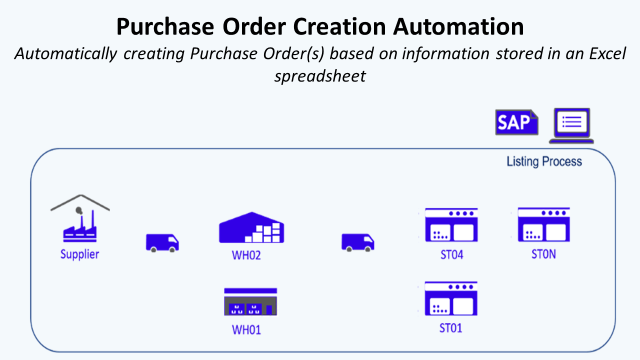
Orders Creation Automation with SAP for Retail Using VB — (Image by Author)

This article is a part of a series about the Automation of SAP GUI for Retail. (You can find the first part: Part 1)

I. Purchase Order Creation in SAP

1. What is a Purchase Order (PO)?

In SAP Retail, a purchase order is a commercial document indicating types, quantities, agreed prices and delivery information (locations, time) for products or services.

Scenario

As a Store Manager, you want to order 10 Pcs of an article (SAP Code: 145654789 ) at the agreed price of 200$ to be delivered 20.09.2020 in WH01 by Supplier XXX-XXX (Vendor Code: 15487).

Your store belongs to the purchase organization (Code: PORG ) of the Retail Company (Code: RTCP) with a dedicated purchasing manager (Code: PRGP).

Edit: You can find a Youtube version of this article with animations in the link below.

2. How to do PO Creation in SAP?

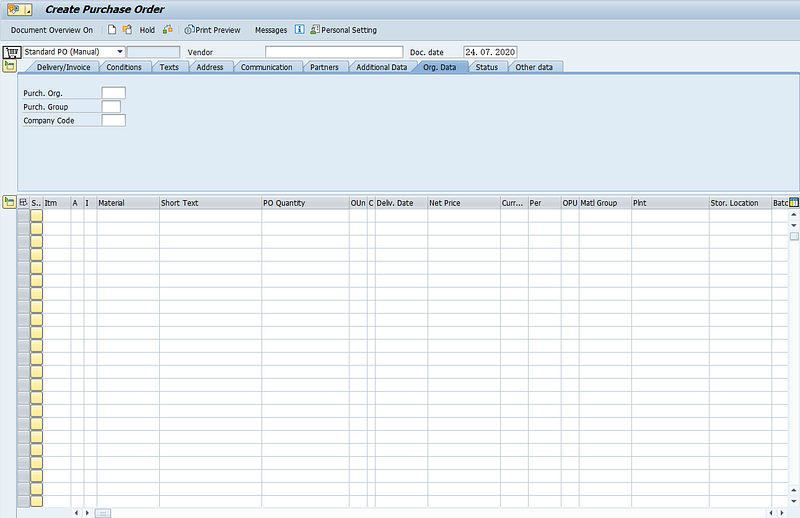
ME21N transaction can be used to operate PO Creation

  1. Launch Transaction ME21N
SAP Transaction ME21N for Purchase Order Creation — (Image by Author)

To create our Purchase Order we need to fill

  • Vendor Code: 15487
  • Purchase Organization: PORG
  • Purchase Group: PRGP
  • Company Code: RTCP
  • Material: 145654789
  • PO Qty: 10
  • Plant: WH01
  • Delivery Date: 20.09.2020

2. Validation and Save
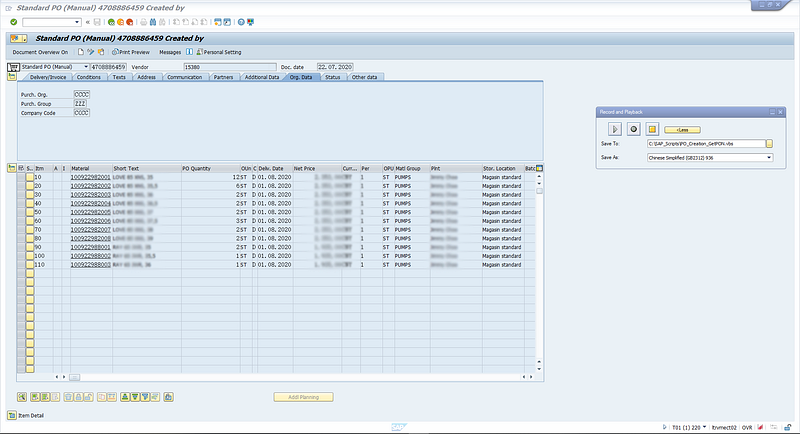
SAP Transaction ME21N for Purchase Order Creation (Step 2) — (Image by Author)

After Enter key is pressed, SAP loads missing PO information from Purchase Info Records, Master Data linked to SAP Code and Purchase Organization. We can then save the PO in the system with a PO Number.
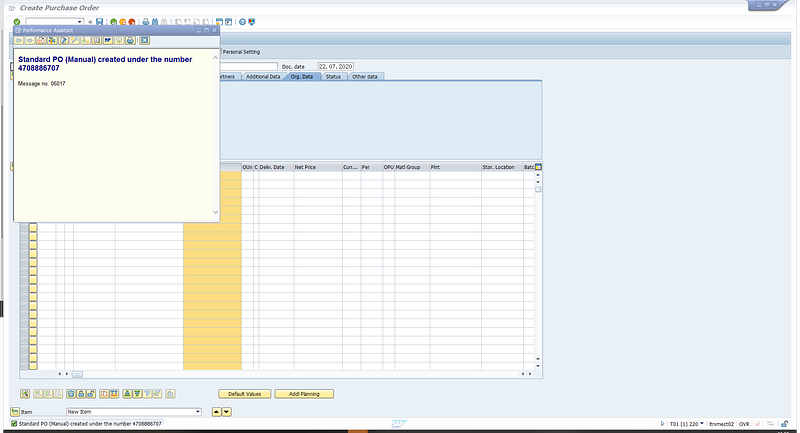
SAP Transaction ME21N for Purchase Order Creation (Step 2) — (Image by Author)

3. Checking in ME23N

After PO creation, we can check in ME23N PO is created and extract PO Number for records.
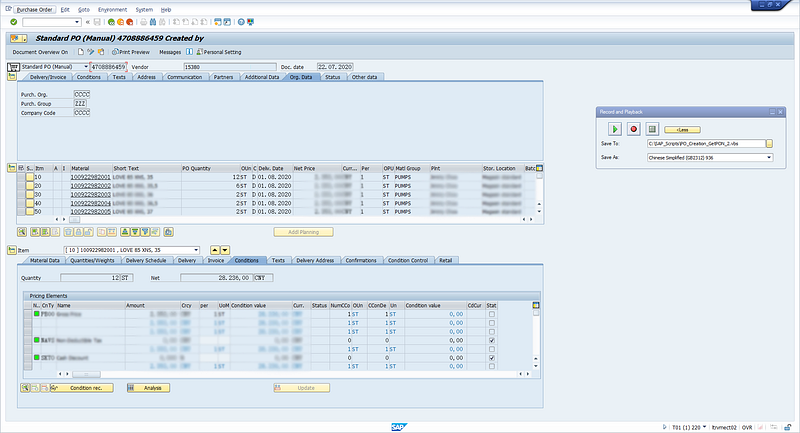
SAP Transaction ME21N for Purchase Order Creation (Step 3) — (Image by Author)

4. Manual Sub-Tasks

To perform this PO creation, you have a set of manual sub-tasks to be operated. I’ll separate these tasks into two categories:

  • 1. Manual Data Inputs: Filling Forms, Clicking on buttons, Uploading Data and any other action of information transfer from User to SAP GUI
  • 2. Manual Data Extraction: Checking Results, Downloading Report, Exporting Tables or any other action of information transfer from SAP GUI to User

For the current example, the transaction form filling task can be placed in category 1 and PO Number Extraction in category 2.

3. How to Automate PO Creation using SAP GUI Scripting?

The target is to fully Automate the process with Visual Basic script in an Excel File where Inputs Data will be extracted, and Output Data will be recorded.

  1. Target = Fully Automated Bot

A list of articles with respective plants in an Excel Spreadsheet:
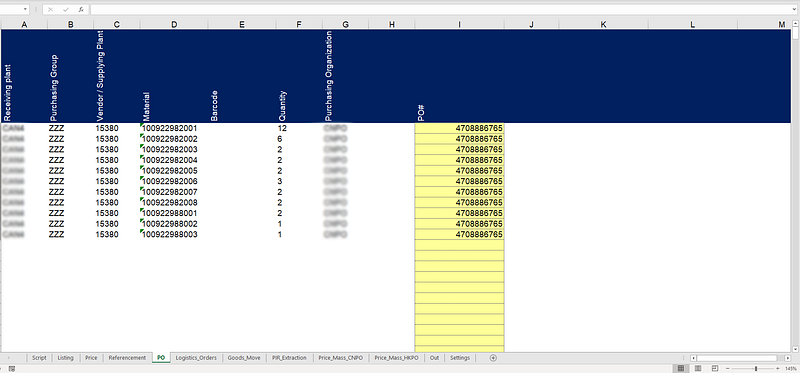
Excel Input File with PO Creation Parameters — (Image by Author)
  • Column A/../H: Plant, Purchasing Group, Vendor Code, Material Code, Barcode, Quantity, Purchasing Organization to be typed in PO Creation Form [1]
  • Column E: PO Number to be extracted from Creation Report ME23N [2]
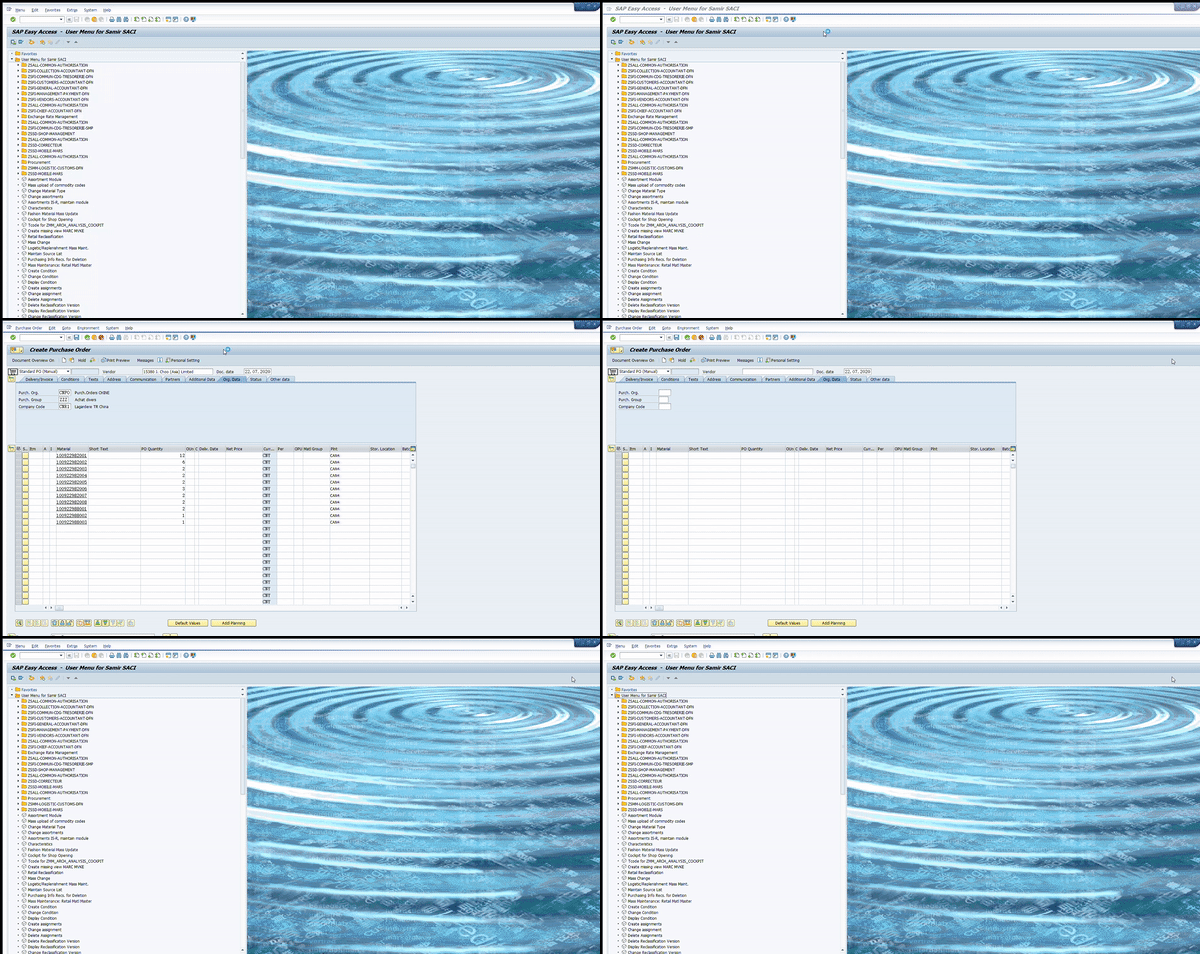
Automation Bot performing Purchase Order Creation — (Image by Author)

2. Excel VBA Script

Looking at the two simple examples presented in Part 1, we understand that our VBA Code needs to include three parts:

  1. Setting Up Connection with SAP GUI: Procedure Create_SAP_Session
  2. Scripting to Perform Action: Function named PO_Function to perform a PO Creation
  3. Looping in Excel File: Procedure named PO_Process to loop through all lines to create all listed PO

You can find the full code in this Github repository: Link. My portfolio with other projects: Samir Saci

Declare Public Variables

Option Explicit
'Variables for SAP GUI Tool
Public SapGuiAuto, WScript, msgcol
Public objGui  As GuiApplication
Public objConn As GuiConnection
Public session As GuiSession
Public objSBar As GuiStatusbar
Public objSheet As Worksheet
'Variables for Functions
Public Plant, SAP_CODE, Listing_Procedure As String
Dim W_System
Dim iCtr As Integer

Setting Up Connection with SAP GUI

Function Create_SAP_Session() As Boolean
'Function to Connect with SAP GUI Sessions
'(1) Variables for Session Creation
Dim il, it
Dim W_conn, W_Sess, tcode, Transac, Info_System
Dim N_Gui As Integer
Dim A1, A2 As String
tcode = Sheets(1).Range("B3") 'Get Transaction Code
'(2) Get System Name in Cell(2,1) of Sheet1
If mysystem = "" Then
    W_System = Sheets(1).Cells(2, 2)
Else
    W_System = mysystem
End If
'(3) If we are already connected to a Session we exit this function
If W_System = "" Then
   Create_SAP_Session = False
   Exit Function
End If
'(4) If Object Session is not null and the system is matching with the one we target: we use this object
If Not session Is Nothing Then
    If session.Info.SystemName & session.Info.Client = W_System Then
        Create_SAP_Session = True
        Exit Function
    End If
End If
'(5) If we are not connected to anything and GUI Object is Nothing we create one
If objGui Is Nothing Then
   Set SapGuiAuto = GetObject("SAPGUI")
   Set objGui = SapGuiAuto.GetScriptingEngine
End If
'(6) Loop through all SAP GUI Sessions to find the one with the right transaction
For il = 0 To objGui.Children.Count - 1
    Set W_conn = objGui.Children(il + 0)
    
    For it = 0 To W_conn.Children.Count - 1
        Set W_Sess = W_conn.Children(it + 0)
        Transac = W_Sess.Info.Transaction
        Info_System = W_Sess.Info.SystemName & W_Sess.Info.Client
        
        'Check if Session Name and Transaction Code are matching then connect to it
        If W_Sess.Info.SystemName & W_Sess.Info.Client = W_System Then
        'If W_Sess.Info.SystemName & W_Sess.Info.Client = W_System And W_Sess.Info.Transaction = tcode Then
            Set objConn = objGui.Children(il + 0)
            Set session = objConn.Children(it + 0)
            Exit For
        End If
        
    Next
    
Next
'(7) If we can't find Session with the right System Name and Transaction Code: display error message
If session Is Nothing Then
   MsgBox "There is no active session found for " + W_System + " with transaction " + tcode + ".", vbCritical + vbOKOnly
   Create_SAP_Session = False
   Exit Function
End If
'(8) Turn on scripting mode
If IsObject(WScript) Then
   WScript.ConnectObject session, "on"
   WScript.ConnectObject objGui, "on"
End If
'(9) Confirm connection to a session
Create_SAP_Session = True
End Function
System Code: T01220 — (Image by Author)

Create SAP GUI Object linked to a system and transaction code

  • Step 1 to 4: Connect to SAP following System Name that can be found in GUI Window (picture above)
  • Step 5: Create the SAP GUI Object
  • Step 6: Loop through all SAP Windows and link GUI Object to the one connected to transaction tcode
  • Step 7: Scripting Mode “on” like in the SAP GUI Recording Tool Output

Scripting to Perform Action

By aking Plant Code, SAP_Code and Listing Procedure to fill the form:

  • Step 1 to 2: Connect to ME21N Transaction
  • Steps 3 to 8: Filling the form and validate
  • Step 9: Save the PO
  • Steps 10 to 12: Go to ME23N to check the PO, get the PO# and paste it in the Excel File
Function PO_Function()
'(1) Declare Variables
Dim W_BPNumber, W_SearchTerm, PON
Dim lineitems As Long
Dim Sht_Name As String
Dim N_Lines As Integer
Dim t As Integer
Sht_Name = "PO"
'(2) Launch_Transaction
session.findById("wnd[0]").Maximize
session.findById("wnd[0]/tbar[0]/okcd").Text = "me21n"
session.findById("wnd[0]").sendVKey 0
Application.Wait (Now + TimeValue("0:00:1"))
'(3) Fill Vendor Code
session.findById("wnd[0]/usr/subSUB0:SAPLMEGUI:0013/subSUB0:SAPLMEGUI:0030/subSUB1:SAPLMEGUI:1105/ctxtMEPO_TOPLINE-SUPERFIELD").Text = Sheets(Sht_Name).Cells(2, 3)
'(4) PurchOrg Code
session.findById("wnd[0]/usr/subSUB0:SAPLMEGUI:0013/subSUB1:SAPLMEVIEWS:1100/subSUB2:SAPLMEVIEWS:1200/subSUB1:SAPLMEGUI:1102/tabsHEADER_DETAIL/tabpTABHDT9/ssubTABSTRIPCONTROL2SUB:SAPLMEGUI:1221/ctxtMEPO1222-EKORG").Text = Sheets(Sht_Name).Cells(2, 7)
'(5) Purch Group
session.findById("wnd[0]/usr/subSUB0:SAPLMEGUI:0013/subSUB1:SAPLMEVIEWS:1100/subSUB2:SAPLMEVIEWS:1200/subSUB1:SAPLMEGUI:1102/tabsHEADER_DETAIL/tabpTABHDT9/ssubTABSTRIPCONTROL2SUB:SAPLMEGUI:1221/ctxtMEPO1222-EKGRP").Text = Sheets(Sht_Name).Cells(2, 8)
session.findById("wnd[0]").sendVKey 0
'(6) Loop for SAP Code
For t = 0 To N_Lines - 3
    session.findById("wnd[0]/usr/subSUB0:SAPLMEGUI:0013/subSUB2:SAPLMEVIEWS:1100/subSUB2:SAPLMEVIEWS:1200/subSUB1:SAPLMEGUI:1211/tblSAPLMEGUITC_1211/ctxtMEPO1211-EMATN[4," & t & "]").Text = Sheets(Sht_Name).Cells(t + 2, 4)
Next t
'(7) Loop for Quantities
For t = 0 To N_Lines - 3
    session.findById("wnd[0]/usr/subSUB0:SAPLMEGUI:0013/subSUB2:SAPLMEVIEWS:1100/subSUB2:SAPLMEVIEWS:1200/subSUB1:SAPLMEGUI:1211/tblSAPLMEGUITC_1211/txtMEPO1211-MENGE[" & "6," & t & "]").Text = Sheets(Sht_Name).Cells(t + 2, 6)
Next t
'(8) Loop for  Plants
For t = 0 To N_Lines - 3
    session.findById("wnd[0]/usr/subSUB0:SAPLMEGUI:0013/subSUB2:SAPLMEVIEWS:1100/subSUB2:SAPLMEVIEWS:1200/subSUB1:SAPLMEGUI:1211/tblSAPLMEGUITC_1211/ctxtMEPO1211-NAME1[15," & t & "]").Text = Sheets(Sht_Name).Cells(t + 2, 1)
Next t
'(9) Click Save Button
session.findById("wnd[0]/tbar[0]/btn[11]").press
session.findById("wnd[1]/usr/btnSPOP-VAROPTION1").press
session.findById("wnd[0]/sbar").DoubleClick
'(10) Leave and go to Me23n
session.findById("wnd[0]/tbar[0]/btn[3]").press
session.findById("wnd[0]/tbar[0]/okcd").Text = "me23n"
session.findById("wnd[0]").sendVKey 0
session.findById("wnd[0]/usr/subSUB0:SAPLMEGUI:0020/subSUB3:SAPLMEVIEWS:1100/subSUB1:SAPLMEVIEWS:4002/btnDYN_4000-BUTTON").press
session.findById("wnd[0]/usr/subSUB0:SAPLMEGUI:0013/subSUB0:SAPLMEGUI:0030/subSUB1:SAPLMEGUI:1105/txtMEPO_TOPLINE-EBELN").SetFocus
session.findById("wnd[0]/usr/subSUB0:SAPLMEGUI:0013/subSUB0:SAPLMEGUI:0030/subSUB1:SAPLMEGUI:1105/txtMEPO_TOPLINE-EBELN").caretPosition = 1
'(11) Copy PO# and paste it in Excel File
session.findById("wnd[0]/usr/subSUB0:SAPLMEGUI:0013/subSUB0:SAPLMEGUI:0030/subSUB1:SAPLMEGUI:1105/txtMEPO_TOPLINE-EBELN").SetFocus
PON = session.findById("wnd[0]/usr/subSUB0:SAPLMEGUI:0013/subSUB0:SAPLMEGUI:0030/subSUB1:SAPLMEGUI:1105/txtMEPO_TOPLINE-EBELN").Text
N_Lines = 1
While Not (Sheets(Sht_Name).Cells(N_Lines, 1) = "")
    N_Lines = N_Lines + 1
    Sheets(Sht_Name).Cells(N_Lines, 9) = PON
Wend
'(12) Leave Ready to go back to Menu
session.findById("wnd[0]/tbar[0]/btn[3]").press
End Function

II. Conclusion and Next Steps

Follow me on medium for more insights related to Data Science for Supply Chain.

This example is a simple solution to automate the PO creation process, with a bit of customization it can be also used to modify a PO that has already been created.

In the next part we’re going to see how:

  • 3. Goods Transfer Orders Extraction: Goods transfers allow you to map transfer deliveries in the system in one data entry transaction

References

[1] Samir Saci, SAP Automation for Retail Using VB

[2] Samir Saci, Product Listing Automation with SAP for Retail Using VB

If you are interested in Supply Chain Analytics, have a look at my website

Sap
Automation
Retail
Procurement
Recommended from ReadMedium