
What is Headless WordPress & Should You Use It?
Meaning, Advantages, Disadvantages, and How to Create One
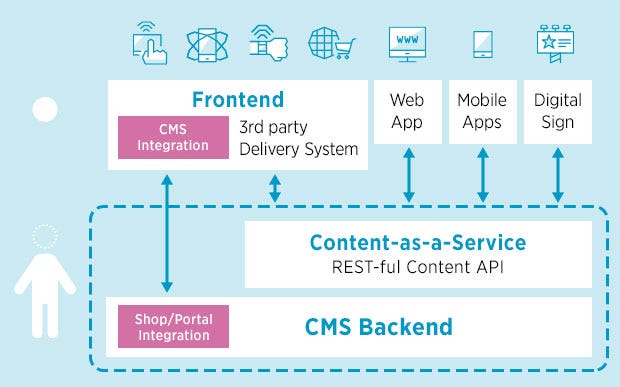
Headless WordPress is a way of using the WordPress content management system (CMS) without the traditional WordPress frontend. In a typical WordPress installation, the frontend consists of the website’s design and layout, as well as the user interface (UI) elements that allow users to interact with the website, such as menus, search bars, and forms.
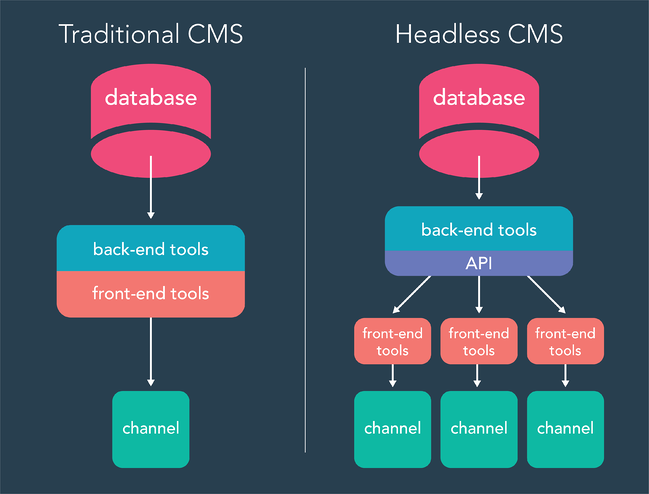
In a headless WordPress setup, the frontend is separated from the backend, which is the part of WordPress that manages the content and data. This allows developers to build the frontend using any technology or framework they prefer, while still using the powerful content management and data storage capabilities of WordPress.
Advantages of Using Headless WordPress
One of the main benefits of headless WordPress is that it allows developers to take advantage of the latest frontend technologies, such as modern JavaScript frameworks like React or Vue.js, without being limited by the constraints of the traditional WordPress frontend. This can result in faster, more flexible, and more scalable websites.
There are several advantages to using headless WordPress:
1. Use of modern frontend technologies
One of the main benefits of headless WordPress is that it allows developers to take advantage of the latest frontend technologies, such as modern JavaScript frameworks like React or Vue.js, without being limited by the constraints of the traditional WordPress frontend. This can result in faster, more flexible, and more scalable websites.
2. Single source of truth for content and data
Another benefit of headless WordPress is that it allows developers to build a single source of truth for their content and data, which can be accessed by multiple frontends or applications. This can be useful for organizations that have multiple websites or applications that share content or data, as it allows them to manage all of their content and data in a single place.
3. Improved performance and scalability
By separating the frontend from the backend, headless WordPress can improve the performance and scalability of a website. This is because the frontend and backend can be optimized and scaled independently, which can allow the website to handle more traffic and requests without slowing down.
4. Greater flexibility and customization
Headless WordPress also provides greater flexibility and customization options for developers, as they are not limited to the features and capabilities of the traditional WordPress frontend. This can allow developers to build websites that are tailored to the specific needs and goals of their clients or projects.
Disadvantages of Using Headless WordPress
Further, while headless WordPress has a number of advantages, there are also some potential disadvantages to consider:
1. Requires advanced skills and knowledge
One of the main disadvantages of headless WordPress is that it requires a deeper understanding of WordPress and its API, as well as advanced frontend skills. This can make it more challenging for developers who are not familiar with these technologies.
2. Limited features and functionality
Another disadvantage of headless WordPress is that it may not have all of the features and functionality of a traditional WordPress website. For example, the traditional WordPress frontend includes a number of built-in UI elements, such as menus, search bars, and forms, which may not be available in a headless setup.
3. Increased complexity
Headless WordPress can also be more complex than a traditional WordPress installation, as it involves two separate systems (the frontend and the backend) that need to be integrated and maintained. This can increase the time and effort required to develop and manage a website.
4. Lack of support
Finally, headless WordPress may not have the same level of support and documentation as a traditional WordPress website. This can make it more difficult for developers to find answers to their questions or resolve issues that may arise.
How to Create a Headless WordPress Website
Here are the steps to create a headless WordPress website:
Step 1: Install WordPress
The first step to creating a headless WordPress website is to install WordPress on your server or hosting account. This can typically be done using a one-click installer or by downloading and uploading the WordPress files manually.
Step 2: Install the WordPress REST API plugin
To create a headless WordPress website, you will need to install the WordPress REST API plugin. This plugin exposes the WordPress data and functionality to the frontend, allowing you to access and manipulate the data using the API.
Step 3: Build the frontend
Once the WordPress REST API plugin is installed, you can start building the frontend of your headless WordPress website. This can be done using any technology or framework that you prefer, such as HTML, CSS, JavaScript, or a modern JavaScript framework like React or Vue.js.
Step 4: Connect the frontend to the backend
To connect the frontend to the backend, you will need to use the WordPress REST API to make requests to the WordPress data and functionality. This can be done using a JavaScript library or framework that is compatible with the API, such as Axios or Fetch.
Step 5: Test and debug
As you build the frontend of your headless WordPress website, it is important to regularly test and debug your code to ensure that it is working as expected. This can be done using tools such as the browser’s developer console or a debugging tool like Postman.
By following these steps, you can create a headless WordPress website that is powered by the powerful content management and data storage capabilities of WordPress, while still allowing you to build the frontend using the technology of your choice.
Please note that headless WordPress requires a deeper understanding of WordPress and its API, as well as advanced frontend skills. It may not be suitable for all users or projects.
Conclusion
Overall, headless WordPress is a powerful approach that can provide many benefits to developers, including the ability to build fast, flexible, and scalable websites, and to create a single source of truth for content and data.
However, sharing this again that headless WordPress requires a deeper understanding of WordPress and its API, as well as advanced frontend skills. It may not be suitable for all users or projects. That’s why, you should always weigh your options before making a final decision on using headless WordPress.
Struggling with WordPress? What if I told that you could,
- Improve your website’s performance
- Give you room to scale up your business more efficiently
- Perform server and platform updates and upgrades automatically
- Have a rapid-response support team made up of WordPress experts
- Get easy migration options
All for as low as $35/month? Yes, Kinsta Web Hosting offers all these premium features and guarantees 99.99% uptime for your website. This way, your business newer loses a valuable customer. Sign up today!
You may also like,


