avatarS M Mamunur Rahman

Free AI web copilot to create summaries, insights and extended knowledge, download it at here

4094

Abstract

ou information about image type, resolution, published date, and downloads count.</p><figure id="b99b"><img src="https://cdn-images-1.readmedium.com/v2/resize:fit:800/1*m_TspGTFRezfX_YNAzq3EQ.png"><figcaption>Download counts. Screenshot by the author</figcaption></figure><p id="9ecb">If you find that the photo has been downloaded thousands of times, you can go and search for another. Always try to use less used or unique images in your story because it will give your writing a fresh and unique look. And if you find no suitable image to use, create one using free tools like <i>Canva</i>.</p><p id="cad6">Anyway, you may find ten less-common yet stunning free-image sites reading my post titled <a href="https://readmedium.com/your-tiresome-quest-for-amazing-copyright-and-royalty-free-images-is-over-223dd0ff71de"><i>Your Tiresome Quest for Amazing Copyright and Royalty-Free Images Is Over</i></a><i>.</i></p><p id="04ba"><b><i>Tips: </i></b>➰ Visit less common websites to get your images. ➰ For popular sites, ignore the first-page search result. ➰See the download information and ignore the image if it is overused. ➰Always give proper attribution mentioning the source-link. ➰If found no suitable image, create your own using <i>Canva.</i></p><h2 id="dbbc">Optimize image file names and reduce image size</h2><p id="6019">Don’t just download the image and insert it into your stories. Before adding the image, change the title name. Because when you download one, the file name includes dates and other information in the image title that is unnecessary for you.</p><p id="eedb">See the below image. I downloaded a photo, and the file name includes numbers in it.</p><figure id="cbf1"><img src="https://cdn-images-1.readmedium.com/v2/resize:fit:800/1*2aUb4ir2dU_sldRBGyOWqw.png"><figcaption>Replacing image file name. Screenshot by the author</figcaption></figure><p id="25e9">Before adding the image to your stories, replace the existing name with the most relevant information.</p><p id="2a87">For example, If I use the above image for any parenting-advice-related article, I will change the name from “father-22194_1920” to <b><i>“best-parenting-advice-ever,”</i></b> or something similar that best describes my article.</p><p id="c1f6">Include your keywords in the file name so that search engines can detect them easily and show the image when someone searches for similar topics.</p><p id="b7ec">Another very important thing is many of us just upload the image without noticing how heavy that image is. I mean if you download a good quality image from any image site, you will see that the image is more than 2 or 3MB. But this is way heavy and it can affect your page loading speed and ultimately, give your reader a bad experience.</p><p id="f810">To solve this issue, you can use a very simple online image compressor. Recently, I am using <b><i>onlineimagecompressor.com</i></b><i> </i>to compress heavy images. It doesn’t destroy image quality and I think this tool can help you a lot. It compresses your images from MB to KB and makes the page loading faster.</p><p id="8825">You can also use an online photo editor like<b> <i>fotor.com</i></b><i> </i>to easily reduce your image size.</p><p id="51ca"><b><i>Tips: </i></b>➰ Always replace the file name based on your title/topics ➰ Include target keyword at the beginning ➰Separate words with hyphens <i>(not underscores — because search engines don’t recognize them)</i> ➰Don’t make your file name irrelevant and too lengthy. ➰ Compress heavy image files with tools like <i>onlineimagecompressor.com,</i> or,<i> fotor.com </i>➰ Make sure your image-loading is not giving your readers a bad experience.</p><h2 id="9af8">Use alt text</h2><p id="fb5d"><i>Alt text </i>means Alternative Text. Some people call it Alt description, Alt attribute, Alt tag, etc. Anyway, it’s for specially-abled people who cannot read the text due to their visual impairments. So, they use screen readers that read to them.</p><p id="4367">When the screen reader finds an image, it reads the <i>alt text </i>to the visually impaired person so

Options

that he/she understands what’s in the photo/image.</p><figure id="c3ee"><img src="https://cdn-images-1.readmedium.com/v2/resize:fit:800/1*XjmAA-MTmDsVDvx5UbOydQ.png"><figcaption>Alt text. Screenshot by the author</figcaption></figure><p id="a71c">See how I included alt text for the above image. Make sure that your <i>alt text</i> describes the photo or image correctly. Do not just put your keywords there. Write good <i>alt text</i> so that the visually impaired person may understand what is in the image.</p><p id="7d95">The ideal <i>alt text</i> is descriptive and between 4 to 8 words. And don’t exceed 125 characters because that’s the <i>alt-text</i> reading limit for screen readers.</p><p id="4953">Writing an <i>alt text </i>takes very little of your time, but it helps you and the other person in a great way. <i>Alt-text</i> is also used by search engines to understand your content.</p><p id="a61e"><b><i>Tips: </i></b>➰ Write a descriptive <i>alt text </i>within 125 characters ➰ Don’t use coma, hyphens, or dashes <i>(spaces between words are enough)</i> ➰ Don’t just copy and paste your story-title in the <i>alt text</i> ➰ Include your keyword only once</p><h2 id="4663">Include captions</h2><p id="1cc1">Captions are mostly ignored as we generally cite the image sources in the caption. But the caption is a necessary thing. It helps your readers by providing additional information about the photo.</p><p id="7c8a">Readers tend to scan image captions very often. <a href="https://blog.kissmetrics.com/shocking-truth-about-graphics/">KissMetrics</a> states that captions under images are read on average 300% more than the body copy itself, so not using them, or not using them correctly, means missing out on an opportunity to engage a huge number of potential readers.</p><p id="e0ef"><b><i>Tips: </i></b>➰ Keep your captions precise and simple ➰ Describe or give additional information about the photo ➰ Don’t randomly put your keywords there</p><h1 id="c7ba">Final thoughts</h1><p id="65b0">None of the above tasks will take much of your time. Just one or two minutes, at best. But it will keep your story alive for many days. When people search for similar topics, your stories will pop up on the first page. Thus your writings will meet their readers.</p><p id="4e27">So, before inserting images or photos into your stories, take a moment and see if your it is unique/ less-used or not. Change your image file name, use <i>alt text</i>, and include captions. And of course, don’t forget to give the proper attribution.</p><p id="bd80">I hope it’s not too much to ask.</p><p id="58c4"><b><i>Thank you for reading.</i></b></p><h2 id="d166">New to Medium?? Unlock thousands of AWESOME stories only for $5/mo. and OUTSHINE others — Click Here.</h2><p id="4941"><i>If you want to read more of my writings, you may read my <b>popular articles</b> on Medium from the following links —</i></p><ol><li><a href="https://readmedium.com/your-tiresome-quest-for-amazing-copyright-and-royalty-free-images-is-over-223dd0ff71de"><i>Your Tiresome Quest for Amazing Copyright and Royalty-Free Images Is Over</i></a></li><li><a href="https://readmedium.com/how-i-unfollowed-my-father-and-learned-things-differently-4b001d853bcd"><i>How I Unfollowed My Father and Learned Things Differently</i></a></li><li><a href="https://writingcooperative.com/apply-the-pomodoro-technique-to-writing-b8295c14f32b"><i>Apply the Pomodoro Technique to Writing</i></a></li><li><a href="https://readmedium.com/if-aristotle-were-a-medium-writer-e68f6e254e74"><i>If Aristotle Were a Medium Writer</i></a></li><li><a href="https://readmedium.com/the-school-of-nature-4c3d052149ce"><i>The School of Nature</i></a></li></ol><p id="31c7"><i>You can share your outstanding stories and inspire others. Just<b> click the below image</b> and be a <b>writer</b> for <a href="https://medium.com/the-masterpiece"><b>The Masterpiece</b></a><b>.</b></i></p><figure id="b082"><img src="https://cdn-images-1.readmedium.com/v2/resize:fit:800/1*t-cgXCOfVdMLOyOaTsnk1A.png"><figcaption></figcaption></figure></article></body>

What 99% of Writers Are Doing Wrong With Their Images

Almost no writers do the correct image SEO
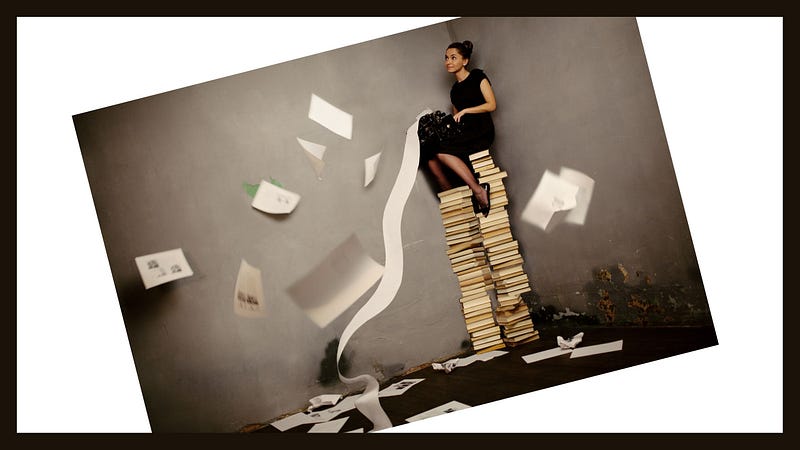
A writer confused about Image-SEO. Image created by the author using Canva.

I understand. Writers are busy writing and have almost no time to focus on other things. They hardly care about the SEO or marketing part of their stories.

When they finish a story and publish it, they immediately go for another. That’s all right. I mean, who wants to bother about those techy things, right? A writer’s main job is always writing.

But the code-driven online world is cruel. The algorithms hardly understand what merit your stories possess or how unfathomable your thinking is. It cannot even read as we humans can. So the best way you can make it understand about yourself is by learning its language.

And there comes the SEO for your writings and the images you use in that. In this article, I will talk about the latter. Because as an editor of two quality publications, I witnessed that almost 99% of writers are doing wrong with their images.

What most writers are doing wrong

In most cases, writers just download an image from free image sites like Pixabay, Pexels, or Unsplash and then insert them in their texts right away. They think the job is well done. But it’s not.

Many a time, they do not care if the image is overused or not. Often, the writers use images that are not closely relevant to the text.

Another noticeable thing is almost nobody cares about Alt text. They left it blank. And a few of the writers, who use it, just copy and paste their title in that alt text section. Many even fail to realize what alt text stands for.

Some writers use heavy image files that interrupt their page loading, therefore, give readers discomfort and painful experience. Especially, who have comparatively slower internet connection suffer the most. Thus, writers lose the attention of their readers.

All these tiny things are crucial for a writer if he/she wants to keep his/her stories alive online for many days. And if a writer spends a little time choosing and using the photos and images carefully, it may generate much traffic to his writings and keep his/her stories alive longer.

Here is what you can do

You don’t have to be an SEO expert to do this. If you remind the following easy tips, your stories will be found easily in Google search or any other search engine. Thus it will reach a greater audience.

Use unique/less-used images

It’s hard to find a unique image online. But with careful search, you may find relevant yet less-used images. When you search on popular copyright-free websites like Pixabay, Pexels, or Unsplash, you must avoid the images that appear on the first-page search result. In most cases, they are overused.

You can identify the overused photos easily. When you find a relevant image or photo, scroll down and see photo information on the right side. It will give you information about image type, resolution, published date, and downloads count.
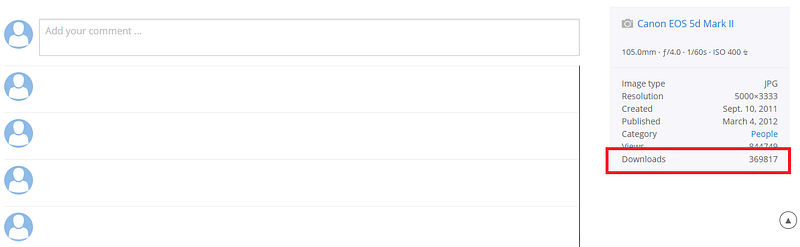
Download counts. Screenshot by the author

If you find that the photo has been downloaded thousands of times, you can go and search for another. Always try to use less used or unique images in your story because it will give your writing a fresh and unique look. And if you find no suitable image to use, create one using free tools like Canva.

Anyway, you may find ten less-common yet stunning free-image sites reading my post titled Your Tiresome Quest for Amazing Copyright and Royalty-Free Images Is Over.

Tips: ➰ Visit less common websites to get your images. ➰ For popular sites, ignore the first-page search result. ➰See the download information and ignore the image if it is overused. ➰Always give proper attribution mentioning the source-link. ➰If found no suitable image, create your own using Canva.

Optimize image file names and reduce image size

Don’t just download the image and insert it into your stories. Before adding the image, change the title name. Because when you download one, the file name includes dates and other information in the image title that is unnecessary for you.

See the below image. I downloaded a photo, and the file name includes numbers in it.
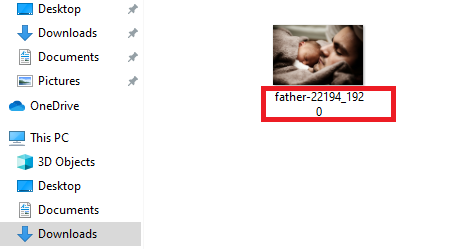
Replacing image file name. Screenshot by the author

Before adding the image to your stories, replace the existing name with the most relevant information.

For example, If I use the above image for any parenting-advice-related article, I will change the name from “father-22194_1920” to “best-parenting-advice-ever,” or something similar that best describes my article.

Include your keywords in the file name so that search engines can detect them easily and show the image when someone searches for similar topics.

Another very important thing is many of us just upload the image without noticing how heavy that image is. I mean if you download a good quality image from any image site, you will see that the image is more than 2 or 3MB. But this is way heavy and it can affect your page loading speed and ultimately, give your reader a bad experience.

To solve this issue, you can use a very simple online image compressor. Recently, I am using onlineimagecompressor.com to compress heavy images. It doesn’t destroy image quality and I think this tool can help you a lot. It compresses your images from MB to KB and makes the page loading faster.

You can also use an online photo editor like fotor.com to easily reduce your image size.

Tips: ➰ Always replace the file name based on your title/topics ➰ Include target keyword at the beginning ➰Separate words with hyphens (not underscores — because search engines don’t recognize them) ➰Don’t make your file name irrelevant and too lengthy. ➰ Compress heavy image files with tools like onlineimagecompressor.com, or, fotor.com ➰ Make sure your image-loading is not giving your readers a bad experience.

Use alt text

Alt text means Alternative Text. Some people call it Alt description, Alt attribute, Alt tag, etc. Anyway, it’s for specially-abled people who cannot read the text due to their visual impairments. So, they use screen readers that read to them.

When the screen reader finds an image, it reads the alt text to the visually impaired person so that he/she understands what’s in the photo/image.
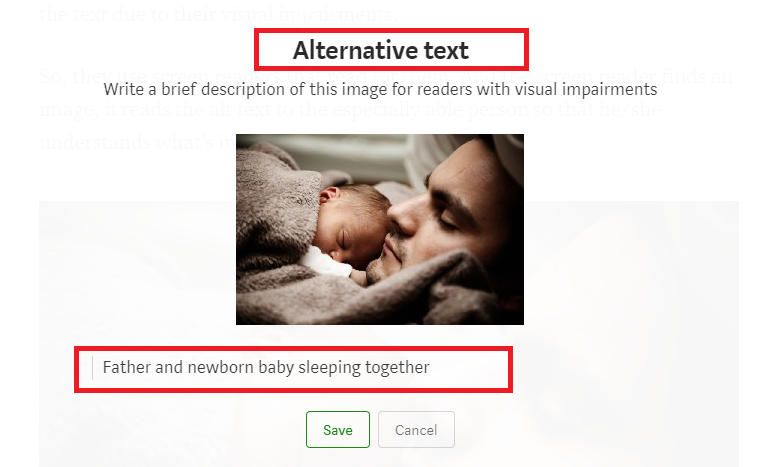
Alt text. Screenshot by the author

See how I included alt text for the above image. Make sure that your alt text describes the photo or image correctly. Do not just put your keywords there. Write good alt text so that the visually impaired person may understand what is in the image.

The ideal alt text is descriptive and between 4 to 8 words. And don’t exceed 125 characters because that’s the alt-text reading limit for screen readers.

Writing an alt text takes very little of your time, but it helps you and the other person in a great way. Alt-text is also used by search engines to understand your content.

Tips: ➰ Write a descriptive alt text within 125 characters ➰ Don’t use coma, hyphens, or dashes (spaces between words are enough) ➰ Don’t just copy and paste your story-title in the alt text ➰ Include your keyword only once

Include captions

Captions are mostly ignored as we generally cite the image sources in the caption. But the caption is a necessary thing. It helps your readers by providing additional information about the photo.

Readers tend to scan image captions very often. KissMetrics states that captions under images are read on average 300% more than the body copy itself, so not using them, or not using them correctly, means missing out on an opportunity to engage a huge number of potential readers.

Tips: ➰ Keep your captions precise and simple ➰ Describe or give additional information about the photo ➰ Don’t randomly put your keywords there

Final thoughts

None of the above tasks will take much of your time. Just one or two minutes, at best. But it will keep your story alive for many days. When people search for similar topics, your stories will pop up on the first page. Thus your writings will meet their readers.

So, before inserting images or photos into your stories, take a moment and see if your it is unique/ less-used or not. Change your image file name, use alt text, and include captions. And of course, don’t forget to give the proper attribution.

I hope it’s not too much to ask.

Thank you for reading.

New to Medium?? Unlock thousands of AWESOME stories only for $5/mo. and OUTSHINE others — Click Here.

If you want to read more of my writings, you may read my popular articles on Medium from the following links —

  1. Your Tiresome Quest for Amazing Copyright and Royalty-Free Images Is Over
  2. How I Unfollowed My Father and Learned Things Differently
  3. Apply the Pomodoro Technique to Writing
  4. If Aristotle Were a Medium Writer
  5. The School of Nature

You can share your outstanding stories and inspire others. Just click the below image and be a writer for The Masterpiece.

Writing Tips
Writing
Writing Advice
Image Seo
The Masterpiece
Recommended from ReadMedium