
Weekly Spreadsheet Roundup (Free Resources)
I like to provide useful free content when I can. I take inspiration from others doing the same. Occasionally I stumble upon other tools and spreadsheets that are too good not to share. These are great products I do not wish to recreate but actually use myself and share with others. Here are a couple of them that I found this week, as well as one of my own.
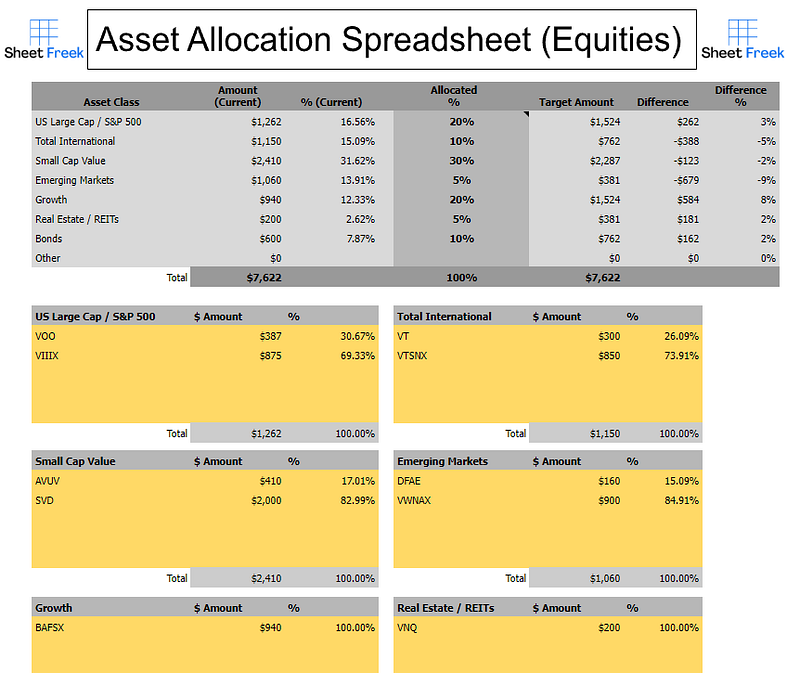
Keeping tabs on all of your stocks, ETFs, and Mutual Funds across multiple accounts can become burdensome. I needed a way to compile them all together and see what percentages I had in each asset class. Not only can it do this, but it will automatically calculate how much you are over or under your target allocation.
A useful tool to manage wealth and balance your portfolio when the time comes. There are brief instructions included on the sheet.
I am giving this tool away for free if you sign up for my free newsletter.
2. Custom ETF Allocation Calculator — Paul Merriman
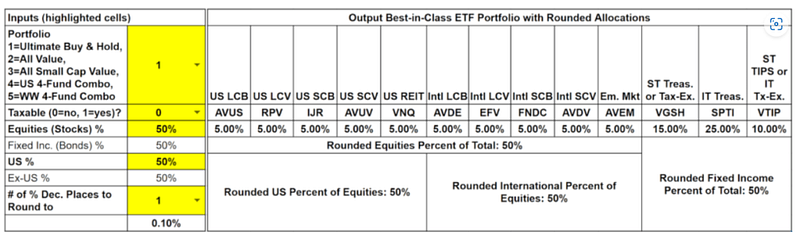
Paul Merriman is a legendary investor who focuses on mutual funds, indexed investing and asset allocation. This spreadsheet makes a full portfolio recommendation based on the type of portfolio you want to have.
The yellow boxes indicate simple input needed, and it will suggest asset allocation percentages to apply to a great selection of ETFs. If you don’t know what any of this means, the link will guide you to his website where he provides explanations and plenty of free resources.
Paul is author of eight books, including, We’re Talking Millions! 12 Simple Ways to Supercharge Your Retirement; Financial Fitness Forever: 5 Steps to More Money, Less Risk, and More Peace of Mind; Live It Up Without Outliving Your Money, and the “How To Invest” series.
3. https://docs.google.com/spreadsheets/d/19DLw_BjIm8txOUmtW6iXYNpKgcyoDF_N8FqBvppMxSM/edit?usp=sharing
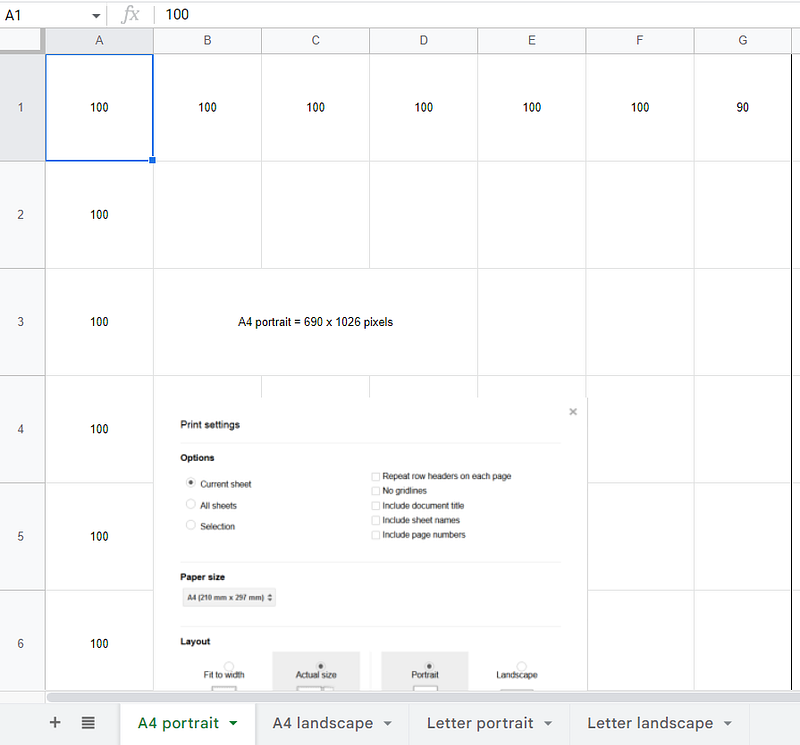
This last one is a simple template if you want your google sheets to print perfectly on 8.5″ x 11″ paper.
the typical portrait style page prints 690×1026 pixels. By changing the width of each column and row to equal these numbers, you can make your page perfectly sized for printing every time. Both portrait and landscape views are included with 4 different tabs at the bottom. The correct print settings are also included as a picture in this template.
I hope you enjoy these free resources. Consider signing up for my free newsletter to receive more of this!
Originally published at https://sheetfreek.com on February 9, 2023.


