
WebSocket with PHP: Building Real-Time Applications
Nowadays, real-time communication with today’s rapidly changing modern systems has become a necessity, whether updating live chat systems, multiplayer games, or collaborative tools, since everything has to take place instantly.
This is where WebSockets come into play: they offer a full-duplex communication channel between a server and its client. In this guide, we will discuss how exactly WebSockets work within PHP and how you could go about building a high-performance real-time application.
What is WebSocket?
It would be great to elucidate what, in fact, WebSocket is before directly jumping into the implementation details.
WebSocket is a communication protocol that provides full-duplex bi-directional communication over a single long-held, server connection.
In contrast to HTTP, which imposes the client to request new data constantly (polling), WebSocket allows both the client and server to send each other any new data without any additional overhead.
That is to say, in layman’s terms, a WebSocket connection is opened and remains open; data can be interchanged in real time without having to reconnect again and again.
Why Use WebSocket?
The main key advantages of using WebSocket are for real-time applications over the traditional way, by AJAX polling or long-polling:
- Low Latency: This is made possible through maintaining a single open connection that helps in reducing delays during data sending and receiving. It works best in those scenarios when updates need to be sent instantly, such as chat apps or real-time trading platforms.
- Real-Time, Bidirectional Communication: Unlike HTTP, which is unidirectional — from client to server — the WebSocket allows both the client and server to send messages any time. Therefore, it truly feels dynamic.
- Lower Overhead: WebSocket performs a handshake only once during the initial connection. After this, both parties can send data without repeating the HTTP request-response cycle, saving bandwidth, and proving more effective.
Setting Up WebSocket in PHP
Though PHP wasn’t originally designed with real-time applications in mind, it’s quite possible to implement WebSocket in PHP with the right libraries and tools.
1. Install a WebSocket Library for PHP
One of the most popular WebSocket libraries for PHP is Ratchet. It’s a simple, flexible, and event-driven library that makes it easy to implement WebSocket communication.
composer require cboden/ratchet
2. Building a WebSocket Server
Now, let’s dive into creating a basic WebSocket server using PHP and Ratchet.
<?php
require __DIR__ . '/vendor/autoload.php';

use Ratchet\MessageComponentInterface;
use Ratchet\ConnectionInterface;

class Chat implements MessageComponentInterface {
    protected $clients;

    public function __construct() {
        $this->clients = new \SplObjectStorage;
    }

    public function onOpen(ConnectionInterface $conn) {
        // Store the new connection
        $this->clients->attach($conn);
        echo "New connection! ({$conn->resourceId})\n";
    }

    public function onMessage(ConnectionInterface $from, $msg) {
        foreach ($this->clients as $client) {
            if ($from !== $client) {
                // Send the message to everyone except the sender
                $client->send($msg);
            }
        }
    }

    public function onClose(ConnectionInterface $conn) {
        $this->clients->detach($conn);
        echo "Connection {$conn->resourceId} has disconnected\n";
    }

    public function onError(ConnectionInterface $conn, \Exception $e) {
        echo "An error has occurred: {$e->getMessage()}\n";
        $conn->close();
    }
}

$server = \Ratchet\Server\IoServer::factory(
    new \Ratchet\Http\HttpServer(
        new \Ratchet\WebSocket\WsServer(
            new Chat()
        )
    ),
    8080
);

$server->run();
3. Running the Server
Save the above script as server.php, and run it using the PHP command line.
php server.php
Your WebSocket server will start listening on port 8080. Now it’s time to create a simple client to interact with this server.
Creating a WebSocket Client
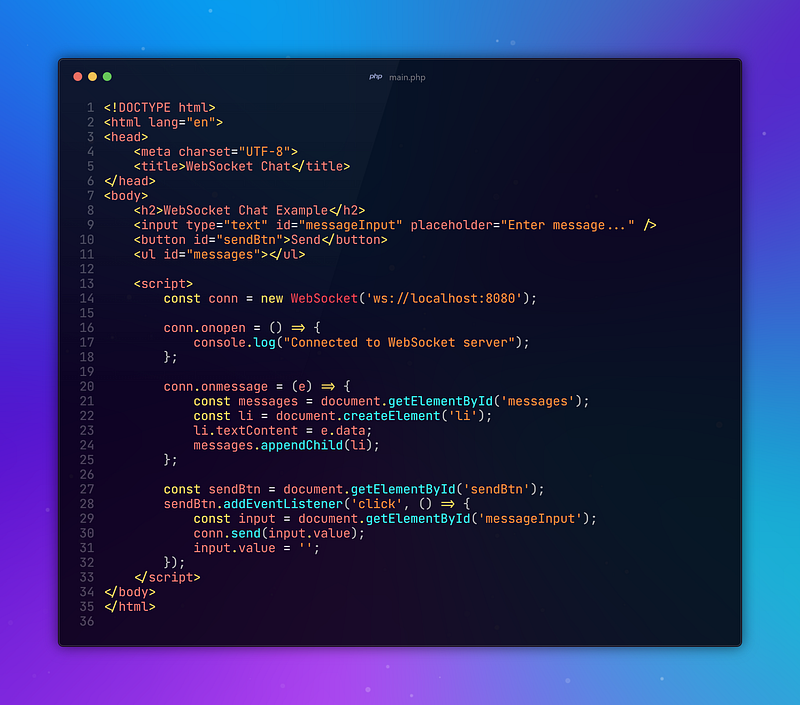
Let’s write a simple HTML and JavaScript client that connects to our PHP WebSocket server. It will act like a normal users’ sonnection to the app.
Enhancing Your WebSocket Server
While we’ve built a basic WebSocket server, there are several ways to improve and scale it:
- Handling More Complex Events: You can create a system where different message types (like notifications, commands, or broadcasts) are handled differently by your WebSocket server.
- Authentication: Add authentication to ensure that only authorized users can connect. This can be done by passing tokens or session information during the WebSocket handshake.
- Scaling with Supervisord or Docker: If you’re planning to deploy your WebSocket server in production, consider using tools like Supervisord or Docker to manage and scale the server.
- Secure WebSocket (WSS): Implement SSL to secure your WebSocket connection by using wss:// instead of ws://. In a production environment, securing your WebSocket connections is essential for protecting sensitive data.
Conclusion
WebSockets enable real-time web applications. They are a really efficient, low-latency solution for use cases that require real-time interactions, such as chat applications, live updates, or collaborative tools.
Although PHP was not initially intended for these types of tasks, with the help of libraries like Ratchet, powerful real-time applications can be now built in a snap.
By doing a little bit of setup and having the right tooling, you can integrate PHP with WebSockets to deliver a much faster, more dynamic experience for your users.
Thanks for coming this far 🎉
- 👏 Could you please clap the story to help spread the article? (50 applause).
- 📩 Also if you want to my newsletter: https://yunus-emre-adas.ck.page/c090914848
You can reach me from the links below:
To access my other articles:


