
VPC Interface Endpoint vs VPC Gateway Endpoint: Understanding the Key Differences — Part1

Curious about the differences between VPC Interface Endpoint and VPC Gateway Endpoint?
Want to securely access AWS services from your VPC without exposing them to the public internet?
This blog post will be into split into 3 parts, offering you a clear understanding and hands-on experience with Interface Endpoint and Gateway Endpoint.
What are VPC Endpoints
VPC endpoints play a crucial role in making the VPC more secure by providing a direct pathway to AWS supported services.
VPC endpoints are virtual devices that use the AWS PrivateLink feature to create a private connection between your VPC and AWS services.
The traffic between your VPC and AWS services does not leave the Amazon network, preventing the AWS resources from traversing the public internet.
This not only ensures data integrity but also enhances network performance by reducing latency.
VPC endpoints are highly available VPC components, redundant, and horizontally scaled.
This blog post will focus on the two types of VPC endpoints:
- Interface endpoints
- Gateway endpoints
VPC Interface Endpoint
An interface endpoint is an elastic network interface (ENI) with a private IP address used as an entry point for traffic destined to a supported service, and this ENI is associated with subnets within your VPC.
Using an interface endpoint, you can connect your private IP address to different AWS services like an Elastic Load Balancer, Cloudformation, SNS, S3, etc.
Interface endpoints also allow you to connect to supported marketplace partner services which are hosted by AWS partners or customers in their own VPCs.
Your security group manages the traffic from the VPC resources to the endpoint ENI. PrivateLink then ensures that the VPC traffic to other AWS services does not go to the public internet.
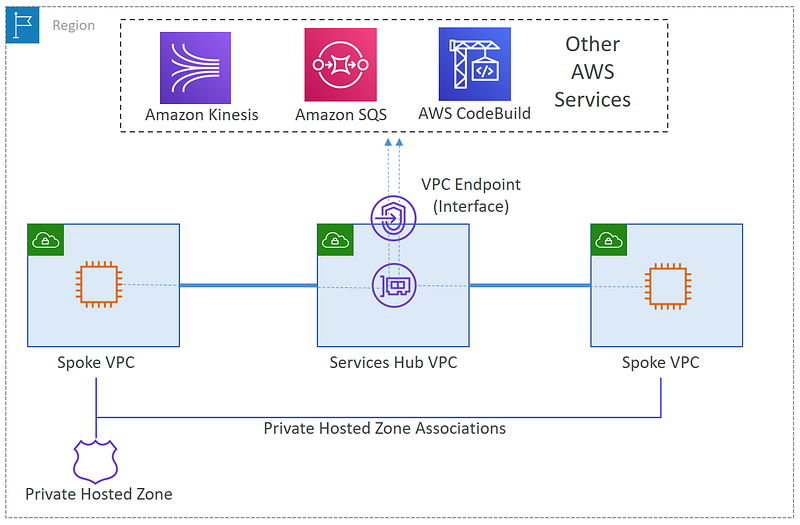
The diagram above illustrates how the endpoint ENI serves as a focal point for directing traffic to different supported AWS services. This communication occurs through a private IP address, ensuring that the data remains within the Amazon network.
The primary purpose of VPC Interface Endpoints is to enhance security and data privacy within your AWS infrastructure. Also provide a scalable, and high-performance way to connect your VPC to AWS services privately.
The VPC interface endpoint is NOT free. You will be charged based on the usage and data processing rates for privatelink.
VPC Gateway Endpoints
Imagine a situation where you need to access S3 from your EC2 instance in a public subnet. Due to the attached internet gateway, the traffic to S3 would go through the public internet.
However, challenges arise when the instance is in a private subnet without any attached NAT gateway/instance, or the cost of a NAT gateway is forbidden.
VPC Gateway endpoints provide connectivity to S3 and DynamoDB without requiring an Internet Gateway or a NAT device for your VPC.
VPC Gateway Endpoints use the VPC routing infrastructure to enable traffic between your VPC and AWS services, unlike VPC Interface Endpoints which use PrivateLink.
The use of gateway endpoints comes with the advantage of no additional data processing or hourly charges, making it a cost-effective solution.
Access through an Internet Gateway
In the diagram below, you can observe the flow of instances accessing S3 and DynamoDB via their respective public service endpoints.
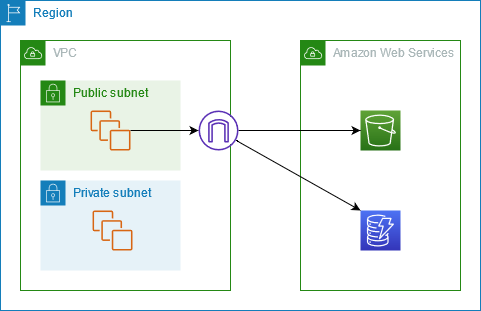
Instances in a public subnet route their traffic through the VPC’s Internet Gateway before reaching the desired service. However, Instances in a private subnet lack direct access to S3 or DynamoDB since private subnets lack routes to an internet gateway.
To enable communication from instances in the private subnet to S3 or DynamoDB it will require the addition of a NAT device in the public subnet, and subsequently routing traffic from the private subnet to the NAT device.
Access through a Gateway Endpoint
Now in this diagram below, instances access S3 and DynamoDB via a gateway endpoint. Traffic originating from your VPC and destined for S3 or DynamoDB is directed to the designated gateway endpoint.
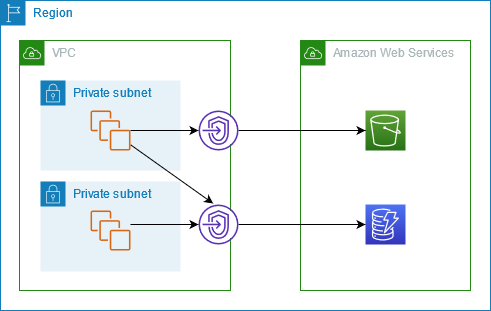
To ensure smooth connectivity, each subnet route table must be configured with a route that directs the relevant traffic toward the gateway endpoint, utilizing the corresponding prefix list for the specific service.
This efficient setup enables secure and direct communication between your VPC and the targeted AWS services through the gateway endpoint.
Key Differences Between Interface Endpoint and Gateway Endpoint
Interface Endpoints
- Used to allow private IP addressing to access public AWS services.
- Don’t use routing, uses DNS instead.
- Supports most AWS services.
- NOT highly available by default.
- To make HA available, one endpoint has to be added to one subnet, per AZ in the VPC.
- Can use Security Groups to control network access.
- Uses PrivateLink.
- Billed.
Gateway Endpoints
- Supports only S3 and DynamoDB.
- Gateway Endpoint does NOT go into a particular subnet or an Availability Zone (AZ).
- It’s highly available across all AZs in a region by default.
- Only accessible from a VPC level.
- Endpoint policy is used to control what it can access.
- Regional. NO cross-region access.
- NOT billed.
Use-case Examples
Case1: Private Access to SaaS Applications
Consider a scenario where you’ve deployed a SaaS-based application within a private subnet in an AWS VPC.
The goal is to grant access to that application to other AWS customers exposing the SaaS application to the public internet.
You can add a Network Load Balancer to the target instances in your VPC, which will represent their endpoint service.
AWS customers having their applications in their own VPC will be granted access to the endpoint service and will create an interface endpoint in their respective VPC that is linked with the endpoint service.
This allows other AWS customers to privately access your SaaS application services from within their own VPC.
Even customers who haven’t deployed their applications on AWS but still wish to your SaaS application services can do it using AWS Direct Connect.
This service enables them to establish secure and direct connections to your SaaS application services without the need for their services to be hosted on AWS.
Case2: Adding Gateway Endpoints for Heavy S3 Workload
Imagine a scenario where multiple web applications are designed to extract important data, and subsequently store this information within dedicated S3 buckets.
Approaching the conventional method, a NAT gateway is used to provide internet connectivity to the instances that host the application. This necessity arises due to the instances being situated in a private subnet.
As a consequence, this configuration leads to substantial costs associated with data transfer to S3.
Now you have the option to use a gateway endpoint to connect to S3 buckets, a solution that effectively eliminates the data transfer charges related to the NAT gateway.
However, internet access is still necessary to ensure that the website can be reached outside of the AWS infrastructure.
Note that both NAT gateway and the gateway endpoint can still work within the same subnet without any issues.
The traffic directed toward S3 will utilize the gateway endpoint, resulting in no charges. Simultaneously, the traffic destined for external websites will use the NAT gateway.
Additionally, interface endpoints can be used for other AWS services, which are not S3 or DynamoDB.


