

V-lookups in Python’s Pandas Package
If you’re coming into Data Analysis by way of Excel, then you’re surely familiar with v-lookups. A v-lookup — or “vertical-lookup” — is a way of joining data in one table on a common column in another table.
For experienced Excel users, it’s an effortless way to join data from other tables.
For experienced Excel users just getting their feet wet in Python’s Pandas package, it can be somewhat challenging to find an analogous strategy in Pandas for joining data. (At least it was for me.)
So with all this being said, here are two strategies for achieving something very similar to a v-lookup: (1) map and (2) merge.
Before we jump in, though, we’ll get a notebook set up to run an example.
0. Set Up Your Jupyter Notebook
This tutorial assumes a little familiarity with Jupyter and Python. If you are just getting started, start with my tutorial here:
If you already have Jupyter, Python, and Pandas installed then don’t go anywhere!
Import pandas:
import pandas as pdThen, create some dataframes. You can use your own data, of course, or practice along with me:
a = {'first_name': ["David","Samantha"], 'zipcode': [11697, 94117]}
b = {'city_name': ["New York","San Francisco"], 'zipcode': [11697, 94117]}
df_a = pd.DataFrame(a)
df_b = pd.DataFrame(b)
Let’s look at the dataframes:
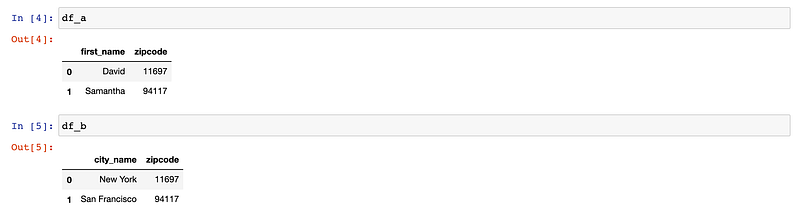
It’s clear that there is a v-lookup opportunity here. We can join on the zipcode column, and get first_name, zipcode, and city_name all in the same table.
Now, for two v-lookup(ish) options:
1. Map
Map is probably the most similar function I’ve found to a v-lookup in my short journey into the great, wide, very deep world of Data Analysis in Python/Pandas.
Here is an example of how it works:
df_a['city_name'] = df_a.zipcode.map(df_b.set_index('zipcode').city_name)What is going on here?
- We have two DataFrames: df_a and df_b.
- These two df’s have a common column called “zipcode”
- The map function relies on the dataframe index, which we can easily set ourselves
- We are using the map function to identify a common column, and map data from one dataframe to a new column in another.

2. Merge
Ever get into a scenario where you need to do several different v-lookups to grab several different columns that you want to bring over into a different Df?
Merge is like doing all the v-lookups in one go. It’s a good choice if there are many columns you want to merge into another Df.
df_c = pd.merge(df_a, df_b, left_on='zipcode',right_on='zipcode')This time we’ll create an entirely new dataframe to store the merged data.
A merge is very similar to a “join” in SQL. You can even specify what type of merge you would like: left, right, inner .
By default, pandas will assume you are running an inner join unless you select something different. This before will give you the exact same output as above.
df_c = pd.merge(df_a, df_b, left_on='zipcode',right_on='zipcode', how='inner')Let’s see it in action:


And that’s all, folks.
Give me a “follow” or a “clap” to let me know you found this useful. And I would be thrilled if you shared this with a friend or on Twitter :).
Appreciate you.
Have fun and learn something new everyday!
If you enjoy reading stories like these and want to support me as a writer, consider signing up to become a Medium member. It’s $5 a month, giving you unlimited access to thousands of Python guides and Data science articles. If you sign up using my link, I’ll earn a small commission with no extra cost to you.
A note from the Plain English team
Did you know that we have four publications and a YouTube channel? You can find all of this from our homepage at plainenglish.io — show some love by giving our publications a follow and subscribing to our YouTube channel!


