
Validate A TLS Certificate Deployed With CloudFormation
ACM.246 Adding the DNS records required to complete a TLS certificate deployment with CloudFormation
~~~~~~~~~~~~~~~~~~~~~~~~~~~~~~~~~~~~~~~~~~~~~~~~~~~~~
⚙️ Check out my series on Automating Cybersecurity Metrics | Code.
🔒 Related Stories: Application Security | AWS Security | DNS | TLS
💻 Free Content on Jobs in Cybersecurity | ✉️ Sign up for the Email List
~~~~~~~~~~~~~~~~~~~~~~~~~~~~~~~~~~~~~~~~~~~~~~~~~~~~~
In the last post we deployed a TLS certificate CloudFormation template.
However, I sadly left you hanging. Well, CloudFormation did. I mentioned how at the end of the deployment you’re left with this for what feels like eternally…

So what’s going on? We’re going to complete that deployment now.
Honestly I don’t recall if I ever bothered to automate this before because for the amount of web sites I deploy it didn’t seem worth it. It’s kind of a hassle as you will see.
But just for you, my readers, I’m going to deploy the step to validate a TLS certificate today. Perhaps I will be deploying more web sites in the future as well so it might come in handy.
DNS Validation (not Email)
As you may recall, we chose DNS as our validation method because email validation is really not secure. And if you don’t choose an option, email is the default unfortunately. I explained that this might be a good reason to automate and enforce compliant TLS certificate deployments.
In order to complete the validation we need to obtain the value AWS provided in the output of the CloudFormation template deployment. We will use it to create a CNAME record on our domain to prove we own it.
I explained what a CNAME is and DNS hosted zone records in this post and we updated a DNS hosted zone record using the AWS CLI:
The idea is that only the owner of the domain can update the records.
That’s why, as I explained in this prior post, you should think carefully about who has permissions to change DNS zone information:
Sadly, AWS is recommending email validation for a specific use case in the above. Avoid this. Use DNS. Figure out another way to architect your TLS solution.

In most cases, you can avoid that by thinking through your design.
Obtaining the information to validate the TLS Certificate
To obtain the information for the record we need to create you’ll need to query the events related to the stack that was left hanging in the last post, or look at the events in the console.
Here’s an AWS CLI command to query the events:
aws cloudformation describe-stack-events --stack-name [your stack] --profile [your profile]You’ll see a ResourceStatusReason like the following that contains the value for the CNAME to create.
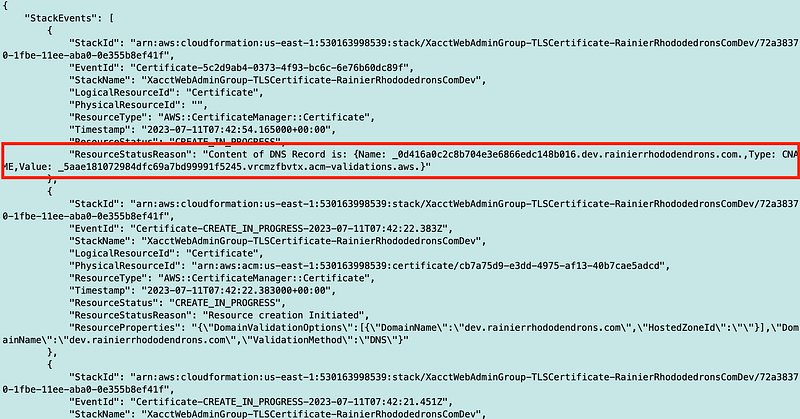
Also note that if you don’t make the changes in time, your stack will end up in a ROLLBACK_COMPLETE state and you’ll have to delete it and start over.
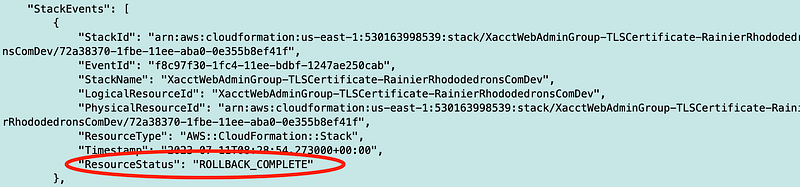
Can I execute the command again or do I need to start over? Let’s try it.
Nope.

In any case, I have to delete that stack and start over. Now I had to think about how this works for a minute because it’s been a while. What we need to do is add the hosted zone ID at the time of initial deployment otherwise it won’t work. This is another oddity. If it won’t work that way with DNS validation and not hosted zone ID, why did CloudFormation let me deploy it?
Anyway, I’ve revised the certificate template to only include the option with a hosted zone ID and to require it. I can get rid of all that condition logic.
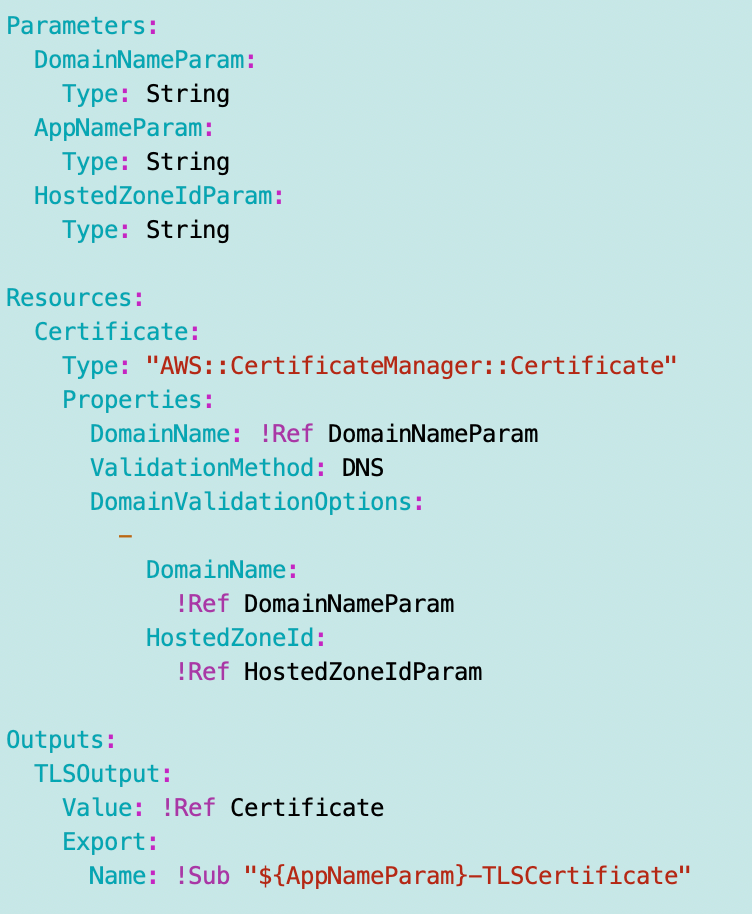
I update the function to deploy a certificate to require the hosted zone id:
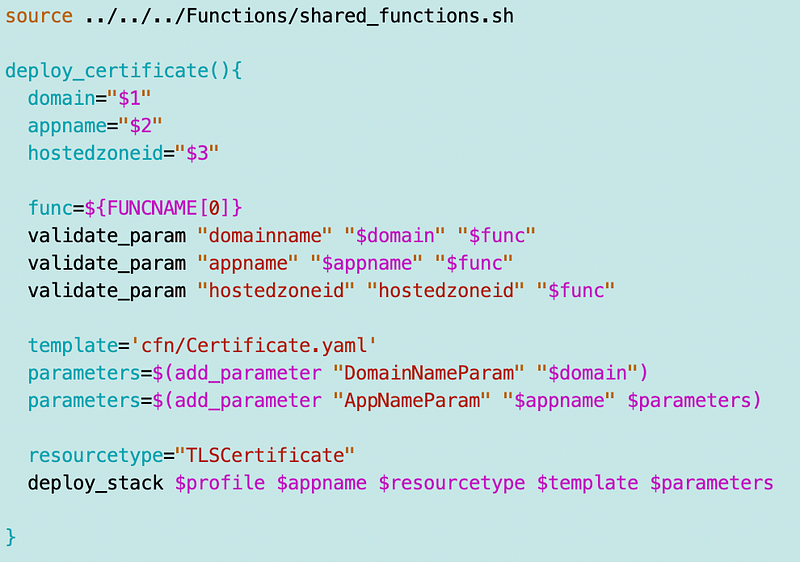
I update the static website deployment script to pass the hosted zone id:

I redeploy and I’m back to this:

In a second terminal window I’m checking the status of the stack:
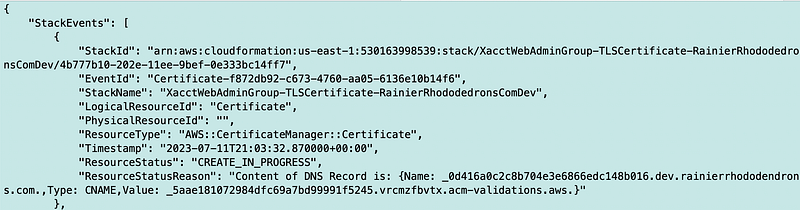
Refer to the last post if you don’t know how to get here 👆.
Now I need to query the CNAME name and value in that second terminal window so can pass it to a function.
First of all I can grep the line with the values I need:
aws $svc describe-stack-events --region $region --max-items 1 --stack-name $stackname --profile $profile | grep ResourceStatusReason
Now I want to remove everything up to the { and after the }. sed to the rescue. Adding these to our handy sed commands:
Beginning up to {
sed 's/^.*{//g'} to end
sed 's/}.*$//g'And we end up with this:
aws $svc describe-stack-events --region $region --max-items 1 --stack-name $stackname --profile $profile | grep ResourceStatusReason | sed 's/^.*{//g' | sed 's/}.*$//g'Which I can put into a variable:
s=$(aws $svc describe-stack-events --region $region --max-items 1 --stack-name $stackname --profile $profile | grep ResourceStatusReason | sed 's/^.*{//g' | sed 's/}.*$//g')
I can use cut to get the name:
name=$(echo $s | cut -d ':' -f2 | cut -d ',' -f1)\
echo $name
And similar to get the value:
value=$(echo $s | cut -d ':' -f4)
echo $value
Now we can use the above to deploy a cname with a name and value for our hosted zone.
Note that you could probably do all of the above with some AWS filtering option but I find them much more convoluted than just using sed and cut in many case. Perhaps I’m just used to sed and cut. I’ve tried and tried to get the querying and filtering with the CLI but find myself rarely using it.
Add the CNAME to the DNS Hosted Zone
On the same page AWS recommends email if you can’t make DNS work they show you how to add a wildcard certificate which I also do not recommend. Maybe sometime I’ll explain how I’ve abused these on cloud and application penetration tests.
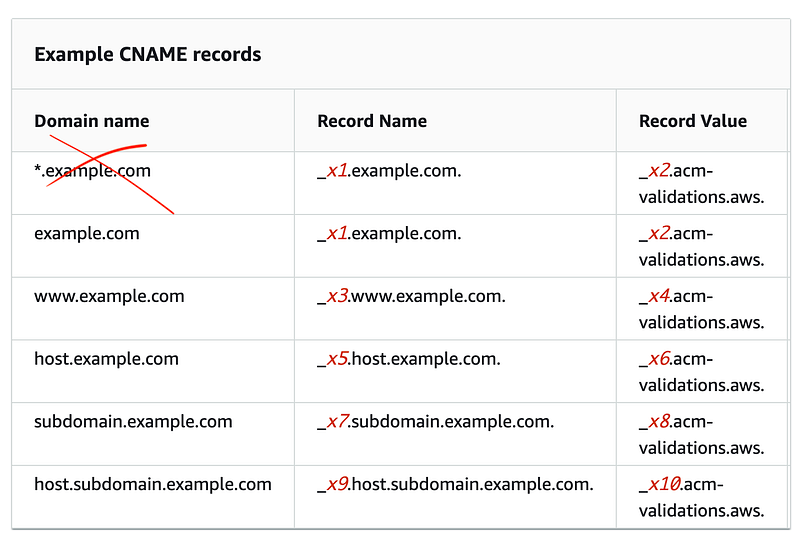
I would opt for separate domain names for different environments over subdomains if you are hitting some kind of limit and you are dealing with sensitive data. However, I know in environments at scale all this is challenging. That’s why automation and standardization of deployments is your friend.
The default certificate quota in AWS is 2500 including expired and revoked certificates. Per account. So if you need more it seems like you can open a new account and you can also request an increase. I can think of companies serving many customers with per customer domains where limits may be an issue but for many companies, limits will not be an issue if you think through your architecture in advance and don’t create a separate domain name for every single web request.
I’d be happy to answer questions about these types of challenges on consulting calls through IANS research. Send me your architecture diagrams (encrypted if you like with my GPG key) and we can discuss.
That’s the type of call I love to get and discuss.
CloudFormation for DNS record on our hosted zone
OK, let’s try to set up a DNS record on our hosted zone using CloudFormation, instead of the AWS CLI.
Here’s the CloudFormation documentation.
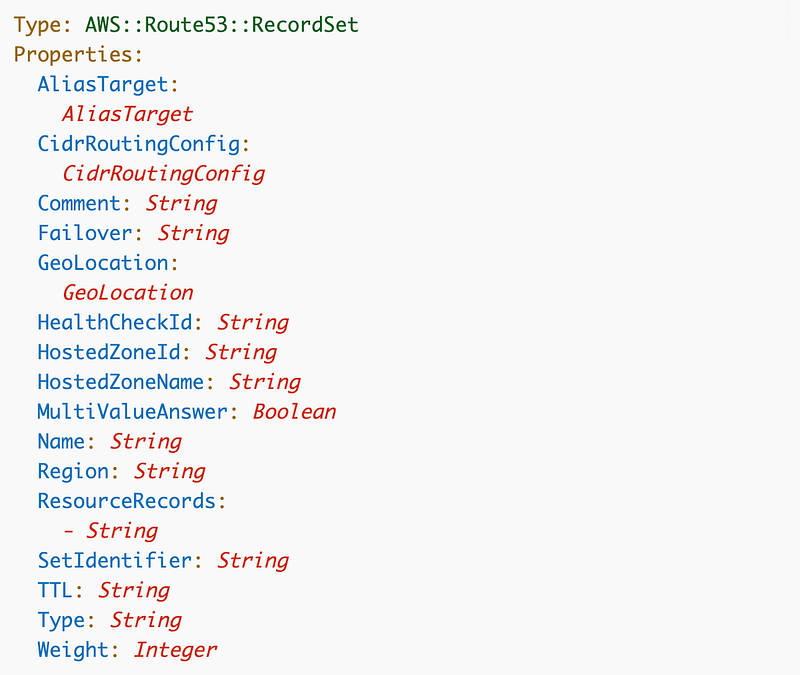
AliasTarget — N/A
CidrRoutingConfig - NA
Comment - if you like
Failover - N/A
Geolocation - N/A
HealthCheckId - N/A
HostedZoneId* - For your domain as I queried in prior posts
HostedZoneName* - Try to look up by zone name - if duplicates will fail
* Use either HostedZoneId (safer) or HostedZoneName (may fail)
MultiValueAnswer - N/A
Name - required - we will use name from CloudFormation output
Region - N/A
ResourceRecords - the value for the type, we will use value from CloudFormation output
SetIdentifier: N/A
TTL - Not required, but can set to 3600
Type - CNAME
Weight - N/A
I’m adding my template here:
SecurityMetricsAutomation/DNS/stacks/cfn/CNAME.yamlHere’s the template — pretty simple compared to our AWS CLI challenges in the prior post, no?
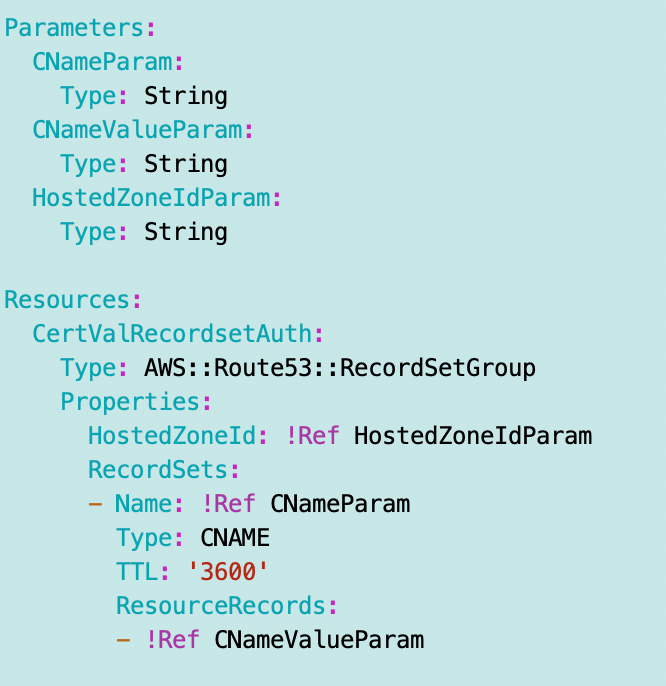
Next I need a function to deploy a CNAME in:
SecurityMetricsAutomation/DNS/stacks/dns_functions.sh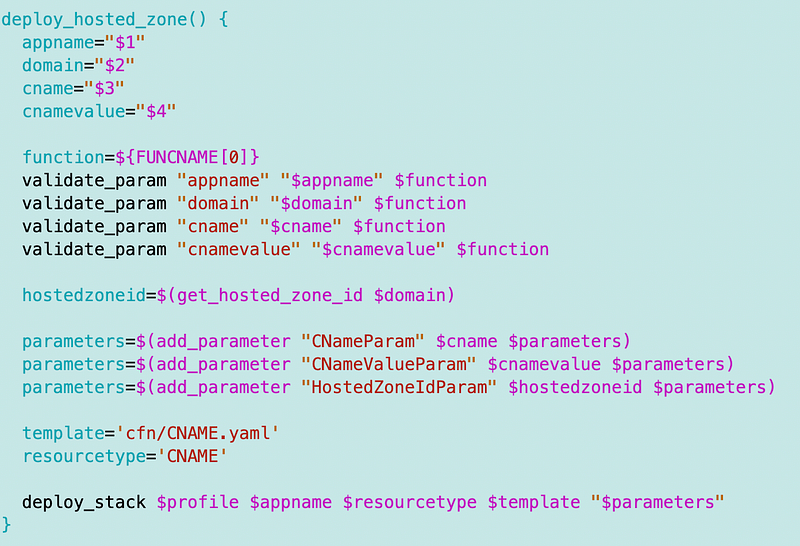
Now we need to combine the POC script above to get the name and value for our CNAME and deploy it to validate the TLS certificate stack.
Now remember, our static website stack is over there hanging and waiting for these updates. We can’t add any of this to that script is needs to be run in a separate script. Hence, why I feel like this is a bit of a house of cards solution but we do what we must to get things done.
So where should be put this code? What if we have separate users managing TLS certificates and DNS as I experienced at Capital One? Who gets to manage the code?
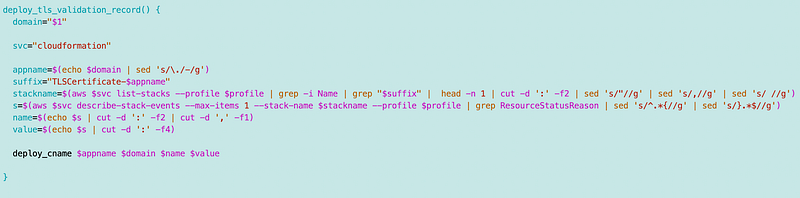
I’m going to presume the DNS team can have read-only access to the TLS stack to pull the CNAMEs, so I’m going to add a function to create a TLS DNS validation record to the DNS functions we’re creating in this dns_functions.sh file. The new function will retrieve the CNAME name and value and use the function we just created:
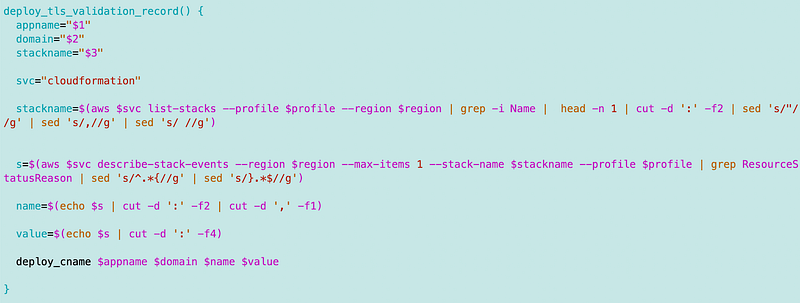
But this code has a problem. It presumes that the last stack is our stack. In an environment with multiple people deploying and working with stacks in our account that is not going to work.
I also mentioned before this name is a bit hideous:
XacctWebAdminGroup-TLSCertificate-RainierRhododedronsComDevWhat if we change it to this:
XacctWebAdminGroup-TLSCertificate-dev-rainierrhododedrons-comThen we can search for stacks with our domain name, replacing a period with a dash. I found that I defined the app name at the top of my script to create a static website:

Now I need to delete and redeploy my stacks. I can delete the stacks in CloudFormation using this command.
aws cloudformation delete-stack --stack-name [name] --profile [profile]When I redeploy I’m also going to run another test. You used to only be able to deploy TLS certificates in us-east-1. I’m seeing them available in other regions now so I’m going to test using an alternate region.
For consistency I added a line of code to calculate the app name from the domain name like this:
appname=$(echo $domain | sed 's/\./-/g')With sed, you need to escape special characters such as periods with \. I’m replacing the period with a dash (-). We can use that same function to search for our stack names when needed. I’ll show you.
OK so I delete and redeploy everything with the new naming convention.
One thing I realized is that I needed to have the ability to update the hosted zone record on the primary domain or edit it. I could probably add delete as well but not doing that yet.
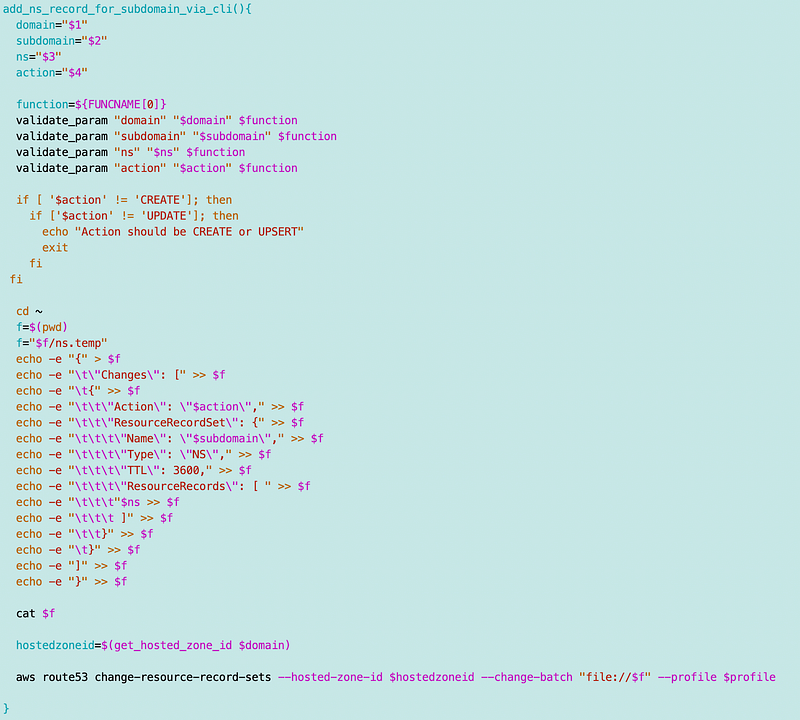
Now I’m back to the waiting state and I can try to retrieve the stack name I’m after using the domain name transformation.
I head back to my function to deploy the CNAME for validation and make a few changes.
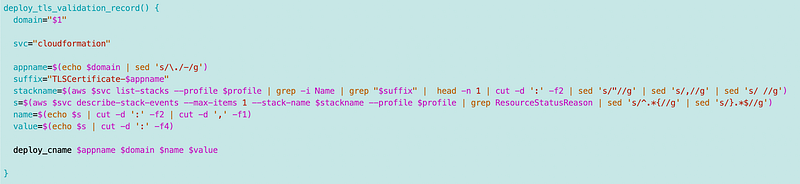
I calculate the app name by replacing periods with dashes:
appname=$(echo $domain | sed 's/\./-/g')I calculate the stack name suffix:
suffix="TLSCertificate-$appname"I add a grep for the suffix to get the correct stack name:
stackname=$(aws $svc list-stacks --profile $profile | grep -i Name | grep "$suffix" | head -n 1 | cut -d ':' -f2 | sed 's/"//g' | sed 's/,//g' | sed 's/ //g')Then I derive the name and value for the CNAME as explained above from the stack events for the stack with that name.
Next I can add a script to call this function to the directory where my static web site script exists to call the function. I only need to pass in the domain name now.
Yay!

Side note — looking at this I think I should add “Route53-CNAME” as the resource type to make it easier to find all route53 resources.
Now take a look at that deployment stack that was hanging waiting for input.
Yay again!

Note that if you left your stack hanging for too long it will time out and you’ll have to delete and redeploy it. If you terminate the script where it’s sitting there waiting you can still complete the validation step and then check the status of the certificate deployment.
I think that would have been a better option for implementation because as is you have a hanging process that you would have to terminate somehow if you wanted to do this all with one script — and the way you terminate might different by OS so you might not have portable code when taking that approach. So I just left it in two scripts for now.
Well it works. Maybe there’s some other secret to doing this more easily (I didn’t read every line of the documentation.) If I find something better later I’ll write about it.
~~~
NOTE: I tried to run this script again for the same certificate and there appears to be a bug in the AWS output. Instead of getting the expected CNAME information I get this:

I fixed it but I believe their are some bugs as noted here:
In general, this implementation is way too fragile. But it’s what we have.
Follow for updates.
Teri Radichel | © 2nd Sight Lab 2023
About Teri Radichel:
~~~~~~~~~~~~~~~~~~~~
⭐️ Author: Cybersecurity Books
⭐️ Presentations: Presentations by Teri Radichel
⭐️ Recognition: SANS Award, AWS Security Hero, IANS Faculty
⭐️ Certifications: SANS ~ GSE 240
⭐️ Education: BA Business, Master of Software Engineering, Master of Infosec
⭐️ Company: Penetration Tests, Assessments, Phone Consulting ~ 2nd Sight Lab
Need Help With Cybersecurity, Cloud, or Application Security?
~~~~~~~~~~~~~~~~~~~~~~~~~~~~~~~~~~~~~~~~~~~~~~~~~~~~~~~~~~~~~
🔒 Request a penetration test or security assessment
🔒 Schedule a consulting call
🔒 Cybersecurity Speaker for PresentationFollow for more stories like this:
~~~~~~~~~~~~~~~~~~~~~~~~~~~~~~~~~~~~~~~~~~~~~~~~~~~~~~~~~~~~~
❤️ Sign Up my Medium Email List
❤️ Twitter: @teriradichel
❤️ LinkedIn: https://www.linkedin.com/in/teriradichel
❤️ Mastodon: @teriradichel@infosec.exchange
❤️ Facebook: 2nd Sight Lab
❤️ YouTube: @2ndsightlab


