avatarTeri Radichel

Free AI web copilot to create summaries, insights and extended knowledge, download it at here

3638

Abstract

</div> </div> </a> </div><p id="163c">However, by enforcing MFA in the trust policy and if only one person has the MFA device that can help with non-repudiation. You might also think about how the user that owns the credentials can securely provide the inputs to this automated process rather than having an administrator access the user credentials.</p><h2 id="7eee">AWS CLI configure set</h2><p id="94c9">We’ll use the AWS CLI configure set command:</p><div id="7544" class="link-block"> <a href="https://awscli.amazonaws.com/v2/documentation/api/latest/reference/configure/set.html"> <div> <div> <h2>set - AWS CLI 2.11.25 Command Reference</h2> <div><h3>undefined</h3></div> <div><p>undefined</p></div> </div> <div> <div style="background-image: url(https://miro.readmedium.com/v2/resize:fit:320/)"></div> </div> </div> </a> </div><p id="26e0">If you take a look at the examples, you can set pretty much anything that we configured manually in the config file with the aws configure set command.</p><figure id="f9df"><img src="https://cdn-images-1.readmedium.com/v2/resize:fit:800/1*8DIBkP8uCEDrHB6fG5Y9jQ.png"><figcaption></figcaption></figure><p id="b66a">We can easily use the aws configure set command to create a cross-account role that requires MFA and an external id with this reusable code:</p><div id="2791"><pre><span class="hljs-comment">#this code presumes you ran aws configure and set the keys</span> <span class="hljs-comment">#for the default profile. This new profile gets credentials from that</span> <span class="hljs-comment">#default proflie</span>

<span class="hljs-attribute">region</span>=<span class="hljs-string">"[your aws region here]"</span> <span class="hljs-attribute">role_arn</span>=<span class="hljs-string">"[your role arn here]"</span> <span class="hljs-attribute">mfa_serial</span>=<span class="hljs-string">"[your mfa device arn here]"</span> <span class="hljs-attribute">externalid</span>=<span class="hljs-string">"[your external id here]"</span>

aws configure <span class="hljs-built_in">set</span> region <span class="hljs-variable">region</span> --profile <span class="hljs-variable">profile</span> aws configure <span class="hljs-built_in">set</span> role_arn <span class="hljs-variable">role_arn</span> --profile <span class="hljs-variable">profile</span> aws configure <span class="hljs-built_in">set</span> mfa_serial <span class="hljs-variable">mfa_serial</span> --profile <span class="hljs-variable">profile</span> aws configure <span class="hljs-built_in">set</span> externalid <span class="hljs-variable">externalid</span> --profile <span class="hljs-variable">profile</span> aws configure <span class="hljs-built_in">set</span> source_profile <span class="hljs-string">"default"</span> --profile <span class="hljs-variable">profile</span> aws configure <span class="hljs-built_in">set</span> output <span class="hljs-string">"json"</span> --profile <span class="hljs-variable">profile</span></pre></div><p id="22f2">You could also pre-populate the AWS keys for the default profile, if appropriate, but only if you are enforcing MFA, otherwise use an AWS role instead.</p><div id="8e1c"><pre><span class="hljs-comment">#make sure the aws secret key and access key are not visible in the code</span> <span class="hljs-comment">#or logs where someone who shouldn't have access to the keys can see them</span> accesskey=[your access key] secretkey=[your<span class="hlj

Options

s-built_in"> secret </span>key]

aws configure <span class="hljs-built_in">set</span> aws_access_key_id <span class="hljs-variable">accesskey</span> aws configure <span class="hljs-built_in">set</span> aws_secret_access_key <span class="hljs-variable">secretkey</span></pre></div><h2 id="9eb1">Credential visibility in logs</h2><p id="0466">You should ensure that the aws access key id and aws secret access key are never accessible in logs, source code, or bash history except to the people who are supposed to use them. You can monitor for unauthorized use of the credentials on a network or device other than the one where the credentials should be used.</p><p id="8ae2">I explain how credentials show up in logs in my posts on automating git configuration.</p><div id="d260" class="link-block"> <a href="https://readmedium.com/git-and-github-security-8728bef0a057"> <div> <div> <h2>Git and GitHub Security</h2> <div><h3>Stories about securing git, GitHub, and your code</h3></div> <div><p>medium.com</p></div> </div> <div> <div style="background-image: url(https://miro.readmedium.com/v2/resize:fit:320/1*LQ5l21ueAnPOGOnhukzTCQ.png)"></div> </div> </div> </a> </div><h2 id="2a3f">Validating the configuration</h2><p id="9e44">As always after running your commands you can validate that they created the correct configuration by checking the aws config file.</p><div id="70a0"><pre><span class="hljs-built_in">cat</span> ~/.aws/config</pre></div><p id="c1ca">and check that your credentials are added to:</p><div id="c015"><pre><span class="hljs-built_in">cat</span> ~/.aws/credentials</pre></div><p id="3a1a">Remember that anyone on the host can read those files which is why I recommend only using hard coded credentials if you are requiring MFA in the trust policy for specific users (<i>not just any MFA</i>). Otherwise use an AWS role.</p><p id="6b8a">Follow for updates.</p><p id="4a3a">Teri Radichel | <i>© <a href="https://2ndsightlab.com/?source=post_page---------------------------">2nd Sight Lab</a> 2023</i></p><div id="8b5f"><pre><span class="hljs-section">About Teri Radichel:

⭐️ Author: Cybersecurity Books
⭐️ Presentations: Presentations by Teri Radichel
⭐️ Recognition: SANS Award, AWS Security Hero, IANS Faculty
⭐️ Certifications: SANS ~ GSE 240
⭐️ Education: BA Business, Master of Software Engineering, Master of Infosec
⭐️ Company: Penetration Tests, Assessments, Phone Consulting ~ 2nd Sight Lab</pre></div><div id="caae"><pre><span class="hljs-section">Need Help With Cybersecurity, Cloud, or Application Security?
~~~~~~~~~~~~~~~~~~~~~~~~~~~~~~~~~~~~~~~~~~~~~~~~~~~~~~~~~~~~~</span>
🔒 Request a penetration test or security assessment
🔒 Schedule a consulting call
🔒 Cybersecurity Speaker for Presentation</pre></div><div id="5a42"><pre>Follow <span class="hljs-keyword">for</span> more stories like <span class="hljs-keyword">this</span>:

❤️ Sign Up my Medium Email List ❤️ Twitter: <span class="hljs-meta">@teriradichel</span> ❤️ LinkedIn: https:<span class="hljs-comment">//www.linkedin.com/in/teriradichel</span> ❤️ Mastodon: <span class="hljs-meta">@teriradichel</span><span class="hljs-meta">@infosec</span>.exchange ❤️ Facebook: 2nd Sight Lab ❤️ YouTube: @2ndsightlab</pre></div><figure id="faf5"><img src="https://cdn-images-1.readmedium.com/v2/resize:fit:800/0*H9Ew1KCl-29nZiPR.jpeg"><figcaption></figcaption></figure></article></body>

Using the AWS CLI to Configure a Role Profile With MFA

ACM.226 Automating CLI configuration for an IAM role that requires MFA

~~~~~~~~~~~~~~~~~~~~~~~~~~~~~~~~~~~~~~~~~~~~~~~~~~~~~~~~~

⚙️ Part of my series on Automating Cybersecurity Metrics. The Code.

🔒 Related Stories: MFA | Passwords | IAM

💻 Free Content on Jobs in Cybersecurity | ✉️ Sign up for the Email List

~~~~~~~~~~~~~~~~~~~~~~~~~~~~~~~~~~~~~~~~~~~~~~~~~~~~~~~~~

In my last post in this series I explained how you can get around some of the weaknesses in AWS Identity Center (formerly SSO).

I showed you in a prior post how to configure the AWS CLI manually with a role that requires MFA by editing the config file.

In this post I’ll show you how to do the same thing with the CLI which lends itself to automation. We might want to auto-configure compute resources with roles that we will use later. Automatic configuration can help prevent errors and make security easier for users, which is always nice!

A note on non-repudiation

Credentials should never be shared to ensure non-repudiation.

However, by enforcing MFA in the trust policy and if only one person has the MFA device that can help with non-repudiation. You might also think about how the user that owns the credentials can securely provide the inputs to this automated process rather than having an administrator access the user credentials.

AWS CLI configure set

We’ll use the AWS CLI configure set command:

If you take a look at the examples, you can set pretty much anything that we configured manually in the config file with the aws configure set command.
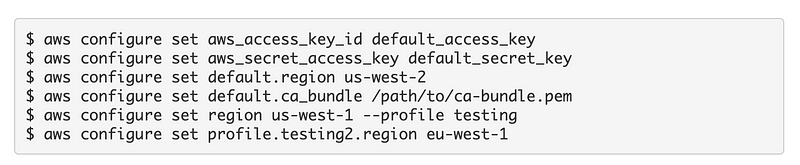
We can easily use the aws configure set command to create a cross-account role that requires MFA and an external id with this reusable code:

#this code presumes you ran aws configure and set the keys
#for the default profile. This new profile gets credentials from that
#default proflie

region="[your aws region here]"
role_arn="[your role arn here]"
mfa_serial="[your mfa device arn here]"
externalid="[your external id here]"

aws configure set region $region --profile $profile
aws configure set role_arn $role_arn --profile $profile
aws configure set mfa_serial $mfa_serial --profile $profile
aws configure set externalid $externalid --profile $profile
aws configure set source_profile "default" --profile $profile 
aws configure set output "json" --profile $profile

You could also pre-populate the AWS keys for the default profile, if appropriate, but only if you are enforcing MFA, otherwise use an AWS role instead.

#make sure the aws secret key and access key are not visible in the code
#or logs where someone who shouldn't have access to the keys can see them
accesskey=[your access key]
secretkey=[your secret key]

aws configure set aws_access_key_id $accesskey
aws configure set aws_secret_access_key $secretkey

Credential visibility in logs

You should ensure that the aws access key id and aws secret access key are never accessible in logs, source code, or bash history except to the people who are supposed to use them. You can monitor for unauthorized use of the credentials on a network or device other than the one where the credentials should be used.

I explain how credentials show up in logs in my posts on automating git configuration.

Validating the configuration

As always after running your commands you can validate that they created the correct configuration by checking the aws config file.

cat ~/.aws/config

and check that your credentials are added to:

cat ~/.aws/credentials

Remember that anyone on the host can read those files which is why I recommend only using hard coded credentials if you are requiring MFA in the trust policy for specific users (not just any MFA). Otherwise use an AWS role.

Follow for updates.

Teri Radichel | © 2nd Sight Lab 2023

About Teri Radichel:
~~~~~~~~~~~~~~~~~~~~
⭐️ Author: Cybersecurity Books
⭐️ Presentations: Presentations by Teri Radichel
⭐️ Recognition: SANS Award, AWS Security Hero, IANS Faculty
⭐️ Certifications: SANS ~ GSE 240
⭐️ Education: BA Business, Master of Software Engineering, Master of Infosec
⭐️ Company: Penetration Tests, Assessments, Phone Consulting ~ 2nd Sight Lab
Need Help With Cybersecurity, Cloud, or Application Security?
~~~~~~~~~~~~~~~~~~~~~~~~~~~~~~~~~~~~~~~~~~~~~~~~~~~~~~~~~~~~~
🔒 Request a penetration test or security assessment
🔒 Schedule a consulting call
🔒 Cybersecurity Speaker for Presentation
Follow for more stories like this:
~~~~~~~~~~~~~~~~~~~~~~~~~~~~~~~~~~~~~~~~~~~~~~~~~~~~~~~~~~~~~ 
❤️ Sign Up my Medium Email List
❤️ Twitter: @teriradichel
❤️ LinkedIn: https://www.linkedin.com/in/teriradichel
❤️ Mastodon: @teriradichel@infosec.exchange
❤️ Facebook: 2nd Sight Lab
❤️ YouTube: @2ndsightlab

Cli
Automate
AWS
MFA
Role
Recommended from ReadMedium