Crawling Google Trends with AirFlow
Crawling Google Trends with Airflow
A complete example of Airflow DAG for crawling Google Trends

In this post, we will see an example of an Airflow pipeline to store information from a Rest API.
You can refer to the post Running Apache Airflow via Docker Compose. As Rest API, we will use Google Trends. It shows insights into the top search queries and their evolution across various countries and regions. Moreover, Google Trends is the source for many research papers:
- Google Trends: A Web-Based Tool for Real-Time Surveillance of Disease Outbreaks
- In Search of a Job: Forecasting Employment Growth Using Google Trends,
- HOW TO USE GOOGLE TRENDS: 10 MIND-BLOWING TRICKS FOR ENTREPRENEURS.
In general, Google Trends offers a good insight into the world and predicts the US election in 2016 (see the NYT).
We can see exploit this tool in the following ways:
- Using the Website (here is the result of the Italian election on 25 September 2022)
- Using the dataset offered by Google Platform in BigQuery
- Parsing the feed-RSS
- Using a library
For this post, we will exploit the last way by using PyTrends.
PyTrends Library
Pytrends library is:
Unofficial API for Google Trends

Allows simple interface for automating downloading of reports from Google Trends. Only good until Google changes their backend again :-P. When that happens feel free to contribute!
Pytrends has the following API:
Interest Over Time: historical data for a searched keyword;Historical Hourly Interest: historical hourly data for a searched keyword ;Related Topics: data for the related keywords to a provided keyword;Interest by Region: where the keyword is most searched for a Region section;Related Queries: for the related keywords to a provided keyword;Trending Searches: for the latest trending searches;Top Charts: the data for a given topic;Suggestions: a list of additional suggested keywords for a search
A deep dive into Pytrends
Pytrends has a lot of methods. We can start with the installation.
Installing Pytrends is simple, type:
pip install pytrends
After this, you can use a python script or a Jupyter notebook for development.
For an introduction, you can read the official documentation here and here.
Now, we can pass to our goal:
We want to save the daily trending topic in a country (e.g. Italy), and save it in a PostgreSQL table for analytics purposes.
So for our need, we need the Trending Searches API. From the documentation, the command is:
trending_searches(pn='united_states')where pn is the name of the country.
The method returns a Pandas DataFrame. So for our needs, the crawling code is simple:
# Get Google Hot Trends data
## Setting function parameter
country = 'italy'

## Retrieve the data
df = pytrend.trending_searches(pn=country)
df.head()
The result is a column with the trending search:

Saving the trends
Prepare the Environment
We have already seen how to get the data using pytrends. Now, we can see how to save the data in a table.
We will use SQLAlchemy, one of the most famous Python SQL toolkits for Object Relational Mapper. For a complete introduction, you can read this post.
To recap the main steps:
1. Create a PostgreSQL user with a password:

    > docker exec -it <POSTGRESS CONTAINER ID> bash

2. From the container:

    > su - postgres
    > psql -d <POSTGRES DATABASE> -U <POSTGRESS ADMIN> -W
    > CREATE USER admin WITH PASSWORD 'Admin1!';  # Create a new user
    > CREATE DATABASE crawled_data OWNER admin; # Create a new dataset
    > \q # To exit

3. Test the access using the new user:

    > psql -d crawled_data -U admin -W
    > \q

4. Exit from the container using two times the command:

    > exit
    > exit

5. Installing SQLAlchemy inside the Jupyter Notebook:

    > !pip install sqlalchemy
    > !pip install psycopg2-binary
Saving code
Now that the environment is set, we can see the saving code:
from sqlalchemy import create_engine
from datetime import date

today = date.today()
print("Today's date:", today)

# Set the database parameters
USERNAME="admin"
PASSWORD="Admin1!"
DATABASE="crawled_data"
TABLE_NAME="google_trends"
HOST_URL="127.0.0.1:5432"

# Create the engine
engine = create_engine(f'postgresql://{USERNAME}:{PASSWORD}@{HOST_URL}/{DATABASE}')

# Get Google Hot Trends data
## Setting function parameter
country = 'italy'

# Retrieve the data
pytrend = TrendReq()
df = pytrend.trending_searches(pn=country)
df.head()
## Change the column name
df.columns = ["TrendingSearch"]
## Set the crawling date
df["Date"] = today

# Save in the database
df.to_sql(TABLE_NAME, engine, if_exists='append', index=None)
The code is simple. Just one comment the command df["Date"] = today has been added to avoid confusing the data for yesterday with the actual date.
From the code to the DAG
Now, we can create the DAG file google_trends_dag.py:
from datetime import datetime, timedelta
from textwrap import dedent
from sqlalchemy import create_engine
from datetime import date
from airflow import DAG
from pytrends.request import TrendReq

from airflow.operators.python_operator import PythonOperator

# Set the database parameters
USERNAME="admin"
PASSWORD="Admin1!"
DATABASE="crawled_data"
TABLE_NAME="google_trends"
HOST_URL="db:5432" # This is the name of the PostgreSQL container

def crawing_google_trends():

    today = date.today()

    # Create the engine
    engine = create_engine(f'postgresql://{USERNAME}:{PASSWORD}@{HOST_URL}/{DATABASE}')

    # Get Google Hot Trends data
    ## Setting function parameter
    country = 'italy'

    # Retrieve the data
    pytrend = TrendReq()
    df = pytrend.trending_searches(pn=country)
    df.head()
    ## Change the column name
    df.columns = ["TrendingSearch"]
    ## Set the crawling date
    df["Date"] = today

    # Save in the database
    df.to_sql(TABLE_NAME, engine, if_exists='append', index=None)

with DAG('google_trends_dag',
         description='Google Trends DAG',
         schedule_interval='0 0 * * *',
         start_date=datetime(2018, 11, 1),
         catchup=False) as dag:
    python_task	= PythonOperator(task_id='google_trends_crawling', python_callable=crawing_google_trends, retries=3)
    python_task
The pipeline in action
Before running, you have to ensure the dependencies. To install them change the variable _PIP_ADDITIONAL_REQUIREMENTS (line 61) inside the docker-compose.yaml file:
_PIP_ADDITIONAL_REQUIREMENTS: ${_PIP_ADDITIONAL_REQUIREMENTS:-pytrends sqlalchemy psycopg2-binary}More details are available here and here.
Now, re-init the docker-compose using:
docker-compose up airflow-initFinally, we can restart the airflow.
Now, we can put the file in the AIRFLOW dag folder /tmp/airflow/dags.
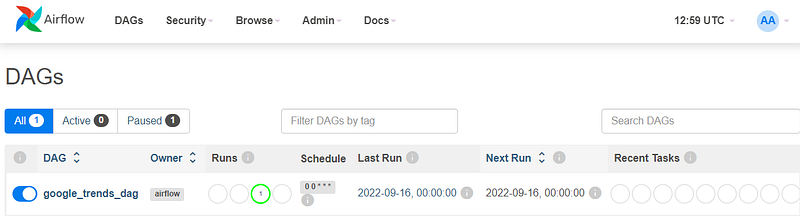
After five minutes, the default Airflow update time, we can see the dag in the interface and start it.
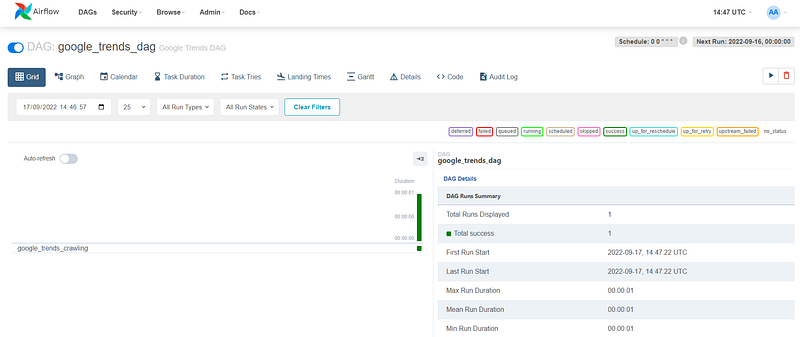
After some seconds, you can see the first pipeline run:
Now, we can see the crawled data using the following code from your main machine:
USERNAME="admin"
PASSWORD="Admin1!"
DATABASE="crawled_data"
HOST_URL="127.0.0.1:5432"
engine = create_engine(f'postgresql://{USERNAME}:{PASSWORD}@{HOST_URL}/{DATABASE}')
df = pd.read_sql("SELECT * FROM google_trends LIMIT 5", engine)
dfSummary
In this post, we see how to create a simple Airflow pipeline able to crawl the google trends daily top query search and store them in a PostgreSQL table. We use the python library pytrends and sqlalchemy. Moreover, we introduce the concept of retrying the pipeline in case of error. Finally, it is not best to use the _PIP_ADDITIONAL_REQUIREMENTS configuration. It could be better to rebuild the image. More information is available here.
Level Up Coding
Thanks for being a part of our community! Before you go:
- 👏 Clap for the story and follow the author 👉
- 📰 View more content in the Level Up Coding publication
- 💰 Free coding interview course ⇒ View Course
- 🔔 Follow us: Twitter | LinkedIn | Newsletter
🚀👉 Join the Level Up talent collective and find an amazing job