avatarDavide Gazzè - Ph.D.

Free AI web copilot to create summaries, insights and extended knowledge, download it at here

5564

Abstract

js-regexp">/tmp/</span>airflow<span class="hljs-regexp">/logs:/</span>opt<span class="hljs-regexp">/airflow/</span>logs - <span class="hljs-regexp">/tmp/</span>airflow<span class="hljs-regexp">/plugins:/</span>opt<span class="hljs-regexp">/airflow/</span>plugins</pre></div><p id="a605">if you do not want the initial dags, you should set a <b>false</b> line <code>59</code>:</p><div id="d4c9"><pre><span class="hljs-symbol">AIRFLOW__CORE__LOAD_EXAMPLES:</span> <span class="hljs-comment">'true'</span></pre></div><p id="287c">Another little improvement is to set the name of the PostgreSQL container adding the following in line 77:</p><div id="a1b6"><pre><span class="hljs-symbol">container_name:</span> db</pre></div><p id="e81f">In this way, you can refer to the PostgreSQL database with the name <code>db</code>. Otherwise, you could change line 83 to set the Postgres data folder.</p><p id="c84c">Moreover, you can change some other basic configurations:</p><ul><li>AIRFLOW_IMAGE_NAME: The Docker image name used to run Airflow (Default: <b>apache/airflow:2.3.4</b>)</li><li>AIRFLOW_UID: The user ID in Airflow containers (Default: <b>50000</b>)</li><li>_AIRFLOW_WWW_USER_USERNAME: The username for the administrator account (Default: <b>airflow</b>)</li><li>_AIRFLOW_WWW_USER_PASSWORD: The password for the administrator account (Default: <b>airflow</b>)</li><li>_PIP_ADDITIONAL_REQUIREMENTS: The additional PIP requirements to add when starting all containers (Default: )</li></ul><h1 id="b121">Toward the starting</h1><p id="56aa">Before starting everything, you have to set the following:</p><ol><li>Create the Airflow folders:</li></ol><blockquote id="b4d8"><p>mkdir -p ./dags ./logs ./plugins ./postgres-db</p></blockquote><p id="fe93">2. Set the Airflow user:</p><blockquote id="350b"><p>echo -e “AIRFLOW_UID=$(id -u)” > .env</p></blockquote><p id="aac7">3. Initialize the database:</p><blockquote id="19af"><p>docker-compose up airflow-init</p></blockquote><p id="15d2">In particular, after the last step, you will see the following output:</p><div id="38ea"><pre>Attaching to airflow-init_1 <span class="hljs-code">.... airflow-init_1 | DB: postgresql+psycopg2://airflow:@postgres/airflow airflow-init_1 | Performing upgrade with database postgresql+psycopg2://airflow:@postgres/airflow airflow-init_1 | [2022-09-10 07:47:18,664] {db.py:1466} INFO - Creating tables airflow-init_1 | INFO [alembic.runtime.migration] Context impl PostgresqlImpl. ....</span> airflow-init<span class="hljs-emphasis">1 | Upgrades done .... airflow-init_1 | FutureWarning, airflow-init_1 | 2.3.4 airflow-init</span>1 exited with code 0</pre></div><p id="4b84">4. Start Airflow typing:</p><blockquote id="07fd"><p>docker-compose up -d</p></blockquote><p id="eab4">If everything goes well, the output of the <code>docker ps</code> is the following:</p><div id="92ee"><pre><span class="hljs-attribute">CONTAINER</span> ID IMAGE COMMAND CREATED STATUS PORTS NAMES <span class="hljs-attribute">5508c60831d4</span> apache/airflow:<span class="hljs-number">2</span>.<span class="hljs-number">3</span>.<span class="hljs-number">4</span> <span class="hljs-string">"/usr/bin/dumb-init …"</span> <span class="hljs-number">12</span> hours ago Up <span class="hljs-number">40</span> seconds (healthy) <span class="hljs-number">0.0.0.0:8080</span>-><span class="hljs-number">8080</span>/tcp resources_airflow-webserver_1 <span class="hljs-attribute">37f71f65f758</span> apache/airflow:<span class="hljs-number">2</span>.<span class="hljs-number">3</span>.<span class="hljs-number">4</span> <span class="hljs-string">"/usr/bin/dumb-init …"</span> <span class="hljs-number">12</span> hours ago Up <span class="hljs-number">40</span> seconds (healthy) <span class="hljs-number">8080</span>/tcp resources_airflow-worker_1 <span class="hljs-attribute">44c2588958cb</span> apache/airflow:<span class="hljs-number">2</span>.<span class="hljs-number">3</span>.<span class="hljs-number">4</span> <span class="hljs-string">"/usr/bin/dumb-init …"</span> <span class="hljs-number">12</span> hours ago Up <span class="hljs-number">40</span> seconds (healthy) <span class="hljs-number">8080</span>/tcp resources_airflow-scheduler_1 <span class="hljs-attribute">cc939447d676</span> apache/airflow:<span class="hljs-number">2</span>.<span class="hljs-number">3</span>.<span class="hljs-number">4</span> <span class="hljs-string">"/usr/bin/dumb-init …"</span> <span class="hljs-number">12</span> hours ago Up <span class="hljs-number">40</span> seconds (healthy) <span class="hljs-number">8080</span>/tcp resources_airflow-triggerer_1 <span class="hljs-attribute">d36e8e849ff8</span> redis:latest <span class="hljs-string">"docker-entrypoint.s…"</span> <span class="hljs-number">12</span> hours ago Up <span class="hljs-number">40</span> seconds (healthy) <span class="hljs-number">6379</span>/tcp resources_redis_1 <span class="hljs-attribute">9ba46b104c7a</span> postgres:<span class="hljs-number">13</span> <span class="hljs-string">"docker-entrypoint.s…"</span> <span class="hljs-number">12</span> hours ago Up <span class="hljs-number">41</span> seconds (healthy) <span class="hljs-number">5432</span>/tcp resources_postgres_1</pre></div><h1 id="e9c8">Some useful commands</h1><p id="8d35">Some useful commands are the following

Options

:</p><h2 id="f484">Run airflow commands</h2><p id="e21e">To run an airflow command type:</p><blockquote id="feb1"><p><i>docker-compose run airflow-worker airflow info</i></p></blockquote><p id="4a52">otherwise, you can download the wrapper script (only for MacOS or Linux):</p><div id="f267"><pre><span class="hljs-attribute">curl</span> -LfO 'https://airflow.apache.org/docs/apache-airflow/<span class="hljs-number">2</span>.<span class="hljs-number">3</span>.<span class="hljs-number">4</span>/airflow.sh' <span class="hljs-attribute">chmod</span> +x airflow.sh</pre></div><p id="d282">finally, run:</p><blockquote id="e75b"><p><i>./airflow.sh info</i></p></blockquote><h1 id="708d">See Graphical User Interface</h1><p id="b1cd">The Airflow GUI is available <code>http://localhost:8080</code> with:</p><ul><li>Username: airflow</li><li>Password: airflow</li></ul><figure id="e216"><img src="https://cdn-images-1.readmedium.com/v2/resize:fit:800/1*WirTYl1YuFQm1KR4aQGfVA.png"><figcaption>Airflow in action</figcaption></figure><h1 id="0560">Shutting down Airflow and clean</h1><p id="007e">For shutting down everything, you can type:</p><div id="07aa"><pre><span class="hljs-attribute">docker-compose down</span></pre></div><p id="e0d9">If you also want to delete the volumes type:</p><div id="42ab"><pre>docker-compose down <span class="hljs-attr">--volumes</span> <span class="hljs-attr">--rmi</span> <span class="hljs-attribute">all</span></pre></div><h1 id="d7a6">Final recommendations</h1><p id="95b7">It is funny the final recommendations that the Apache Airflow community tells <a href="https://airflow.apache.org/docs/apache-airflow/stable/start/docker.html#customizing-the-quick-start-docker-compose">here</a>:</p><div id="c005"><pre>DO NOT attempt <span class="hljs-keyword">to</span> customize images <span class="hljs-keyword">and</span> <span class="hljs-keyword">the</span> Docker Compose <span class="hljs-keyword">if</span> you do <span class="hljs-keyword">not</span> know exactly what you are doing, do <span class="hljs-keyword">not</span> know Docker Compose, <span class="hljs-keyword">or</span> are <span class="hljs-keyword">not</span> prepared <span class="hljs-keyword">to</span> debug <span class="hljs-keyword">and</span> resolve problems <span class="hljs-keyword">on</span> your own. .... Even <span class="hljs-keyword">if</span> many users think <span class="hljs-keyword">of</span> Docker Compose <span class="hljs-keyword">as</span> “ready <span class="hljs-keyword">to</span> use”, <span class="hljs-keyword">it</span> <span class="hljs-keyword">is</span> really a developer tool ... It <span class="hljs-keyword">is</span> extremely easy <span class="hljs-keyword">to</span> make mistakes <span class="hljs-keyword">that</span> lead <span class="hljs-keyword">to</span> difficult-<span class="hljs-keyword">to</span>-diagnose problems <span class="hljs-keyword">and</span> <span class="hljs-keyword">if</span> you are <span class="hljs-keyword">not</span> ready <span class="hljs-keyword">to</span> spend your own <span class="hljs-built_in">time</span> <span class="hljs-keyword">on</span> learning <span class="hljs-keyword">and</span> diagnosing <span class="hljs-keyword">and</span> resolving those problems <span class="hljs-keyword">on</span> your own do <span class="hljs-keyword">not</span> follow this path. You have been warned. ... DO NOT expect <span class="hljs-keyword">the</span> Docker Compose <span class="hljs-keyword">below</span> will be enough <span class="hljs-keyword">to</span> <span class="hljs-built_in">run</span> production-ready Docker Compose Airflow installation using <span class="hljs-keyword">it</span>. This <span class="hljs-keyword">is</span> truly quick-start docker-compose <span class="hljs-keyword">for</span> you <span class="hljs-keyword">to</span> <span class="hljs-keyword">get</span> Airflow up <span class="hljs-keyword">and</span> <span class="hljs-built_in">running</span> locally <span class="hljs-keyword">and</span> <span class="hljs-keyword">get</span> your hands dirty <span class="hljs-keyword">with</span> Airflow.</pre></div><p id="380b">In any case, you can see the <a href="https://airflow.apache.org/docs/helm-chart/stable/index.html">Helm Chart for Apache Airflow</a> for more information on how to install Airflow over Kubernetes.</p><h1 id="8810">The rise of Amazon Web Service</h1><p id="0f89">As is usually the case, there where there is a configuration problem. Companies see a sales opportunity. And it happened here, too. AWS provides Amazon Managed Workflows for Apache Airflow (MWAA).</p><p id="e71b"><a href="https://aws.amazon.com/managed-workflows-for-apache-airflow">MWAA</a> is a managed orchestration service for Apache Airflow to create end-to-end data pipelines in the cloud at scale. Managed Workflows is optimized to use Airflow and Python to create workflows without taking care the scalability, availability, and security.</p><h1 id="eca0">Summary</h1><p id="d177">In this post, we start to see the importance of setup a production environment for Apache Airflow. After a short introduction, we see a simple docker-compose implementation to start with Apache Airflow local. Finally, we shortly see the Amazon Managed Workflows for Apache Airflow and an all-in-one solution for the developer.</p><p id="e01e">That’s all for this post, in the next, I will go deeper inside the production problem of Apache Airflow, and we will analyze the <a href="https://airflow.apache.org/docs/helm-chart/stable/index.html">helm</a> and MWAA.</p></article></body>

Running Apache Airflow via Docker Compose

Photo by william william on Unsplash

Apache Airflow is a platform to programmatically author, schedule, and monitor workflows. It is simple to start with it because:

  • Apache Airflow has a nice UI
  • Apache Airflow has a programmatic way to create workflows
  • Apache Airflow is very important in the community, and that means that you have a lot of courses and posts for starting
  • Apache Airflow is simple compared to Apache Nifi (see my articles here and here)

For your first steps, in Apache Airflow worlds, you can use the development as explained here. In this post, you will use SQLite as the database for running the tutorial.

However, if you want to use this fantastic tool, you can learn how to directly from the Apache Airflow website.

To summarize, the post will tell to you to:

  1. select a Database backend like Mysql/MariaDB or Postgres
  2. use the LocalExecutor for the local machine of Kubernetes executor or the Celery executor in a multi-node setup
  3. setting Stackdriver Logging, Elasticsearch, or Amazon CloudWatch for saving the logs

The above information is just the starting point for a robust orchestrator in production.

As usual, it is not always simple to set up everything in your local machine for testing a production environment. For this reason, Docker, and in particular docker-compose can help us.

As described here, you can test a production environment on your local machine.

The proposed configuration

An Airflow installation is composed of the following components:

  • scheduler for triggering scheduled workflow:
  • executor for running the tasks
  • webserver for managing, inspecting, triggering, and debugging the DAGs and tasks
  • folder with all DAG files
  • metadata database for saving the states of the scheduler, executors, and web server.

The image below represents the Airflow architecture:
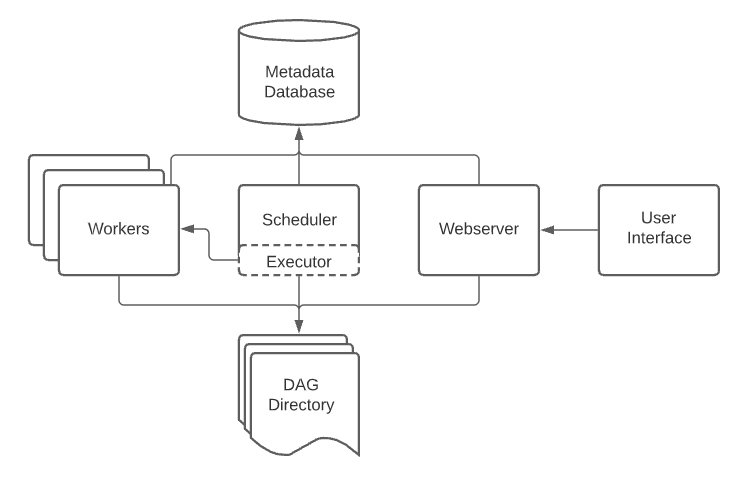
The Airflow architecture

The proposed configuration is not a run production-ready Docker Compose Airflow installation. It is just a quick-start docker-compose to get your hands dirty with Airflow.

Of course, you have to install it on your laptop:

It is recommended to reserve at least 4GB (better 8GB) of memory for Docker.

The docker-compose.yaml file

The community file is available here, you can download it using the command:

curl -LfO ‘https://airflow.apache.org/docs/apache-airflow/2.3.4/docker-compose.yaml'

The docker-compose file is formed by:

  • airflow-scheduler: The scheduler monitors all DAGs
  • airflow-webserver: The AIRFLOW webserver (available at the URL: http://localhost:8080)
  • airflow-worker: The executor of each task in a DAG
  • airflow-init: The initialization service
  • postgres: The database
  • redis: The broker that forwards messages from scheduler to worker
  • flower: The optional application that monitors the environment (you can start using: docker-compose --profile flower up)

The docker-compose set three volumes:

  • dags: the folder where you can put your DAG
  • logs: the folder that contains logs from task execution and scheduler
  • plugins: the folder where you can put your custom plugins

all of these volumes are persisted onto your local machine. So it is simple to perform some tests locally and then move to another machine without losing anything. In any case, the folders are created in the same folder where the file docker-compose.yaml is present. If you want, you can change the local folders in lines 63 - 65:

volumes:
    - /tmp/airflow/dags:/opt/airflow/dags
    - /tmp/airflow/logs:/opt/airflow/logs
    - /tmp/airflow/plugins:/opt/airflow/plugins

if you do not want the initial dags, you should set a false line 59:

AIRFLOW__CORE__LOAD_EXAMPLES: 'true'

Another little improvement is to set the name of the PostgreSQL container adding the following in line 77:

container_name: db

In this way, you can refer to the PostgreSQL database with the name db. Otherwise, you could change line 83 to set the Postgres data folder.

Moreover, you can change some other basic configurations:

  • AIRFLOW_IMAGE_NAME: The Docker image name used to run Airflow (Default: apache/airflow:2.3.4)
  • AIRFLOW_UID: The user ID in Airflow containers (Default: 50000)
  • _AIRFLOW_WWW_USER_USERNAME: The username for the administrator account (Default: airflow)
  • _AIRFLOW_WWW_USER_PASSWORD: The password for the administrator account (Default: airflow)
  • _PIP_ADDITIONAL_REQUIREMENTS: The additional PIP requirements to add when starting all containers (Default: )

Toward the starting

Before starting everything, you have to set the following:

  1. Create the Airflow folders:

mkdir -p ./dags ./logs ./plugins ./postgres-db

2. Set the Airflow user:

echo -e “AIRFLOW_UID=$(id -u)” > .env

3. Initialize the database:

docker-compose up airflow-init

In particular, after the last step, you will see the following output:

Attaching to airflow-init_1
....
airflow-init_1  | DB: postgresql+psycopg2://airflow:***@postgres/airflow
airflow-init_1  | Performing upgrade with database postgresql+psycopg2://airflow:***@postgres/airflow
airflow-init_1  | [2022-09-10 07:47:18,664] {db.py:1466} INFO - Creating tables
airflow-init_1  | INFO  [alembic.runtime.migration] Context impl PostgresqlImpl.
....
airflow-init_1  | Upgrades done
....
airflow-init_1  |   FutureWarning,
airflow-init_1  | 2.3.4
airflow-init_1 exited with code 0

4. Start Airflow typing:

docker-compose up -d

If everything goes well, the output of the docker ps is the following:

CONTAINER ID   IMAGE                  COMMAND                  CREATED        STATUS                    PORTS                    NAMES
5508c60831d4   apache/airflow:2.3.4   "/usr/bin/dumb-init …"   12 hours ago   Up 40 seconds (healthy)   0.0.0.0:8080->8080/tcp   resources_airflow-webserver_1
37f71f65f758   apache/airflow:2.3.4   "/usr/bin/dumb-init …"   12 hours ago   Up 40 seconds (healthy)   8080/tcp                 resources_airflow-worker_1
44c2588958cb   apache/airflow:2.3.4   "/usr/bin/dumb-init …"   12 hours ago   Up 40 seconds (healthy)   8080/tcp                 resources_airflow-scheduler_1
cc939447d676   apache/airflow:2.3.4   "/usr/bin/dumb-init …"   12 hours ago   Up 40 seconds (healthy)   8080/tcp                 resources_airflow-triggerer_1
d36e8e849ff8   redis:latest           "docker-entrypoint.s…"   12 hours ago   Up 40 seconds (healthy)   6379/tcp                 resources_redis_1
9ba46b104c7a   postgres:13            "docker-entrypoint.s…"   12 hours ago   Up 41 seconds (healthy)   5432/tcp                 resources_postgres_1

Some useful commands

Some useful commands are the following:

Run airflow commands

To run an airflow command type:

docker-compose run airflow-worker airflow info

otherwise, you can download the wrapper script (only for MacOS or Linux):

curl -LfO 'https://airflow.apache.org/docs/apache-airflow/2.3.4/airflow.sh'
chmod +x airflow.sh

finally, run:

./airflow.sh info

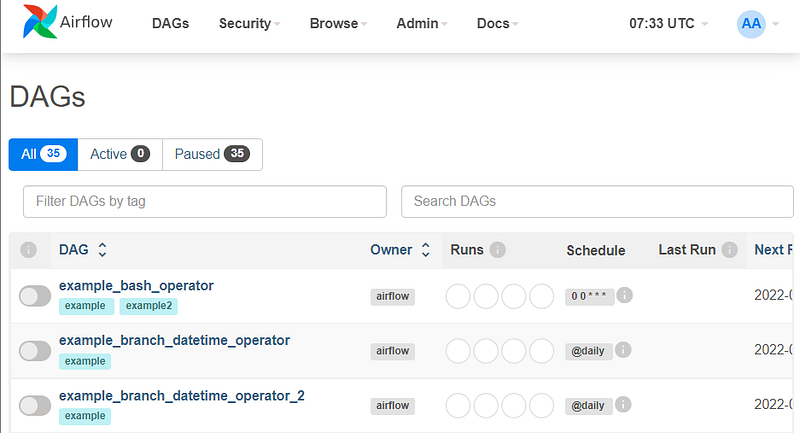
See Graphical User Interface

The Airflow GUI is available http://localhost:8080 with:

  • Username: airflow
  • Password: airflow
Airflow in action

Shutting down Airflow and clean

For shutting down everything, you can type:

docker-compose down

If you also want to delete the volumes type:

docker-compose down --volumes --rmi all

Final recommendations

It is funny the final recommendations that the Apache Airflow community tells here:

DO NOT attempt to customize images and the Docker Compose if you do not know exactly what you are doing, do not know Docker Compose, or are not prepared to debug and resolve problems on your own.
....
Even if many users think of Docker Compose as “ready to use”, it is really a developer tool ...
It is extremely easy to make mistakes that lead to difficult-to-diagnose problems and if you are not ready to spend your own time on learning and diagnosing and resolving those problems on your own do not follow this path. You have been warned.
...
DO NOT expect the Docker Compose below will be enough to run production-ready Docker Compose Airflow installation using it. This is truly quick-start docker-compose for you to get Airflow up and running locally and get your hands dirty with Airflow.

In any case, you can see the Helm Chart for Apache Airflow for more information on how to install Airflow over Kubernetes.

The rise of Amazon Web Service

As is usually the case, there where there is a configuration problem. Companies see a sales opportunity. And it happened here, too. AWS provides Amazon Managed Workflows for Apache Airflow (MWAA).

MWAA is a managed orchestration service for Apache Airflow to create end-to-end data pipelines in the cloud at scale. Managed Workflows is optimized to use Airflow and Python to create workflows without taking care the scalability, availability, and security.

Summary

In this post, we start to see the importance of setup a production environment for Apache Airflow. After a short introduction, we see a simple docker-compose implementation to start with Apache Airflow local. Finally, we shortly see the Amazon Managed Workflows for Apache Airflow and an all-in-one solution for the developer.

That’s all for this post, in the next, I will go deeper inside the production problem of Apache Airflow, and we will analyze the helm and MWAA.

Airflow
Docker
Docker Compose
Python
Production
Recommended from ReadMedium