
Using BigQuery and Google Analytics Hub
How to work with Google Analytics Hub

Great news! Google now offers the Analytics Hub for its’ cloud Data Warehouse BigQuery:
Analytics Hub is a new service in BigQuery that lets you create secure data exchanges and share analytics assets within and across organizations. This platform allows data providers to publish listings that reference shared datasets. Analytics Hub subscribers can then view and subscribe to these listings. — Google [1]
How does it Work?
Analytics Hub is a data exchange service that enables you to efficiently and securely share data assets across organizations to address data reliability and cost challenges.
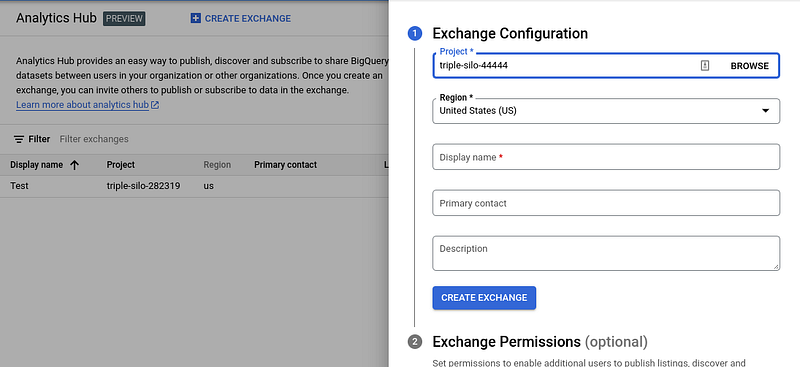
Before you can set up an exchange via a dataset as above, you still need to enable the API. After that, you can set up the region and also permissions and a description to share it with your company or external partners.
The following BigQuery objects can be shared using Analytics Hub [2]:
- Tables
- Views
- Materialized views
- Authorized views
- Table snapshots
- External tables
- BigQuery ML models.
Architecture
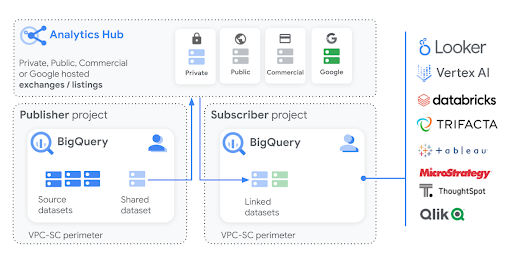
The Google Analytics Hub is built on BigQuery and the publish and subscribe model of BigQuery datasets. The separation of compute and storage in BigQuery’s architecture enables data publishers to share data with as many subscribers as they want without having to make multiple copies of the data. Publishers are only charged for data storage, whereas subscribers only pay for queries that run against the shared data. The publisher and subscriber workflows in Analytics Hub are explained in detail in the following sections [2].
Summary
I think it’s a really useful new feature or API built on top of BigQuery that is super easy-to-use and scalable. With this function, you can easily distribute data and models from e.g. BigQuery ML (Read here more about BigQuery ML) in your company. This is a great support for the Data Mesh approach and to become a data-driven company.
Sources and Further Readings
[1] Google, Release Notes (2022)
[2] Google, Introduction to Analytics Hub (2022)
[3] Google, Analytics Hub (2022)


