
Use Azure App Configuration with .NET or ASP.NET Core Applications
Store app settings in Azure App Configuration for .NET 5.x or ASP.NET Core 3.x applications.
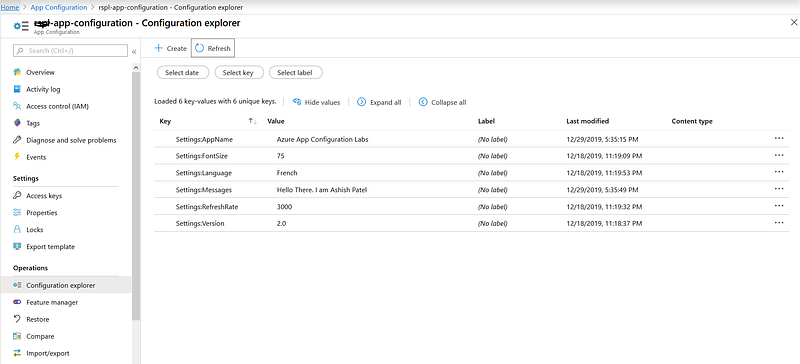
TL;DR
Azure App Configuration allows you to define settings that can be shared among multiple apps, including apps running in App Service. We will use Azure App Configuration to centralize storage and management of application settings for an ASP.NET Core application. ASP.NET Core builds a single key-value-based configuration object using settings from one or more data sources specified by an application.
More details on Azure App Configuration Use Azure Key Vault with .NET or ASP.NET Core Applications
Store settings in Azure App Configuration
To enable the use of Azure App Configuration you need to install below packages.
PM> Install-Package Microsoft.Azure.AppConfiguration.AspNetCore
PM> Install-Package Microsoft.FeatureManagement.AspNetCore
PM> Install-Package Azure.IdentityYou need to modify your Host Builder logic to add the code needed. We can use the ConfiureAppConfiguration() method to plug in Azure App Configuration code into ASP.NET Core Application configuration.
- Enable App Configuration in Program.cs — Update the
CreateWebHostBuildermethod to use App Configuration by calling theconfig.AddAzureAppConfiguration()method.
2. Enable automatic configuration refresh from Azure App Configuration in Startup.cs.
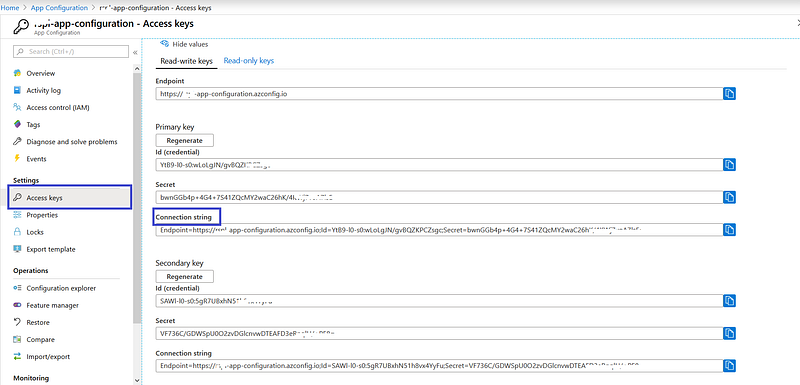
3. Store connection string in the appsettings.json file.
4. Get Azure App Configuration Connection String from Azure Portal
5. Read settings in Controller.
Sample source code on GitHub — .NET 5.x and ASP.NET Core 3.x
View more from .NET Hub
- Clean Architecture with .NET and .NET Core
- Most popular .NET Libraries every developer should know
- Interception in Entity Framework Core
- Use Azure App Configuration with ASP.NET or ASP.NET Core Applications
- Health Checks in ASP.NET Core
Happy Coding!!!


