
Understanding Kubernetes Authorization — A Beginner’s Guide
What are RBAC and Access Control in Kubernetes?
Find Complete mind map of A Beginner’s Guide to Kubernetes
In our previous articles on authentication and the kubeconfig file, we explored how to establish trust and authenticate users in a Kubernetes cluster.
However, you may recall encountering an error when trying to perform certain actions, such as running the kubectl get nodes command. This error highlights the importance of authorization in Kubernetes, which controls the permissions and access levels granted to users.
In this article, we will delve into the world of authorization and focus on one of its key components: Role-Based Access Control (RBAC). By understanding RBAC, we can enable fine-grained control over user permissions and ensure secure operations within the cluster.
Now, let’s delve deeper into the RBAC authorization mode and its key involved api objects.
Check out “Understanding Kubernetes — A Beginner’s Guide” for the comprehensive series🚀
Roles Based Access Control
Once a client’s identity is authenticated, authorization comes into play to determine what actions and resources they are allowed to access within the cluster. It is an essential layer of security that ensures only authorized entities can perform actions on specific resources.
RBAC (Role-Based Access Control) in Kubernetes extends the RBAC model and introduces the following key objects:
- Role and ClusterRole
- RoleBinding and ClusterRoleBinding
Let’s check these out!
Role and ClusterRole
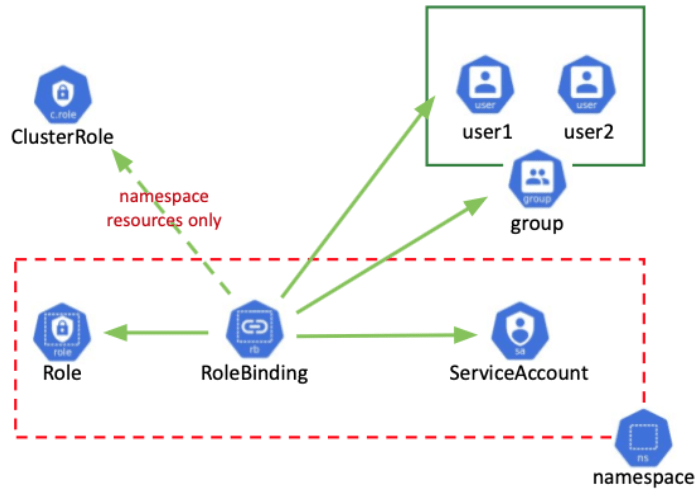
RBAC in Kubernetes revolves the following key resources to define the actions:
Role:
- A Role in Kubernetes defines the permissions and access levels for a specific namespace.
- It allows fine-grained control over resources within the namespace, such as pods, services, and deployments.
- Roles are created within a specific namespace and provide authorization within that namespace only.
- They grant or restrict access to various operations like creating, reading, updating, or deleting resources.
Example:
- create a Role named
demorolein thens1namespace with permissions to get and list pods. This allows the user assigned with this Role to perform operations like retrieving and listing pods within thens1namespace:
$ kubectl create role demorole --verb=get,list --resource=pods --namespace ns1ClusterRole:
- ClusterRoles are designed for cluster-wide authorization.
- Unlike Roles, they are applicable to the entire cluster.
- ClusterRoles provide access control for cluster-wide resources like nodes, persistent volumes, or custom resources.
Example:
- create a ClusterRole named
democlusterrolewith permissions to get and list nodes. This allows the user assigned with this ClusterRole to perform operations like retrieving and listing nodes across the entire cluster:
$ kubectl create clusterrole democlusterrole --verb=get,list --resource=nodesRoleBinding and ClusterRoleBinding
RBAC in Kubernetes revolves the following key resources to bind Role(with allowed operations) to users:
RoleBinding:
- A RoleBinding in Kubernetes binds a Role to a user, group, or service account within a specific namespace.
- It specifies who has the permissions defined by the Role.
Example:
- Create a RoleBinding named
demorolebindingin thens1namespace, binding thedemoroleRole to thedemouseruser. This allows thedemouserto have the permissions defined by thedemorolewithin thens1namespace:
$ kubectl create rolebinding demorolebinding --role=demorole --user=demouser --namespace ns1ClusterRoleBinding:
- A ClusterRoleBinding is similar to a RoleBinding but applies to the entire cluster instead of a specific namespace.
- It binds a ClusterRole to a user, group, or service account across all namespaces.
Example:
- Create a ClusterRoleBinding named
democlusterrolebinding, binding thedemoclusterroleClusterRole to thedemouser. This allows thedemouserto have the permissions defined by thedemoclusterroleacross all namespaces in the cluster:
$ kubectl create clusterrolebinding democlusterrolebinding --clusterrole=democlusterrole --user=demouserRoleBindings and ClusterRoleBindings are essential for managing and controlling access to resources within a Kubernetes cluster.
They define who has the permissions specified by the associated Roles or ClusterRoles, allowing for fine-grained authorization control.
Validating Role and RoleBinding
To ensure that the Role and RoleBinding are functioning as expected, we can perform various kubectl commands to test the permissions and access for the demouser.
Let's go through some examples:
1.First, let’s switch to the cluster administrator context to create some resources:
$ kubectl config use-context kubernetes-admin@kubernetes
$ kubectl create namespace ns1
$ kubectl create deployment web1 --namespace=ns1 --image=gcr.io/google-samples/hello-app:1.0 --port=8080 --replicas=2
2.Now, let’s test the demouser’s permissions using the auth can-i command:
$ kubectl auth can-i list pod
yes
$ kubectl auth can-i list pod --as demouser
no
3.Next, we will create the Role and RoleBinding:
$ kubectl create role demorole --verb=get,list --resource=pods --namespace ns1
role.rbac.authorization.k8s.io/demorole created
$ kubectl create rolebinding demorolebinding --role=demorole --user=demouser --namespace ns1
rolebinding.rbac.authorization.k8s.io/demorolebinding created
4.Now, let’s test the demouser’s permissions again:
$ kubectl auth can-i list pod --as demouser
no
$ kubectl auth can-i list pod --as demouser --namespace ns1
yes
$ kubectl get pods --namespace ns1 --as demouser
NAME                    READY   STATUS    RESTARTS   AGE
web1-7f6c665f7d-65h6v   1/1     Running   0          9m38s
web1-7f6c665f7d-n54t5   1/1     Running   0          9m38s
5.We can also test other actions and resources:
$ kubectl auth can-i delete pod --as demouser --namespace ns1
no
$ kubectl auth can-i list node --as demouser --namespace ns1
Warning: resource 'nodes' is not namespace scoped
no
$ kubectl auth can-i list deployment --as demouser --namespace ns1
no
By performing these commands, we can see that the demouser has limited access based on the defined Role and RoleBinding. The demouser can list pods in the ns1 namespace but does not have permissions for other actions or resources.
This validates that the Role and RoleBinding have been successfully configured and are working as expected.
Key Takeaway
In this article, we explored the concept of authorization in Kubernetes and focused on Role and RoleBinding. Here are the key takeaways:
- Roles define what actions a user or group can perform on specific resources within a namespace.
- RoleBindings associate a user or group with a Role, granting them the defined permissions.
- ClusterRole and ClusterRoleBinding are used for defining and binding permissions across all namespaces.
- By creating Roles and RoleBindings, we can ensure that users have the appropriate access levels and restrictions within the cluster.
- Validating the configuration with `kubectl` commands helps confirm that the RBAC settings are working as intended.
By leveraging RBAC and properly configuring Roles and RoleBindings, you can ensure that only authorized users have access to resources and actions within the cluster.
Remember, authorization plays a vital role in securing your Kubernetes cluster, so it’s important to understand and implement RBAC effectively.
🔔 Stay tuned or subscribe to my series: “Understanding Kubernetes — A Beginner’s Guide” to explore everything about Kubernetes. 🚀
➕Join the Medium Membership Program to support my work and connect with other writers.
📝 Have questions or suggestions? Leave a comment or message me through Medium. Let’s connect!
Thank you for your support! 🌟