avatarrouterhan

Free AI web copilot to create summaries, insights and extended knowledge, download it at here

2794

Abstract

namespace.</li></ul><p id="50a8">Both user accounts and service accounts enable authentication and help control access to cluster resources. They play crucial roles in establishing secure and controlled interactions within Kubernetes.</p><h1 id="6ba7">Authentication Methods in Kubernetes</h1><p id="952c">Let’s explore each method and understand its key features, pros and cons, and see how Kubernetes utilizes them.</p><h1 id="fd00">HTTP Base Authentication:</h1><figure id="8002"><img src="https://cdn-images-1.readmedium.com/v2/resize:fit:800/1*WYuMk_mvGZMZxkJ4_T_N1Q.png"><figcaption></figcaption></figure><h2 id="edee">Key Features:</h2><ul><li>Uses username and password for authentication.</li><li>Encodes the credentials using the BASE64 algorithm and sends them in the Authorization field of the HTTP request header.</li><li>The server decodes the encoded string and performs user authentication.</li></ul><h2 id="ee50">Pros:</h2><ul><li>Simple and widely supported authentication method.</li><li>Easy to set up and use for basic authentication needs.</li></ul><h2 id="7991">Cons:</h2><ul><li>Vulnerable to interception since credentials are encoded, not encrypted.</li><li>Does not provide strong security measures like token-based or certificate-based authentication.</li></ul><h2 id="ad9c">Example:</h2><p id="0519">To illustrate HTTP Base Authentication, let’s consider a scenario where a developer wants to authenticate and access a Kubernetes cluster using their username and password. Here’s an example of how Kubernetes handles this authentication method:</p><ol><li>The developer sends an HTTP request to the Kubernetes API server, including their encoded username and password in the Authorization field of the request header.</li><li>The API server receives the request and decodes the encoded string to extract the username and password.</li><li>The API server then verifies the provided credentials against the configured user accounts or external authentication sources.</li><li>If the credentials are valid, the developer is granted access to the Kubernetes cluster.</li></ol><p id="5986">To enable HTTP Base Authentication in Kubernetes, you need to configure the API server with the necessary authentication settings. Here’s an example YAML configuration:</p><div id="e79a"><pre><span class="hljs-attr">apiVersion:</span> <span class="hljs-string">v1</span> <span class="hljs-attr">kind:</span> <span class="hljs-string">Config</span> <span class="hljs-attr">clusters:</span> <span class="hljs-bullet">-</span> <span class="hljs-attr">cluster:</span> <span class="hljs-attr">server:</span> <span class="hljs-string">https://your-kubernetes-api-server</span> <span class="hljs-attr">name:</span> <span class="hljs-string">your-cluster-name</span> <span class="hl

Options

js-attr">contexts:</span> <span class="hljs-bullet">-</span> <span class="hljs-attr">context:</span> <span class="hljs-attr">cluster:</span> <span class="hljs-string">your-cluster-name</span> <span class="hljs-attr">user:</span> <span class="hljs-string">your-username</span> <span class="hljs-attr">name:</span> <span class="hljs-string">your-context-name</span> <span class="hljs-attr">current-context:</span> <span class="hljs-string">your-context-name</span> <span class="hljs-attr">users:</span> <span class="hljs-bullet">-</span> <span class="hljs-attr">name:</span> <span class="hljs-string">your-username</span> <span class="hljs-attr">user:</span> <span class="hljs-attr">password:</span> <span class="hljs-string">your-password</span></pre></div><p id="e5b6">In the above example, you specify the API server URL, cluster name, context, username, and password in the YAML configuration. Once the configuration is set, you can use the configured credentials to authenticate with the Kubernetes cluster.</p><h1 id="9dd6">Key Takeaways</h1><p id="d541">Understanding authentication in Kubernetes is essential for securing your cluster and controlling access to resources. Here are the key takeaways from this article:</p><ul><li>User accounts represent individual users, while service accounts are used by applications and services within the cluster.</li><li>Kubernetes provides multiple authentication mechanisms, including HTTP Base, HTTP Token, and HTTPS Certificate authentication.</li><li>HTTP Base authentication uses a username and password, while HTTP Token authentication relies on tokens for identification.</li></ul><p id="b69c">By implementing proper authentication methods and understanding the role of user accounts and service accounts, you can enhance the security of your Kubernetes cluster and protect sensitive data and operations!</p><p id="c380">Stay tuned for our next article, where we will explore more aauthentication method in Kubernetes, diving deeper into controlling user permissions and resource restrictions.</p><blockquote id="6829"><p>🔔 Stay tuned or <a href="https://routerhan.medium.com/subscribe">subscribe </a>to my series: “<a href="https://routerhan.medium.com/a-beginners-guide-to-kubernetes-e0f1c2866d36"><b>Understanding Kubernetes — A Beginner’s Guide</b></a>” to explore everything about Kubernetes. 🚀</p></blockquote><blockquote id="7375"><p>➕Join the <a href="https://medium.com/@routerhan/membership">Medium Membership Program</a> to support my work and connect with other writers.</p></blockquote><blockquote id="1daa"><p>📝 Have questions or suggestions? Leave a comment or message me through Medium. Let’s connect!</p></blockquote><blockquote id="2dea"><p>Thank you for your support! 🌟</p></blockquote></article></body>

Understanding Kubernetes Authentication — A Beginner’s Guide

Unraveling the Key Features of Authentication
Find Complete mind map of A Beginner’s Guide to Kubernetes

Welcome back to our ongoing series on Understanding Kubernetes Security! In our previous post, we explored the importance of security in Kubernetes and introduced the concepts of authentication, authorization, and admission control.

In this article, we will continue to examine various authentication methods, including HTTP-based authentication, token-based authentication, and certificate-based authentication.

We’ll explore how Kubernetes leverages these authentication mechanisms to establish trust and verify the identities of users and services within the cluster.

Check out “Understanding Kubernetes — A Beginner’s Guide” for the comprehensive series🚀

User Accounts and Service Accounts

In Kubernetes, user accounts represent individual users interacting with the cluster, while service accounts are used by applications and services within the cluster. Here’s a quick recap of their key features:

User Accounts:

  • Represent individuals with specific permissions and access levels. They authenticate using credentials like a username/password or client certificate.

Service Accounts:

  • Intended for non-human entities like applications and services. They authenticate using a token and are automatically created within each namespace.

Both user accounts and service accounts enable authentication and help control access to cluster resources. They play crucial roles in establishing secure and controlled interactions within Kubernetes.

Authentication Methods in Kubernetes

Let’s explore each method and understand its key features, pros and cons, and see how Kubernetes utilizes them.

HTTP Base Authentication:
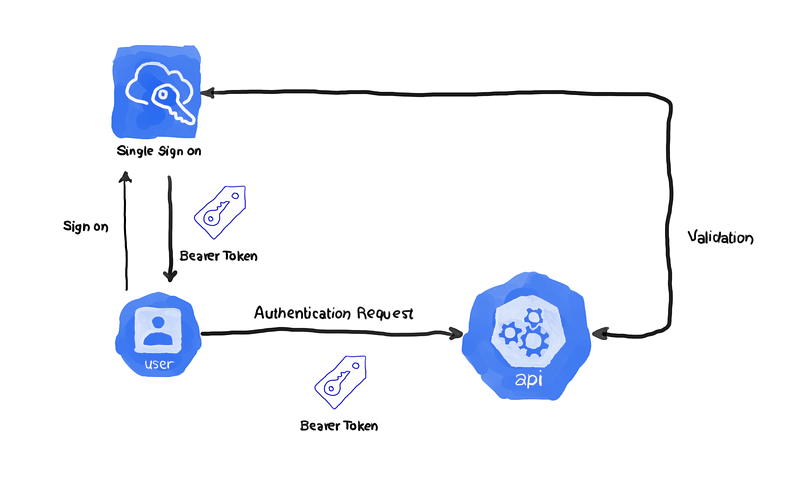
Key Features:

  • Uses username and password for authentication.
  • Encodes the credentials using the BASE64 algorithm and sends them in the Authorization field of the HTTP request header.
  • The server decodes the encoded string and performs user authentication.

Pros:

  • Simple and widely supported authentication method.
  • Easy to set up and use for basic authentication needs.

Cons:

  • Vulnerable to interception since credentials are encoded, not encrypted.
  • Does not provide strong security measures like token-based or certificate-based authentication.

Example:

To illustrate HTTP Base Authentication, let’s consider a scenario where a developer wants to authenticate and access a Kubernetes cluster using their username and password. Here’s an example of how Kubernetes handles this authentication method:

  1. The developer sends an HTTP request to the Kubernetes API server, including their encoded username and password in the Authorization field of the request header.
  2. The API server receives the request and decodes the encoded string to extract the username and password.
  3. The API server then verifies the provided credentials against the configured user accounts or external authentication sources.
  4. If the credentials are valid, the developer is granted access to the Kubernetes cluster.

To enable HTTP Base Authentication in Kubernetes, you need to configure the API server with the necessary authentication settings. Here’s an example YAML configuration:

apiVersion: v1
kind: Config
clusters:
- cluster:
    server: https://your-kubernetes-api-server
  name: your-cluster-name
contexts:
- context:
    cluster: your-cluster-name
    user: your-username
  name: your-context-name
current-context: your-context-name
users:
- name: your-username
  user:
    password: your-password

In the above example, you specify the API server URL, cluster name, context, username, and password in the YAML configuration. Once the configuration is set, you can use the configured credentials to authenticate with the Kubernetes cluster.

Key Takeaways

Understanding authentication in Kubernetes is essential for securing your cluster and controlling access to resources. Here are the key takeaways from this article:

  • User accounts represent individual users, while service accounts are used by applications and services within the cluster.
  • Kubernetes provides multiple authentication mechanisms, including HTTP Base, HTTP Token, and HTTPS Certificate authentication.
  • HTTP Base authentication uses a username and password, while HTTP Token authentication relies on tokens for identification.

By implementing proper authentication methods and understanding the role of user accounts and service accounts, you can enhance the security of your Kubernetes cluster and protect sensitive data and operations!

Stay tuned for our next article, where we will explore more aauthentication method in Kubernetes, diving deeper into controlling user permissions and resource restrictions.

🔔 Stay tuned or subscribe to my series: “Understanding Kubernetes — A Beginner’s Guide” to explore everything about Kubernetes. 🚀

➕Join the Medium Membership Program to support my work and connect with other writers.

📝 Have questions or suggestions? Leave a comment or message me through Medium. Let’s connect!

Thank you for your support! 🌟

Kubernetes
DevOps
Cloud Computing
Software Development
Technology
Recommended from ReadMedium