
Medium Formatting
Medium Article Canonical Links
How Medium article canonical links can be used when reposting content from your blog to Medium
One of the most commonly searched questions on Google related to Medium is some variation of:
How can I re-publish my existing blog posts on Medium to drive additional traffic to my blog without being penalized by Google for duplicate content?
When posting content to multiple platforms at the same time (such as your website and Medium), it is important to make sure a single source of that content is the ultimate authority. Medium’s tools for cross-posting (such as the Import tool) add the source it is importing from as the canonical link automatically.
As long as you use this tool (correctly) Medium’s publication and cross-posting pathways automatically add canonical links to protect your original content posted offsite. This means that Medium can only boost — not cannibalize — your SEO.
However, if you are copy and pasting your blog articles into Medium, it is imperative that you manually add the correct canonical link.
Search engines use canonical links to determine and prioritize the ultimate source of content, removing confusion when there are multiple copies of the same document in different locations. Sites that publish an overabundance of duplicate content without indicating a canonical link may be penalized in search engine rankings.
Example:
I originally posted an article on my personal blog called 10 Creative Guerilla Marketing Tactics to Boost your Brand, Company, or Cause.
I subsequently posted this same post (at least 80% of the same content) to Medium, hoping to receive more views from a larger audience:
There was a brief period of time, before I manually adjusted the canonical link, that both articles appeared in Google’s search engine. However, they both were performing poorly as Google was unsure of which content was the true “authority” article.
Medium has much higher domain authority than my independent blog, so the Medium article was generally ranked higher. However, part of my idea in re-posting content from my blog on Medium was to boost the rank of my own content.
Any blogger can use Medium’s strong SEO to their benefit. By correctly setting the canonical link in your medium article to attribute your blog, you can reap the benefits of high discoverability on Medium while still crediting all authority towards your own blog using Medium’s canonical URLs.
Any blogger can use Medium’s strong SEO to their benefit. By correctly setting the canonical link in your medium article to attribute your blog, you can reap the benefits of high discoverability on Medium while still crediting all authority towards your own blog using Medium’s canonical URLs.
So how can you manually set the canonical link or check to make sure it is set correctly after using Medium’s Import Tool?
- Click the edit button on any article you wish to modify.
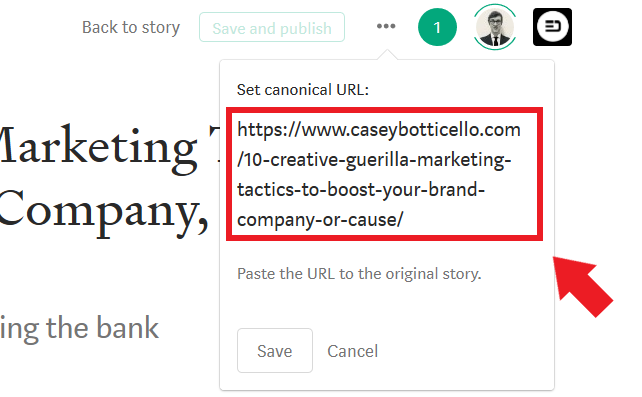
- Select the “Customize canonical link” option.
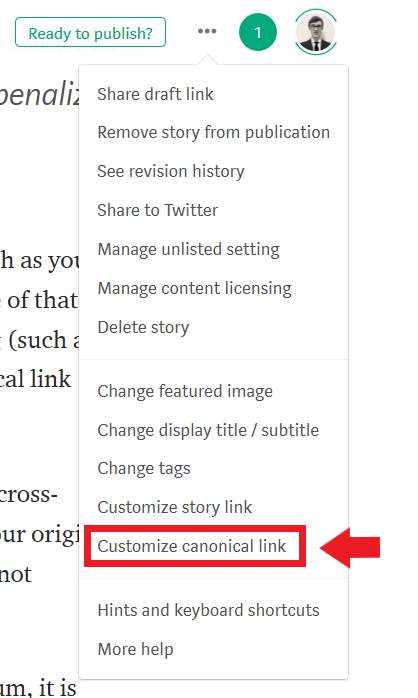
3. Enter the URL of the original article and select save.
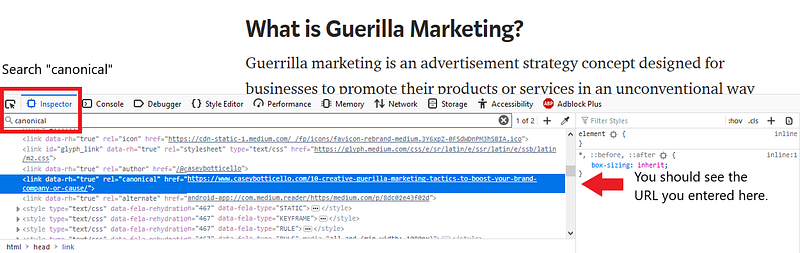
To verify if this process has worked, or to check to see if an article you previously imported contains the correct tag, simply right click anywhere on the article in question.
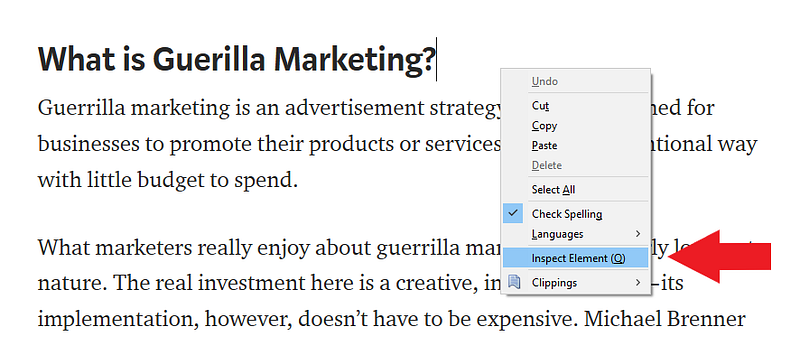
Search for “canonical”, and the first result will show the link you imported from.
A few notes:
- Make sure you save your article before looking for the canonical tag
- I’ve noticed that when I changed this link after having previously published a Medium article, that sometimes my articles revert to being “unlocked” or not part of Medium’s metered paywall, so make sure to double check your article listing status.
- You do not need to manually configure the canonical link if you use Medium’s import tool properly, but I’d still suggest verifying that it is crediting the proper URL.

Thanks for reading this article! Leave a comment below if you have any questions. Be sure to sign up for the Blogging Guide newsletter, to get the latest tips, tricks, and news about writing on Medium and to join our Facebook group, Medium Writing, to share your latest Medium posts and connect with other writers.
If you liked this article, here are some other articles you may enjoy:

Casey Botticello is a partner at Black Edge Consulting. Black Edge Consulting is a strategic communications firm, specializing in online reputation management, digital marketing, and crisis management. Prior to founding Black Edge Consulting, he worked for BGR Group, a bipartisan lobbying and strategic communications firm.
Casey is the founder of the Cryptocurrency Alliance, a Super PAC dedicated to cryptocurrency and blockchain advocacy. He is a graduate of The University of Pennsylvania, where he received his B.A. in Urban Studies.
You can connect with him on LinkedIn, Twitter, Facebook, or by visiting his website, Blogging Guide.