Understanding Apache Spark Deployment Modes: Client Mode, Cluster Mode, and Local Mode
Access this blog for free: https://readmedium.com/understanding-apache-spark-deployment-modes-client-mode-cluster-mode-and-local-mode-bbfd1c7612fa?sk=53de2ec3d40e390b3b17df9f0050c447
Apache Spark, a powerful tool for processing big data, offers different deployment modes to suit your needs. Whether you’re running on your personal laptop for testing or managing large-scale production jobs across many machines, Spark has a fit mode. In this article, we’ll dive into three of Spark’s key deployment modes: Client Mode, Cluster Mode, and Local Mode, and explore when and why you should use each.
Client Mode: The Simple Start
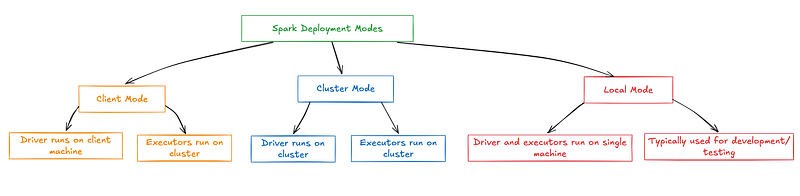
Let’s begin with Client Mode, which is great for smaller tasks or when you want to test things without too much complexity. In this mode, the driver program — the brain behind your Spark job — runs on the same machine where you submit the job. It’s perfect for cases when you’re developing or debugging because everything happens in one place.
How It Works When you submit your Spark job, the driver doesn’t look for worker nodes in the cluster. Instead, it stays local, managing everything from job execution to collecting results on your machine. While this might sound straightforward, it’s extremely useful for small to mid-sized tasks where you don’t need to harness the power of multiple machines.
For example, say you’re working on a personal project, analyzing a dataset that’s not too large. Client Mode gives you everything you need to test, explore, and refine your code without worrying about complex cluster configurations.
Why Use Client Mode?
Client Mode is a great choice when you’re working on development or testing environments and want quick results without dealing with many setups. It’s ideal when your data isn’t too large, and everything can be managed easily from your local machine.
- Development and testing: You get immediate feedback without needing a cluster, making debugging and fine-tuning your code easy. This mode is perfect when you want to experiment quickly.
- Small to mid-sized data: If your data isn’t too large, you don’t need the complexity of a full cluster. Client Mode keeps things simple by running everything locally or in a minimal environment.
- Interactive analysis: This mode works beautifully with Jupyter Notebooks or similar tools where you can explore data step-by-step. It’s especially useful for data exploration and visualization.

Cluster Mode: The Powerhouse
If you’re working on large datasets and production-grade jobs, Cluster-Mode is the way to go. This is where Spark really shines — distributing work across multiple machines to handle massive workloads. Cluster Mode’s driver program runs on a separate machine within the cluster, not your local machine. This means the Cluster Manager is responsible for scheduling jobs, allocating resources, and ensuring everything runs smoothly.
How It Works Once you submit a job in Cluster-Mode, the Cluster Manager assigns the driver program to one of the worker nodes in the cluster. It then starts coordinating with the available executors to get the job done. Because the driver runs remotely, you can focus on scaling your jobs without worrying about overloading your machine. This mode is especially helpful in production environments where large datasets must be processed across many machines, ensuring your jobs are done efficiently and reliably.
Imagine you’re working at a company analyzing terabytes of data — running the job locally would crash your system in no time. Instead, with Cluster Mode, Spark spreads the work across multiple machines, ensuring the load is balanced and the job gets done fast.
Why Use Cluster-Mode?
Cluster Mode is the go-to option when you’re dealing with large-scale data in production environments. It ensures that Spark can handle big workloads efficiently by distributing the tasks across multiple machines.
- Production environments: Cluster Mode ensures everything runs smoothly when running critical jobs requiring high availability and fault tolerance, even if some components fail.
- Big data workloads: Spark’s ability to distribute the load across many nodes makes a big difference in performance for huge datasets. This model is designed for scaling and handling large, complex tasks.
- Fault-tolerant execution: If an executor or node crashes, Spark can rerun the tasks on a different machine, ensuring the job still completes successfully. This resilience makes it perfect for real-time or batch processing at scale.

Local Mode: The Easiest Way to Get Started
Lastly, we have Local Mode, which is the simplest Spark deployment mode out there. This mode is perfect for when you don’t have access to a cluster but still want to run Spark jobs. In Local Mode, Spark runs everything on your local machine, but unlike Client Mode, the driver and executors both run on your single machine. It’s almost like running Spark in a miniaturized cluster that exists only on your laptop.
How It Works When you run Spark in Local Mode, specify the number of executor threads Spark will use. This means you can simulate a small distributed environment on your machine by running multiple parallel tasks. Local Mode is great for learning Spark or working with tiny datasets that don’t need much computing power.
Think of Local Mode like your training wheels for Spark. You can experiment, try new things, and get a feel for how Spark works without the need for complex cluster setups or resource management. It’s a great starting point if you get to know Spark or work on small personal projects.
Why Use Local Mode?
Local Mode is ideal for beginners or anyone working on small projects that don’t need the resources of a full cluster. It lets you learn and practice Spark in a lightweight environment.
- Learning and practicing: Perfect if you’re starting out with Spark. You can experiment on your laptop without needing access to a cluster, making it a great way to learn the basics.
- Small datasets: Local Mode does the job without any unnecessary complexity for tiny workloads that don’t need heavy processing. Think of it as your personal Spark playground.
- Simulating a cluster: You can test your code locally before deploying it to a real cluster. This makes identifying issues easy and ensures your code will work when scaled up.

Choosing the Right Mode
Each mode has its place, depending on the job size, the resources available, and the environment you’re working in. If you’re starting out or working on small datasets, Local Mode offers simplicity without sacrificing the Spark experience. Client Mode is ideal if you’re testing or debugging and want to work on your own machine without relying on a cluster. But Cluster-Mode will be your best friend when working with big data in a production environment and needs to scale.
Here’s a quick summary:
- Local Mode: Best for beginners or small projects.
- Client Mode: Great for development and testing with small-to-medium datasets.
- Cluster Mode: For large-scale, production-level jobs requiring distributed computing.
Conclusion
Apache Spark’s flexibility in deployment modes is what makes it so versatile. Whether you’re a beginner experimenting on your laptop or a data engineer processing terabytes of data in production, Spark has a mode that suits your needs. Local Mode lets you learn and experiment, Client Mode helps you easily develop and test, and Cluster Mode scales up to handle the big jobs in distributed environments.
No matter your workload, Spark ensures that you can deploy your jobs in an efficient and scalable way. The key is understanding which mode is best for your current task, and now that you do, you’re ready to make the most of Spark!
Connect with Me on LinkedIn:
Where I Got My Ideas From
- YouTube Channels — I found some helpful videos that made complex topics easier to understand.
- Official Apache Spark Documentation — A great resource for detailed information.
- Google — It’s my go-to tool whenever I hit a roadblock or need quick answers.
- Personal Experience — Working on Spark projects myself has helped me learn by doing.
- Grammarly — To ensure my writing is clear and easy to read.
Stackademic 🎓
Thank you for reading until the end. Before you go:
- Please consider clapping and following the writer! 👏
- Follow us X | LinkedIn | YouTube | Discord | Newsletter | Podcast
- Create a free AI-powered blog on Differ.
- More content at Stackademic.com


