
Ultralytics YOLOv8 Object Trackers (BotSort vs ByteTrack) Comparison
The field of computer vision is swiftly progressing, impacting not just real-world challenges but also influencing advancements in other domains of AI, such as Natural Language Processing. While new concepts continually emerge in computer vision, consistent object tracking becomes almost imperative when addressing real-world problems.

In this write-up, we will delve into the following:
- What is Object Tracking?
- Usage of Bytetrack and BotSort with Ultralytics YOLOv8!
- Comparison between BotSort and ByteTrack🚀
Let’s get started 🚀
What is Object Tracking?
Object tracking is a fundamental aspect of computer vision, involving the continuous identification and monitoring of objects in a video sequence. It ensures the consistent tracking of an object’s trajectory despite changes in appearance and conditions. Various algorithms, including Kalman filters and deep learning approaches, are employed for accuracy.
Bytetrack and BotSort usage with Ultralytics YOLOv8
Popular algorithms for object tracking include Bytetrack and BotSort, while DeepSORT excels in various scenarios. Ultralytics YOLOv8 provides comprehensive object tracking capabilities, including tasks such as object detection, object segmentation, and pose estimation, all achievable with just a few lines of code.
Note: Ensure that you install the Ultralytics package by using the provided command below.
pip install ultralytics
BotSort
You can use BotSort alongside YOLOv8 with the mentioned code below. A single-line command in the command line interface facilitates the execution of object tracking with BotSort.
yolo track model="path/to/best.pt" source="path/to/video.mp4"To draw track lines for each object, use the provided code below.
import cv2
import numpy as np
from pathlib import Path
from ultralytics import YOLO
from collections import defaultdict
from ultralytics.utils.plotting import Annotator

track_history = defaultdict(lambda: [])

model = YOLO("yolov8n.pt")
names = model.model.names
video_path = "path/to/video.mp4"

if not Path(video_path).exists():
    raise FileNotFoundError(f"Source path "
                            f"'{video_path}' "
                            f"does not exist.")

cap = cv2.VideoCapture(video_path)

while cap.isOpened():
    success, frame = cap.read()

    if success:
        results = model.track(frame, persist=True)

        boxes = results[0].boxes.xywh.cpu()
        clss = results[0].boxes.cls.cpu().tolist()
        track_ids = results[0].boxes.id.int().cpu().tolist()

        annotator = Annotator(frame, line_width=2,
                              example=str(names))

        for box, track_id, cls in zip(boxes, track_ids, clss):
            x, y, w, h = box
            x1, y1, x2, y2 = (x - w / 2, y - h / 2,
                              x + w / 2, y + h / 2)
            label = str(names[cls]) + " : " + str(track_id)
            annotator.box_label([x1, y1, x2, y2],
                                label, (218, 100, 255))

            # Tracking Lines plot
            track = track_history[track_id]
            track.append((float(box[0]), float(box[1])))
            if len(track) > 30:
                track.pop(0)

            points = np.hstack(track).astype(np.int32).reshape((-1, 1, 2))
            cv2.polylines(frame, [points], isClosed=False,
                          color=(37, 255, 225), thickness=2)

            # Center circle
            cv2.circle(frame,
                       (int(track[-1][0]), int(track[-1][1])),
                       5, (235, 219, 11), -1)

        cv2.imshow("YOLOv8 Detection", frame)

        if cv2.waitKey(1) & 0xFF == ord("q"):
            break
    else:
        break

cap.release()
cv2.destroyAllWindows()
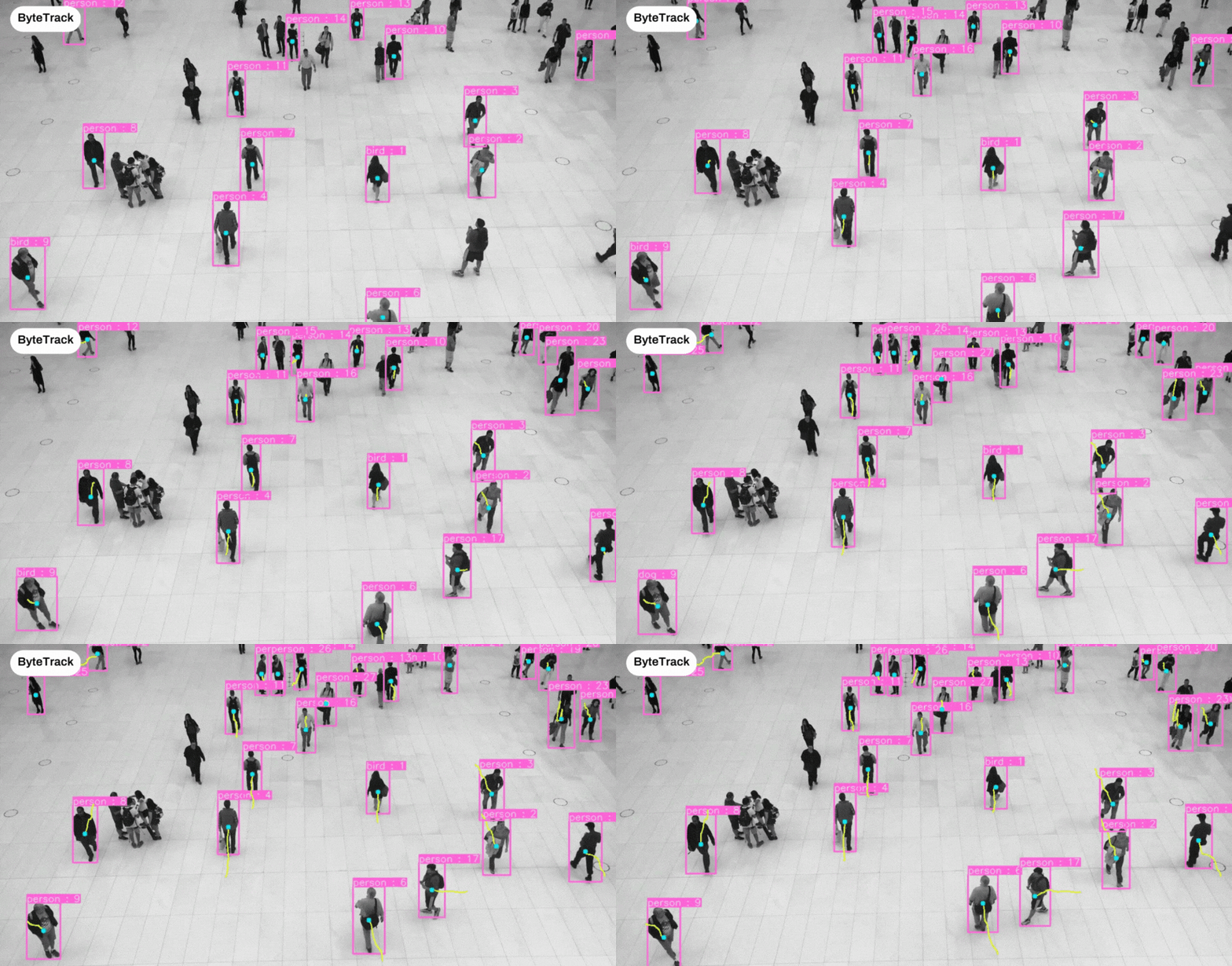
The result will appear as follows:

ByteTrack
You can use bytetrack with YOLOv8 using the mentioned code below.
yolo track model=path/to/best.pt tracker="bytetrack.yaml" source=0To draw track lines for each object, use the provided code below.
import cv2
import numpy as np
from pathlib import Path
from ultralytics import YOLO
from collections import defaultdict
from ultralytics.utils.plotting import Annotator

track_history = defaultdict(lambda: [])

model = YOLO("yolov8n.pt")
model.to("cpu")
names = model.model.names
video_path = "G:\\vid\\pose.mp4"

if not Path(video_path).exists():
    raise FileNotFoundError(f"Source path "
                            f"'{video_path}' "
                            f"does not exist.")

cap = cv2.VideoCapture(video_path)

while cap.isOpened():
    success, frame = cap.read()

    if success:
        results = model.track(frame, persist=True,
                              tracker="bytetrack.yaml")

        boxes = results[0].boxes.xywh.cpu()
        clss = results[0].boxes.cls.cpu().tolist()
        track_ids = results[0].boxes.id.int().cpu().tolist()

        annotator = Annotator(frame, line_width=2,
                              example=str(names))

        for box, track_id, cls in zip(boxes, track_ids, clss):
            x, y, w, h = box
            x1, y1, x2, y2 = (x - w / 2, y - h / 2,
                              x + w / 2, y + h / 2)
            label = str(names[cls]) + " : " + str(track_id)
            annotator.box_label([x1, y1, x2, y2],
                                label, (218, 100, 255))

            # Tracking Lines plot
            track = track_history[track_id]
            track.append((float(box[0]), float(box[1])))
            if len(track) > 30:
                track.pop(0)

            points = np.hstack(track).astype(np.int32).reshape((-1, 1, 2))
            cv2.polylines(frame, [points], isClosed=False,
                          color=(37, 255, 225), thickness=2)

            # Center circle
            cv2.circle(frame,
                       (int(track[-1][0]), int(track[-1][1])),
                       5, (235, 219, 11), -1)

        cv2.imshow("YOLOv8 Detection", frame)

        if cv2.waitKey(1) & 0xFF == ord("q"):
            break
    else:
        break

cap.release()
cv2.destroyAllWindows()
The result will appear as follows:
Comparison of BotSort and ByteTrack
BotSort and ByteTrack are both robust object-tracking algorithms, distinguished by unique features that set them apart. In our comprehensive comparison, we will delve into two key metrics, namely speed (measured in frames per second or FPS) and accuracy, shedding light on their individual strengths and performance characteristics. This analysis aims to provide a nuanced understanding of how each algorithm excels in the crucial aspects of real-time tracking.
Speed (FPS)
In terms of speed, ByteTrack outperforms BotSort. This enables Bytetrack to run inference near real-time. This feature is vital for applications requiring swift and responsive object tracking.

Accuracy
While excelling in various scenarios, BotSort demonstrates heightened effectiveness in scenarios involving REID (Re-identification) and new tracker association when compared to ByteTrack.
In the provided image, the highlighted area distinctly illustrates the stronger association achieved by BotSort in comparison to ByteTrack.

Conclusion
Bytetrack and BotSort stand out as effective object-tracking algorithms. It’s advisable to test each algorithm for specific use cases before deciding on adoption.
- You can opt for ByteTrack if you prioritize speed with minimal compromise on accuracy.
- You can choose BotSort if you prioritize accuracy with a slight trade-off in speed.
- For reidentification purposes, BotSort outperforms ByteTrack.
Trending Articles
- Train YOLOR on Custom Data?
- Train YOLOv7 on Custom Data
- YOLOR or YOLOv5 which one is better?
- Setup Transfer Learning Toolkit with Docker on Ubuntu 18.04
- Image Classification using Transfer Learning with PyTorch
- Ultralytics YOLOv8 Vital Features🤔You Should Know!
- My 🖐️Computer Vision Hobby Projects that Yielded Earnings?
About Authors
- Muhammad Rizwan Munawar is a highly experienced professional with more than three years of work experience in Computer Vision and Software Development. He is working as a Computer Vision Engineer. He has knowledge and expertise in different computer vision techniques including object detection, object tracking, pose estimation, object segmentation, segment anything, software development, and embedded systems. In his free time, he likes to play online games and enjoys his time sharing knowledge with the community through writing articles on Medium.
- Let’s link up on LinkedIn
Please don’t hesitate to drop your questions in the comments section.


