avatarLouis Josso

Summary

The website content provides a detailed guide on translating SQL grouping sets, specifically the multi-grouping feature of PostgreSQL 9.5, into Python using the Pandas library, to achieve similar data aggregation results.

Abstract

The article focuses on the concept of SQL grouping sets and demonstrates how to replicate the functionality in Python with Pandas. It begins by explaining the SQL grouping sets feature available in PostgreSQL 9.5, which allows for the calculation of averages across different groupings within a single query. The author illustrates this with an example of calculating average grades for students by class and gender, using the GROUPING SETS clause in SQL. The article then transitions to Pandas, a Python data manipulation library, and outlines the process of achieving analogous results by performing group-by operations and merging the results. A function named group_set is defined to automate this process for any number of grouping columns. The function iterates over the specified columns, groups the data accordingly, calculates the mean, and concatenates the results. The author acknowledges a common pitfall where non-numeric columns are also included in the mean calculation and demonstrates how to avoid this by dropping unnecessary columns. The article concludes by showcasing the successful application of the function and invites readers to explore further by reading the author's other work on analyzing Facebook Messenger data with Python and Pandas.

Opinions

  • The author believes that the grouping sets feature of PostgreSQL 9.5 is highly useful for data analysis, particularly for performing multiple groupings in a single operation.
  • The author implies that translating SQL grouping sets to Python is not straightforward and requires a custom function to handle the grouping and merging of data.
  • There is an emphasis on the flexibility of the group_set function, as it can handle an arbitrary number of grouping columns, making it a versatile tool for data analysts working with Python.
  • The author suggests that the process of grouping and merging data in Pandas can be counterintuitive, as it may include non-numeric columns in mean calculations by default, which necessitates the removal of such columns in the final results.
  • The author values the conciseness and efficiency of the Python function presented, as it simplifies a complex SQL operation into a more accessible Python function for those proficient in Python but not SQL.

Translate SQL Grouping Sets to Python

How to handle the multi group by of PostgreSQL 9.5 in Pandas

Image generated by author with Dall-E

After understanding how grouping sets exactly works, we will see how to write a Python function to do it, using Pandas

SQL : Grouping set

The super useful multi grouping of Postgres 9.5. It creates the union of different grouping. Let’s create a table for our example :

create a table
CREATE TABLE students (
 name Text Not null,
 class TEXT NOT NULL,
 gender TEXT NOT NULL,
 grade INTEGER NOT NULL
 
);
 — insert some values
INSERT INTO students VALUES ( 'Pierre',1,1,15);
INSERT INTO students VALUES ( 'Paul',2,1,15);
INSERT INTO students VALUES ( 'Jack',1,1,14);
INSERT INTO students VALUES ( 'Marie',1,2,12);
INSERT INTO students VALUES ( 'Lea',2,2,18);
INSERT INTO students VALUES ( 'Nath',2,2,10);
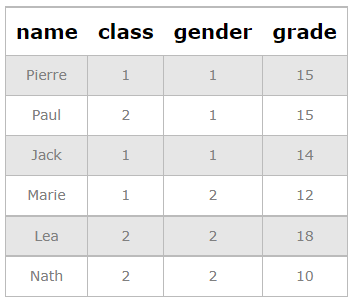
by author

Objective: Calculate the average per class, and the average per gender.

If we want to calculate in the same table, the average of the grades per class and per gender, we could calculate the average per class in one table, the average per gender in another one, then join both vertically. This is exactly the purpose of the grouping set of Postgres:

fetch some values
SELECT class,gender,AVG(grade) 
FROM students 
GROUP BY GROUPING SETS (class,gender);
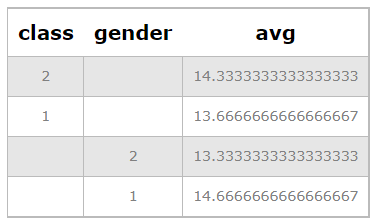
by author

Try these queries here : https://extendsclass.com/postgresql-online.html

In Pandas

import pandas as pd
df= pd.DataFrame(
{'name':['Pierre','Paul','Jack','Marie','Lea','Nath']   ,
'class': ['Class 1','Class 2','Class 1','Class 1','Class 2','Class 2'] ,
'gender': ['M','M','M','F','F','F'] ,
'grade':  [15,15,14,12,18,10]})
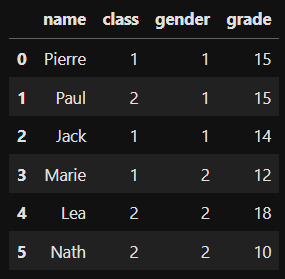
by author

We need to create the two group by and then join them. We could use the basic function groupby.

df_temp=df.groupby(by='class').mean().reset_index()

Why is it not working ? because it will also calculate the mean() of the column gender, which is a numerical value.
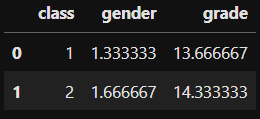
by author

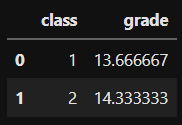
As we want to continue on the same path, we can calculate it this way, but then, drop the column we don’t want, here it’s the gender

df_temp.drop(columns='gender')
by author

How to put everything in a function?

The first objective of the function is to be able to take as a parameter as many column we want to feed the grouping set. We will enter this parameter in a list. We will then loop over this list.

def group_set(df,list_groupset):
    
    #initialzation for the Concatenation
    data=pd.DataFrame()
    for group in list_groupset :
        
        #Group by on one of the list
        df_temp=df.groupby(by=group).mean().reset_index()
    
        #Which column do we need to delete ?
        list_groupset_temp=list(list_groupset)
        list_groupset_temp.remove(group)
        df_temp=df_temp.drop(columns=list_groupset_temp)
        
        #Merging the different group by 
        data=pd.concat([data,df_temp])
        
    return(data)
list_groupset = ['class','gender']
group_set(df,list_groupset)
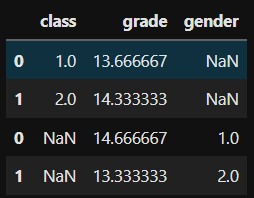
TADAM

If you liked this story, you can check my latest post here:

Python
Sql
Postgres
Data Science
Programming
Recommended from ReadMedium