avatarLouis Josso

Free AI web copilot to create summaries, insights and extended knowledge, download it at here

5097

Abstract

ta[<span class="hljs-string">'messages'</span>])

<span class="hljs-comment">#Then open the other ones and append them</span>
<span class="hljs-comment">#Would need to change that to apply to every number of files needed</span>
<span class="hljs-keyword">for</span> i <span class="hljs-keyword">in</span> np.arange(<span class="hljs-number">2</span>,<span class="hljs-number">6</span>) : 
    <span class="hljs-built_in">file</span> = <span class="hljs-built_in">open</span>(path + <span class="hljs-string">'message_'</span>+str(i)+<span class="hljs-string">'.json'</span>, encoding=<span class="hljs-string">'utf8'</span>)
    data = json.<span class="hljs-built_in">load</span>(<span class="hljs-built_in">file</span>, object_hook=parse_obj)
    df_temp = pd.json_normalize(data[<span class="hljs-string">'messages'</span>])
    df=df.append(df_temp)
<span class="hljs-literal">return</span> (df)</pre></div><blockquote id="b099"><p>Spoiler Alert : Facebook (Meta now), did not encode the JSON in a good way, we need a trick here to access the content</p></blockquote><div id="aa22"><pre><span class="hljs-keyword">def</span> <span class="hljs-title function_">parse_obj</span>(<span class="hljs-params">obj</span>):
<span class="hljs-keyword">for</span> key <span class="hljs-keyword">in</span> obj:
    <span class="hljs-keyword">if</span> <span class="hljs-built_in">isinstance</span>(obj[key], <span class="hljs-built_in">str</span>):
        obj[key] = obj[key].encode(<span class="hljs-string">'latin_1'</span>).decode(<span class="hljs-string">'utf-8'</span>)
    <span class="hljs-keyword">elif</span> <span class="hljs-built_in">isinstance</span>(obj[key], <span class="hljs-built_in">list</span>):
        obj[key] = <span class="hljs-built_in">list</span>(<span class="hljs-built_in">map</span>(<span class="hljs-keyword">lambda</span> x: x <span class="hljs-keyword">if</span> <span class="hljs-built_in">type</span>(x) != <span class="hljs-built_in">str</span> <span class="hljs-keyword">else</span> x.encode(<span class="hljs-string">'latin_1'</span>).decode(<span class="hljs-string">'utf-8'</span>), obj[key]))
    <span class="hljs-keyword">pass</span>
<span class="hljs-keyword">return</span> obj</pre></div><p id="61a5">Thanks, Jakub —<i> Original answer: <a href="https://stackoverflow.com/questions/50008296/facebook-json-badly-encoded">stackoverflow</a>: </i>We need to encode in Latin_1 before decoding it again in UTF-8</p><blockquote id="9343"><p>We could look at every text and see what going on there, but as data scientists, could we do that in another way?</p></blockquote><p id="a5ae">As we said, let’s focus on messages. What information is there? We have the <b>timestamps </b>of the messages, the <b>content </b>itself, the <b>author</b>, and the <b>reactions</b>.</p><div id="4073"><pre>def clean_data(df):
#We want a usable <span class="hljs-type">time</span> stamp
df[<span class="hljs-string">'date_time'</span>]=pd.to_datetime(df[<span class="hljs-string">'timestamp_ms'</span>], unit=<span class="hljs-string">'ms'</span>) 

#Way easier <span class="hljs-keyword">to</span> <span class="hljs-keyword">work</span> <span class="hljs-keyword">with</span> lower cases <span class="hljs-keyword">for</span> <span class="hljs-type">text</span>
df[<span class="hljs-string">'content'</span>]=df[<span class="hljs-string">'content'</span>].str.lower()

#Let<span class="hljs-string">'s not work first with every data --&gt; Only text
df.drop(columns=['</span>timestamp_ms<span class="hljs-string">','</span>gifs<span class="hljs-string">','</span>is_unsent<span class="hljs-string">','</span>photos<span class="hljs-string">','</span>typ<span class="hljs-string">e','</span>videos<span class="hljs-string">','</span>audio_files<span class="hljs-string">','</span>sticker.uri<span class="hljs-string">',
                 '</span>call_duration<span class="hljs-string">','</span><span class="hljs-keyword">share</span>.link<span class="hljs-string">','</span><span class="hljs-keyword">share</span>.share_text<span class="hljs-string">','</span>users<span class="hljs-string">','</span>files<span class="hljs-string">'],inplace=True)

df['</span>year<span class="hljs-string">']=df['</span>date_tim<span class="hljs-string">e'].dt.year
#df=df[df['</span>year<span class="hljs-string">']==2021]
df['</span>hour<span class="hljs-string">']=df['</span>date_tim<span class="hljs-string">e'].dt.hour
df['</span>weekday<span class="hljs-string">']=df['</span>date_tim<span class="hljs-string">e'].dt.weekday

#We can exclude some non participing people
df=df[~df['</span>sender_nam<span class="hljs-string">e'].isin(['</span><span class="hljs-string">'])]

df['</span>content<span class="hljs-string">']=df.content.fillna('')
#df=df[~df['</span>content<span class="hljs-string">'].isna()].reset_index()


return (df)</span></pre></div><h1 id="333a">What are we looking for?</h1><p id="6284">Here comes the time to ask o

Options

urselves questions. What do we want to find and show?</p><h2 id="5116">1. The number of messages</h2><p id="cdf9">The first information we can think of is the number of messages sent by every participant of the conversation. Let’s give an award to the one who sent the most messages in 2021.</p><h2 id="22ec">2. The number of words per message</h2><p id="13f0">Who sent the longest message? With that, we could also think of the average number of words per message. <i>Did someone ever say that the longer the messages you write, the smartest you are?</i> I’m sure you could find an article on that here on medium</p><h2 id="c1d7">3. The time messages were sent</h2><p id="b6d7">We can see how many messages we send each other per day of the week and per hour of the day. Let’s find one fun behavior here</p><h2 id="c6e7">4. We can find what are the most used words</h2><p id="f531">And once we have it for the conversation, we can find the same per person. This will give us great information about our friend’s behavior on the chat</p><h2 id="3e9f">5. Reactions are a gold mine</h2><p id="cd58">With the reaction to the message, we can also try to find out who reacts the more to each other, which were the keystone of the year, and so on.</p><h1 id="801f">How do we go from that to the result?</h1><blockquote id="f30b"><p>A big part of the data scientist job is to be able to tell a story from the data we have</p></blockquote><p id="4695">As I said, if you want to do it for yourself, all my code is accessible here: <a href="https://github.com/Josso35/Messenger_Podium">Messenger_Podium</a>. I will not overload this post with the whole code. Once we have all the information, let’s put it all in excel. The Pandas library is useful as always, and here is one of the best ways to push every data to one final excel. We will use this excel to plot our graphs to PowerPoint</p><div id="7800"><pre>with pd.ExcelWriter(<span class="hljs-string">"../2. Output/Data.xlsx"</span>, <span class="hljs-attribute">engine</span>=<span class="hljs-string">'openpyxl'</span>,mode='w') as writer:

    df_grouped_2021.to_excel(writer,<span class="hljs-attribute">sheet_name</span>=<span class="hljs-string">'grouped'</span>,startrow=1)
    df_grouped_2020.to_excel(writer,<span class="hljs-attribute">sheet_name</span>=<span class="hljs-string">'grouped'</span>,startrow=15)
    
    sender_list =  np.concatenate((df.sender_name.unique(),[<span class="hljs-string">'all'</span>]))
    <span class="hljs-keyword">for</span> sender <span class="hljs-keyword">in</span> sender_list : 
        <span class="hljs-built_in">print</span>(sender)
        day_max_message,hours,day,word_max_freq =  by_sender(df,temmenized,sender)
        
        day_max_message.to_excel(writer,<span class="hljs-attribute">sheet_name</span>=sender,startrow=0)
        hours.to_excel(writer,<span class="hljs-attribute">sheet_name</span>=sender,startrow=5)
        day.to_excel(writer,<span class="hljs-attribute">sheet_name</span>=sender,startrow=10)
        word_max_freq.to_excel(writer,<span class="hljs-attribute">sheet_name</span>=sender,startrow=15)</pre></div><h1 id="ab7d">And now what?</h1><figure id="47f4"><img src="https://cdn-images-1.readmedium.com/v2/resize:fit:800/1*frBK_voJtZtGDoALGPgFZw.png"><figcaption></figcaption></figure><blockquote id="e6ae"><p>Paul won the <b>chatterbox award</b>, with no less than 3350 messages sent over the year. Far ahead of the other two on the podium, with an average of around 2500. However, Alex does not leave empty-handed with the award for the longest message: 450 words in one go.</p></blockquote><figure id="7e25"><img src="https://cdn-images-1.readmedium.com/v2/resize:fit:800/1*xxXmpLfD2WYu_xyind9eeQ.png"><figcaption></figcaption></figure><blockquote id="4256"><p>With the weekend coming, it seems that we are starting to get active. Sunday being a sacred day, rest is in order. We clearly see an effect that we will call the “Aperitif” effect on the average number of messages sent per hour with a preferred exchange around 6 p.m.</p></blockquote><p id="a9dd"><b>If you want us to also dive deeper into the messages, and run some NLP analysis on the exchanged text, follow me and leave it in the comments.</b> I was thinking of teaching an algorithm: ‘“how to speak like A ?”. What do you think?</p><p id="7330"><i>If you like this post, you can check my previous story here :</i></p><div id="33ea" class="link-block">
      <a href="https://readmedium.com/translate-sql-grouping-sets-to-pandas-db38f14f1c9c">
        <div>
          <div>
            <h2>Translate SQL Grouping Sets to Python</h2>
            <div><h3>How to handle the multi group by of Postgres 9.5 in Pandas</h3></div>
            <div><p>medium.com</p></div>
          </div>
          <div>
            <div style="background-image: url(https://miro.readmedium.com/v2/resize:fit:320/0*CZaNQNlMmgx1jN-p)"></div>
          </div>
        </div>
      </a>
    </div></article></body>

Analyze Facebook Messenger Data with Python and Pandas

How to download Facebook Data, open them with pandas and find the best behavior’s insights
Photo by Snowscat on Unsplash

Hey, medium! Who would like to have a magic wand to go back in the past and find lots of fun facts in our friend’s conversations? Thanks to the law on private data, we can access all our previous conversations on Facebook, and who says data, says Python and graphs!

This dive into my messenger conversations comes from one question: What the heck is going on in the group conversation with my friends? There are websites where you can print your whole conversation on books, and share it with your friends. First of all, I don’t want all the photos from this discussion to be spread around the world. Second, This would be a way too huge book for me to read, we have around 50k messages spread on mostly 10y of Facebook experience in this single thread. This is why I wanted to do what I know how to do: Run some analyses on the data we have at hand. This will be my late Christmas gift to them. Some fun on a chocolate bar as we say here.

We will first see :

  1. How to get our messages back and understand how to read it
  2. What we can dig into it and focus on a specific question
  3. Try to put it all together and look at those beautiful results

If you want to do it for yourself, all my code is accessible here: Messenger_Podium. I will presume that you already have a running Python environment on your computer, either in a Jupyter Notebook or in an IDE. If you are not familiar with Python, just jump with us and see all we can do here!! That’s a fun project to enter the world of data science.

(Ps: I’m shocked, I just understood right now the pun joke with JupYter)

Get Back Our Data and Understand it

Thanks, Facebook for letting us play

Sorry, I’m French. And thus, Facebook is in French for me, but you should be able to follow me on this :
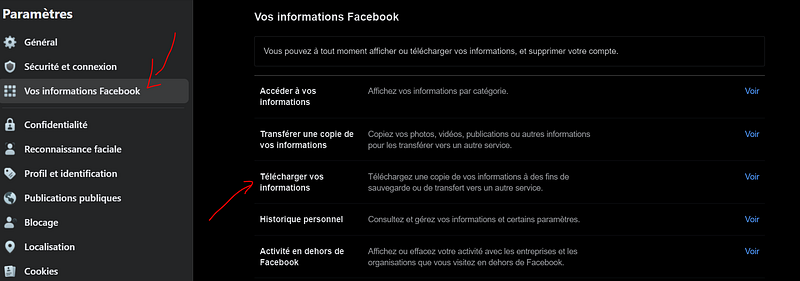
In “Parameters”, “Your information” — Download your information. I downloaded only my messages, and for the past 3years.

You can do more, but I wanted here only to look at my messages on one conversation in 2021.

You can either download them in HTML or JSON. JSON will be way easier to work on, so let’s just take it in JSON.

We now have all our conversations, on the past 3years.

I’m jumping directly on the conversation that interests me. I have one conversation, with my oldest friends. We send messages there every day, so it’s my chat with the more messages. There, we can find EVERYTHING, from the pictures to the voicemail, passing by the messages. Let’s focus only on the messages. If you would like me to have a project also on photos and voicemail leave it in the comments

What is a JSON file? If you are here, I assume you already know how a JSON works. If not, my friend, Omar, explained it nicely here: JSON-in-a-nutshell. In my chat, there are 5 JSON files, all containing messages on different periods. The first object is the list of participants, the second object of the JSON is the messages.

Open Messenger data with Pandas

I love to work with Pandas because I’m used to it. I think it is also really well suited for this project, as one row can be interpreted as one message.

import pandas as pd
import json
def load_all_messages(path):
    # Open first the first message
    file = open(path + 'message_1.json')
    
    #Here we have the decoder from messenger
    data = json.load(file, object_hook=parse_obj)
    df = pd.json_normalize(data['messages'])
    
    #Then open the other ones and append them
    #Would need to change that to apply to every number of files needed
    for i in np.arange(2,6) : 
        file = open(path + 'message_'+str(i)+'.json', encoding='utf8')
        data = json.load(file, object_hook=parse_obj)
        df_temp = pd.json_normalize(data['messages'])
        df=df.append(df_temp)
    return (df)

Spoiler Alert : Facebook (Meta now), did not encode the JSON in a good way, we need a trick here to access the content

def parse_obj(obj):
    for key in obj:
        if isinstance(obj[key], str):
            obj[key] = obj[key].encode('latin_1').decode('utf-8')
        elif isinstance(obj[key], list):
            obj[key] = list(map(lambda x: x if type(x) != str else x.encode('latin_1').decode('utf-8'), obj[key]))
        pass
    return obj

Thanks, Jakub — Original answer: stackoverflow: We need to encode in Latin_1 before decoding it again in UTF-8

We could look at every text and see what going on there, but as data scientists, could we do that in another way?

As we said, let’s focus on messages. What information is there? We have the timestamps of the messages, the content itself, the author, and the reactions.

def clean_data(df):
    #We want a usable time stamp
    df['date_time']=pd.to_datetime(df['timestamp_ms'], unit='ms') 
    
    #Way easier to work with lower cases for text
    df['content']=df['content'].str.lower()
    
    #Let's not work first with every data --> Only text
    df.drop(columns=['timestamp_ms','gifs','is_unsent','photos','type','videos','audio_files','sticker.uri',
                     'call_duration','share.link','share.share_text','users','files'],inplace=True)

    df['year']=df['date_time'].dt.year
    #df=df[df['year']==2021]
    df['hour']=df['date_time'].dt.hour
    df['weekday']=df['date_time'].dt.weekday
    
    #We can exclude some non participing people
    df=df[~df['sender_name'].isin([''])]
    
    df['content']=df.content.fillna('')
    #df=df[~df['content'].isna()].reset_index()
    
    
    return (df)

What are we looking for?

Here comes the time to ask ourselves questions. What do we want to find and show?

1. The number of messages

The first information we can think of is the number of messages sent by every participant of the conversation. Let’s give an award to the one who sent the most messages in 2021.

2. The number of words per message

Who sent the longest message? With that, we could also think of the average number of words per message. Did someone ever say that the longer the messages you write, the smartest you are? I’m sure you could find an article on that here on medium

3. The time messages were sent

We can see how many messages we send each other per day of the week and per hour of the day. Let’s find one fun behavior here

4. We can find what are the most used words

And once we have it for the conversation, we can find the same per person. This will give us great information about our friend’s behavior on the chat

5. Reactions are a gold mine

With the reaction to the message, we can also try to find out who reacts the more to each other, which were the keystone of the year, and so on.

How do we go from that to the result?

A big part of the data scientist job is to be able to tell a story from the data we have

As I said, if you want to do it for yourself, all my code is accessible here: Messenger_Podium. I will not overload this post with the whole code. Once we have all the information, let’s put it all in excel. The Pandas library is useful as always, and here is one of the best ways to push every data to one final excel. We will use this excel to plot our graphs to PowerPoint

with pd.ExcelWriter("../2. Output/Data.xlsx", engine='openpyxl',mode='w') as writer:
    
        
        df_grouped_2021.to_excel(writer,sheet_name='grouped',startrow=1)
        df_grouped_2020.to_excel(writer,sheet_name='grouped',startrow=15)
        
        sender_list =  np.concatenate((df.sender_name.unique(),['all']))
        for sender in sender_list : 
            print(sender)
            day_max_message,hours,day,word_max_freq =  by_sender(df,temmenized,sender)
            
            day_max_message.to_excel(writer,sheet_name=sender,startrow=0)
            hours.to_excel(writer,sheet_name=sender,startrow=5)
            day.to_excel(writer,sheet_name=sender,startrow=10)
            word_max_freq.to_excel(writer,sheet_name=sender,startrow=15)

And now what?
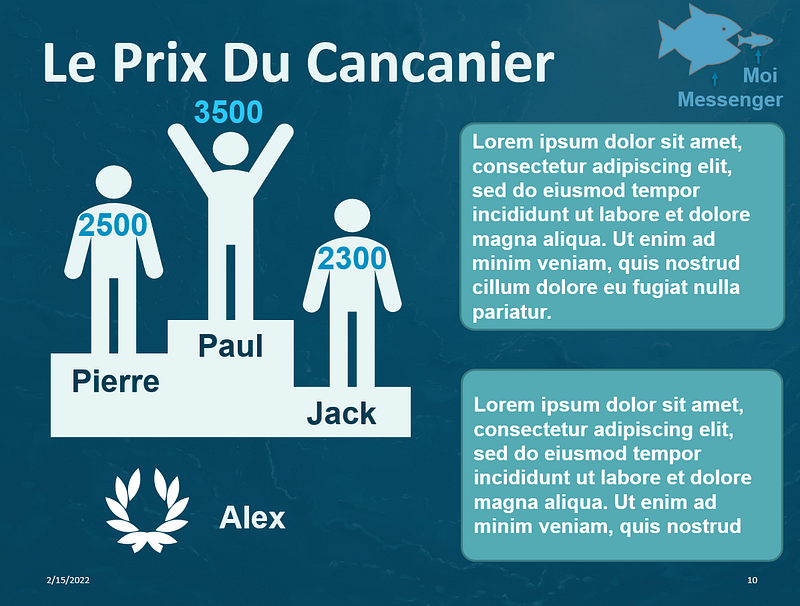
Paul won the chatterbox award, with no less than 3350 messages sent over the year. Far ahead of the other two on the podium, with an average of around 2500. However, Alex does not leave empty-handed with the award for the longest message: 450 words in one go.
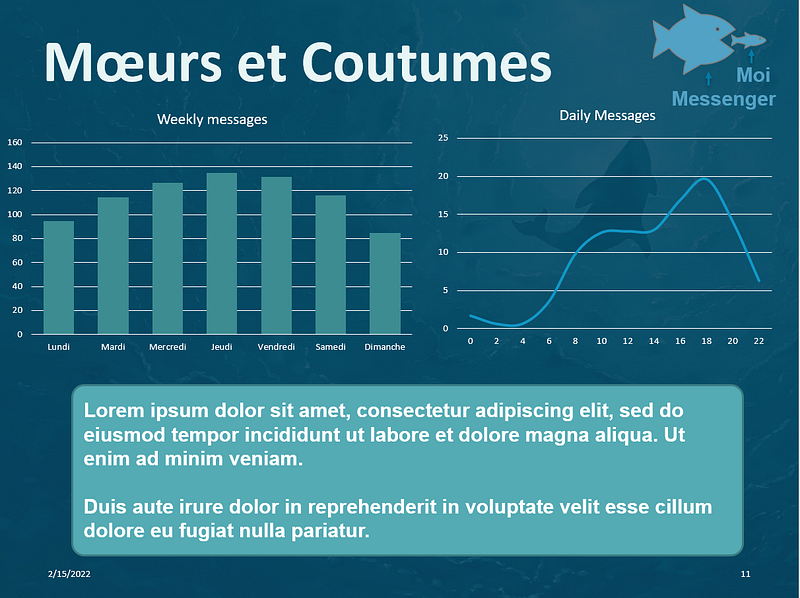
With the weekend coming, it seems that we are starting to get active. Sunday being a sacred day, rest is in order. We clearly see an effect that we will call the “Aperitif” effect on the average number of messages sent per hour with a preferred exchange around 6 p.m.

If you want us to also dive deeper into the messages, and run some NLP analysis on the exchanged text, follow me and leave it in the comments. I was thinking of teaching an algorithm: ‘“how to speak like A ?”. What do you think?

If you like this post, you can check my previous story here :

Data Science
Facebook
Pandas
Python
Data
Recommended from ReadMedium