avatarJerry Ng

Free AI web copilot to create summaries, insights and extended knowledge, download it at here

4088

Abstract

st built on a completely different computing environment (<i>with Docker installed over there of course</i>).</p><blockquote id="d68d"><p>Learn more about <code>Dockerfile</code> and building Docker images <a href="https://docs.docker.com/engine/reference/builder/">here</a>.</p></blockquote><h2 id="6ec7">Dealing With External Dependencies</h2><p id="69a2">In a real-life scenario, our applications often require us to have external dependencies such as databases, message queues, etc. With Docker, we could <b>easily download and run</b> specific versions of the external dependencies that we want.</p><p id="4182">For example, to install the latest version of PostgreSQL, simply run:</p><div id="6fc7"><pre><span class="hljs-comment"># To download & run the latest postgres image</span> docker <span class="hljs-built_in">run</span> -d --name dpostgres -p 5432:5432 -e <span class="hljs-attribute">POSTGRES_PASSWORD</span>=password postgres:latest</pre></div><div id="75b3"><pre><span class="hljs-comment"># To use psql</span> docker exec -<span class="hljs-keyword">it</span> dpostgres psql -U postgres</pre></div><div id="c7fd"><pre><span class="hljs-comment"># To run shell within the same docker container</span> docker <span class="hljs-keyword">exec</span> -it dpostgres sh</pre></div><p id="c43f">Oh, now you need a <a href="https://redis.io/">Redis</a> instance? Simply run:</p><div id="f5ee"><pre>docker <span class="hljs-built_in">run</span> <span class="hljs-comment">--name dredis -d redis</span></pre></div><p id="7640">The best part about this is that we keep different versions of the same software running on our machine! If you haven’t started using Docker, I would highly recommend you try it out. It has made my life as a developer so much easier.</p><h1 id="a87d">Insomnia REST Client</h1><blockquote id="230d"><p><b>Pricing: <a href="https://insomnia.rest/pricing">Freemium</a></b> Free version (with gist sync plugin) is great enough for personal usage</p></blockquote><figure id="ef52"><img src="https://cdn-images-1.readmedium.com/v2/resize:fit:800/0*N_o6gj43ctr97ZQJ.png"><figcaption>Photo Credits: <a href="https://insomnia.rest/download/">Insomnia REST Client</a></figcaption></figure><p id="83f3">Regardless of whether you’re a front-end or a back-end developer, it is common for us to integrate with 3rd party API or even develop our own set of APIs.</p><p id="653b">Typically, one would use API Clients such as <a href="https://www.postman.com/">Postman</a> to test the functionality and performance of our API during the development.</p><p id="852a">While Post is no doubt the <i>de facto standard</i> for API testing and development, <a href="https://insomnia.rest/">Insomnia REST Client</a> — a <b>light</b> and <b>easy-to-use</b> alternative to Postman is hands down my favorite API client today.</p><h2 id="596c">Why?</h2><p id="1c6b">Besides the cleaner-looking UI, one of the best features that I like about Insomnia is the ability to chain requests. <a href="https://support.insomnia.rest/article/175-chaining-requests"><b>Chaining requests</b></a> basically means we can <b>extract values from the responses of other requests</b> and use them in the current request.</p><blockquote id="1604"><p>For instance, imagine you have an <code>/user/update</code> endpoint that requires a <code>token</code> and <code>userId</code> value from a <code>/login</code> endpoint.</p></blockquote><blockquote id="258e"><p>In this case, you can use chaining requests to automatically run the <code>/login</code> request and extract the response from that endpoint every time you hit ‘Run’ on the <code>/user/update</code> request without having to switch to <code>/login</code> endpoint every time the <code>token</code> expires.</p></blockquote><p id="c141">Besides, Insomnia also supports a bunch of community-written <a href="https://insomnia.rest/plugins">plugins</a> which can come in handy such as <a href="https://insomnia.rest/plugins/insomnia-plugin-faker"><code>fa</code>ker</a>.</p><p id="d1b5">As the free version of Insomnia does <b>not</b> come

Options

with cloud sync (which might be a deal-breaker for some), I personally use <a href="https://insomnia.rest/plugins/insomnia-plugin-gist-sync"><code>insomnia-gist-s</code>ync</a> to <b>sync all my workspaces for free</b>.</p><p id="9792">Though I’d still highly recommend you get the paid version of it. It’s worth every penny!</p><h1 id="68ad">TablePlus</h1><blockquote id="aeb0"><p>Pricing: <a href="https://tableplus.com/pricing">Freemium</a> I’d recommend you to switch to the paid version ($60 for perpetual license) for a better user experience. The free trial is limited to 2 opened tabs, 2 opened windows, 2 advanced filters at a time.</p></blockquote><figure id="47e3"><img src="https://cdn-images-1.readmedium.com/v2/resize:fit:800/0*ruexNyS-7FQjnZmU.png"><figcaption>Using TablePlus to connect to a database (Photo Credits: <a href="https://tableplus.com/">TablePlus</a>)</figcaption></figure><p id="1f73">As a backend developer, it is pretty common for me to perform database administration tasks with the help of a database tool.</p><p id="706e">TablePlus is a native tool with a modern-looking and friendly interface that you can use to create, query, edit, and save your databases in a very fast and secure way — it <b>feels just like editing a spreadsheet</b>.</p><figure id="87b7"><img src="https://cdn-images-1.readmedium.com/v2/resize:fit:800/0*6nWG94-PPYvDjY_c"><figcaption>TablePlus view of a database (Photo Credits: <a href="https://tableplus.com/">TablePlus</a>)</figcaption></figure><h2 id="8bdb">What Can You Use It For?</h2><ul><li>Using conditional filters to narrow down data in your database table</li><li>With a spreadsheet-like view, one could easily modify data using the inline editing feature by simply double-clicking a cell</li><li>Writing custom SQL queries</li><li>Viewing multiple databases and tables in multiple tabs</li><li>Deleting, updating, or creating database tables and indexes</li><li>Exporting data as CSV, JSON, or SQL</li><li>Database restore and backup to your local machine</li><li>And many <a href="https://docs.tableplus.com/">more</a></li></ul><h2 id="a7f8">Supported Databases</h2><p id="bb53">As of the time of writing this, it currently supports PostgreSQL, MySQL, SQLite, MS SQL Server, Redshift, Redis, MariaDB, and CockroachDB.</p><h2 id="f919">Getting Started</h2><p id="576c">Here are some amazing guides that are written by <a href="https://medium.com/tableplus">TablePlus</a> to get you started quickly:</p><ul><li><a href="https://readmedium.com/getting-started-with-tableplus-1ad69e3a635d">Getting Started with TablePlus</a></li><li><a href="https://readmedium.com/11-tips-to-boost-your-productivity-with-tableplus-a554ab773575">More tips on using TablePlus</a></li></ul><h2 id="1079">Originally published at jerrynsh.com</h2><div id="ffe6" class="link-block"> <a href="https://readmedium.com/fast-track-your-api-development-with-insomnia-rest-client-d02521c31b9d"> <div> <div> <h2>Fast Track Your API Development With Insomnia REST Client</h2> <div><h3>A Fast and Simple Alternative to Postman for Sending REST and GraphQL Requests</h3></div> <div><p>medium.com</p></div> </div> <div> <div style="background-image: url(https://miro.readmedium.com/v2/resize:fit:320/0*qk-YkW0_3prCwZsS.png)"></div> </div> </div> </a> </div><div id="bdd4" class="link-block"> <a href="https://betterprogramming.pub/how-to-write-clean-code-in-python-5d67746133f2"> <div> <div> <h2>How To Write Clean Code in Python</h2> <div><h3>3 Tips for writing clean code with Python examples</h3></div> <div><p>betterprogramming.pub</p></div> </div> <div> <div style="background-image: url(https://miro.readmedium.com/v2/resize:fit:320/0*S7l8m1iFRMJve25V)"></div> </div> </div> </a> </div></article></body>

3 Best Backend Developer Tools You Should Use

Check out these tools that can increase your productivity as a backend developer

Photo by Andreas Klassen on Unsplash

Every developer has a toolset which we will use while coding. These are tools that we live and breathe with at our jobs daily, and chances are, we can’t work effectively without them.

For the most part, everyone has their favorite code editor like Vim, Sublime Text, Atom, VSCode, etc., I am not going to bring those up. Also, using Git is indisputable and I believe we are all on the same page.

This article will share some of my favorite tools that I use as a back-end developer. If you are looking for tools recommendation beyond VSCode and Git, read on.

Docker

Pricing: Free
Photo Credits: Docker

Long gone the days where you need to SSH into your production server and install the dependencies (i.e. Python, NodeJS, etc.) of your app before your application can run.

Today, with Docker image, we could easily package up our code and all its dependencies into a Docker container that can run quickly and reliably from one computing environment to another.

Dockerizing Your Application For Different Computing Environment

Docker images are defined within special text files called Dockerfile, and it requires us to define all the steps explicitly inside the Dockerfile.

Here’s a simple example, if your application requires NodeJS and running npm install to work, we can simply define everything we need inside our Dockerfile i.e.:

# Example of a NodeJS application Dockerfile
FROM node
RUN mkdir /usr/src/app
WORKDIR /usr/src/app
ENV PATH /usr/src/app/node_modules/.bin:$PATH
COPY package*.json /usr/src/app
RUN npm install
COPY . /usr/src/app
EXPOSE 4000
CMD [ "npm", "start"]

We can use docker build -t xxxcommand to build our image and then docker run -d — name xxx -p xxxto serve our application.

The best part of this is that we can then use the same Docker image that was just built on a completely different computing environment (with Docker installed over there of course).

Learn more about Dockerfile and building Docker images here.

Dealing With External Dependencies

In a real-life scenario, our applications often require us to have external dependencies such as databases, message queues, etc. With Docker, we could easily download and run specific versions of the external dependencies that we want.

For example, to install the latest version of PostgreSQL, simply run:

# To download & run the latest postgres image
docker run -d --name dpostgres -p 5432:5432 -e POSTGRES_PASSWORD=password postgres:latest
# To use psql
docker exec -it dpostgres psql -U postgres
# To run shell within the same docker container
docker exec -it dpostgres sh

Oh, now you need a Redis instance? Simply run:

docker run --name dredis -d redis

The best part about this is that we keep different versions of the same software running on our machine! If you haven’t started using Docker, I would highly recommend you try it out. It has made my life as a developer so much easier.

Insomnia REST Client

Pricing: Freemium Free version (with gist sync plugin) is great enough for personal usage
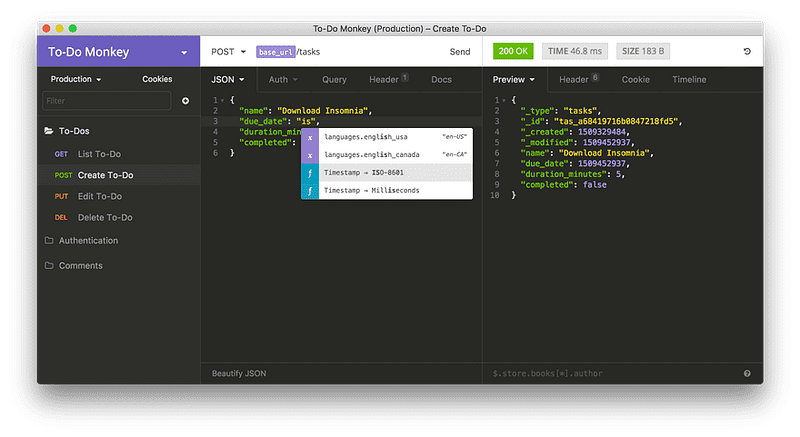
Photo Credits: Insomnia REST Client

Regardless of whether you’re a front-end or a back-end developer, it is common for us to integrate with 3rd party API or even develop our own set of APIs.

Typically, one would use API Clients such as Postman to test the functionality and performance of our API during the development.

While Post is no doubt the de facto standard for API testing and development, Insomnia REST Client — a light and easy-to-use alternative to Postman is hands down my favorite API client today.

Why?

Besides the cleaner-looking UI, one of the best features that I like about Insomnia is the ability to chain requests. Chaining requests basically means we can extract values from the responses of other requests and use them in the current request.

For instance, imagine you have an /user/update endpoint that requires a token and userId value from a /login endpoint.

In this case, you can use chaining requests to automatically run the /login request and extract the response from that endpoint every time you hit ‘Run’ on the /user/update request without having to switch to /login endpoint every time the token expires.

Besides, Insomnia also supports a bunch of community-written plugins which can come in handy such as faker.

As the free version of Insomnia does not come with cloud sync (which might be a deal-breaker for some), I personally use insomnia-gist-sync to sync all my workspaces for free.

Though I’d still highly recommend you get the paid version of it. It’s worth every penny!

TablePlus

Pricing: Freemium I’d recommend you to switch to the paid version ($60 for perpetual license) for a better user experience. The free trial is limited to 2 opened tabs, 2 opened windows, 2 advanced filters at a time.
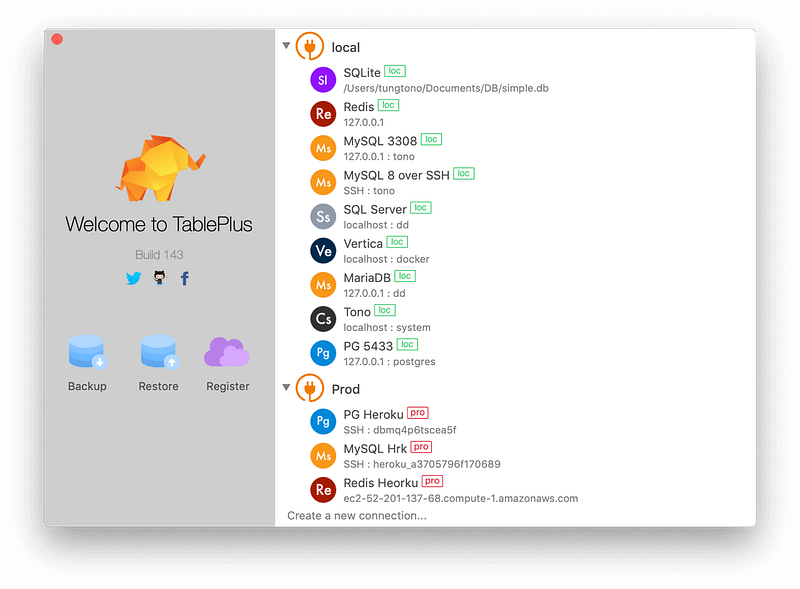
Using TablePlus to connect to a database (Photo Credits: TablePlus)

As a backend developer, it is pretty common for me to perform database administration tasks with the help of a database tool.

TablePlus is a native tool with a modern-looking and friendly interface that you can use to create, query, edit, and save your databases in a very fast and secure way — it feels just like editing a spreadsheet.
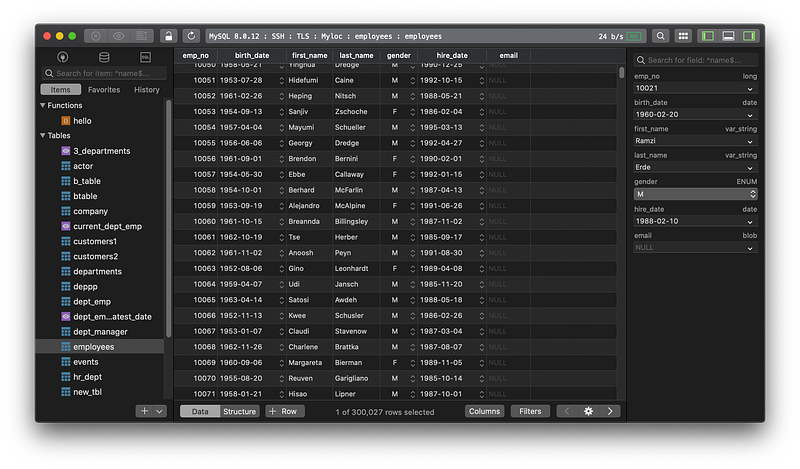
TablePlus view of a database (Photo Credits: TablePlus)

What Can You Use It For?

  • Using conditional filters to narrow down data in your database table
  • With a spreadsheet-like view, one could easily modify data using the inline editing feature by simply double-clicking a cell
  • Writing custom SQL queries
  • Viewing multiple databases and tables in multiple tabs
  • Deleting, updating, or creating database tables and indexes
  • Exporting data as CSV, JSON, or SQL
  • Database restore and backup to your local machine
  • And many more

Supported Databases

As of the time of writing this, it currently supports PostgreSQL, MySQL, SQLite, MS SQL Server, Redshift, Redis, MariaDB, and CockroachDB.

Getting Started

Here are some amazing guides that are written by TablePlus to get you started quickly:

Originally published at jerrynsh.com

Software Development
Productivity
Tools
Software Engineering
Tips
Recommended from ReadMedium