
TLDR: How to Stream Data from a Movella DOT with a Mac and Python

This is a quickstart version of How to Stream Data from a Movella DOT with a Mac and Python. If you’re new to Python and Bluetooth, check out that article.
This code will allow you to get Free Acceleration data (X, Y, and Z of the accelerometer) from a Movella DOT (formerly known as Xsens DOT).
Requirements
- A computer (preferably Mac)
- Python 3
- Bleak (a Python Bluetooth LE library)
- NumPy (a Python math library)
- 1 Movella DOT sensor
Install Bleak with pip install bleak .
Install NumPy with pip install numpy.
Steps
- “Scan” for the DOT’s Bluetooth address
- Connect to the Movella DOT in Python
- “Subscribe” to measurement data notifications
- Set and Turn on the measurement mode
- “Listen” for data
- Format the data with NumPy
Step 1: Scan for the DOT’s Bluetooth address
Scan for the DOT with scanner.py to get its UUID:
# scanner.py

import asyncio
from bleak import BleakScanner

async def main():
    devices = await BleakScanner.discover()
    for device in devices:
        print(device)

asyncio.run(main())
The scanner output is:

We have two DOTs in our office, so we’ve picked a random one: 338312FA-C3D1–183F-325A-0726AFDBEB78.
Step 2: Connect to the DOT
# Connect to a Movella DOT

import asyncio
from bleak import BleakClient

async def main():
    address = "338312FA-C3D1-183F-325A-0726AFDBEB78" # Movella DOT UUID

    async with BleakClient(address) as client:
        # Check if connection was successful
        print(f"Client connection: {client.is_connected}") # prints True or False

asyncio.run(main())
Step 3: Subscribe to Data Notifications
Use Bleak’s start_notify() to “subscribe” to the data that the DOT is sending out.
# Connect to a Movella DOT and subscribe to the Short Payload Characteristic

import asyncio
from bleak import BleakClient

short_payload_characteristic_uuid = "15172004-4947-11e9-8646-d663bd873d93"

def notification_callback(sender, data):
    print(sender, data)

async def main():
    address = "338312FA-C3D1-183F-325A-0726AFDBEB78" # Movella DOT UUID

    async with BleakClient(address) as client:
        # Check if connection was successful
        print(f"Client connection: {client.is_connected}") # prints True or False

        # Subscribe to notifications from the Short Payload Characteristic
        await client.start_notify(short_payload_characteristic_uuid, notification_callback)

asyncio.run(main())
Step 4: Set and Turn on Measurement Mode
We’re going to stream data in Free Acceleration measurement mode (mode #6 according to the Movella DOT BLE Services Specifications documentation). This will give us the accelerometer’s X, Y, and Z measurements.
# Turn on Free Acceleration measurement mode

import asyncio
from bleak import BleakClient

measurement_characteristic_uuid = '15172001-4947-11e9-8646-d663bd873d93'
short_payload_characteristic_uuid = "15172004-4947-11e9-8646-d663bd873d93"

def notification_callback(sender, data):
    print("Sender:", sender)
    print("Data:", data)

async def main():
    address = "338312FA-C3D1-183F-325A-0726AFDBEB78" # Movella DOT UUID

    async with BleakClient(address) as client:
        # Check if connection was successful
        print(f"Client connection: {client.is_connected}") # prints True or False

        # Subscribe to notifications from the Short Payload Characteristic
        await client.start_notify(short_payload_characteristic_uuid, notification_callback)

        # Set and turn on the Free Acceleration measurement mode
        binary_message = b"\x01\x01\x06"
        await client.write_gatt_char(measurement_characteristic_uuid, binary_message, response=True)


asyncio.run(main())
Where binary_message is made up of:
\x01— A default value that the DOT BLE docs say is required\x01— whether measurement is on or not.01= on.00= off.\x06— specifies that we want Free Acceleration (option6from the measurement modes list)
Step 5: “Listen” for Data
Use asyncio.sleep(x) to stream data for x number of seconds.
# Stream data from a Movella DOT for 10 seconds

import asyncio
from bleak import BleakClient

measurement_characteristic_uuid = '15172001-4947-11e9-8646-d663bd873d93'
short_payload_characteristic_uuid = "15172004-4947-11e9-8646-d663bd873d93"

def notification_callback(sender, data):
    print("Sender:", sender)
    print("Data:", data)

async def main():
    address = "338312FA-C3D1-183F-325A-0726AFDBEB78" # Movella DOT UUID

    async with BleakClient(address) as client:
        # Check if connection was successful
        print(f"Client connection: {client.is_connected}") # prints True or False

        # Subscribe to notifications from the Short Payload Characteristic
        await client.start_notify(short_payload_characteristic_uuid, notification_callback)

        # Set and turn on the Free Acceleration measurement mode
        binary_message = b"\x01\x01\x06"
        await client.write_gatt_char(measurement_characteristic_uuid, binary_message, response=True)

        # Collect data from the DOT for 10.0 seconds
        await asyncio.sleep(10.0)

asyncio.run(main())
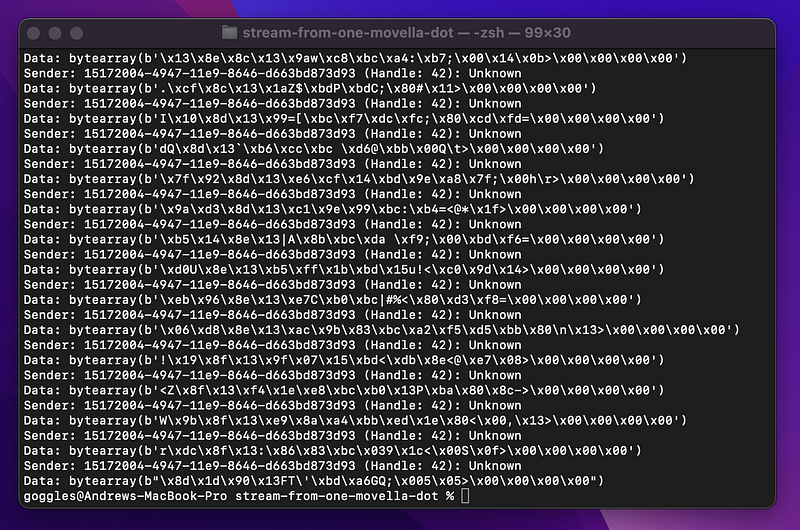
The output:
Step 6: Format the Data with Numpy
Make a new function, encode_free_acceleration() , which uses NumPy to convert bytes to real numbers.
Add this new function to the print statement in notification_callback().
# stream.py

import numpy as np
import asyncio
from bleak import BleakClient

measurement_characteristic_uuid = '15172001-4947-11e9-8646-d663bd873d93'
short_payload_characteristic_uuid = "15172004-4947-11e9-8646-d663bd873d93"

def notification_callback(sender, data):
    print(encode_free_acceleration(data))

def encode_free_acceleration(bytes_):
    # These bytes are grouped according to Movella's BLE specification doc
    data_segments = np.dtype([
        ('timestamp', np.uint32),
        ('x', np.float32),
        ('y', np.float32),
        ('z', np.float32),
        ('zero_padding', np.uint32)
        ])
    formatted_data = np.frombuffer(bytes_, dtype=data_segments)
    return formatted_data

async def main():
    address = "338312FA-C3D1-183F-325A-0726AFDBEB78" # Movella DOT UUID

    async with BleakClient(address) as client:
        # Check if connection was successful
        print(f"Client connection: {client.is_connected}") # prints True or False

        # Subscribe to notifications from the Short Payload Characteristic
        await client.start_notify(short_payload_characteristic_uuid, notification_callback)

        # Set and turn on the Free Acceleration measurement mode
        binary_message = b"\x01\x01\x06"
        await client.write_gatt_char(measurement_characteristic_uuid, binary_message, response=True)

        # Collect data from the DOT for 10.0 seconds
        await asyncio.sleep(10.0)

asyncio.run(main())
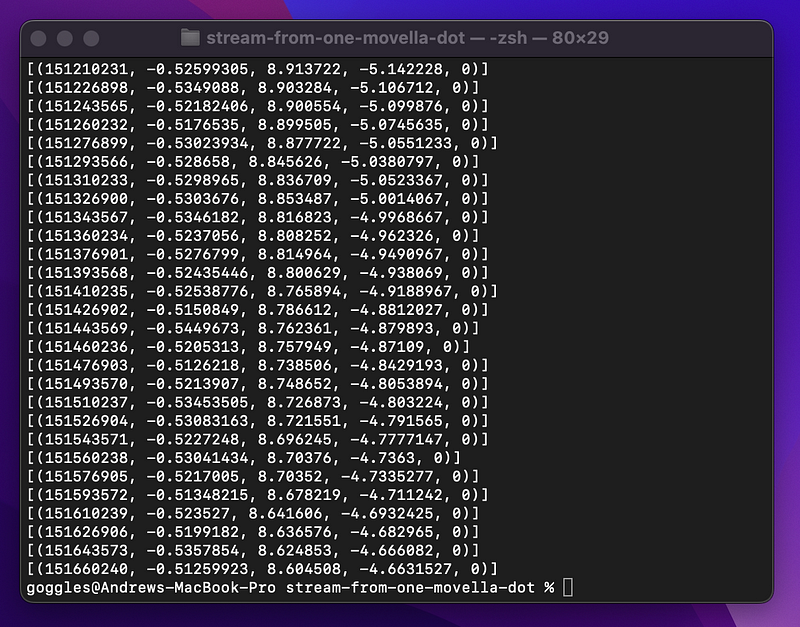
The final output:
Check out Movella’s DOT BLE Services Specifications documentation as well as their Knowledge Base for more info on coding for Movella/Xsens DOTs.
Learn more about Python’s AsyncIO here.
A more detailed version of this article is also available here.
Questions and Feedback
If you have questions or feedback, email us at [email protected] or message us on Instagram (@protobioengineering).
If you liked this article, consider supporting us by donating a coffee.


