
TLD- Your Silent Internet Hero You Never Knew About
There is one crucial piece that allows you to visit any website/app… Yet, most people have no idea about it.

In the previous post, I explained what ISPs are (just guys who rent you the internet connection)…
Let’s continue further with TLDs…
Another abbreviation?
Depending on the Top Level Domain (TLD) you visit, the root servers will return the corresponding DNS server to your ISP. For example, in the domain name https://igorjovanovic.INFO, the corresponding DNS Server to ask further is that of the .INFO domain.
💡At this point, DNS is one step closer to answering the question of the IP address behind the igorjovanovic.INFO domain.
On the IANA website, you can see the responsible name servers (DNS servers) for the resolution of .INFO domains. Here is a copy/paste directly from the IANA database.
Name Servers (DNS servers) of the .INFO domains
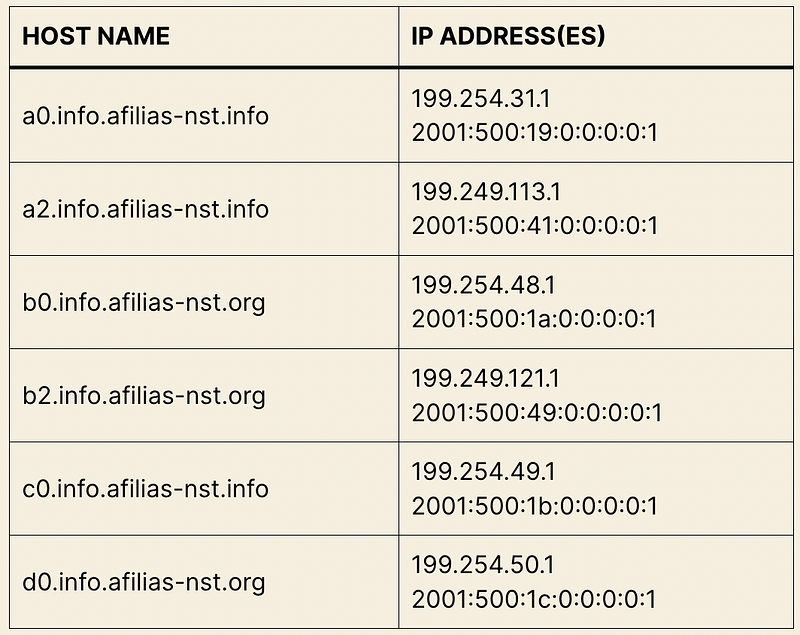
Based on the table that your ISP gets from the Root Servers, the ISP can send the query to one of the INFO DNS servers.
💡.INFO DNS server still does not know the IP behind https://igorjovanovic.com but knows the DNS server that KNOWS the answer.
We say that the TLD DNS server returns the authoritative name servers of the domain in question. For my domain, this answer could contain something like this.
HOSTNAME / IP ADDRESS
ns1.bluehost.com	162.88.60.37
ns2.bluehost.com	162.88.61.37
💡 BlueHost is a solid hosting solution if you are looking for where to host your website. You can find their offer here.
Authoritative (SLD) DNS
After the TLD DNS server responds, your ISP has the address where to knock further. The good news is that the address in hand is the final one.
The DNS server that runs behind ns1.bluehost.com and ns2.bluehost.com knows the answer to the question of what is the IP address of the domain name igorjovanovic.com.
That is why we call these name servers the authoritative name servers. They are the authority when it comes to answering the question of the IP address for the igorjovanovic.com domain — the one who knows is the authority.
💡You can also hear people calling the authoritative name servers the second-level domain (SLD) name servers.
Just for curious readers, I want to explain something you might have spotted here.
💡ns1.bluehost.com and ns2.bluehost.com exist in pairs (there are two of them). Had there been only ns1.bluehost.com, upon its failure, the domain name could not be resolved and you would get an error. Because of that, there is also ns2.bluehost.com to safeguard against the name server failure. You see now that one name server is a backup to the other.
Finally, the ISP can ask the authority DNS server to find the IP address of the igorjovanovic.com domain. Here is the address that the ISP uses to ask this question.
HOSTNAME / IP ADDRESS
ns1.bluehost.com	162.88.60.37
ns2.bluehost.com	162.88.61.37
💡I use BlueHost as a hosting company for many of my projects. You can find here their hosting offer if you also need a hosting solution.
Once the ISP gets the answer from the authoritative DNS server, the ISP has the million-dollar answer: the IP address behind igorjovanovic.com.
The answer would look similar to this.
HOSTNAME/ TTL / RECORD / IP
igorjovanovic.com.	86400	A	85.25.111.71
💡NOTE: I did not provide the real IP address/ name servers of the website just to avoid bots scanning this text, but you can easily find it out yourself since it is public.
Since the ISP has the target IP address, it stores a copy in its cache and passes it back to your laptop (browser). Now your browser knows the IP address, and all the subsequent requests to igorjovanovic.com do not need domain name resolution but execute directly. (This is why you might wait a bit longer when you visit a website for the first time, but all the coming requests go much faster).