
Timedeltas, DateOffsets and Periods in Pandas
Special Date and Time Objects You Should Know.
In the first part of the pandas Date and Time series I’ve explored the core of pandas’ time series functionality — in this article, I would like to take a glimpse at a bit more special time objects designed to make Timestamp arithmetic easy and suit special needs for marking time in your data.
For this article, I will use Kaggle’s “Flat Earth on Twitter” dataset.
Note: the features shown in this article are just a tiny-tiny fracture of all the capabilities of the different time objects in Python and Pandas — the ones I felt worth presenting in an introductory post, just to give a taste of the power of these objects. I don’t want to make the impression that these are the limits of the topic — that would not be true by any stretch of the imagination.
Timedeltas
Timedeltas are objects representing the difference between two points in time, between two timestamps.
It can use several different units of measure (e.g. minutes, days) and can be either positive or negative.
One way of creating a Timedelta is subtracting a timestamp from another:

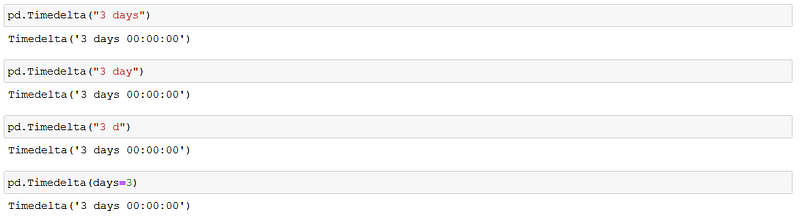
You can construct a Timedelta object using Pandas.Timedelta. Here you need to specify as argument(s) what is the timedelta duration you would like to have. For this you can for example use strings as arguments or provide integers as keyword arguments (there are several other methods you can find in the Parsing timedeltas section of the documentation):
In case we want to increase a Timestamp’s value with a specific amount of time, we can use timedeltas to make this operation. Assume you just cannot wait until Christmas, so you decide to turn the clock forward 3 days:

Note: if you want to perform this operation you will have to find a heavy enough object in your specific part of the universe (a black hole is always a good choice) that can help you get through the waiting for Santa.
We can of course extract Timedeltas from Timestamps as well, what’s more, we can do operations with entire date ranges without looping:

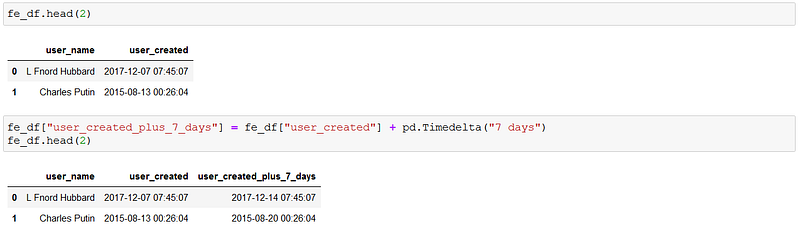
Timedeltas can be applied on datetime Series as well. Going back to our Flat Earth data, we can easily create a new Series based on the original user creation date:
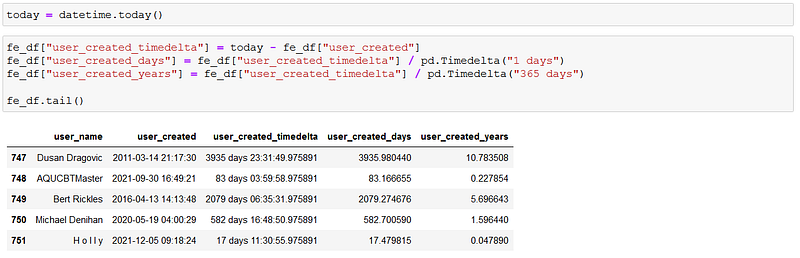
Assume we would like to know how many days (months, years, seconds) ago the users were created in the example DataFrame. We can use the Timedelta objects marking the difference between today and the creation date to divide with another Timedelta, its value depending on what metric we would like to see:
Timedelta objects have attributes and methods to access certain parts of the data or perform further operations — all of these can be found in the documentation.
If you would like to keep me caffeinated for creating more content like this please consider to support me, with just a coffee.

DateOffsets
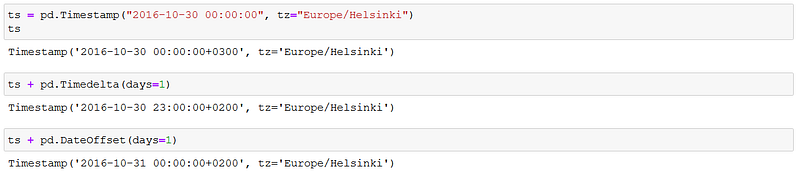
DateOffests are closely related to Timedeltas, however, working slightly differently. The different logic behind the two is for example that sometimes the difference between two consecutive days at midnight is not 24 hours: e.g. daylight saving can shake things up a bit. 1 day Timedelta will always add 24 hours to the timestamp, while DateOffset will move the timestamp forward to the next day and the exact hour of the original timestamp:
Offset objects offer lots of opportunities to move forward or backward timestamps to a certain logical point in time instead of by a fixed period. using the Flat Earth data, let’s find out the closest business day to the creation of the user accounts:
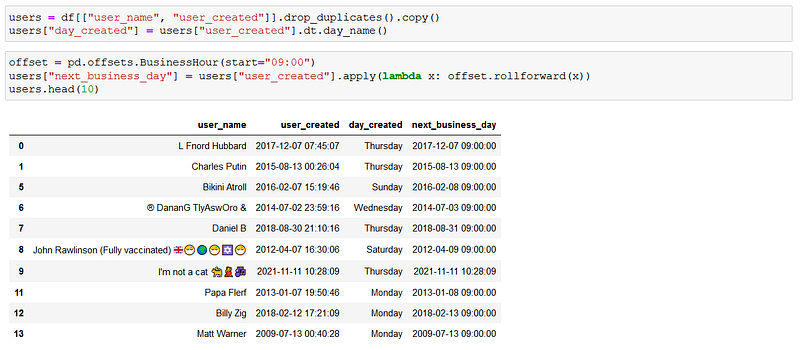
As you can see, if a Timestamp was in business hours, the “next_business_day” Timestamp is the same as the original. Out of business hours, the rolling forward moved the Timestamp to the next business day — if it happened to be applied on a Saturday, instead of flipping to the next day the offset looked for the next Monday instead.
Periods
A Period is a certain time period (hour, day, week, month, quarter and so on) represented in a time object.
The main idea behind this is that while a Timestamp represents a certain moment in time, a Period (even though it can very well be in such high resolution that it points to a certain second for instance) is used when your data is marked with the object is associated with a periodic recurrence, a timespan that the data is linked to.
A good example of this is sales data: every time you sell a donut in your shop you make a record of that sale, and the time of the sale (a Timestamp) is associated with each transaction. 100 purchases a day are leading to up to 100 different Timestamp. When you sum up your revenue at the end of the day, however, you have the sum of the revenue and the day (the Period) it was realized. Next day, next 100 Timestamps for the transactions, but your daily revenue gets only 1 Period mark — no need for specific Timestamp. Your daily Periods can be summed up into monthly, quarterly, and yearly Periods as well. The point is that these time periods are reoccurring with a certain logic, and this is what Periods are capturing.

Right off the bat, there seems to be no huge difference between a Timestamp and a Period — the point starts to come through when we start to play with the arithmetics and the methods/attributes associated with Periods. The frequency parameter for example plays a huge role in the logic: when adding or subtracting to a Period, the amount specified in the frequency parameter will be added:

As you can see, since the frequency was set to 3 hours in the above example, adding 1 added 3 hours (=1 unit of the frequency).
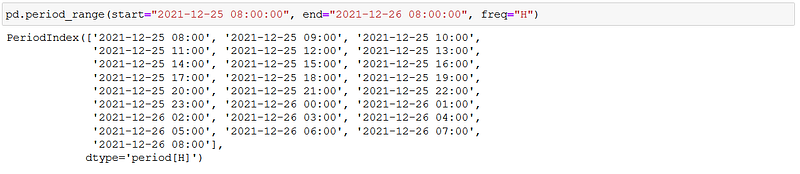
Creating Period ranges are one of the basic use cases I think when working with these objects, after all the whole point is to have some sort of regular recurrence when using these types:
Periods encompass a given time span, and the object can return the beginning and the end of these timespans. Creating a Period range where the frequency marks the quarters, the start and end dates would look like this:
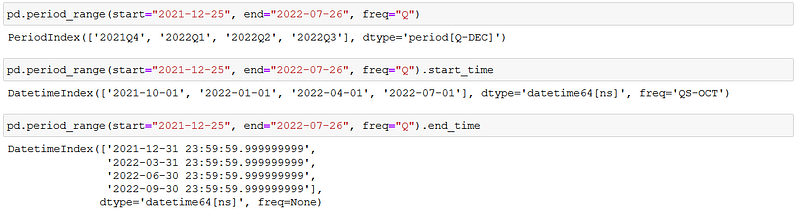
The full list of attributes and methods available in the Period object can be found in the documentation.
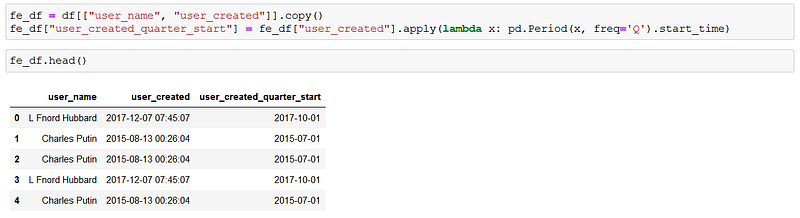
Timestamps can be converted to Periods of course (and vice versa): adding the beginning of the quarter each user in the Flat Earth dataset was created is just as simple as the below line of code:
The date and time functionality of pandas has incredible depth. As you can probably tell based on just these 2 posts on the subject, it's hard to think of any problem you can’t solve using the already existing built-in solutions. I hope you have found educational this 2 part series, and as always I encourage you to visit and read the linked documentation to learn even more.