
This Could Be A Life Saver!
Life is precious. Do this and you could save one!
Technology is great these days but a lot of people don’t know about half the features that are available. In the next 5 minutes, I'm going to teach you something that could save your life or someone else's life.
I asked two of my mates who work in the emergency services “Do you know how to find my Medical ID?” and both of them said no. When I explained they were both shocked that their employers aren’t teaching them this stuff as part of their training and it baffles me too.
Smartphones have a built-in Medical ID. Unfortunately, I’ve been an iPhone lover all of my life so I don’t know where this lives on Android devices but I know it’s there somewhere so once you’ve finished reading this article Google it or speak to someone who knows about Android devices.
So on the iPhone, you press and hold the power and volume buttons at the same time for around 3 seconds and you’ll see you get the menu to power off your phone, and below there’s a Medical ID option. (Press whatever buttons get you to the screen where you power off your phone.)
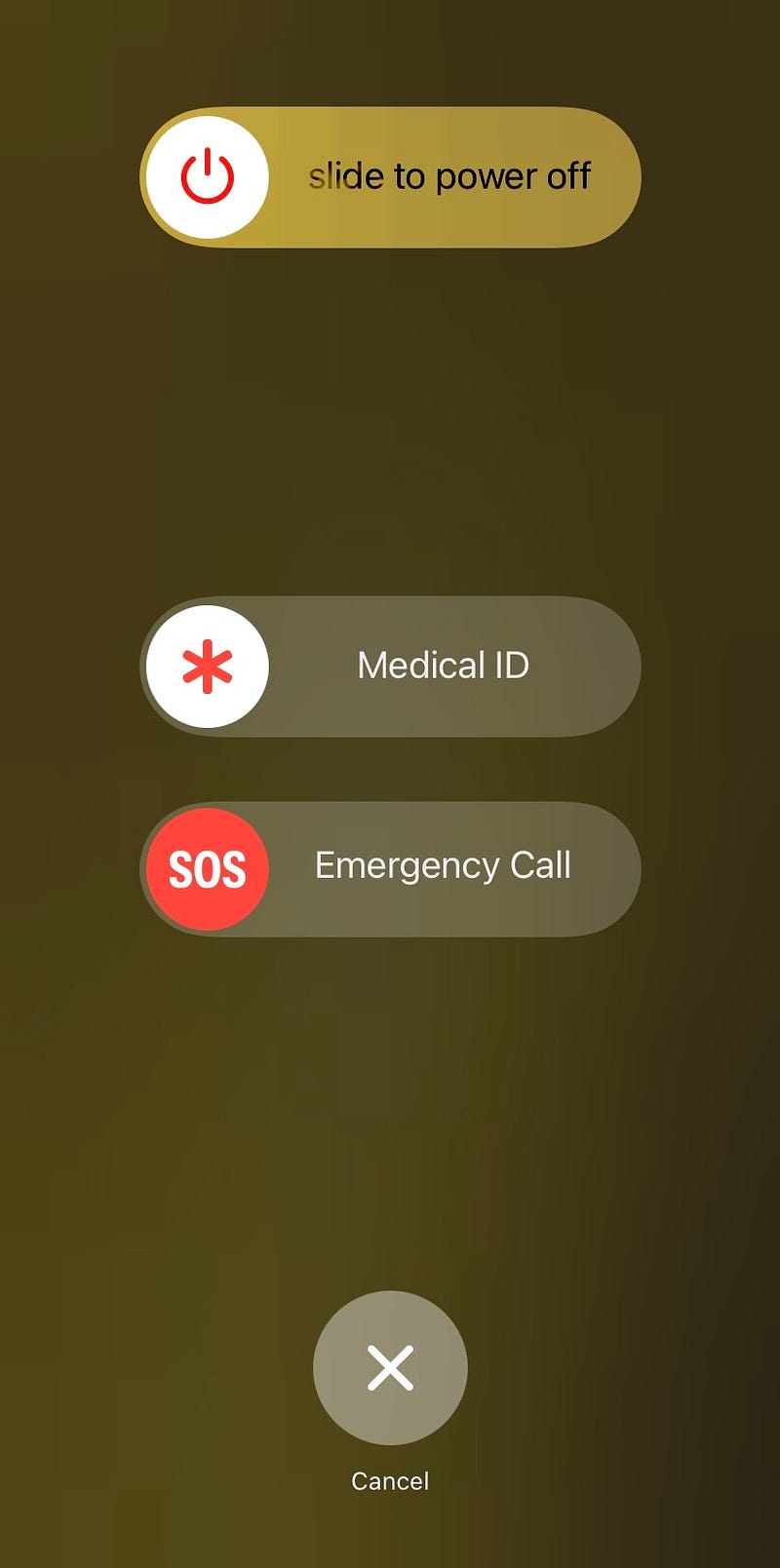
By sliding across where it says Medical ID you get given a page of information about the person who owns the phone. This is so valuable as anyone holding your phone can access this information and relay it to the emergency services. They don’t need to get into your phone, they just need to know which buttons to press when it’s locked.
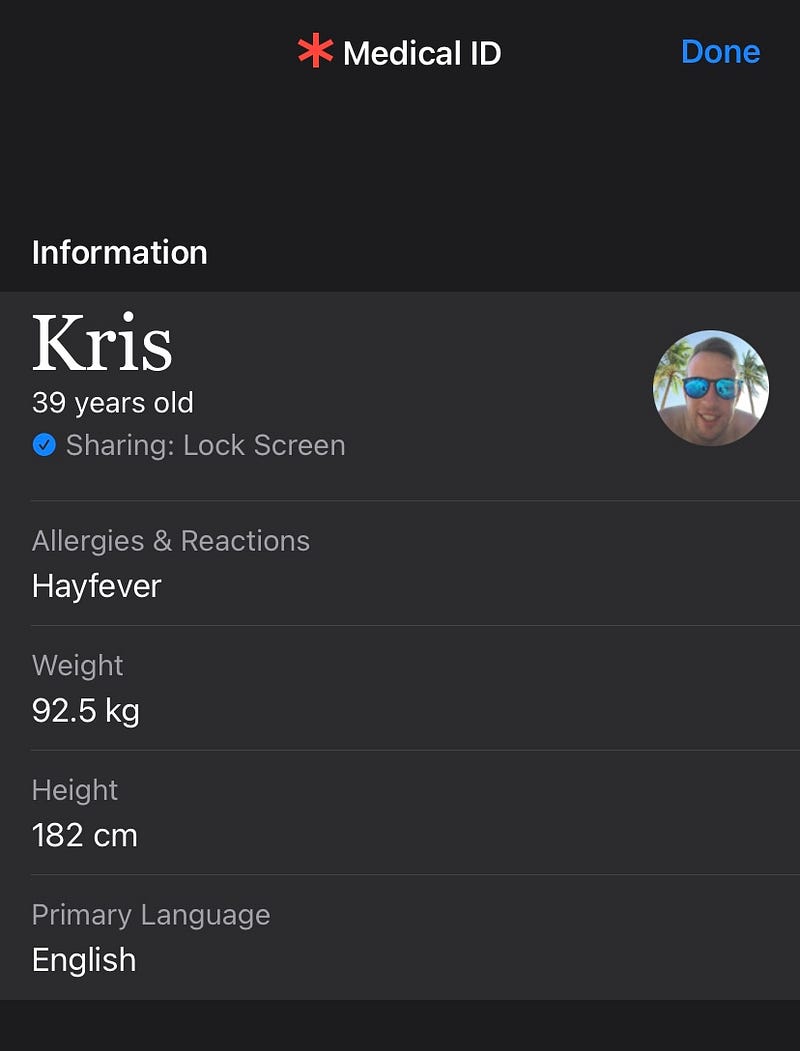
So let's put you in a scenario. You’re the first person on the scene of a road traffic accident involving a car and a motorbike. Both people are unconscious and the first thing you do is call for an ambulance. You do whatever you need to at the time but at some point, you grab each person's phone and access their Medical ID hoping they’ve set it up which they both have. The emergency services arrive and straight away you say to them the driver of the car is John Southby, he’s 57 years old. His blood type is O-Positive and he’s got a pacemaker. The motorcyclist is Dan Lullianu, he’s 23 years old. His blood type is B-Negative, he’s allergic to penicillin and his primary language is Romanian. Within 30 seconds of the emergency services arriving on the scene, you’ve given them a wealth of information they didn’t have that might save someone's life all because you follow Kris Talks Life on Medium ;-)
Now, let us flip the scenario around. You’re the person who’s been in the car crash and you’re unconscious but you’ve filled out your Medical ID so that’s half the battle won. The other half is relying on someone else who follows Kris Talks Life on Medium to be at the scene and know what they’re doing when it comes to Medical IDs.
To fill out your Medical ID on the iPhone do the following… Settings > Scroll Down To Health > Medical ID > Fill out the form as much as possible. Add some emergency contacts so the hospital staff can get your loved ones to the hospital as soon as possible. That could be the difference between dying alone or dying with your family around you. Lastly in the Medical ID form make sure the ‘Show When Locked’ toggle is turned on.
So, there you have it folks. Another piece of golden wisdom added to your life by yours truly. Once you’ve finished reading this article you need to go and set up your Medical ID. You then need to push this onto all your family and friends which I’ve made very easy for you to do because you can simply share this article with them :-)
I’m only just getting started on my Medium journey but I hope this shows you the value of following my profile. Over time I’m going to build up a wealth of knowledge and information that I hope adds value to the lives of people all over the globe. Sharing is caring and I’m here to help others whenever I can so hit that follow button and add me to your email list.
If you want to know more about me and what I’m about then check out My About Me article below
If you want to support me as a writer or thank me for the wisdom I’ve given you then why not subscribe to Medium using my referral link below? You’ll get unlimited access to all my articles and it’s a great way to support the writers on this platform.
Lastly, if you’re still reading at this point then I’m giving you a virtual hug as a thank-you for your support. Give this article 47 claps so I know who you are. Much love and I’ll catch you in the next one.
I’ve started a publication and would really appreciate your support. It’s called Experience Life! and if you click here and give it a follow I’d be extremely grateful.
Click here to be the first to receive my articles when I publish them.
© Kris Talks Life - Article #1 in the ‘Phone Tips’ series


