
Write and Debug JavaScript With NodeJS
A guide to write and debug JavaScript with NodeJS instead of browsers
What is NodeJS? It is an open-source and cross-platform JavaScript runtime environment. It can be interchangeably called node.js, nodejs, or node. NodeJS has a unique advantage because millions of frontend developers that write JavaScript for browsers are now able to write server-side code in addition to the client-side code without the need to learn a completely different language.
After writing a lot of JavaScript code for the client-side, I have been working on NodeJS middle layer lately. I’d like to share some of my experience of writing JavaScript in the NodeJS ecosystem. It is similar to writing JavaScript code for browsers, but not exactly the same.
1. The command is launched by node
First, you launch the code differently. Instead of npm start, now you run the command as node app.js, assuming your application’s name is app.js.
Optionally, you can supply arguments to your application.
node app.js system.log
The command line information can be read by process.argv:
If you have complicated arguments, you may consider installing minimist, an argument parser.
2. You have full control of the NodeJS environment
If you write JavaScript for browsers, customers may use different browsers with different versions. However, in the NodeJS environment, you have full control of which NodeJS version to use.
Check this table for features of ES2015, ES2016, ES2017, ES2018, ES2019, ES2020, ES2021, or ES2022. You will know exactly which ECMAScript APIs are supported for which node version.
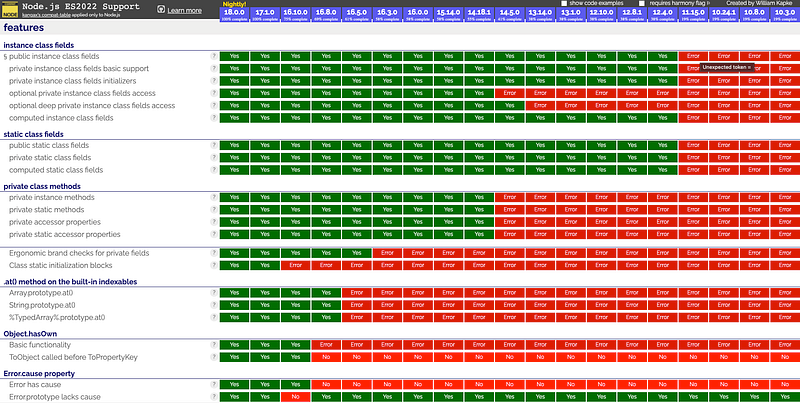
If you want to use BigInt, it is obvious you have to use NodeJS 10.8.0+.
3. You have full control of system access
In browsers, JavaScript is sandboxed for safety. But NodeJS has full access to your system. It allows reading and writing directly to/from the file system, unrestricted access to the network, and executing software. Just be very careful with the power.
The following is an example of file system utilities:
4. NodeJS uses CommonJS module system
JavaScript in browsers uses Asynchronous Module Definition (AMD), with RequireJS being the most popular implementation. ES6 modules are getting popular too.
NodeJS uses CommonJS module system. In practice, this means import and export are coded differently.
5. NodeJS uses the global object
In a NodeJS environment, there are no global window and document, and all other objects that are provided by browsers. A global object in NodeJS is global. From ES2020, globalThis will replace both window and global.
Similar to window, you do not need to prefix a global object with global.
process is a global object that provides information about and control over the current node process. As a global, it is always available to NodeJS applications without using require().
6. You can debug NodeJS’ JavaScript via VSCode
In a NodeJS environment, there is no browser’s inspect tool to debug code. VSCode could be a helpful tool for debugging.
We have this JavaScript code called sum.js:
Run it with NodeJS:
$ node sum.js 1 2 3 4 5 6 7 8 9 10
55
How can we debug it?
Create launch.json under <rootDir>/.vscode:
At line 12, all input numbers have to be quoted. This is not needed for the command line execution.
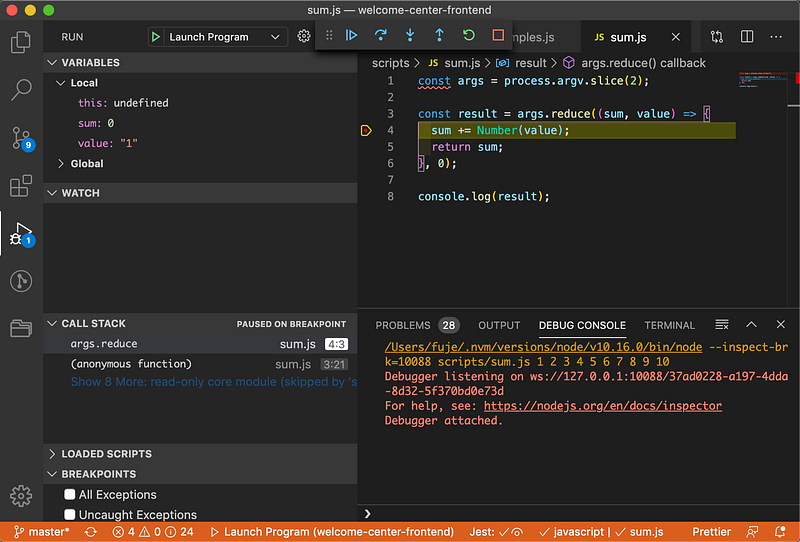
Set a breakpoint at line 4 in the following code. Then we can examine value and sum for each iteration.
Conclusion
JavaScript runs in browsers and NodeJS environment. They are similar, with a few differences. If you use JavaScript to develop client-slide code, you would enjoy using JavaScript to develop server-side code as well.
Part of this work was contributed by Jonathan Ma.
Thanks for reading. I hope this was helpful. You can see my other Medium publications here.


