
There is a way to add link to Pinterest Idea Pin
It will make growing your blog much easier
Pinterest is a critical part of growing any blog today. This visual social media platform has exploded in popularity over the last few years. But with this growth and popularity, small bloggers have felt left out. Whether you’re new to blogging or have been blogging for some time, Pinterest can help your blog grow faster.
When it comes to growing your blog and engaging your audience on Pinterest, the goal is to increase the number of people who visit the blog and the number of boards where content from the blog lives. This was made easy by idea pins.
What are Pinterest idea pins?
Pinterest Ideas Pins: These video pins are great for showing off both your content as well as your products/services.
Idea pins are made up of up 20 20 images or videos. SInce introducing them, Pinterest is really pushing idea pins and it has never been easier to grow.
Where to design them?
I use Canva to create my ideas pins because there are plenty of options and templates to choose from if you are stuck on an idea.
You can make great pins using the free Canva option, so don’t stress if you don’t have the pro version.
One thing to keep in mind, you can’t create an idea pin using the Quick create option under Social Media Templates.
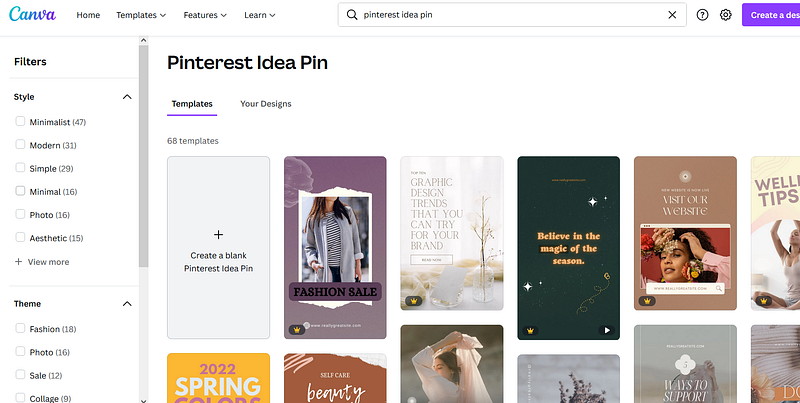
One way to do this is to just type in Pinterest Idea Pin and Canva will lead you to its template library.
Another way to do this is by opening the Pin template, or any dimension you would like. Add pages and animate them, and when downloading choose mp4 format.
Also, you can use Instagram Story Templates to create awesome pins. Trust me, no one will know and there are more template options to choose from.
Uploading the Idea Pin and adding a link to your blog post
So far this is the only way of adding a link to your blog post to idea pin. Hopefully, Pinterest will change this and make it easier to link.
The most important thing you can do when pinning is to share your unique style and voice. Be sure to use great images, focus on telling a story with your blog so that Pinterest users want to read more, and try to pin in the right group or boards on Pinterest to ensure you’re getting the most exposure. Ultimately, the ultimate goal is still to get visitors back to your website so always be sure to add links back in your pins!
For $5 a month you can get access to every story published here on Medium. Just a heads up, this is an affiliate link and I will receive half of that payment as a commission.
If you would like to receive an email with my newest stories, you can subscribe here.


