
The Only 2 Apps You Need to Finally Read More Books
Exponentially read more books this year by downloading 2 simple apps to your phone right now.

5 years ago, I used to spend most of my time running an Instagram account for my dog. It consumed 90% of my free time, and prevented me from reading books (and lots of other things, like working out and cooking). I didn’t track religiously at that point in my life, but I probably averaged 4 books a year.
Then in 2020, I was sick of it. I was about to embark on Yoga teacher training (which COVID laughed in the face of) and knew I needed to be more strategic with my time. On top of feeling like I was developing carpal tunnel, I could tell my vocabulary was contracting and I knew my priorities were out of whack.
The first step I took was to delete the Instagram app from my phone and replace it with the Kindle app.
That year I think I set my goal of 1 book a month, and thanks in part to COVID restrictions I blew past that. But even more so than being stuck in the house with nowhere to go, was the 2-app combo I started using.
Last year I hit 56 books, and I’m on a quest to hit 60 this year. The only way I can do this is with my 2-app combo.
Libby + Goodreads
Libby
If I had $1 for every time I suggested Libby on Medium, I’d probably have more than my monthly income from Medium referrals (which is $30/month right now, for reference).
Libby is an app version of your local library’s collection. You can browse digital, audio, and physical books and rent them from the comfort of your own home. You can even sign up for a library card right within the app, reducing any possible friction.
You can place holds on endless amounts of books so you always have one in the queue. Once you’ve rented a book, it connects seamlessly to your Kindle. Audibooks play right within the app.
And the best part? It’s all completely free.
I’m a Libby evangelist because it’s completely changed the way and frequency in which I read. You’re welcome in advance.
Goodreads
Now that you have Libby, and endless amounts of books at your fingertips, selecting a book is the hard part. Enter: Goodreads.
Goodreads is a “social network” just for books. You can follow friends and authors and see what books they read. You can create your own “book shelves” where you can mark books you’ve read, want to read, or are in the process of reading. Each book’s page has an average rating and reviews from the Goodreads community.
As if that wasn’t enticing enough, Goodreads connects directly with your Kindle and automatically updates as you progress through books. It also suggests books you might like based on previous reads and ratings.
Link to download Goodreads on Android and on iPhone
(And if you feel so inclined, let’s be friends)
My process for combining the two
With Libby and Goodreads, integrating reading into your life is a breeze.
When I finish a book, I sift through my Goodreads “want to read” shelf. I go in order of when I first shelved the book and search for it within the Libby app — in both audio and digital form. I place holds until I find a book that is available now.
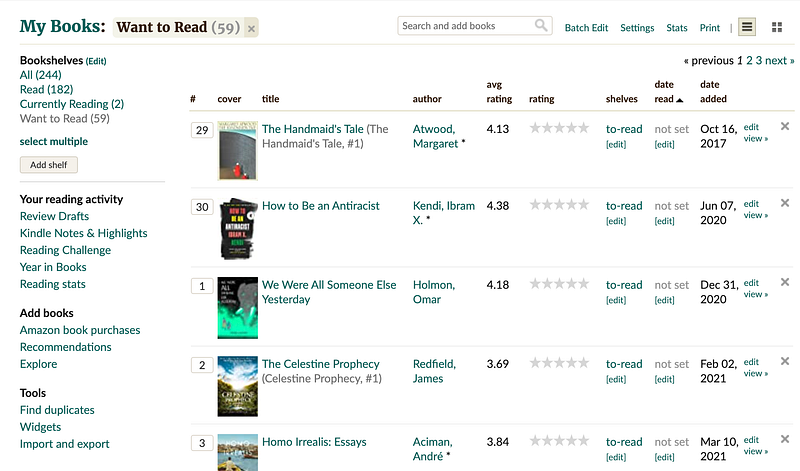
Once I have enough books on hold, it’s rare that I need to perform that search. Held books become available on, or often before they are scheduled. If I’m still in the middle of a book when a new one becomes available, you can choose to “deliver later” so you’re never missing out.
At any given time I have at least 1 book and 1 audiobook rented and waiting at my fingertips.
The kicker
Outside of decision paralysis and lack of access, the biggest hinderance to reading that I hear is getting stuck on one book for multiple weeks or months.
Consider this your excuse to put the book down and find one you love.
Books are meant to be enjoyed. Unless you’re reading for school, you have every right to stop a book midway that you don’t enjoy. 99% of the time, I have to force myself to stop reading a book and go to bed because I love it so much. That’s how you read over 50 books a year — you read books you can’t put down.
With Libby and Goodreads, this is easier than ever. By renting over purchasing, and knowing you have a long list to choose from, there’s less pressure to stick a book out. You don’t like it after 10%? Jump back to your “want to read” shelf and pick anew. Nothing on that shelf? Pop over to your best friend or your favorite author’s Goodreads page and see what they’re reading.
The possibilities are endless.
With this 2-app process, reaching your reading goals is easier than ever. All you need to do is download Libby and Goodreads and get started.
What are you waiting for? Stop reading this Medium post and head to your App store.
If you made it this far, thank you! You’re clearly a dedicated reader. So as much as I’d like you to read more of my articles, how about you go read a book instead. If you’re not sure where to start, feel free to peep my Goodreads for some ideas. Then drop me a comment and let me know what you’re reading right now 👇