avatarAimée Brown Gramblin

Free AI web copilot to create summaries, insights and extended knowledge, download it at here

2300

Abstract

<figure id="5e20"><img src="https://cdn-images-1.readmedium.com/v2/resize:fit:800/1*fgUpDepRXiIWxUv0HOQGjw.png"><figcaption>Author Screenshot.</figcaption></figure><p id="e245">4. Next, click Command + F to bring up the Search Function. In the Search Box, Type in TopicId exactly as I have done. If you add an extra space or change capitalization, it won’t work. This will bring you to the topics your story was distributed in, as we see in the screenshot below.</p><figure id="eef7"><img src="https://cdn-images-1.readmedium.com/v2/resize:fit:800/1*oo6675RpLMHJDwV6oQCP-w.png"><figcaption>Author Screenshot.</figcaption></figure><p id="5067">5. Earlier today, I self-published <a href="https://aimeegramblin.medium.com/covid-19-revealed-our-collective-trauma-now-what-935f80b32e8">COVID-19 Revealed Our Collective Trauma — Now What?</a> The code states that it was chosen for distribution in Nonfiction, Society, and Mental Health. Let’s double check that by going to the Topics pages. Go to “Topics You Follow” on your front page and you’ll see a list of all Topics.</p><figure id="ab2f"><img src="https://cdn-images-1.readmedium.com/v2/resize:fit:800/1*KZMndjiO4YiQM6_XTL6aPw.png"><figcaption>Author Screenshot.</figcaption></figure><figure id="2417"><img src="https://cdn-images-1.readmedium.com/v2/resize:fit:800/1*Ql1dj_64yu2B7dg0BFLt8w.png"><figcaption>Author Screenshot.</figcaption></figure><p id="a6a8">That was a happy surprise! I wouldn’t have known I’m currently the Featured Writer in the Society Topic had I not been writing this article. Medium doesn’t send emails to inform writers of achievements like this and distribution. It seems counterintuitive and counter-relational, but it is what it is. I like getting the grownup version of a gold star. Don’t you?</p><p id="7227">A Caveat — My article does not currently appear on the Mental Health Topic page even though it does appear in the code. I’m not sure why. One guess is that Mental Health has many distributions and mine is too far down on the list right now. These are not listed in chronological order. My guess is they are listed due to popularity and chronology, but I’m not sure.</p><h1 id="ec98">Takeaway</h1><p id="1066">It’s helpful to know which topics we write in that our readers enjoy us writing in. I’d appreciate # Options Medium Staff considering that writers want to be relational with our readers and write to our audience. Having easily accessible information like which Topics we’re distributed in and when we are Featured as writers in a topic would be very valuable to us.</p><p id="7f5b">In the meantime, this will have to do.</p><p id="f8c1">By <a href="undefined">Melissa Coffey</a>:</p><div id="6576" class="link-block"> <a href="https://readmedium.com/discovering-the-topics-for-your-curated-stories-on-medium-cbf1bf4849b4"> <div> <div> <h2>Discovering the Topics for your Curated Stories on Medium</h2> <div><h3>Medium doesn’t want us to know anymore — but it can help grow your writing</h3></div> <div><p>medium.com</p></div> </div> <div> <div style="background-image: url(https://miro.readmedium.com/v2/resize:fit:320/0*mvpZ1fI1nJq_mf_K)"></div> </div> </div> </a> </div><p id="5ea1">More of my work in Feedium:</p><div id="18d9" class="link-block"> <a href="https://readmedium.com/medium-etiquette-guide-for-beginners-4d048eae5890"> <div> <div> <h2>Medium Etiquette Guide For Beginners</h2> <div><h3>A cheat-cheat for best practices</h3></div> <div><p>medium.com</p></div> </div> <div> <div style="background-image: url(https://miro.readmedium.com/v2/resize:fit:320/0*oB0JoEMfgeKcvWxg)"></div> </div> </div> </a> </div><div id="8367" class="link-block"> <a href="https://readmedium.com/so-you-want-to-start-a-medium-publication-okay-lets-get-started-c752313ce9b1"> <div> <div> <h2>So You Want to Start a Medium Publication? — Okay, Let’s Get Started</h2> <div><h3>Video tutorial</h3></div> <div><p>medium.com</p></div> </div> <div> <div style="background-image: url(https://miro.readmedium.com/v2/resize:fit:320/1*pM8qosOM3v1Wmxv2ueq7QA.png)"></div> </div> </div> </a> </div></article></body>

The New Way to Find Your Distribution Topics — For Mac Users (+ an Article Link for PC Users)

A 5-Step Guide

Photo by William Carlson on Unsplash

On February 2nd 2020 Feedium published my 10-Step Guide to Decoding Your Curation Topics. What was correct February 1st disappeared overnight. I assured readers if I found a new way to locate distribution topics, I’d let you know.

Surprise! My writing peer, Melissa Coffey, figured it out and wrote up an article on how to do it. She uses a PC and wrote her article for PC users. I use a Mac and the process is slightly different.

If you’re on a Mac, you’ve come to the right place. If you use a PC, head over to Melissa’s article for the how-to. Either way, head to her article sometime soon because she also includes insights into how distribution works and why it’s important. I’ve linked her article at the bottom of my guide.

Let’s do this my Apple Friends.

5-Step Guide to Finding Your Distribution Topics

  1. Before looking for the source code (don’t worry if you’re not a tech-head — neither am I), you need to know if your article was “chosen for further distribution. To do this go to your Stats page and click on each of your articles. If there is a sentence under your title that reads: “Chosen for further distribution,” click on the title to take you to your story.
  2. Currently, I’m only getting this to work in the Chrome Browser. In Chrome, go to View/Developer/View Source. It’ll look like this:
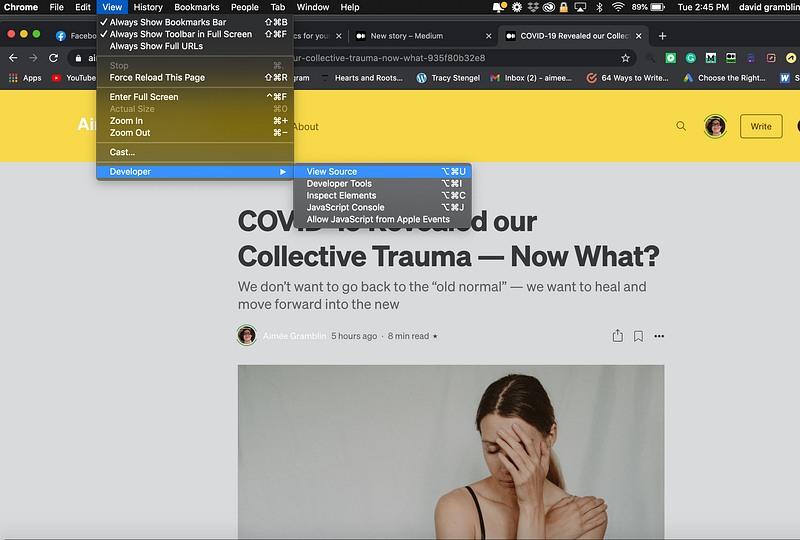
Author screenshot.

3. Click Page Source. This will bring up a bunch of code that looks like this:
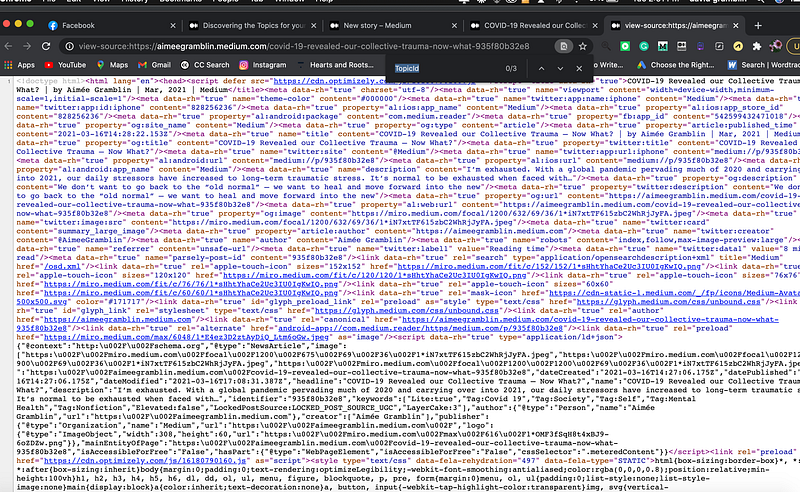
Author Screenshot.

4. Next, click Command + F to bring up the Search Function. In the Search Box, Type in TopicId exactly as I have done. If you add an extra space or change capitalization, it won’t work. This will bring you to the topics your story was distributed in, as we see in the screenshot below.
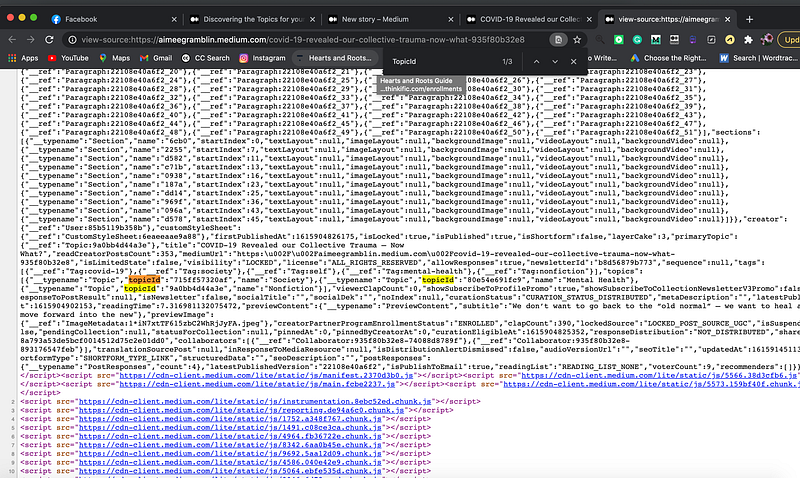
Author Screenshot.

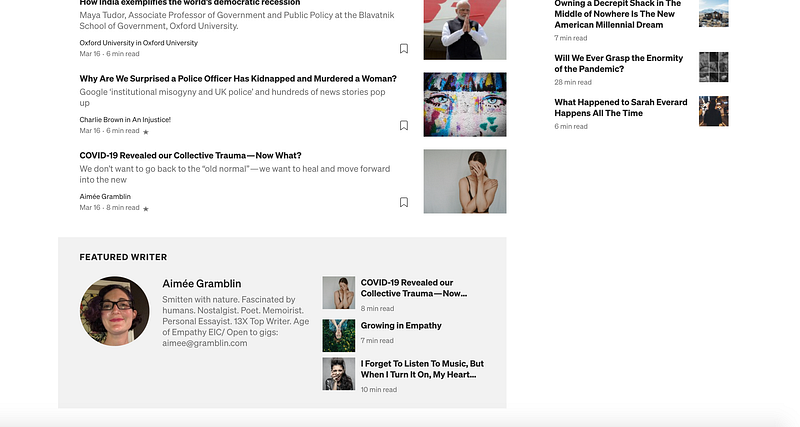
5. Earlier today, I self-published COVID-19 Revealed Our Collective Trauma — Now What? The code states that it was chosen for distribution in Nonfiction, Society, and Mental Health. Let’s double check that by going to the Topics pages. Go to “Topics You Follow” on your front page and you’ll see a list of all Topics.
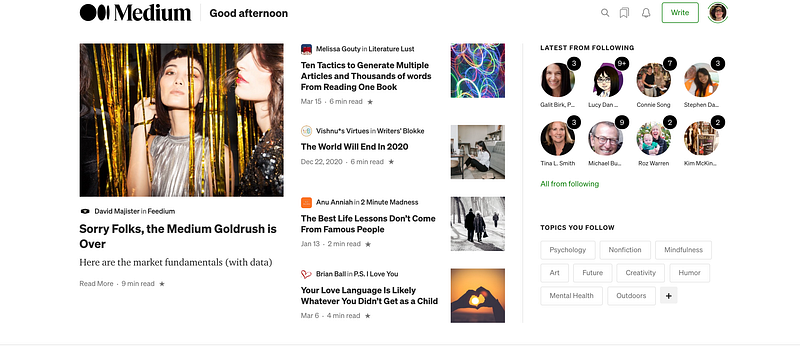
Author Screenshot.
Author Screenshot.

That was a happy surprise! I wouldn’t have known I’m currently the Featured Writer in the Society Topic had I not been writing this article. Medium doesn’t send emails to inform writers of achievements like this and distribution. It seems counterintuitive and counter-relational, but it is what it is. I like getting the grownup version of a gold star. Don’t you?

A Caveat — My article does not currently appear on the Mental Health Topic page even though it does appear in the code. I’m not sure why. One guess is that Mental Health has many distributions and mine is too far down on the list right now. These are not listed in chronological order. My guess is they are listed due to popularity and chronology, but I’m not sure.

Takeaway

It’s helpful to know which topics we write in that our readers enjoy us writing in. I’d appreciate Medium Staff considering that writers want to be relational with our readers and write to our audience. Having easily accessible information like which Topics we’re distributed in and when we are Featured as writers in a topic would be very valuable to us.

In the meantime, this will have to do.

By Melissa Coffey:

More of my work in Feedium:

Distribution
Medium
Writing
Advice
Writing Tips
Recommended from ReadMedium