avatarTeri Radichel

Free AI web copilot to create summaries, insights and extended knowledge, download it at here

6384

Abstract

s. Often attackers will generate a lot <span class="hljs-keyword">of</span> noise <span class="hljs-keyword">to</span> distract <span class="hljs-keyword">from</span> another attack.</pre></div><p id="fd3f">Let’s say you are on a home network. You have tested your firewall software and analyzed your network traffic, and you think it is working correctly. Take that rule I gave you in the last blog post. Start adding the IP addresses that hit that rule to an alias that you block with a second rule and do not log that traffic. These are “known bad networks.” Be careful that you are don’t block innocent traffic from good networks. Some traffic captured by this rule might be an inadvertent mistake due to a typo or an attacker abusing a network to which your devices need to connect.</p><div id="b1ac"><pre><span class="hljs-keyword">Do</span> you care <span class="hljs-keyword">about</span> these logs?</pre></div><div id="8c2b"><pre><span class="hljs-keyword">If</span> you know you are never going <span class="hljs-keyword">to</span> <span class="hljs-keyword">connect</span> <span class="hljs-keyword">to</span> hosts <span class="hljs-keyword">in</span> Russia <span class="hljs-keyword">or</span> China — what about dropping <span class="hljs-keyword">and</span> disregarding that traffic? <span class="hljs-keyword">No</span> logging, <span class="hljs-keyword">no</span> response, just dropped.</pre></div><div id="7f85"><pre>What about traffic coming <span class="hljs-selector-tag">to</span> your residential networks <span class="hljs-selector-tag">from</span> other residential networks? Is that ever legitimate? Occasionally <span class="hljs-selector-tag">I</span> get traffic <span class="hljs-selector-tag">from</span> Road Runner, Comcast, Charter Networks, and others. That type of traffic might be <span class="hljs-selector-tag">a</span> compromised home router or laptop or <span class="hljs-selector-tag">a</span> hacker in <span class="hljs-selector-tag">a</span> basement.</pre></div><div id="3a34"><pre><span class="hljs-keyword">Should </span>traffic ever <span class="hljs-keyword">be </span>coming <span class="hljs-keyword">directly </span>from Hurricane Electric, a <span class="hljs-keyword">backbone </span>company? I don’t think so. What about mobile <span class="hljs-keyword">and </span>wireless networks?</pre></div><div id="45c3"><pre>Then there are <span class="hljs-keyword">just </span>all the hacker-friendly <span class="hljs-keyword">cloud </span>networks. So many hosting companies, virtual machine providers, <span class="hljs-keyword">and </span><span class="hljs-keyword">cloud-related </span>networks are the source of noisy traffic. I’ve <span class="hljs-keyword">been </span>seeing an uptick from Alibaba <span class="hljs-keyword">Cloud, </span><span class="hljs-keyword">and </span>I always see <span class="hljs-keyword">Digital </span>Ocean in my logs, for example. Some networks are <span class="hljs-keyword">just </span>easy for attackers <span class="hljs-keyword">and </span><span class="hljs-keyword">scanners </span>to use, for whatever reason.</pre></div><p id="b386">When you drop the traffic for an IP, you can look up the IP address in ARIN and drop the entire range instead of adding rules for every single IP address. Let’s take a random sampling of this high port traffic from my logs right now.</p><figure id="43cf"><img src="https://cdn-images-1.readmedium.com/v2/resize:fit:800/1*XF_E7a3GA1MwXU3cjxkEaw.png"><figcaption></figcaption></figure><p id="3fb5">OK, I’ve got multiple hits from that first address 103.92.28.102. I’ve become familiar with IP addresses over the years, so I know that’s somewhere in Asia unless, of course, someone in another part of the world registered addresses in APNIC. I can look up the address in APNIC. But I also know that ARIN will grab the information from any registry for me. So let’s go ahead and look it up at <a href="https://arin.net.">https://arin.net.</a></p><p id="8dc0">This network is in Vietnam:</p><figure id="02dc"><img src="https://cdn-images-1.readmedium.com/v2/resize:fit:800/1*cpFQEaag8DNwmqi4D_M1iA.png"><figcaption></figcaption></figure><p id="0122">What’s kind of strange about this particular record is that no parent network exists. Usually, that parent record is populated. That makes me wonder if there is something sketchy about this network. Also, make sure any security tools leveraging parent records work properly when none exists. It could also just be an oversight. Who knows. Typically I will create a rule for the parent network. But in this case, there isn’t one. So I’ll just grab the CIDR block: <b>103.92.28.0/22 </b>and block that.</p><p id="9825">Let’s look at the next one: 164.52.24.175. I’m guessing this is in the US or North America somewhere based on the IP address. But as it turns out, it’s not. It’s in Hong Kong. I know this by the country code HK.</p><figure id="332a"><img src="https://cdn-images-1.readmedium.com/v2/resize:fit:800/1*imzbJa7S00AHVcBtxQvxug.png"><figcaption></figcaption></figure><p id="ae47">You can also scroll to the bottom two records, and typically you’ll find an address. Sometimes the records are missing information. That is often the case with suspect networks.</p><p id="92cd">The 183 range is a Chinese network range. 183.136.225.14. Once again, no parent network exists in this record.</p><figure id="6a11"><img src="https://cdn-images-1.readmedium.com/v2/resize:fit:800/1*U_Y_cGJ_YoLfBd560eJJIA.png"><figcaption></figcaption></figure><p id="6011">Let’s check out: 203.159.80.27. This record is a bit more normal-looking. It has a parent record. The only problem is that it’s not in the form of a CIDR block, which some firewall rules require. We can see the range of IP addresses for the parent is 203.159.80.0–203.159.95.255.</p><figure id="969b"><img src="https://cdn-images-1.readmedium.com/v2/resize:fit:800/1*jkCF_2Q7vi4PQcbot_-xNg.png"><figcaption></figcaption></figure><p id="c7b5">If you need a CIDR block, the easiest thing to do is use an online CIDR calculator. Be careful about putting your own IP ranges into any online tools, but we can use one for this purpose. ARIN has a CIDR calculator here: <a href="https://account.arin.net/public/cidrCalculator">https://account.arin.net/public/cidrCalculator</a></p><figure id="6dd6"><img src="https://cdn-images-1.readmedium.com/v2/resi

Options

ze:fit:800/1*IoS58Vh_rpIjgwylvxRfog.png"><figcaption></figcaption></figure><p id="0f25">You can calculate the CIDR block for the IP range to use in your firewall rules if needed.</p><p id="6336">Here’s another interesting one. I don’t think I had ever heard of Seychelles before I looked at my network logs. I see traffic from this part of the world and IP Volume, in particular, quite often.</p><figure id="db92"><img src="https://cdn-images-1.readmedium.com/v2/resize:fit:800/1*FpwmKDxSPrSLqO1_36Pn1w.png"><figcaption></figcaption></figure><p id="4f95">My experience with reporting problems to abuse IP addresses has not been very beneficial in the past. Unless it’s a well-known company that I know will actually care about the abuse, I generally don’t bother reporting it, then I simply block it. The problem is that other countries don’t have the same interests or laws as one home network user in the United States might, so I suggest not wasting your time on that for the most part.</p><figure id="1673"><img src="https://cdn-images-1.readmedium.com/v2/resize:fit:800/1*0V0LlAW6bKNzrC-t5MYuZw.png"><figcaption></figcaption></figure><p id="2a9a">Until there is an actual attack that you can report to the Internet Crime Center, this traffic is simply noise and to be ignored. If you do face an attack that results in business impact or financial loss, you can report it here in the United States:</p><div id="2ea1" class="link-block"> <a href="https://www.ic3.gov/"> <div> <div> <h2>Internet Crime Complaint Center(IC3) | Home Page</h2> <div><h3>Edit description</h3></div> <div><p>www.ic3.gov</p></div> </div> <div> <div style="background-image: url(https://miro.readmedium.com/v2/resize:fit:320/0*nVqL4kX4YfoIgGKl)"></div> </div> </div> </a> </div><p id="f3ca">Once you start blocking and dropping all this traffic, you can begin to whittle down the noise and understand what is really going on in your network. At that point, you may grab a packet capture (pcap file or sniff live traffic) and dig deeper into the packets to see what they are doing. Just be very careful that you only drop things you are positive get denied by firewall rules. You might want a backup logging system like I mentioned in my last post on the topic on your host in case anything falls through the cracks.</p><p id="5b56">I have ideas for alternative network solutions that capture all traffic but reduce the load on production systems and reduce the chances of a successful attack from one of these networks. Maybe I’ll write about that in a separate post or save it for my <a href="https://2ndsightlab.com/cloud-security-training.html">cloud security classes</a>.</p><p id="51ad">In related news, Yandex has been hit with the largest DDOS attack in history today, and I’m seeing a lot less traffic from Russia at the moment.</p><div id="722b" class="link-block"> <a href="https://www.bleepingcomputer.com/news/security/yandex-is-battling-the-largest-ddos-in-russian-internet-history/"> <div> <div> <h2>Yandex is battling the largest DDoS in Russian Internet history</h2> <div><h3>Russian internet giant Yandex has been targeted in a massive distributed denial-of-service (DDoS) attack that started…</h3></div> <div><p>www.bleepingcomputer.com</p></div> </div> <div> <div style="background-image: url(https://miro.readmedium.com/v2/resize:fit:320/0*cdX6xHZPr4CGRHFT)"></div> </div> </div> </a> </div><p id="90ad">These strategies might help them. It would also help if networks all over the world started blocking this noisy and unrequested traffic. I wrote about this in a blog post on unrequested penetration tests.</p><div id="1066" class="link-block"> <a href="https://readmedium.com/the-unrequested-penetration-test-f1a394efe2b7"> <div> <div> <h2>The Unrequested Penetration Test</h2> <div><h3>Vigilante security researchers or attackers may give you a penetration test whether you wanted one or not.</h3></div> <div><p>medium.com</p></div> </div> <div> <div style="background-image: url(https://miro.readmedium.com/v2/resize:fit:320/1*3_8rhahXNFVjp283FS6uEQ.png)"></div> </div> </div> </a> </div><p id="164d">Network traffic can be super interesting if you’re geeky about packets like me! Check it out. Especially if you want to get into cybersecurity.</p><p id="a24c">Follow for updates.</p><p id="4a3a">Teri Radichel | <i>© <a href="https://2ndsightlab.com/?source=post_page---------------------------">2nd Sight Lab</a> 2021</i></p><div id="8b5f"><pre><span class="hljs-section">About Teri Radichel:

⭐️ Author: Cybersecurity Books
⭐️ Presentations: Presentations by Teri Radichel
⭐️ Recognition: SANS Award, AWS Security Hero, IANS Faculty
⭐️ Certifications: SANS ~ GSE 240
⭐️ Education: BA Business, Master of Software Engineering, Master of Infosec
⭐️ Company: Penetration Tests, Assessments, Phone Consulting ~ 2nd Sight Lab</pre></div><div id="caae"><pre><span class="hljs-section">Need Help With Cybersecurity, Cloud, or Application Security?
~~~~~~~~~~~~~~~~~~~~~~~~~~~~~~~~~~~~~~~~~~~~~~~~~~~~~~~~~~~~~</span>
🔒 Request a penetration test or security assessment
🔒 Schedule a consulting call
🔒 Cybersecurity Speaker for Presentation</pre></div><div id="3b5e"><pre>Follow <span class="hljs-keyword">for</span> more stories like <span class="hljs-keyword">this</span>:

❤️ Sign Up my Medium Email List ❤️ Twitter: <span class="hljs-meta">@teriradichel</span> ❤️ LinkedIn: https:<span class="hljs-comment">//www.linkedin.com/in/teriradichel</span> ❤️ Mastodon: <span class="hljs-meta">@teriradichel</span><span class="hljs-meta">@infosec</span>.exchange ❤️ Facebook: 2nd Sight Lab ❤️ YouTube: @2ndsightlab</pre></div><figure id="5610"><img src="https://cdn-images-1.readmedium.com/v2/resize:fit:800/0*H9Ew1KCl-29nZiPR.jpeg"><figcaption></figcaption></figure></article></body>

The Network Logs You Might Not Need (GASP!)

Traffic you might not want to log in certain cases and why

This is one of my posts on Network Security.

Free Content on Jobs in Cybersecurity | Sign up for the Email List

In my last post I explained that there’s a single firewall rule that can identify a whole lot of useless noise on your network.

Now, I’m going to suggest a controversial idea in the world of cybersecurity where professionals want every single log — not logging a particular subset of network traffic. Before you start to shame me into oblivion (I know who you are…the same people that flipped out on me when I said maybe cloud could have some security benefits) read my next post also linked at the bottom.

This suggestion is not for production workloads hosting sensitive data. I’m talking about home networks and others where the risk of not logging this data is low because you don’t have full-time staff inspecting it and limited time to figure out what is going on in your logs. You also may benefit from improved network performance.

You’ll also want to be absolutely positive that your firewall rules are correct, your network appliances are not compromised, and doing what they are supposed to be doing. So test all that out before you take this action. Consider if you would ever, ever, ever need that traffic logged to prove what happened in a security incident before doing this.

I wrote previously about one network rule that can cause a lot of noise on your network. I explained how one single firewall rule can identify and block a massive amount of pure, useless noise.

This traffic creates extra work for your firewall:
It has to go through all your network firewall rules to determine if the traffic is acceptable or should be blocked.
Writing that information to your logs takes up firewall processing power and impacts how fast packets get through it.
If there is any vulnerability in the logging that a network packet could take advantage of, a maliciously crafted packet could attack your systems when the firewall writes the packet to the logs.

If you know a network is malicious and you never, ever have a reason to connect to it, why not block it, drop the packet and eliminate that noise from your logs? Your firewall won’t have to do as much work, which may speed up your network connection. If you later have a network problem and need to troubleshoot, you can turn that rule back on and inspect the logs.

What is the risk of dropping this information?
If you have a set of incorrectly defined firewall rules, then you could block the wrong traffic.
If there is a bug in your firewall software, it might fail to log traffic for other rules, not only this one.
If you need to know what sort of DDOS attack occurred prior to and around another security incident, you won’t have that DDOS attack information in your logs. Often attackers will generate a lot of noise to distract from another attack.

Let’s say you are on a home network. You have tested your firewall software and analyzed your network traffic, and you think it is working correctly. Take that rule I gave you in the last blog post. Start adding the IP addresses that hit that rule to an alias that you block with a second rule and do not log that traffic. These are “known bad networks.” Be careful that you are don’t block innocent traffic from good networks. Some traffic captured by this rule might be an inadvertent mistake due to a typo or an attacker abusing a network to which your devices need to connect.

Do you care about these logs?
If you know you are never going to connect to hosts in Russia or China — what about dropping and disregarding that traffic? No logging, no response, just dropped.
What about traffic coming to your residential networks from other residential networks? Is that ever legitimate? Occasionally I get traffic from Road Runner, Comcast, Charter Networks, and others. That type of traffic might be a compromised home router or laptop or a hacker in a basement.
Should traffic ever be coming directly from Hurricane Electric, a backbone company? I don’t think so. What about mobile and wireless networks?
Then there are just all the hacker-friendly cloud networks. So many hosting companies, virtual machine providers, and cloud-related networks are the source of noisy traffic. I’ve been seeing an uptick from Alibaba Cloud, and I always see Digital Ocean in my logs, for example. Some networks are just easy for attackers and scanners to use, for whatever reason.

When you drop the traffic for an IP, you can look up the IP address in ARIN and drop the entire range instead of adding rules for every single IP address. Let’s take a random sampling of this high port traffic from my logs right now.
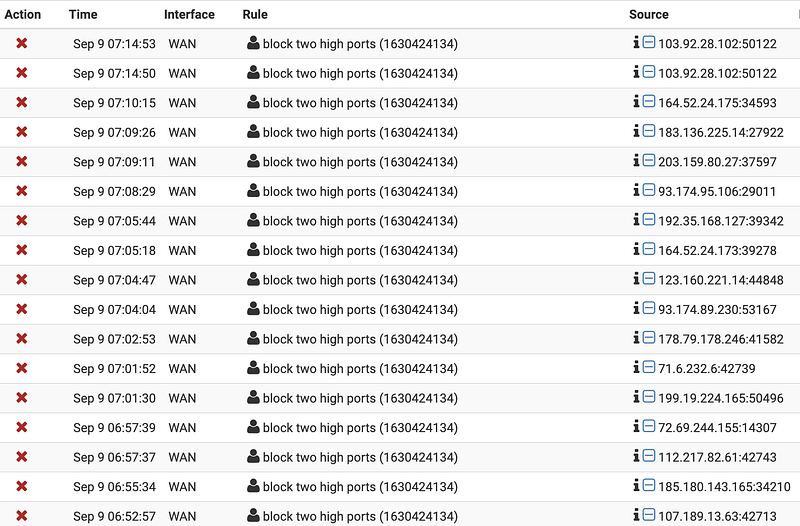
OK, I’ve got multiple hits from that first address 103.92.28.102. I’ve become familiar with IP addresses over the years, so I know that’s somewhere in Asia unless, of course, someone in another part of the world registered addresses in APNIC. I can look up the address in APNIC. But I also know that ARIN will grab the information from any registry for me. So let’s go ahead and look it up at https://arin.net.

This network is in Vietnam:
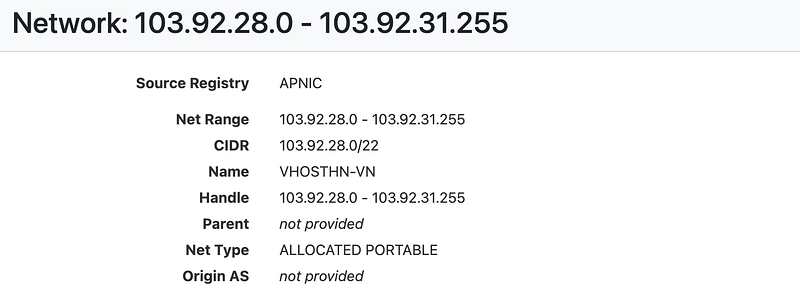
What’s kind of strange about this particular record is that no parent network exists. Usually, that parent record is populated. That makes me wonder if there is something sketchy about this network. Also, make sure any security tools leveraging parent records work properly when none exists. It could also just be an oversight. Who knows. Typically I will create a rule for the parent network. But in this case, there isn’t one. So I’ll just grab the CIDR block: 103.92.28.0/22 and block that.

Let’s look at the next one: 164.52.24.175. I’m guessing this is in the US or North America somewhere based on the IP address. But as it turns out, it’s not. It’s in Hong Kong. I know this by the country code HK.
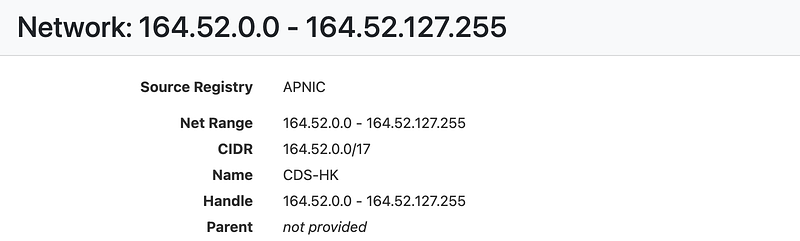
You can also scroll to the bottom two records, and typically you’ll find an address. Sometimes the records are missing information. That is often the case with suspect networks.

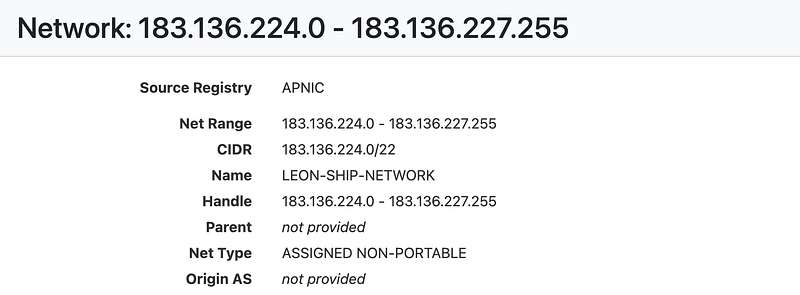
The 183 range is a Chinese network range. 183.136.225.14. Once again, no parent network exists in this record.
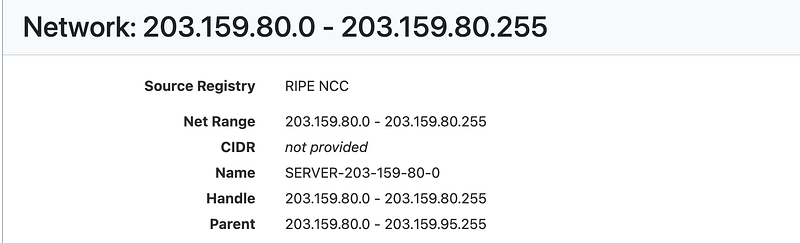
Let’s check out: 203.159.80.27. This record is a bit more normal-looking. It has a parent record. The only problem is that it’s not in the form of a CIDR block, which some firewall rules require. We can see the range of IP addresses for the parent is 203.159.80.0–203.159.95.255.
If you need a CIDR block, the easiest thing to do is use an online CIDR calculator. Be careful about putting your own IP ranges into any online tools, but we can use one for this purpose. ARIN has a CIDR calculator here: https://account.arin.net/public/cidrCalculator
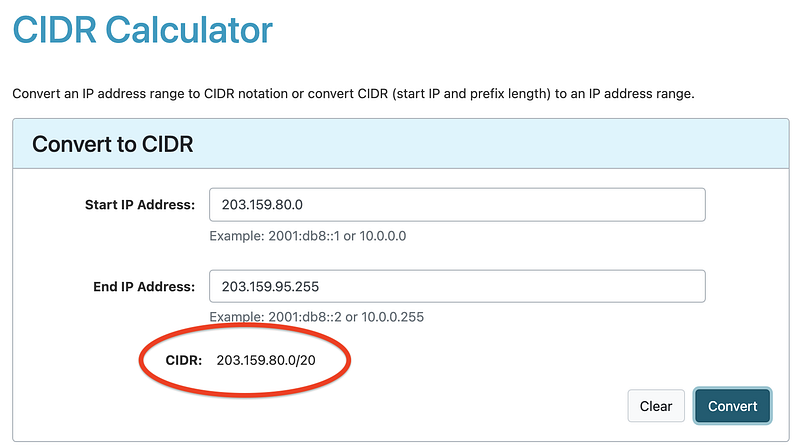
You can calculate the CIDR block for the IP range to use in your firewall rules if needed.

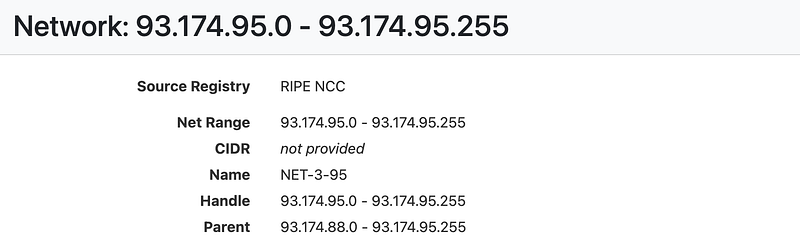
Here’s another interesting one. I don’t think I had ever heard of Seychelles before I looked at my network logs. I see traffic from this part of the world and IP Volume, in particular, quite often.
My experience with reporting problems to abuse IP addresses has not been very beneficial in the past. Unless it’s a well-known company that I know will actually care about the abuse, I generally don’t bother reporting it, then I simply block it. The problem is that other countries don’t have the same interests or laws as one home network user in the United States might, so I suggest not wasting your time on that for the most part.

Until there is an actual attack that you can report to the Internet Crime Center, this traffic is simply noise and to be ignored. If you do face an attack that results in business impact or financial loss, you can report it here in the United States:

Once you start blocking and dropping all this traffic, you can begin to whittle down the noise and understand what is really going on in your network. At that point, you may grab a packet capture (pcap file or sniff live traffic) and dig deeper into the packets to see what they are doing. Just be very careful that you only drop things you are positive get denied by firewall rules. You might want a backup logging system like I mentioned in my last post on the topic on your host in case anything falls through the cracks.

I have ideas for alternative network solutions that capture all traffic but reduce the load on production systems and reduce the chances of a successful attack from one of these networks. Maybe I’ll write about that in a separate post or save it for my cloud security classes.

In related news, Yandex has been hit with the largest DDOS attack in history today, and I’m seeing a lot less traffic from Russia at the moment.

These strategies might help them. It would also help if networks all over the world started blocking this noisy and unrequested traffic. I wrote about this in a blog post on unrequested penetration tests.

Network traffic can be super interesting if you’re geeky about packets like me! Check it out. Especially if you want to get into cybersecurity.

Follow for updates.

Teri Radichel | © 2nd Sight Lab 2021

About Teri Radichel:
~~~~~~~~~~~~~~~~~~~~
⭐️ Author: Cybersecurity Books
⭐️ Presentations: Presentations by Teri Radichel
⭐️ Recognition: SANS Award, AWS Security Hero, IANS Faculty
⭐️ Certifications: SANS ~ GSE 240
⭐️ Education: BA Business, Master of Software Engineering, Master of Infosec
⭐️ Company: Penetration Tests, Assessments, Phone Consulting ~ 2nd Sight Lab
Need Help With Cybersecurity, Cloud, or Application Security?
~~~~~~~~~~~~~~~~~~~~~~~~~~~~~~~~~~~~~~~~~~~~~~~~~~~~~~~~~~~~~
🔒 Request a penetration test or security assessment
🔒 Schedule a consulting call
🔒 Cybersecurity Speaker for Presentation
Follow for more stories like this:
~~~~~~~~~~~~~~~~~~~~~~~~~~~~~~~~~~~~~~~~~~~~~~~~~~~~~~~~~~~~~ 
❤️ Sign Up my Medium Email List
❤️ Twitter: @teriradichel
❤️ LinkedIn: https://www.linkedin.com/in/teriradichel
❤️ Mastodon: @teriradichel@infosec.exchange
❤️ Facebook: 2nd Sight Lab
❤️ YouTube: @2ndsightlab

Network Security
Firewall Logs
Intrusion Detection
Ddos
Cybersecurity
Recommended from ReadMedium