
The Easiest Way to Change the Default Font Family in Vuetify 3 and Nuxt 3
For non-member readers, you can read from this friend link.
You can support me by giving me some claps or sharing your ideas in the comments, which is important to me.
Vuetify doesn’t provide a usual way to edit its default font-family. That’s understandable cause it is based on Material Design. It is hard to change the default font by my search result in Vuetify 2, and it is also not cleared in Vuetify 3.
However, Vuetify 3 has a very useful feature: v-defaults-provider
Defaults provider component — Vuetify (vuetifyjs.com)
The defaults provider allows you to provide specific default prop values to components in a section of your application.
Sounds good and you can use it in this way:
<v-defaults-provider
  :defaults="{'VBtn':{'color':'primary','size':'large','variant':'tonal'}}"
>
  <v-btn>Button</v-btn>
</v-defaults-provider>
Vuetify will use your options to rewrite the props of the Vuetify components. We can see there are some props that affect the style. Since we can set the color, can we set the font-family? I found a discussion in GitHub and the answer is yes:
But up to now, we are still rewriting the props of a specific component, not the whole page. After I started to use Nuxt 3, I drew a conclusion that every part of a page is actually a component, even the page itself. So maybe we can rewrite the v-app component?
In your Nuxt 3 project (also the same for the normal Vue 3 project) , use v-defaults-provider to wrap the v-app component:
<template>
  <NuxtLayout>
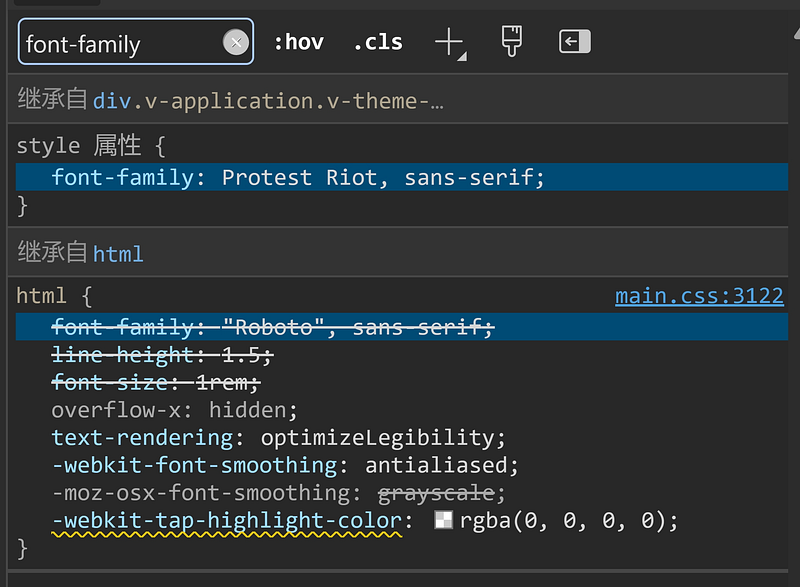
    <v-defaults-provider :defaults="{ VApp: { style: 'font-family: Protest Riot, sans-serif;' } }">
      <v-app>
        <NuxtPage />
      </v-app>
    </v-defaults-provider>
  </NuxtLayout>
</template>
And things are done! If you are using <NuxtLayout> like me, you may find this won’t work for the Vuetify components in the layout. Because the layout is not being wrapped in v-app, so you may need to do the same in your layout code; Or you could also use v-defaults-provider to wrap both the v-app and <slot /> in the layout:
<template>
  <div>
    <v-defaults-provider :defaults="{ VBreadcrumbs: { style: 'font-family: Protest Riot, sans-serif;' } }">
      <v-breadcrumbs :items="breadcrumbs">
        ...
      </v-breadcrumbs>
    </v-defaults-provider>
    <slot />
  </div>
</template>
Then you just need to import your fonts globally:
If you are interested, you can read my list to learn more about Vuetify:
List: Learn Frontend from Vuetify | Curated by LikeDreamwalker | Medium
In Plain English 🚀
Thank you for being a part of the In Plain English community! Before you go:
- Be sure to clap and follow the writer ️👏️️
- Follow us: X | LinkedIn | YouTube | Discord | Newsletter
- Visit our other platforms: Stackademic | CoFeed | Venture | Cubed
- More content at PlainEnglish.io


