
The Difference Between Cookie, Session, and Tokens
Cookie —Maintain the active state between the server and the client Session — Record the server and client session states Token — A string generated by the server
Please support me if you feel that I contribute value to you!
My dad was detected with recurrent extrahepatic cholangiocarcinoma last week. I will reduce the frequency of sharing here.
You can read my article to have a better understanding.
Cookie V.s Session
Cookie
- Create a cookie
- Update a cookie — Update the key value
- Delete cookies — set the expiry date to the cookie
1. name=value;
2. expires=date;
3. path=path;
4. domain=domain;
5. secure
6. maxAge
7. HTTP only
- The cookie records your login information, browsing activities, online activities, purchase activities, devices, etc.
- Essential cookies — Stored on your local storage, focus on user experience
- Session cookies — Keep you logged in to your account when browsing a webpage
- User-input cookies — Keep track of items that the user inputs to your website
- Authentication cookies — Identify users through their login credentials
- User-centric security cookies — Detect authentication errors and abuses, such as incorrect login details
- Load-balancing cookies — Connect between the client and server
- Non-Essential Cookies — Only stored on the local storage when the user allows
- Analytics and customization cookies — Track user’s browsing activities
- Advertising cookies — Customize a user’s ad experience based on their browsing history
- Social networking tracking cookies — Share activity between a website and social media (third-party platform)
- Feature-led consent or user-led consent — The setting the user wants the website to work
- Multimedia content player session cookies (flash cookies) — Store data (image quality, playback speed, buffering parameters, etc) to play back video or audio content
- User-interface customization cookies — Store user-experience preferences
- The server will check if there are any cookies left from the last time. If there is, it reads the data in the cookie to determine the user and deliver the corresponding webpage content, either allowing you to log in without a username and password or displaying the content on the webpage you prefer.
- If there is not, the server generates cookies when processing the client’s request. The cookie information will be added to the response header. The client receives a response and creates a cookie and stores it locally The next time the client makes a request, the cookie will be sent to the server together.
- What data is stored in the cookies is very important because it can increase web performance.
The application scenario
- Customize the content according to the user’s preferences
- Realize permanent login (login directly)
- Simplify the login process
- Implement automatic login
- Record the visit count
- Implement pop-up functions
Session
- The server records the client information in the way called session.
- When the client accesses the website again, the server only finds the status of the client by looking up the session information.
- The session = a user profile created on the server
- To get a higher access speed, the server generally stores the session information in memory. Each user will have a separate session. If the session content is too complex, it may cause a buffer overflow when a large number of clients access the server. However, if there are too many sessions stored in the server's local storage, it may affect the server's performance. Therefore, the session information should be as concise as possible.
- The session is automatically created when the client sends a request to the server for the first time. After the session is generated, the server will update the last access time of the session as long as the user continues to access it. When the number of users accesses the server, there will be many sessions because each user will have a separate session. To avoid buffer overflow, the server deletes sessions that have not been active for a long time (session timeout).
Common Method of Session
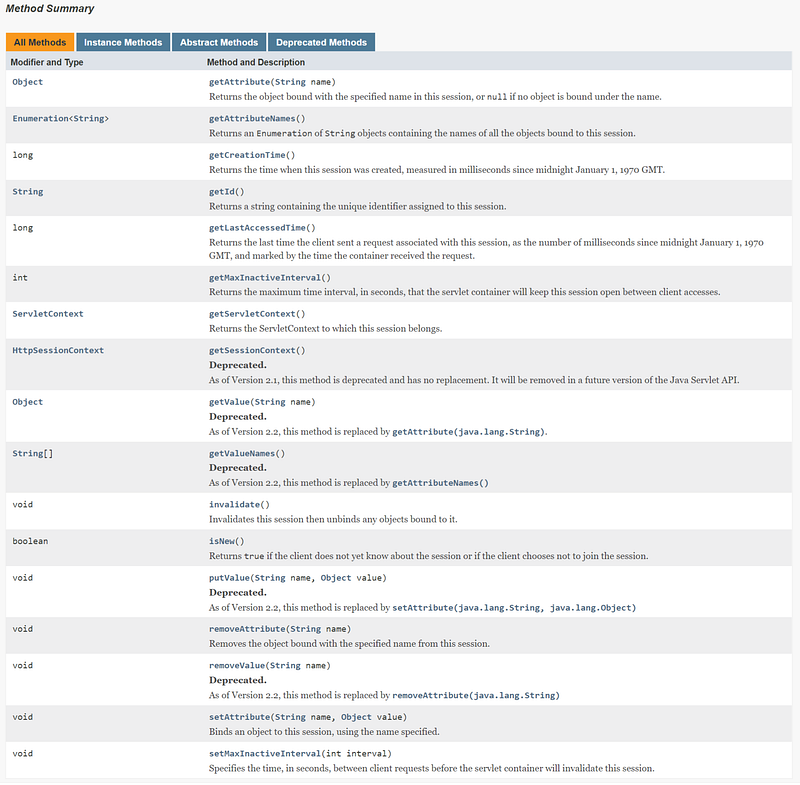
The differences between sessions and cookies
- The session is stored on the server. The cookie is stored on the client.
- The session uses a session ID to look up information. The cookie will be sent to the server along with the request. The session id is included in the cookie because the session requires the support of the client to use the cookie as an identifier. In other words, the session can identify if it is the same user based on the cookie.
- Cookies are not very safe because someone can analyze the cookie and perform cookie spoofing.
- When the number of visits increases, it affects the performance of the server because each user has a separate session, and session information will be stored on the server for a certain period of time.
- A single cookie data size cannot exceed 4K. Many browsers limit to store at most 20 cookies on the client side. But, many browsers have no restrictions on the server side.
Token
It is the way to verify the user’s identity
- user’s unique identity (uid)
- Timestamp of the current time (time)
- signature (a string of a certain length of hexadecimal characters by the first few digits of the token)
- Invariable parameter (avoid multiple database searches)
Process:
- The server generates a token value by using a hashing algorithm and then returns the token value to the client when the user logs in successfully for the first time.
- After the client gets the token value, it stores it locally
- When the client requests again, it attaches the token value with the request and sends it to the server
- After the server receives the client’s request, it will extract the token value and compare it with the token value stored locally on the server
- Token value from client = Token value from the server — The user is logged in successfully
- Token value =/ token value from the server — The original login information has expired, and the user is required to log in again
- No such token value — the login is not successful
The Difference between Token and Session
- The security of the token is better than the session because each request has a signature and it can avoid malicious attacks, while the session only relies on the communication link to ensure security
- Mobile apps generally use RESTful API to deal with the server. So, mobile apps don’t use a cookie to run the session like the browser. So it is enough to use the token to identify itself. Token can provides authentication and authorization. Authentication is for users and authorization is for mobile apps. So that, mobile apps can access user information. Also, the token is unique because it cannot be transferred to other apps and other users. If the user information may need to be shared with a third-party app, the API interface is allowed to authorize the use of tokens. Cookies include the session ID and login information and are stored on the client's local storage. The session will look up the session ID to establish a communication link. When the user makes a request, the cookie is sent to the server for processing, either login in automatically or displaying the preferred content.
- The token can resist cross-site request forgery (CSRF), but the combination of cookie and session mechanisms cannot do so. When users visit a bank webpage, they are vulnerable to CSRF and can be exploited to visit other websites.
The Difference between Token and Cookie
- Token and cookies are issued by the server when you log in for the first time. Both are used for verification and provide a persistence mechanism for stateless HTTP.
- Tokens can exist anywhere, but the cookie is stored only on the client’s local storage
- The token is used to log in automatically by informing the server who it is.
- Cookies cannot be shared across multiple applications. If single sign-on (SSO) is implemented, it is difficult to use cookies to log in once to access all mutually trusted application systems.
- There are no cookies in the request of the mobile terminal. Session ID depends on the cookie, so the session ID cannot be accepted by the cookie. The token does not store the session on the server's local storage, so it is highly scalable. The token is used in most mobile apps.
References
https://ponyfoo.com/articles/json-web-tokens-vs-session-cookies
If you’ve found any of my articles helpful or useful then please consider throwing a coffee my way to help support my work or give me patronage😊, by using
Last but not least, if you are not a Medium Member yet and plan to become one, I kindly ask you to do so using the following link. I will receive a portion of your membership fee at no additional cost to you.