
Google Bug Discovery
The Crazy Android Fragment Bug I’ve Investigated
Google, it is really a bug and not intended behavior. Please fix it.

Fragment in Android is a love-hate feature. Its complicating and confusing lifecycle sometimes makes us wonder when we face an issue, is it our lack of understanding of it, or is it Android’s bug. I’ve list the challenges and bugs discovered in the past in this linked article.
Here, I want to share an Android bug, that I filed to Google, but the Google developer state it is an intended behavior. And after further checking, I clearly think this really an Android Bug!
Do join me in this quest to understand the issue, and test it out. Would love to hear from you if you think this is a bug or an intended behavior.
Knowing about this issue, might save you 2 days puzzling
Hi Chet Haase, Romain Guy, Ian Lake, Yigit Boyar, sorry to ping you here. Hopes you can check it out. Do let me know if I get any of the below wrong.
It’s actually an easily replicable issue, but it will be very hard to get to the root cause when you first discovered it in a big design. So I made a very simple design to show the issue.
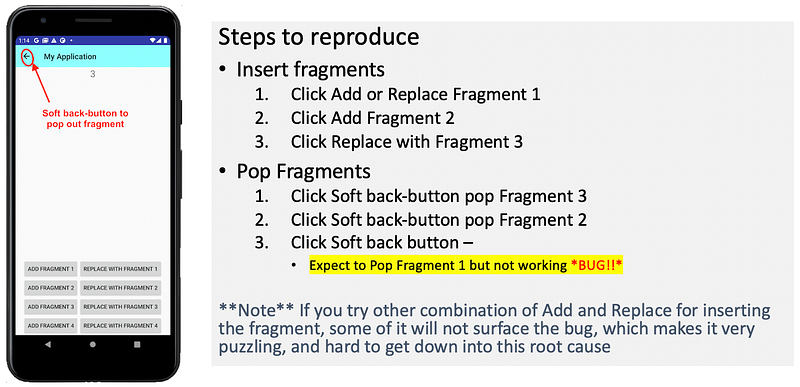
Try it out, and be puzzled by this odd behavior.
Explanation of the cause of the issue
This is to clearly explain how to surface this issue based on the fragment behavior
The Fragments insertion process
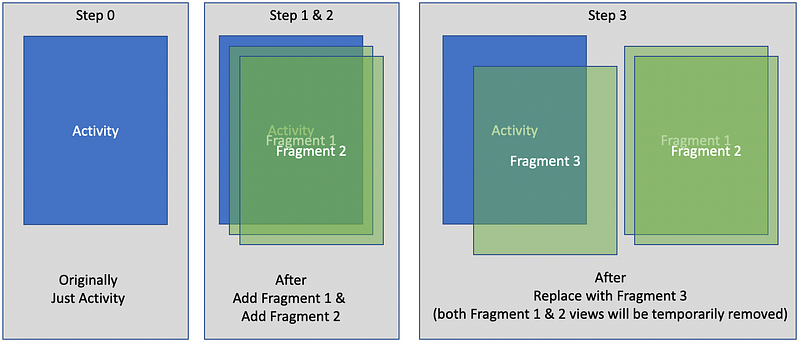
Originally we just have an activity. After add fragment 1 and fragment 2, both of them exist together, where their views got created and stack up within the container.
When we use Fragment 3 with replace function, both fragment 1 and fragment 2’s views will be removed (though the fragments are still alive, just that their views are destroyed).
This is all good.
The Fragments popping process
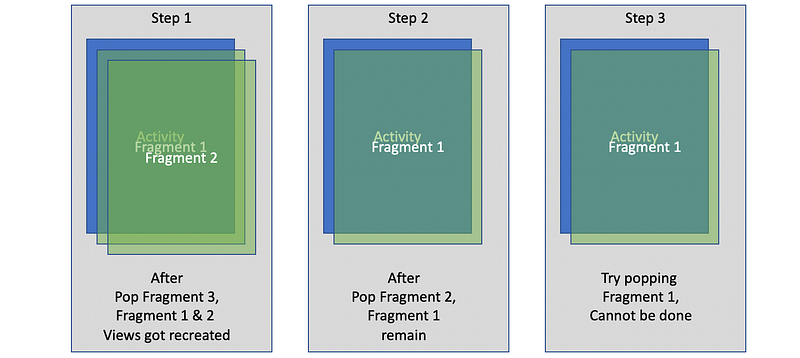
Now, let’s pop the fragment one by one.
Step 1, pop fragment 3 by clicking on the softback button. When fragment 3 has been popped. Both fragment 1 and fragment 2’s views are re-created again and put back into the fragment container. (Do note this step, that both fragments 1 and 2 get put back into the fragment container, which is the initial start of the issue).
Step 2, pop fragment 2 by clicking on the softback button, all good, it goes away, only remaining fragment 1.
Step 3, pop fragment 1 by clicking on the softback button, not working!! Why? 🧐
The issue happens before we see it.
Although we only realize the issue when we are trying to pop the fragment 1, it actually happens right after we pop fragment 3, when the two fragments (fragment 1 and fragment ) was placed back into the fragment container.
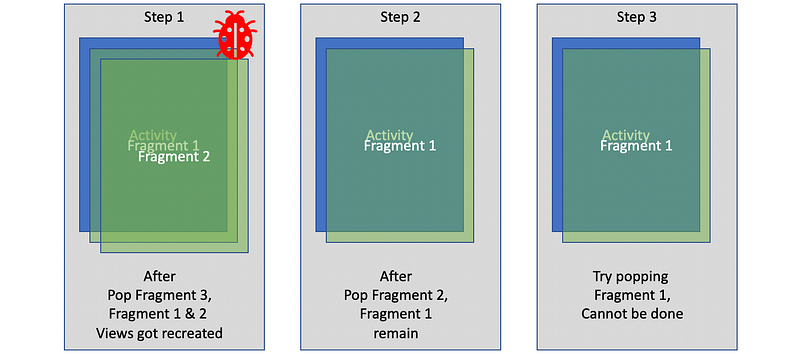
When both Fragment 1 and Fragment 2’s views are re-created, they will call onViewCreate for both of them.
override fun onViewCreated(view: View, savedInstanceState: Bundle?) {
    super.onViewCreated(view, savedInstanceState)
    toolbar_actionbar
        .setNavigationIcon(R.drawable.ic_arrow_back_black_24dp)
    setHasOptionsMenu(true)
    (activity as AppCompatActivity)
        .setSupportActionBar(toolbar_actionbar)
}
With this, clearly, both of them called setSupportActionBar, to initialize the toolbar so that the softback button will work.
Unfortunately, only the fragment at the top (i.e. Fragment 2) calling of setSupportActionBar taking effect, while it doesn’t take effect for the other (Fragment 1) even though clearly it has been called. Hence this makes the softback button of Fragment 1 not working.
My suspicious of what causes the bug
According to Google Developer response in the issue reported:
This is working as intended. When you use add(), the previous fragment’s view is still there. That means when you popBackStack(), onViewCreated() on the now visible fragment isn’t called again — the view is already created so your code doesn’t run.
I don’t agree this is working as intended. The onViewCreated() for Fragment 1 and Fragment 2 is called, and only need to be called once to set up the softback button. It doesn’t need to be called again to get the softbutton works.
Well, to reaffirm this is a bug, I investigated further…
My investigation (into Android SDK code)
So I investigated why the softback button of Fragment 1 is not working.
Apparently, when we click on it, the Android’s SDK onClick for the class of ToolbarWidgetWrapper does get called.
@Override
public void onClick(View v) {
    if (mWindowCallback != null && mMenuPrepared) {
        mWindowCallback.onMenuItemSelected(
            Window.FEATURE_OPTIONS_PANEL, mNavItem);
    }
}
Unfortunately the mMenuPrepared is false, hence it cannot proceed to our Fragment class.
This mMenuPrepared is set to true using the below function, which is usually called when a view (of the fragment) is created and becomes visible.
@Override
public void setMenuPrepared() {
    mMenuPrepared = true;
}
When one view is created and visible, all is good. However, when there is more than one view (i.e. Fragment 1 and Fragment 2) got reinserted back into the fragment container, only the latest Fragment (i.e. Fragment 2) got mMenuPrepared set to true, while others (Fragment 1 in my case), doesn’t get to set to true, hence making the toolbar menu not functioning for those fragments.
Why don’t the mMenuPrepared set to true for other views even when they are created? That I will need Google developers help….
My hope is
I understand this might be a corner case, and not a killer bug.
But when it happens, getting down to the bottom of it, make it replicable is really tedious. I spend much time making it crystal clear of what happens and what could potentially cause the issue.
So my hope is, Google developers don’t just close an issue after 1.5 years later but with a relatively shallow explanation of the issue.
With this, I have submitted a new issue to Google again here, as the issue still there since SDK 27 up till now in SDK 30.
In case you want to find a workaround for the issue, you can find my report of this same issue back then


