
The Best Way to Type Check in Vanilla JS
The best way to check the type of a variable in JavaScript is not typeof. Here’s why to use Object.prototype.toString.call() instead and how to alias it to a custom type_of function.

Type checking with typeof in JavaScript
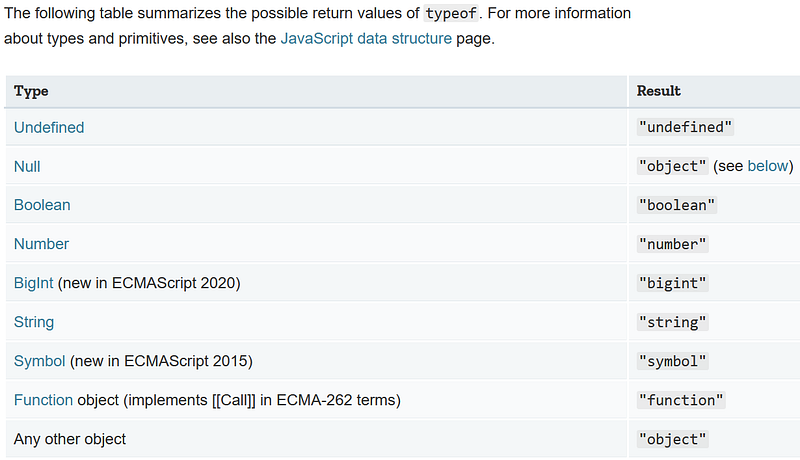
Everyone knows that the typeof keyword has some problems, most notably that typeof returns "object"for null:
Thankfully, there is a better solution that works vanilla JavaScript, though it is a mouthful: Object.prototype.toString.call().
Note that by vanilla JS I mean not using any external libraries at all, just ES5 (ECMAScript5) features.
(The site vanilla-js.com will jokingly let you download an empty “Vanilla JS Library” file — because browsers have vanilla JavaScript baked in.)
Let’s talk about Object.prototype.toString.call() and then try using it.
Why Object.prototype.toString.call() works
Every object in JavaScript has a default .toString() method, which lives on the Object prototype (the Object.prototype.toString() method).
“Using
toString()to detect object class
toString()can be used with every object and allows you to get its class.
To use the
Object.prototype.toString()with every object, you need to callFunction.prototype.call() orFunction.prototype.apply() on it, passing the object you want to inspect as the first parameter (calledthisArg).” — MDN Docs
While the default .toString() method can be overwritten, the Object prototype’s version returns a string with the type as the second word.
“If this method is not overridden in a custom object,
toString()returns "[object type]", wheretypeis the object type.” — MDN Docs
By using .call() or .apply(), we can use the original .toString() method inherited by all objects from the Object prototype.
This original Object.prototype.toString() method always returns the string `object ${type}` including the specific object type, such as Date.
Next I compare using Object.prototype.toString.call() and typeof.
Object.prototype.toString.call() vs. typeof
Using Object.prototype.toString.call() works much than typeof for type checking in JavaScript, since it works properly for null.
Not only that, but it returns the specific type of any given object:
Creating a type_of function
Given how easy it is to write a function in JavaScript, it is super easy to make a type_of function for Object.prototype.toString.call().
Here is an example of doing so that returns just the data type, lowercase:
Object-wrapped primitives? No problem
It is generally considered bad practice to use the new keyword with a wrapper object like the Number() function in JavaScript.
Doing so creates what’s called an object-wrapped primitive: a primitive value that is actually an object (so typeof returns "object" ).
The reason we don’t want that is that these object wrappers are invoked behind the scenes, allowing us to access properties on primitives.
An example is "string".length, where the string literal "string" is a primitive, so the JavaScript interpreter creates an object automatically.
But, if we need to, we can use Object.prototype.toString.call() to detect the true type (object class) of object-wrapped primitives in our code:
The other way to convert object-wrapped primitives back to primitive values is calling the .valueOf() method:
Conclusion
It is definitely a mouthful. Bookmark this page so you can copy-paste: Object.prototype.toString.call().slice(8,-1).toLowerCase()
Hopefully you understand now why typeof kinda sucks — it returns "object" for all object types, including arrays, as well as for null.
If you’re not convinced, or you need a refresher on typeof, you can read what I wrote about how to use typeof in JavaScript over in Better Programming:
Sorry typeof, your long-standing bug with typeof null means there is simply a better way to type check in JavaScript:
I hope to see type_of in your code instead! Happy coding! 💻👩💻💯🥳
Postscript
Slo Mo pointed out in response to this blog post that it’s possible to change the default behavior of Object.prototype.toString().
Using
toString()in this way is unreliable; objects can change the behavior ofObject.prototype.toString()by defining aSymbol.toStringTag property, leading to unexpected results.
That makes it sound like there should be a better alternative, but sadly there isn’t. In my article on type checking for JavaScript arrays, I dug deep into alternative type-checks like instanceof and .constructor:
Basically, instanceof won’t work in iframes, and .constructor can be overwritten directly on any object.
Comparing .constructor to Object.prototype.toString(), I feel that I’m less likely to break Object.prototype.toString() by defining a Symbol.toStringTag property than by overwriting .constructor.
Accidentally overwriting .constructor could easily happen if you change the equality operator (== or ===) to the assignment operator (=) by mistake:
if(object.constructor = "Date") {} // whoops!if(object.constructor === "Date") {} // correctBased on my extensive research, I haven’t found any better solution for type-checking then Object.prototype.toString(), despite its fallibility.
Taken together, I think we can all benefit from stricter type-checking systems, like TypeScript, Flow, or just the TypeScript features built-in to VS Code.
Further Reading
- Damian Cipolat combines
typeofandassertto check types on Dev.to:
- The Webbjocke blog uses
typeofwithinstance_ofand.constructor:
- Fernando Doglio contrasts Flow and TypeScript on Bits and Pieces:
- Ryan Paul explains you can use VSCode to highlight TypeScript type errors without actually needing to transpile your JavaScript on his blog:
- Martin Hochel wrote about type safety in vanilla JS on his Medium blog:

Dr. Derek Austin is the author of Career Programming: How You Can Become a Successful 6-Figure Programmer in 6 Months, now available on Amazon.


